
In the world of technology, an idea is only as strong as its documentation. When an innovator develops a groundbreaking piece of hardware, a new software architecture, or a unique gadget, the transition from a mental concept to a legally protected asset requires a very specific type of visual communication: the patent drawing.
To the uninitiated, patent drawings might look like simple black-and-white sketches. However, in the tech sector, these illustrations are highly regulated, technically precise blueprints that define the scope of intellectual property. They are the bridge between abstract engineering and enforceable law. Understanding what these drawings look like—and the technological rigor required to produce them—is essential for any developer, engineer, or tech entrepreneur.
The Anatomy of a Technical Patent Drawing
Patent drawings are governed by strict international standards, most notably those set by the United States Patent and Trademark Office (USPTO) and the Patent Cooperation Treaty (PCT). Unlike artistic illustrations, these drawings must follow a rigid “language” of lines and symbols to ensure clarity and universality.
Line Work and Shading Techniques
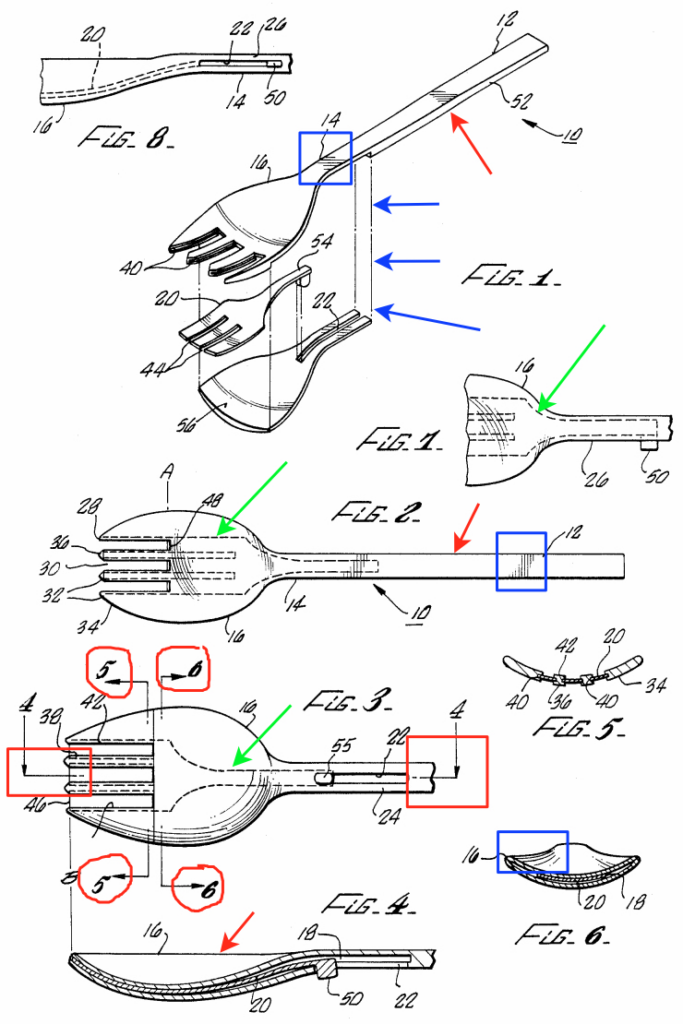
The most striking feature of a patent drawing is its monochromatic nature. Most tech patents utilize strictly black ink on white paper. Color is rarely permitted unless it is absolutely necessary to describe the invention. To convey depth, texture, and shape without the use of color or gradients, illustrators use “surface shading.”
Surface shading consists of thin, parallel lines or stippling (dots) used to show the contour of a technological component. For example, a curved smartphone screen or a cylindrical server housing will use varied line density to indicate curvature. These lines are not just stylistic; they allow a patent examiner to distinguish between a flat surface and a rounded one, which could be the difference between a new invention and “prior art.”
Perspectives and Standard Views
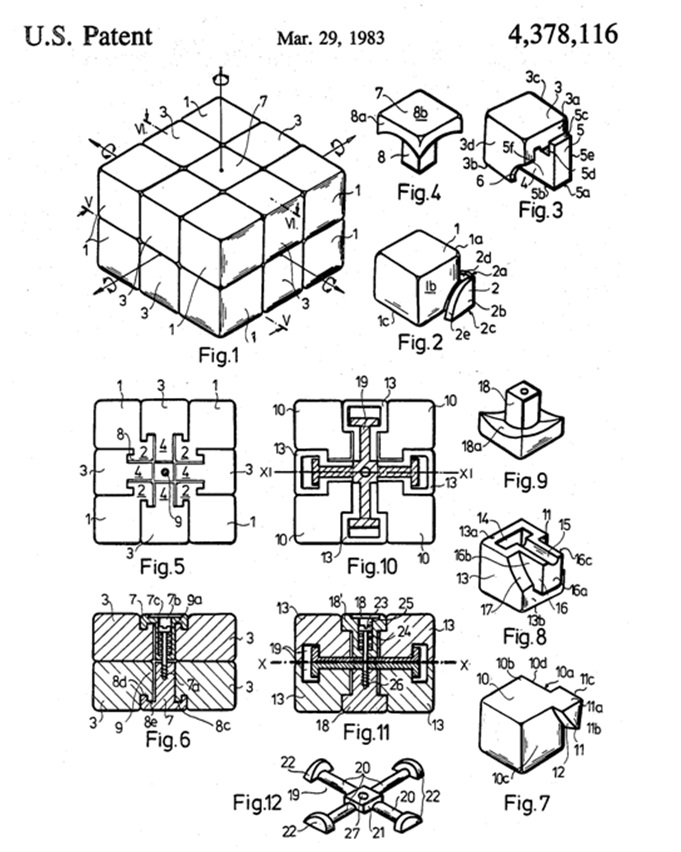
A comprehensive patent filing for a tech gadget rarely relies on a single image. Instead, it employs a suite of orthographic and perspective views. These typically include:
- Perspective View: A 3D-like representation that shows the overall look of the device.
- Front, Back, and Side Elevations: “Flat” views that show the proportions and placement of buttons, ports, or sensors.
- Sectional Views: A “cutaway” that shows the internal arrangement of components, such as how a battery sits against a motherboard.
- Exploded Views: A drawing where parts are separated but aligned, showing how an assembly fits together. This is common in hardware patents to demonstrate mechanical complexity.
Reference Numerals and Labeling
Every technical element in a patent drawing is assigned a reference numeral (e.g., 10, 12, 14). There are no descriptive words on the drawing itself. These numbers correspond to a detailed written description in the patent specification. If a drawing shows a new type of cooling fan in a laptop, that fan might be labeled “Element 22,” and the text will explain exactly what “Element 22” does and how it interacts with “Element 24” (the heat sink).
Software and Tools: How Modern Tech Shapes Patent Illustrations
The days of drafting tables and rapidograph pens are largely over. Today, patent drawings are a product of the same high-end technology they seek to protect. The transition to digital-first workflows has increased the precision and speed of patent filings.
From Drafting Tables to CAD Systems
Most modern patent drawings begin their life in Computer-Aided Design (CAD) software. Engineers using tools like SolidWorks, AutoCAD, or Rhino 3D create high-fidelity models of their inventions. These 3D models are then “flattened” into 2D vector line art. This ensures that every proportion is mathematically accurate. Because CAD files are used, if an inventor changes the dimensions of a component in the prototype, the patent drawings can be updated almost instantaneously, maintaining sync between the physical tech and the legal filing.
3D Modeling and Photogrammetry
In cases where a physical prototype exists but digital schematics do not, tech firms often use photogrammetry or 3D scanning. By taking hundreds of photos of a device from every angle, software can reconstruct a 3D cloud point model. This model is then converted into the clean, crisp line drawings required by patent offices. This high-tech approach ensures that even the most complex organic shapes—like a specialized ergonomic mouse or a wearable medical sensor—are captured with 100% accuracy.
The Role of AI in Automated Drawing Generation
Artificial Intelligence is the newest frontier in the creation of patent drawings. New AI tools are being developed to analyze a written technical description and automatically suggest or generate the necessary flowcharts and diagrams. While the USPTO still requires human oversight for accuracy, AI is significantly reducing the “manual labor” of labeling and shading. AI-driven verification tools also scan drawings to ensure they meet margin requirements and line-weight standards, preventing administrative rejections before the patent is even submitted.
Types of Patent Drawings in the Tech Industry
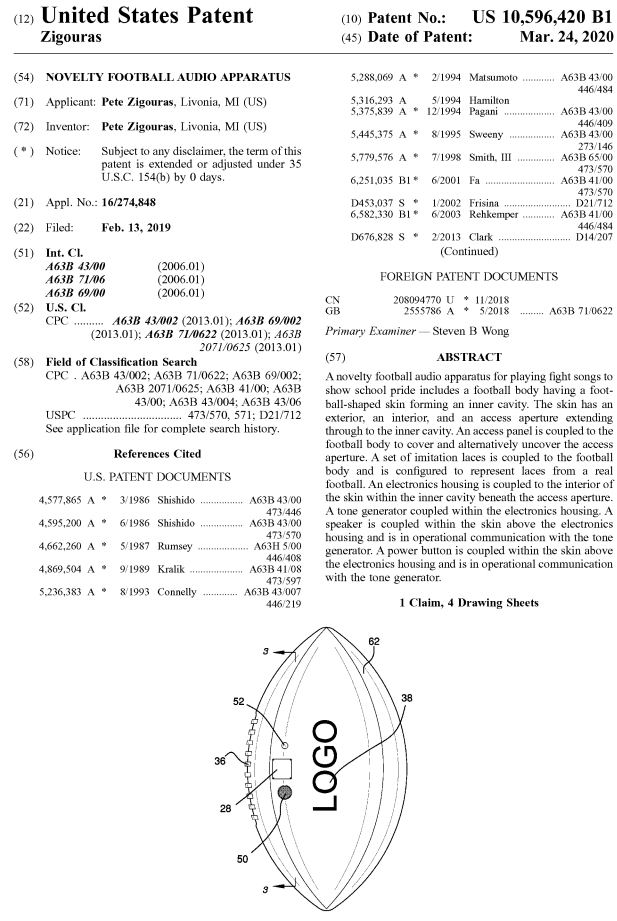
The “look” of a patent drawing varies significantly depending on what aspect of the technology is being protected. In the tech world, we generally categorize these into three distinct visual styles.
Utility Patent Drawings (Functional)
Utility patents protect how an invention works. These drawings focus on the “mechanics” of the technology. If the patent is for a new type of folding hinge on a smartphone, the drawings will show the internal gears, the tension springs, and the range of motion. The focus is on functionality over aesthetics. These drawings are often dense, filled with reference numerals pointing to every screw, bracket, and wire.
Design Patent Drawings (Aesthetic)
Design patents protect how an invention looks. These are critical for consumer electronics brands. For example, the original iPhone design patent famously featured drawings of a rectangular device with rounded corners and a single circular button.
Design patent drawings are much cleaner than utility drawings. They do not use reference numerals. Their goal is to show the “ornamental appearance” of the product. They use broken lines (dashed lines) to show parts of the design that are not being claimed, while solid lines represent the specific aesthetic features being protected.
Flowcharts and Software Logic Diagrams
Not all tech is physical. Software, algorithms, and “computer-implemented inventions” require a different visual approach. Since you cannot “draw” code, these patents utilize logic flowcharts.
These look like a series of boxes and diamonds connected by arrows. They represent the “if-then” logic of a program. For instance, a patent for a new AI facial recognition algorithm would feature a flowchart showing how data enters the system, how the neural network processes the features, and how a “match” or “no-match” decision is reached. These are considered “drawings” in the eyes of the patent office and are subject to the same strict formatting rules as hardware sketches.
Security and Digital Submission Standards
In the tech industry, the security of intellectual property is paramount. Because patent drawings reveal the “secret sauce” of an invention, the process of creating and submitting them is handled with extreme digital caution.
USPTO EFS-Web and International PDF Standards
Patent drawings are no longer mailed in tubes. They are submitted through secure portals like the USPTO’s EFS-Web or the EPO’s Online Filing 2.0. These systems require drawings to be submitted in highly specific PDF formats. The tech requirements include:
- Resolution: Typically a minimum of 300 DPI to ensure that fine lines do not blur.
- Embedded Fonts: All text (numerals) must be embedded to prevent display errors across different operating systems.
- File Integrity: Drawings must be “flattened” so that layers cannot be manipulated or hidden, ensuring the public record is transparent and immutable.
Maintaining Integrity in Digital File Transfers
Tech companies often outsource drawing creation to specialized patent illustration firms. To prevent the leaking of unreleased product designs, these firms use encrypted file transfer protocols (SFTP) and secure cloud environments. The “look” of the drawing must remain consistent from the illustrator’s CAD workstation to the patent examiner’s screen. Any digital artifact or compression noise could be misinterpreted as a physical feature of the invention, potentially narrowing the scope of the patent or leading to a rejection.
The Future of Technical Visualization
As technology continues to evolve, the way we visualize inventions is also changing. We are currently seeing a move toward more dynamic forms of documentation.
In the near future, we may see the adoption of 3D interactive models as official patent “drawings.” Rather than looking at a static 2D PDF, a patent examiner might use an AR (Augmented Reality) interface to rotate a digital twin of the invention, zooming in on microscopic circuits or viewing a software’s logic flow in a three-dimensional space.
While the traditional black-and-white line drawing remains the gold standard today, the integration of digital tools is making these documents more precise than ever. Whether it is a flowchart for a blockchain protocol or a detailed exploded view of a quantum processor, patent drawings remain the definitive visual record of human ingenuity. They are the blueprints of the future, rendered with the precision that only modern technology can provide.
aViewFromTheCave is a participant in the Amazon Services LLC Associates Program, an affiliate advertising program designed to provide a means for sites to earn advertising fees by advertising and linking to Amazon.com. Amazon, the Amazon logo, AmazonSupply, and the AmazonSupply logo are trademarks of Amazon.com, Inc. or its affiliates. As an Amazon Associate we earn affiliate commissions from qualifying purchases.