
Forgetting a voicemail password is a common, yet often frustrating, tech hiccup that can hinder communication and access to important messages. While modern smartphones often integrate visual voicemail, allowing seamless access without regular password entry, the underlying security still relies on that forgotten PIN for dial-in access, or for initial setup and troubleshooting. Recovering access requires understanding the specific mechanisms provided by your mobile carrier and taking a few structured steps. This guide navigates the technical pathways to regain control of your voicemail, enhance its security, and prevent future lockouts.
Immediate Steps When You Can’t Access Voicemail
Before diving into complex recovery processes, several immediate, simple checks can often resolve the issue quickly. These foundational troubleshooting steps are crucial for any technical challenge, including a forgotten voicemail password.
Attempt Common Passwords and Previous PINs
Many users, for convenience or lack of awareness, tend to use easily guessable or default passwords. Before initiating a reset, try entering some common candidates:
- Default Passwords: Some carriers or devices initially set the voicemail password to the last four digits of your phone number, 0000, 1111, or 1234. If you never changed it, these might work.
- Previously Used PINs: If you recall changing your password at some point, try variations of past PINs or other numerical codes you frequently use.
- Birthdays or Anniversaries: While not recommended for security, personal dates are often used as simple numeric passwords.
It’s worth exhausting these basic possibilities, as they represent the fastest route back to your messages if successful.
Check Saved Credentials and Notes
In the digital age, many individuals rely on various tools to store important information. Your forgotten voicemail password might be securely stashed away in one of these locations:
- Password Managers: If you use a password manager (e.g., LastPass, 1Password, Bitwarden, or even your browser’s built-in manager), check its vault for an entry related to your carrier or “voicemail.” These tools are designed for secure credential storage.
- Notes Applications: Many smartphone users utilize notes apps (like Apple Notes, Google Keep, or Evernote) for quick information storage. Search these applications for keywords like “voicemail,” “PIN,” or your carrier’s name.
- Physical Records: For those who prefer analog backups, check any personal organizers, journals, or secure physical locations where you might jot down critical passwords. While less common for everyday digital services, this could be a lifeline.
Retrieving credentials from these sources not only saves time but also reinforces the importance of a consistent password management strategy.
Review Carrier Documentation or Setup Guides
When you first activated your phone service or voicemail, your carrier likely provided documentation or a setup guide. This material often contains instructions on initial voicemail setup, including default passwords or a temporary PIN. If you’ve retained these documents, a quick review could yield the original password or direct you to specific recovery steps unique to your provider. Many carriers also have extensive support sections on their websites dedicated to voicemail setup and management.
Restart Your Device
While restarting a phone won’t magically reveal a forgotten password, it’s a foundational troubleshooting step in technology. A soft reboot can clear temporary glitches that might be interfering with your phone’s ability to interface correctly with the voicemail system, sometimes resolving minor access issues unrelated to the password itself. It’s a quick, harmless step worth taking before proceeding to more involved solutions.
Carrier-Specific Recovery Methods
When immediate checks fail, the next step involves leveraging the tools and support channels provided by your mobile carrier. Each carrier has specific protocols for password resets, usually accessible through your device, their online portals, or direct customer service.
Utilizing Your Phone’s Voicemail Settings
Modern smartphones integrate voicemail management directly into their operating systems, often providing a pathway for password changes or resets.
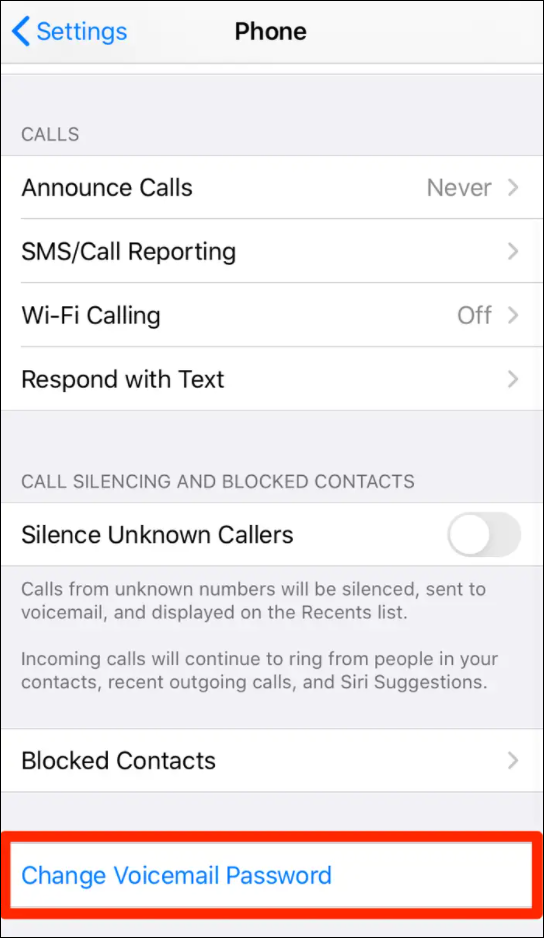
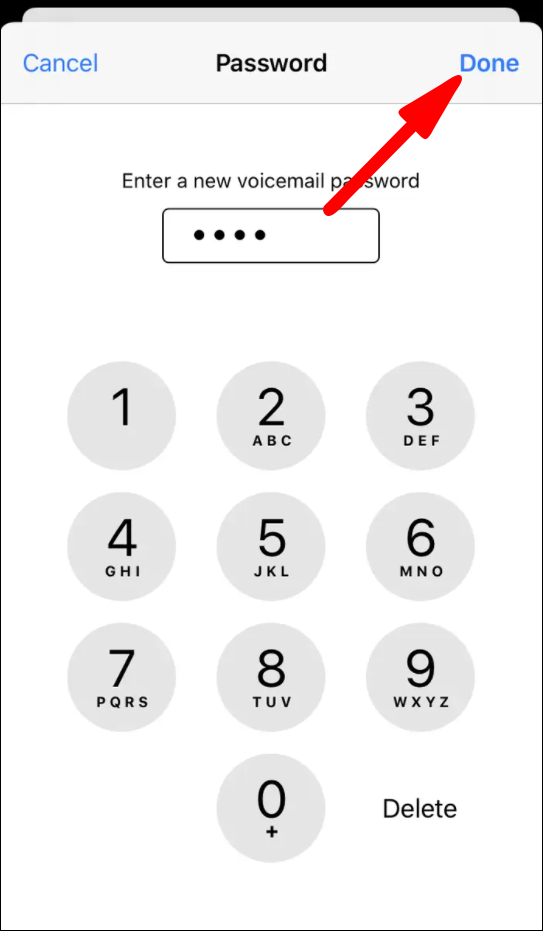
- iOS Devices: Open the “Phone” app, tap the “Voicemail” tab. If you haven’t set up Visual Voicemail or are prompted for a password, there might be an option to “Change Voicemail Password” or an indicator directing you to carrier settings. For Visual Voicemail, access is typically tied to your device’s passcode and Touch ID/Face ID, often circumventing the need for a separate PIN in daily use.
- Android Devices: Open the “Phone” app, tap the three-dot menu (or gear icon) for “Settings,” then navigate to “Voicemail Settings.” Here, you might find options to “Change PIN” or “Reset Voicemail Password.” The exact location and terminology can vary significantly between Android versions and phone manufacturers (e.g., Samsung, Google Pixel, OnePlus).
If your device is linked to your carrier’s system, some settings might allow a direct password reset without needing to contact support, provided your identity is verified through your phone’s existing security.
Logging Into Your Carrier’s Online Portal
Most mobile carriers offer comprehensive online account management portals. This is often the most efficient way to manage services, including voicemail.
- Access the Official Website: Go to your mobile carrier’s official website (e.g., Verizon, AT&T, T-Mobile, Vodafone, O2, etc.).
- Log In: Use your primary account credentials (username and password) to log into your online account. If you’ve forgotten these, you’ll need to use the “Forgot Username/Password” option for the portal itself, which usually involves email or SMS verification.
- Navigate to Voicemail Settings: Once logged in, look for sections like “Account Settings,” “My Services,” “Add-ons,” “Features,” or specifically “Voicemail.” The exact path varies by carrier.
- Initiate Password Reset: Within the voicemail management section, you should find an option to “Change Voicemail Password” or “Reset Voicemail PIN.” Follow the on-screen prompts, which typically involve identity verification (e.g., answering security questions, receiving a code via SMS to your active line).
This method requires access to the main account holder’s credentials and a working internet connection.
Contacting Carrier Customer Support
When all self-service options fail, contacting your carrier’s customer support is the definitive solution.
- Preparation: Before calling, have your account number, account holder’s name, security PIN (for the main account, if applicable), and any relevant security answers ready. Customer service representatives will need to verify your identity thoroughly before making any changes to your account, especially password resets.
- Contact Channels:
- Phone Call: This is often the most direct method. Dial your carrier’s customer service number (usually 611 from your mobile, or a toll-free number found on their website).
- Online Chat: Many carriers offer live chat support on their websites, which can be convenient for multitasking.
- In-Store Visit: If you prefer face-to-face assistance or have complex account issues, visiting a local carrier store can be effective. Be prepared to show photo ID.
- What They Can Do: Customer support can remotely reset your voicemail password, often providing a temporary one you can change immediately, or guide you step-by-step through an on-device reset process.
Be patient during identity verification, as it’s a critical security measure designed to protect your account.
Resetting Through Dial-In Voicemail Menu
In some instances, particularly if you’re calling your voicemail from your own device, the automated voicemail system itself might offer a recovery option after a few failed password attempts. This typically involves:
- Dialing Your Voicemail: Press and hold ‘1’ or dial your carrier’s specific voicemail access number.
- Failed Attempts: After entering an incorrect password a few times, the system might prompt, “If you forgot your password, press *.”
- Security Challenge: This usually leads to a security question or an option to send a temporary code to your phone via SMS for verification.
This method can be a quick fix if the feature is enabled by your carrier.
Proactive Measures to Prevent Future Lockouts
Forgetting a voicemail password can be a major inconvenience. Implementing robust practices can prevent such issues from recurring, ensuring continuous and secure access to your messages.
Implement a Robust Password Management Strategy
The cornerstone of digital security is strong password management.
- Strong, Unique Passwords: Always create passwords that are long, complex, and unique for each service. Avoid using easily guessable information.
- Password Managers: Utilize a reputable password manager. These applications securely store all your passwords, generate strong new ones, and can often autofill them, eliminating the need for you to remember dozens of complex combinations.
- Memorable Techniques: If not using a manager, employ techniques like passphrases (e.g., “TheBigBrownFoxJumpedOverTheLazyDog1!”) that are easy for you to remember but hard for others to guess.
Configure Visual Voicemail (if available)
Visual Voicemail transforms how you interact with messages, often eliminating the need to manually enter a password regularly.
- Seamless Integration: Visual Voicemail integrates directly with your phone’s operating system (iOS or Android), allowing you to see a list of messages, play them in any order, and manage them like emails, all without dialing in or typing a PIN.
- Device Security: Access to Visual Voicemail is typically protected by your phone’s primary security measures – its passcode, PIN, fingerprint, or facial recognition. This ties voicemail access to your device’s robust security, reducing reliance on a separate, easily forgotten PIN.
- Carrier Support: Most major carriers offer Visual Voicemail, though some may charge a small fee or require a specific plan. Check with your carrier for compatibility and activation.
Regularly Update Your Security Information
Your carrier account’s recovery options are only as good as the information tied to them.
- Up-to-Date Contact Info: Ensure your recovery email addresses and secondary phone numbers (if applicable) are current. These are often used for identity verification when resetting passwords.
- Relevant Security Questions: Review and update your security questions and answers periodically. Ensure the answers are memorable to you but not easily discoverable by others.
Keeping this information current significantly streamlines the recovery process should you ever forget a password again.
Document Your Voicemail Password Securely
While password managers are highly recommended, having a secure, offline backup for critical passwords, like your voicemail PIN, can be a prudent fallback.
- Encrypted Notes: Use an encrypted notes application or a secure, password-protected document on a device you trust.
- Physical Journal: For the utmost security against digital breaches, consider writing it down in a dedicated journal kept in a secure, private location, like a locked drawer or safe. This acts as a reliable backup should your digital tools fail or be inaccessible.
The key is to store it in a way that is easily retrievable by you but inaccessible to unauthorized individuals.
Understanding Voicemail Security and Best Practices
Voicemail, though seemingly a simple service, can be a repository for sensitive information. Understanding its security implications and adopting best practices is crucial for protecting your digital privacy.
The Importance of a Strong Voicemail Password
Your voicemail isn’t just for casual messages; it can contain critical personal, financial, or business communications.
- Sensitive Information: Voicemails often include bank alerts, appointment reminders, personal conversations, or even two-factor authentication codes delivered via voice.
- Risk of Unauthorized Access: A weak or easily guessed voicemail password makes your account vulnerable. Unauthorized individuals could access your messages, potentially gleaning information for identity theft, social engineering attacks, or simply impersonating you to gain access to other services.
- Impersonation: With access to your voicemail, an attacker could potentially trick others into believing they are you, leading to further breaches or fraud.
Differentiating Voicemail Passwords from Device Passcodes
It’s vital to understand that your phone’s lock screen passcode or biometric security (fingerprint, face ID) protects your device, but it does not inherently protect your voicemail when accessed remotely.
- Separate Layers: A voicemail password protects access to your messages when someone calls your number and is prompted for the PIN. Your device passcode protects the phone itself.
- Remote Access Vulnerability: If your phone is lost or stolen, or if someone simply knows your phone number, they could potentially access your voicemail by dialing in and guessing a weak PIN, even if your phone itself is securely locked. This distinction underscores why a strong, unique voicemail password is non-negotiable.
Reviewing Voicemail Forwarding and Settings
Periodically checking your voicemail settings can help maintain security.
- Forwarding: Confirm that your voicemail isn’t unintentionally or maliciously forwarded to another number or email address. This is a potential privacy risk.
- Notifications: Ensure your voicemail notification preferences are set securely and don’t inadvertently expose message details on a lock screen.
- Retention Policies: Be aware of how long your carrier retains voicemails, especially if they contain sensitive information.
Regular review ensures your settings align with your privacy and security preferences.
The Role of Multi-Factor Authentication (MFA) in Broader Account Security
While voicemail systems typically don’t have direct MFA, the broader concept of MFA is critical for your entire mobile carrier account.
- Securing the Parent Account: Enabling MFA (e.g., using an authenticator app or SMS codes to a trusted device) on your main mobile carrier account adds a powerful layer of security.
- Preventing Unauthorized Changes: With MFA, even if someone obtains your account username and password, they won’t be able to log in, reset your voicemail password, change call forwarding, or access other sensitive settings without the second factor.
- Holistic Approach: A strong voicemail password, coupled with robust security on your main carrier account via MFA, creates a comprehensive defense against unauthorized access to your communication services.
By proactively managing your voicemail password, understanding its security implications, and leveraging your carrier’s support, you can ensure your personal communications remain private and accessible only to you.
aViewFromTheCave is a participant in the Amazon Services LLC Associates Program, an affiliate advertising program designed to provide a means for sites to earn advertising fees by advertising and linking to Amazon.com. Amazon, the Amazon logo, AmazonSupply, and the AmazonSupply logo are trademarks of Amazon.com, Inc. or its affiliates. As an Amazon Associate we earn affiliate commissions from qualifying purchases.