
In the realm of home automation and environmental control technology, the humble ceiling fan remains one of the most misunderstood yet essential gadgets in our arsenal. While often viewed as a simple mechanical fixture, the ceiling fan is a critical component of a building’s thermal management system. As we transition into the warmer months, the most frequent technical query arises: what direction does the fan go in summer?
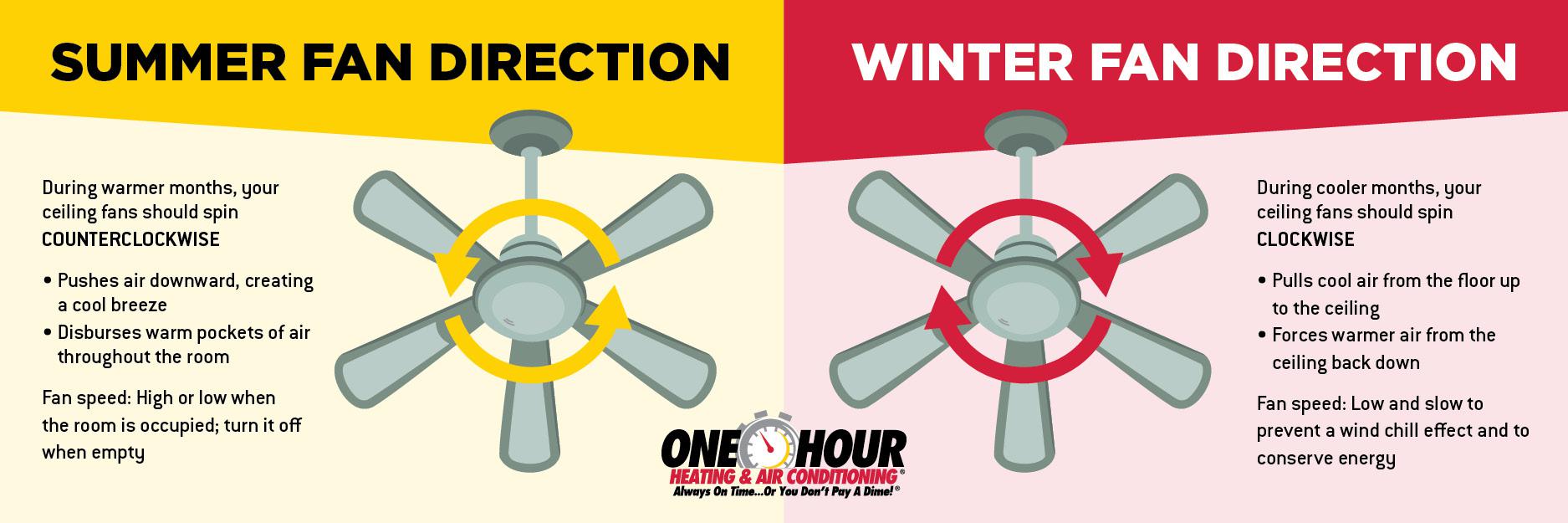
The short answer is counter-clockwise. However, the technological reasoning behind this setting, the mechanical engineering of blade pitch, and the integration of smart home protocols into modern fan systems offer a fascinating look at how we manipulate our micro-environments. Understanding the tech behind the breeze is the first step in optimizing your smart home’s efficiency and comfort.
1. The Mechanics of Aerodynamics: Why Counter-Clockwise Matters
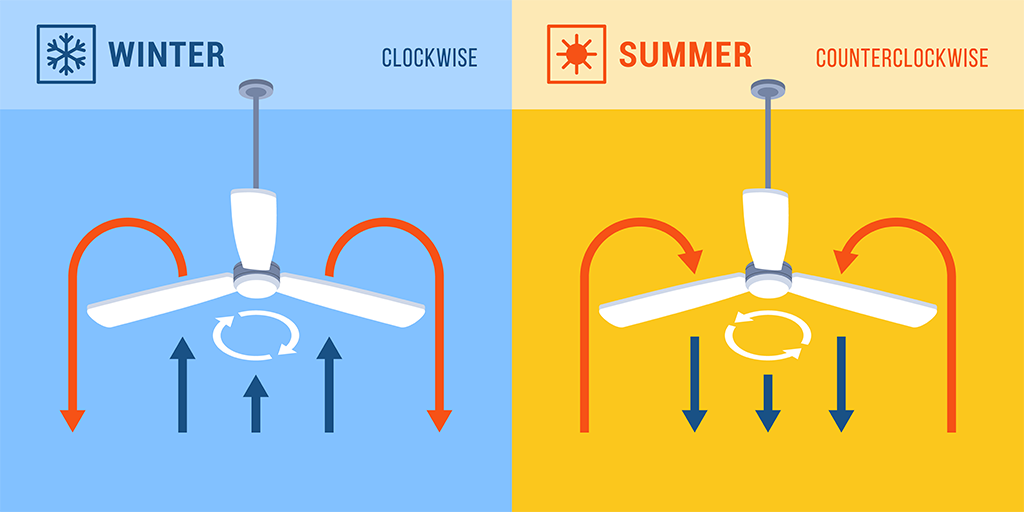
The fundamental technology of a ceiling fan relies on the angle of the blades, known in engineering terms as the “blade pitch.” Most fans are designed so that when the motor rotates in a counter-clockwise direction (when looking up at it), the angled blades slice through the air and push a concentrated column of air directly downward.
The Downdraft Effect
Technically referred to as a “downdraft,” this column of moving air is the primary mechanism for summer cooling. From a mechanical perspective, the fan is not actually lowering the temperature of the room. Instead, it is utilizing the tech of evaporative cooling. As the downward breeze passes over human skin, it accelerates the evaporation of moisture, which is an endothermic process that removes heat from the body. This is known in the HVAC industry as the “wind chill effect.”
Blade Pitch and Motor Torque
High-performance fans utilize sophisticated blade geometries. In high-end tech reviews, you will often see “blade pitch” measured in degrees. A standard fan might have a pitch of 12 to 15 degrees. The motor must produce enough torque to overcome the air resistance generated by this pitch. During the summer, the tech objective is to maximize “CFM” (Cubic Feet per Minute), which is the standard metric for measuring airflow volume. A counter-clockwise rotation at high speed is the optimal setting for maximum CFM output.
Identifying the Rotation
For users who are unsure which way their fan is spinning, the simplest diagnostic is a visual check. Turn the fan on high and stand directly beneath the blades. If you feel a distinct breeze immediately, the fan is rotating counter-clockwise. From a gadget-functionality standpoint, if you look at the blades as they spin, they should be moving from the top left toward the bottom right as they approach you.
2. The Evolution of Motor Technology: AC vs. DC Fans
The debate between Alternating Current (AC) and Direct Current (DC) motors is a central topic in modern appliance technology. While the direction of the fan remains the same regardless of the motor type, the efficiency and control mechanisms differ significantly.
The Legacy of AC Motors
For decades, AC motors were the standard for ceiling fans. These motors connect directly to the power grid and use a capacitor to start and run. While reliable, AC tech is limited in its speed control and energy efficiency. Most AC fans offer only three or four fixed speeds, and reversing the direction usually requires a manual physical switch located on the motor housing.
The Rise of DC Motor Technology
The latest generation of fans utilizes brushless DC motors. This is a significant technological leap. DC motors use permanent magnets to rotate the internal rotor, resulting in up to 70% less energy consumption than AC counterparts. Furthermore, DC fans offer much more granular control.
Because DC motors use an internal electronic controller (an inverter) to convert AC to DC, they can offer six or more speed settings. Most importantly, the direction of the fan can be reversed via remote control or a smartphone app, eliminating the need for manual switches. This allows for seamless seasonal transitions at the touch of a button.
Silent Operation and EMF Reduction
One of the key technological benefits of DC motors in the summer is their near-silent operation. Because they generate less heat and have more precise internal timing, they avoid the “hum” often associated with older AC fans. For tech enthusiasts building a quiet, optimized home office or bedroom, the DC motor is the superior hardware choice.
3. Smart Home Integration and Environmental Sensors
As we move toward the “Internet of Things” (IoT), the ceiling fan has evolved from a manual appliance into a smart gadget capable of responding to real-time data. Integrating your fan into a smart home ecosystem allows for automated seasonal adjustments and energy optimization.
Ecosystem Compatibility: Matter, Zigbee, and Thread
The modern tech-savvy homeowner looks for fans that support protocols like Matter or Zigbee. By connecting a fan to a hub (such as Apple Home, Google Home, or Amazon Alexa), the user can program “Summer Scenes.” For example, when an external weather API reports that the local temperature has exceeded 75°F, the smart home controller can automatically set the fan to counter-clockwise at a medium-high speed.
Sensor-Driven Automation
Advanced fans now come equipped with integrated sensors. Occupancy sensors (PIR) ensure the fan only runs when someone is in the room, saving energy. Even more impressive is the use of thermal sensors. These devices monitor the delta between the ambient room temperature and the thermostat setting. In a “Smart Summer Mode,” the fan can adjust its RPM (Revolutions Per Minute) based on the current heat index within the room, ensuring a consistent wind chill effect without manual intervention.
IFTTT and Geofencing
Using platforms like IFTTT (If This Then That), users can create complex logic gates for their fans. A popular tech configuration is geofencing: as your smartphone approaches your home’s GPS coordinates during summer months, your HVAC system and fans activate simultaneously. The fan, set to its counter-clockwise summer rotation, begins circulating air immediately so that the home feels cool the moment you walk through the door.
4. Energy Efficiency and the “Tech Stack” of Cooling
In an era of rising energy costs and environmental consciousness, the ceiling fan is a critical piece of “Green Tech.” When used correctly in the summer, it allows for a significant reduction in the load placed on air conditioning units.
The 4-Degree Rule
Studies in building science technology suggest that a ceiling fan in the correct summer setting can make a room feel up to 4 degrees Fahrenheit cooler. This allows users to raise their AC thermostat by the same amount. From a financial and technical perspective, this is a massive win: for every degree you raise your thermostat in the summer, you can save between 3% and 5% on cooling costs.
Fluid Dynamics and Air Destratification
While the summer setting is about creating a downdraft, the tech also helps with air destratification. Air naturally layers itself with heat at the top and cool air at the bottom. Even in the summer, “pockets” of stagnant, humid air can form. The counter-clockwise motion breaks up these layers, ensuring that the cooled air provided by an AC unit is distributed more evenly across the living space.
Comparing High-Volume Low-Speed (HVLS) Technology
In larger spaces or commercial “tech-hubs,” we see the implementation of HVLS fans. These are essentially ceiling fans on a massive scale, often spanning 10 to 24 feet. The tech here focuses on moving massive volumes of air at a lower speed to prevent turbulence while maintaining the cooling effect. For large smart-homes or open-concept lofts, HVLS technology represents the pinnacle of summer airflow management.
5. Maintenance and Troubleshooting the Hardware
Like any piece of technology, a ceiling fan requires regular maintenance to ensure its summer performance remains optimal. A fan that is wobbling or making noise is not just an annoyance; it is an inefficient machine losing energy to friction and vibration.
Balancing and Calibration
If a fan is not balanced, the counter-clockwise rotation can become unstable, causing wear on the motor bearings. Modern balancing kits use adhesive weights to calibrate the blades. Tech enthusiasts often use smartphone accelerometers to measure the vibration of the fan housing and identify which blade is out of sync.
Software and Firmware Updates
For smart fans (like those from Big Ass Fans or Hunter), summer preparation often involves checking for firmware updates. Manufacturers frequently release updates that optimize motor timing, improve Wi-Fi connectivity, or refine sensor accuracy. Ensuring your fan’s “OS” is up to date is just as important as ensuring the blades are clean.
Cleaning for Aerodynamic Efficiency
Dust buildup on the leading edge of a fan blade can significantly disrupt airflow. In technical terms, dust increases “drag” and reduces the effectiveness of the airfoil. A simple seasonal cleaning ensures the blades can slice through the air with minimal resistance, keeping the motor cool and the airflow at peak CFM.

Conclusion
The question of “what direction does the fan go in summer” is the gateway to a broader understanding of home climate technology. By setting your fan to rotate counter-clockwise, you are engaging a mechanical system designed to optimize human comfort through the physics of evaporative cooling.
When you pair this mechanical foundation with modern DC motor efficiency and IoT smart-home integration, the ceiling fan ceases to be a relic of the past and becomes a sophisticated tool for modern living. As we leverage sensors, automation, and advanced aerodynamics, the simple act of flipping a switch (or tapping an app) ensures that our technology works in harmony with the seasons to create the perfect environment.
aViewFromTheCave is a participant in the Amazon Services LLC Associates Program, an affiliate advertising program designed to provide a means for sites to earn advertising fees by advertising and linking to Amazon.com. Amazon, the Amazon logo, AmazonSupply, and the AmazonSupply logo are trademarks of Amazon.com, Inc. or its affiliates. As an Amazon Associate we earn affiliate commissions from qualifying purchases.