
The question of what color red, blue, and green make when combined might seem like a simple elementary school art lesson. However, in the realm of technology and digital media, this question delves into the fundamental principles of how we perceive and display color on screens. This isn’t about pigments mixing on a canvas; it’s about light. Understanding the additive color model, specifically the RGB system, is crucial for anyone involved in digital design, user interface development, web development, or even simply creating compelling digital content. The colors we see on our monitors, smartphones, and televisions are not the result of physical pigments but rather the intricate interplay of light emitted by millions of tiny pixels.

The Foundations of Digital Color: Additive vs. Subtractive
Before we can definitively answer what color red, blue, and green make in a digital context, it’s essential to distinguish between the two primary methods of color mixing: additive and subtractive. This distinction is fundamental to understanding why digital displays behave the way they do.
Subtractive Color Mixing: The Painter’s Palette
The most familiar form of color mixing for many is subtractive color. This is what you learn in art class. When you mix paints, you are essentially absorbing certain wavelengths of light and reflecting others. For example, blue paint absorbs most of the red and green wavelengths of light and reflects the blue wavelengths, which is why we perceive it as blue. When you mix blue and yellow paint, the blue pigment absorbs the red and green light, and the yellow pigment absorbs the blue and red light. The only wavelength that both can reflect is green, hence the resulting mixture appears green.
The primary colors in subtractive mixing are typically Cyan, Magenta, and Yellow (CMY), often with Black (K) added for printing processes (CMYK). When you combine all subtractive primaries (cyan, magenta, and yellow), you theoretically absorb all wavelengths of light, resulting in black. Conversely, the absence of any pigment means all light is reflected, resulting in white. This model is used in printing, where ink on paper absorbs light.
Additive Color Mixing: The Illuminated Screen
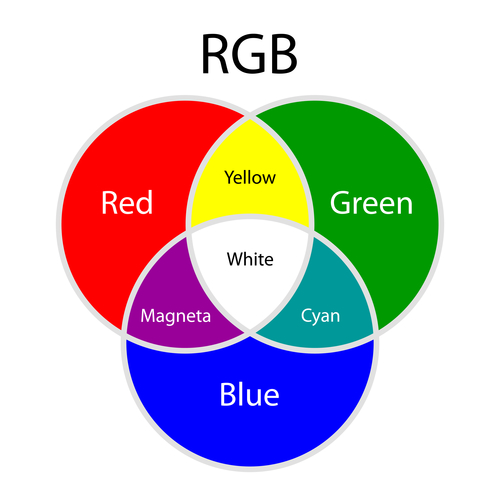
Digital displays, on the other hand, operate on the principle of additive color mixing. Here, the primaries are Red, Green, and Blue (RGB). Instead of absorbing light, these primary colors emit light. Imagine a screen composed of tiny dots, or pixels. Each pixel is made up of three smaller sub-pixels: one red, one green, and one blue. By controlling the intensity of the light emitted by each of these sub-pixels, we can create a vast spectrum of colors.
In additive mixing, the starting point is blackness – the absence of light. When you introduce light, you start to create color. The more light you add, the brighter the color becomes. When you combine the additive primaries (red, green, and blue) at their maximum intensity, you are essentially turning on all three sub-pixels to their brightest setting. This flood of red, green, and blue light, when perceived by the human eye at a close distance, blends together to create white light. This is a critical concept in understanding how screens achieve their visual output.
The Power of RGB: Creating the Digital Spectrum
The RGB color model is the backbone of virtually all digital displays, from your smartphone screen and laptop monitor to high-definition televisions and digital signage. Its ability to generate millions of distinct colors from just three primary light sources makes it incredibly versatile and efficient.
Understanding the RGB Color Cube
Visually representing the RGB color model can be done using a three-dimensional cube. The three axes of the cube represent the intensity of red, green, and blue light, respectively. Each axis typically ranges from 0 (no light) to 255 (maximum intensity).
-
The Axes (Pure Colors): Along each axis, you find the pure primary colors. For instance, moving along the red axis from the origin (0,0,0 – black) will take you to pure red (255,0,0). Similarly, moving along the green axis leads to pure green (0,255,0), and along the blue axis to pure blue (0,0,255).
-
The Edges (Secondary Colors): Where two axes meet, we find the secondary colors of the additive system.
- Yellow: This is created by combining maximum red and maximum green light (255,255,0). Red light stimulates our red cones, and green light stimulates our green cones. When both are stimulated strongly, our brain interprets this combination as yellow.
- Cyan: This is formed by combining maximum green and maximum blue light (0,255,255). Green and blue light stimulate the corresponding cones, and the brain perceives this as cyan.
- Magenta: This is generated by combining maximum red and maximum blue light (255,0,255). Red and blue light stimulate their respective cones, resulting in the perception of magenta.
-
The Center (Tertiary/White): At the opposite corner of the origin, where all three axes meet at their maximum intensity (255,255,255), lies white. This is the combination of all three primary colors of light at their highest brightness. Conversely, the origin (0,0,0) represents the absence of any light, which we perceive as black.
-
The Interior (Millions of Colors): The vast space within the cube, between the axes, edges, and corners, represents all the other colors that can be created by varying the intensity of red, green, and blue. For example, a pale pink might be a high intensity of red with a small amount of green and blue (e.g., 255,200,200), while a dark grey would be a moderate, equal intensity of all three (e.g., 100,100,100).
Color Values and Digital Representation
In digital design, colors are often represented using hexadecimal codes (hex codes) or RGB values. Understanding these notations is key to precise color selection and implementation.
-
RGB Values: As mentioned, these are typically represented as three numbers, each ranging from 0 to 255, indicating the intensity of red, green, and blue respectively. For example:
- Pure Red:
rgb(255, 0, 0) - Pure Green:
rgb(0, 255, 0) - Pure Blue:
rgb(0, 0, 255) - Yellow:
rgb(255, 255, 0) - Cyan:
rgb(0, 255, 255) - Magenta:
rgb(255, 0, 255) - White:
rgb(255, 255, 255) - Black:
rgb(0, 0, 0)
- Pure Red:
-
Hexadecimal Codes: This is a more compact way to represent RGB colors, commonly used in web development (HTML and CSS). Each color component (red, green, blue) is represented by a two-digit hexadecimal number, ranging from 00 to FF (equivalent to 0 to 255 in decimal). The format is
#RRGGBB.- Pure Red:
#FF0000 - Pure Green:
#00FF00 - Pure Blue:
#0000FF - Yellow:
#FFFF00 - Cyan:
#00FFFF - Magenta:
#FF00FF - White:
#FFFFFF - Black:
#000000
- Pure Red:
These notations are the language of digital color, allowing designers and developers to communicate and implement precise color choices across various platforms and applications.
Practical Applications of RGB in the Digital Landscape
The RGB color model isn’t just a theoretical concept; it has profound practical implications across numerous technology sectors. Its ubiquity is a testament to its effectiveness in creating the visual experiences we interact with daily.
User Interface (UI) and User Experience (UX) Design
In UI/UX design, color plays a critical role in usability, aesthetics, and brand recognition. Understanding RGB allows designers to:
- Create Consistent Branding: Ensure that brand colors are accurately represented across all digital touchpoints, from websites and mobile apps to social media graphics. This requires specifying colors using RGB values or hex codes that can be understood by design software and web browsers.
- Enhance Readability and Accessibility: Choose color palettes that provide sufficient contrast between text and background, making content easier to read for all users, including those with visual impairments. Tools for checking color contrast often rely on RGB values.
- Guide User Attention: Use color strategically to highlight important elements, direct user flow, and create visual hierarchy within an interface. For example, using a vibrant RGB value for a call-to-action button can draw immediate attention.
- Evoke Emotions and Communicate Meaning: Different color combinations can evoke specific emotions or associations. For instance, blues can convey trust and professionalism, while oranges and yellows can suggest energy and warmth. Designers leverage RGB to achieve these desired emotional responses.
Web Development and Digital Graphics
Web developers and graphic designers rely heavily on the RGB model for creating visually appealing and functional websites and digital assets.
- CSS Styling: Cascading Style Sheets (CSS) extensively use RGB values and hex codes to define the color of backgrounds, text, borders, and other elements on web pages. This allows for granular control over the visual appearance of a website.
- Image Editing Software: Applications like Adobe Photoshop and GIMP use RGB as their primary color model for manipulating and creating digital images. When you adjust colors, saturation, or brightness, you are essentially altering the RGB values of the pixels.
- Vector Graphics: While vector graphics are resolution-independent, their final output on screen is rendered using the RGB model. Software like Adobe Illustrator and Figma allows designers to define colors using RGB or hex codes for vector shapes and text.
- Color Palettes and Themes: Creating cohesive color palettes for websites or applications involves selecting harmonious RGB combinations that work well together, considering factors like contrast, accessibility, and brand identity.
Gaming and Multimedia
The immersive worlds of video games and multimedia content are heavily reliant on the precise rendering of color.
- Game Development: Game engines use RGB to define the colors of characters, environments, textures, and special effects. The ability to create a vast range of colors is essential for building realistic or stylized virtual worlds.
- Video Production and Editing: Digital video cameras capture color information in formats that are often based on RGB or related color spaces. Video editing software allows for color grading and correction using RGB values to achieve specific looks and moods.
- Animation: Whether it’s 2D or 3D animation, color is a fundamental storytelling tool. Animators meticulously choose RGB values to bring their characters and scenes to life, ensuring consistency across frames.
Beyond the Basics: Advanced Concepts and Considerations
While the core RGB model explains how red, green, and blue light combine to create color, there are further layers of understanding that are relevant in advanced digital contexts.
Color Depth and Bit Depth
The number of bits used to represent the color of each pixel determines the “color depth” or “bit depth” of an image or display. This dictates the number of possible colors that can be displayed.
- 8-bit Color (24-bit True Color): This is the most common standard for modern displays. Each of the three RGB channels (red, green, blue) is represented by 8 bits. Since 8 bits can represent 2^8 = 256 different values, this allows for 256 shades of red, 256 shades of green, and 256 shades of blue. The total number of possible colors is 256 x 256 x 256 = 16,777,216 colors. This is often referred to as “True Color.”
- Higher Bit Depths (e.g., 10-bit, 12-bit, 16-bit): Professional applications, such as high-end photography, videography, and graphic design, may utilize displays and file formats that support higher bit depths. For example, 10-bit color means each channel has 2^10 = 1024 shades, resulting in over a billion possible colors. This higher bit depth allows for smoother color gradients, more subtle tonal transitions, and a greater dynamic range, reducing issues like banding in images and videos.
Color Spaces: sRGB vs. Adobe RGB and Beyond
While RGB defines the primary colors and the additive mixing process, different “color spaces” define the specific range and interpretation of these colors.
- sRGB (Standard Red Green Blue): This is the most widely used color space and is the default for the internet, most consumer digital cameras, and displays. It was designed to be a compromise that would look reasonably good on the displays of the time and is therefore a relatively limited color gamut (range of colors). When you see colors online, they are most likely being displayed using sRGB.
- Adobe RGB: This color space offers a wider gamut than sRGB, particularly in the cyan-green region. It’s commonly used in professional photography and printing workflows because it can represent more colors than sRGB, allowing for richer and more nuanced images, especially when editing or printing.
- Other Color Spaces: There are many other color spaces, such as ProPhoto RGB, Rec. 2020, and DCI-P3, each with its own specific gamut and intended applications, often related to professional video production, cinema, or advanced HDR (High Dynamic Range) displays.
Understanding the difference between color models (like RGB) and color spaces (like sRGB) is crucial for ensuring color fidelity and consistency when moving content between different devices and workflows.
In conclusion, the seemingly simple question of what color red, blue, and green make when combined opens a window into the sophisticated world of digital color. The RGB additive color model, where the fusion of red, green, and blue light creates white, is the fundamental principle powering our digital visual experiences. From the intricate interfaces of our devices to the vibrant imagery on our screens, the precise control and understanding of RGB values and their associated color spaces are paramount for designers, developers, and anyone involved in creating or consuming digital content. The ability to manipulate these three primary light colors allows us to conjure millions of hues, shaping our perception and interaction with the digital realm.
aViewFromTheCave is a participant in the Amazon Services LLC Associates Program, an affiliate advertising program designed to provide a means for sites to earn advertising fees by advertising and linking to Amazon.com. Amazon, the Amazon logo, AmazonSupply, and the AmazonSupply logo are trademarks of Amazon.com, Inc. or its affiliates. As an Amazon Associate we earn affiliate commissions from qualifying purchases.