
In the modern digital landscape, every action we take—from sending an encrypted email to streaming a high-definition video—relies on a fundamental protocol that governs the internet: the Internet Protocol (IP) address. Often described as your digital home address, an IP address is a unique string of characters that identifies a specific device on a network. While this system is the backbone of global connectivity, it also represents a significant piece of metadata that can be exploited if it falls into the wrong hands.
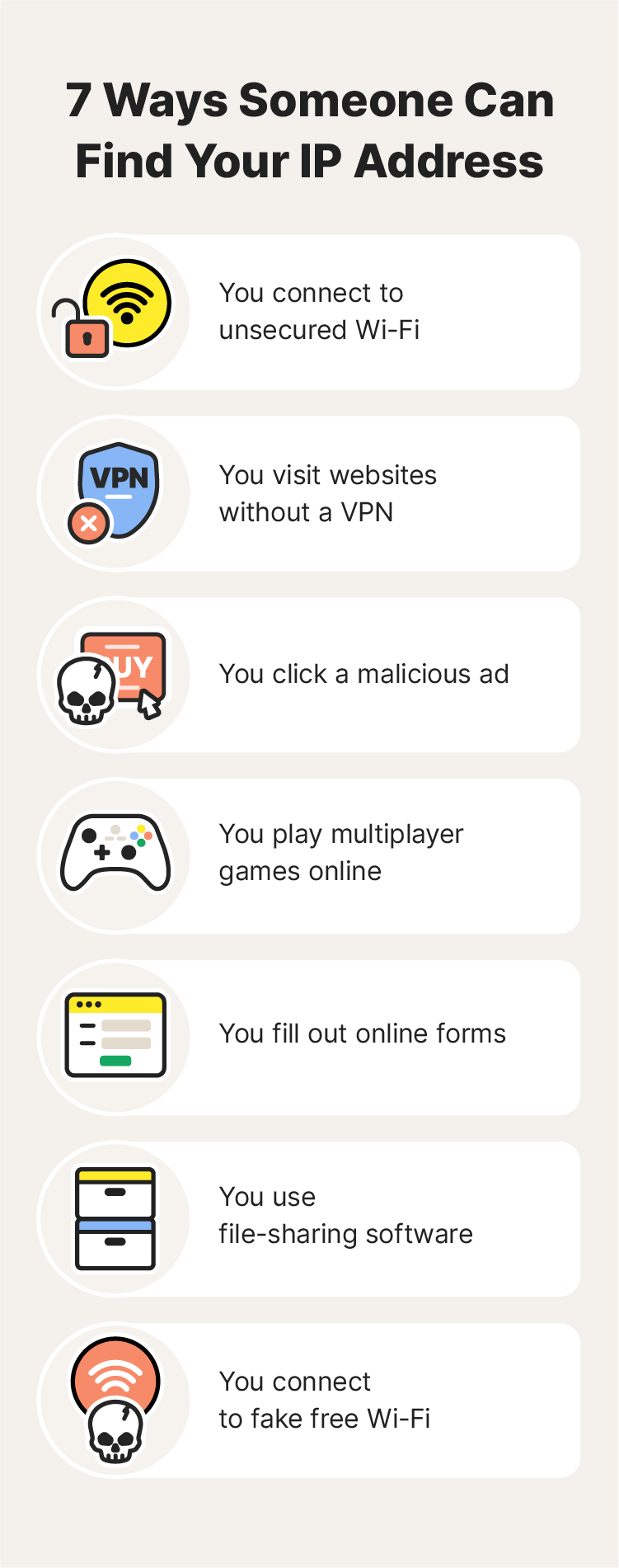
The question of “what can someone do with your IP” is no longer a niche concern for cybersecurity experts; it is a vital consideration for every internet user. Understanding the technical capabilities and limitations of an IP address is the first step in fortifying your digital security. This article explores the mechanics of IP addresses, the realistic risks associated with their exposure, and the technical strategies you can employ to shield your identity online.
Understanding the Architecture of IP Addresses
To understand the risks, one must first understand the technology. An IP address serves two primary functions: identifying the host (or network interface) and providing the location of the host in the network. This allows for the routing of data packets across the vast expanse of the World Wide Web.
Static vs. Dynamic IP Addresses
Most residential internet users are assigned a dynamic IP address by their Internet Service Provider (ISP). Dynamic IPs change periodically, such as every time you restart your router or when the ISP’s lease expires. This provides a minor layer of privacy through rotation. Conversely, static IP addresses remain constant. These are typically used by businesses, servers, or gamers who require a stable connection for hosting services. While static IPs offer reliability, they also provide a permanent target for malicious actors, as the “digital coordinates” never change.
IPv4 vs. IPv6: The Evolution of Connectivity
The world is currently in a long-term transition from IPv4 to IPv6. IPv4 addresses (e.g., 192.168.1.1) are limited to approximately 4.3 billion unique combinations—a number the world surpassed years ago. IPv6 was introduced to solve this “address exhaustion” by using a 128-bit format (e.g., 2001:0db8:85a3:0000:0000:8a2e:0370:7334), allowing for an almost infinite number of addresses. From a security standpoint, IPv6 includes built-in encryption protocols like IPsec, but the increased visibility of individual devices (due to the lack of Network Address Translation or NAT in some IPv6 configurations) creates new challenges for privacy.
The Technical Risks: What Malicious Actors Can Achieve
If a hacker, a disgruntled peer, or a sophisticated botnet obtains your IP address, they can engage in several types of technical interference. While an IP address alone is rarely enough to “hack” a computer completely, it is a critical piece of the puzzle for multi-stage attacks.
Geolocation and Digital Stalking
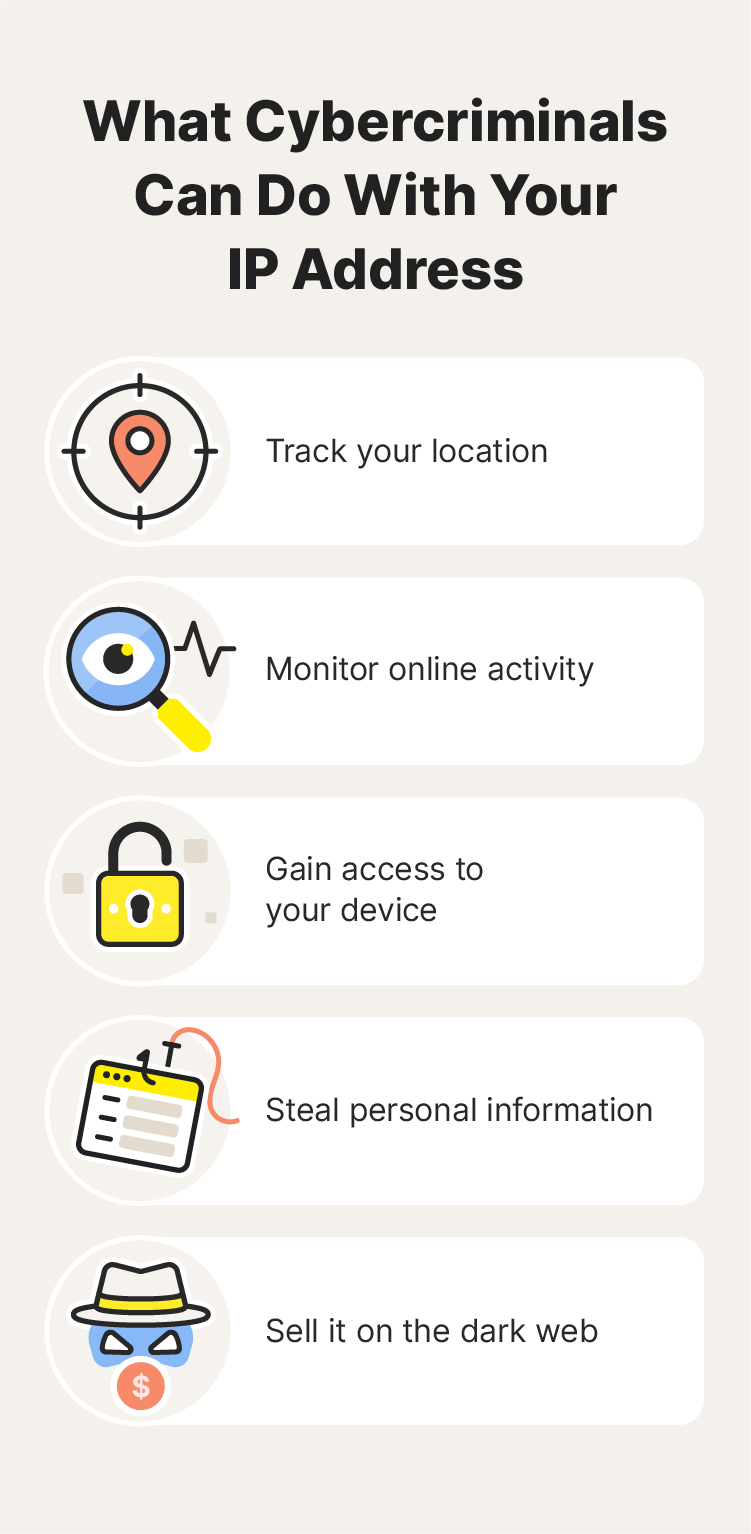
An IP address reveals your approximate physical location. While it generally won’t show your specific house number or apartment, it can pinpoint your city, ZIP code, and the ISP you use. Using geolocation databases, an attacker can determine your general vicinity. In the hands of a stalker or a “doxxer” (someone who publishes private information with malicious intent), this information can be cross-referenced with social media posts or public records to triangulate a person’s exact physical address.
Distributed Denial of Service (DDoS) Attacks
One of the most common uses of a stolen IP address is the initiation of a DDoS attack. This occurs when an attacker uses a botnet—a network of compromised computers—to flood your IP address with an overwhelming amount of data traffic. This “traffic jam” causes your internet connection to slow down or crash entirely. DDoS attacks are particularly prevalent in the competitive gaming community, where players may attempt to knock opponents offline to secure a victory.
Port Scanning and Vulnerability Probing
Think of your IP address as the front door to your digital life. Every device connected to the internet has “ports” that allow specific types of traffic (e.g., Port 80 for web traffic, Port 22 for SSH). A malicious actor with your IP address can use port-scanning software to check which of these doors are unlocked. If they find an open port associated with an unpatched software vulnerability or a weak password, they can gain unauthorized access to your router or network-connected devices, such as smart cameras or network-attached storage (NAS).
Impersonation and Illegal Activity Masking
Sophisticated hackers often use “IP spoofing” or route their illegal traffic through a compromised user’s IP. If a criminal manages to hijack your IP address or use it as a proxy, they can engage in illegal activities—such as downloading pirated content or launching cyberattacks on government institutions—while making it appear as though the traffic originated from your home. This can lead to your ISP throttling your connection or, in extreme cases, legal scrutiny from law enforcement.
Debunking Myths: What an IP Address Cannot Do
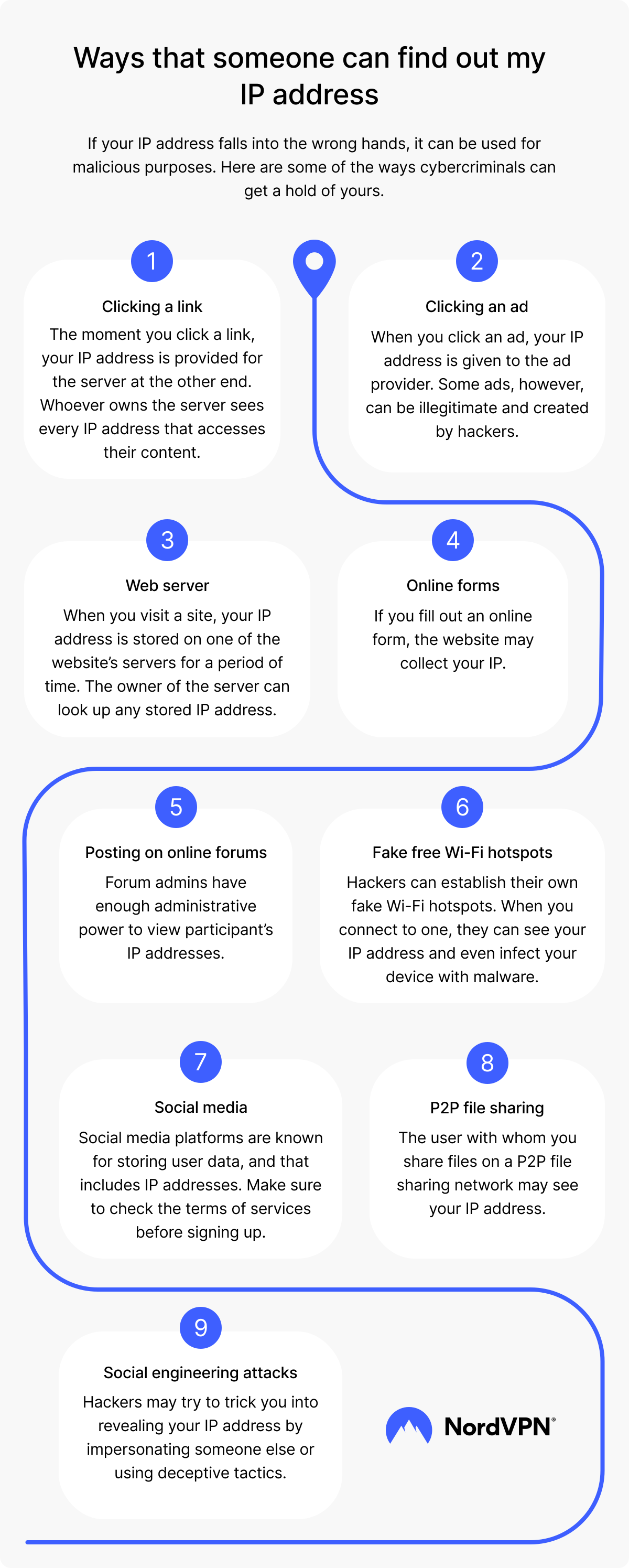
In the realm of digital security, it is just as important to understand what is not possible. Hollywood often portrays IP addresses as magical keys that grant instant access to a user’s webcam or bank account. In reality, the security architecture of modern operating systems is more robust than that.
Direct Access to Personal Files
Simply knowing an IP address does not grant someone the ability to look through your folders or read your private documents. For an attacker to access your files, they would need to exploit a specific software vulnerability (like an outdated version of Windows or macOS) or trick you into installing malware. The IP address is merely the path to your network; the security of your individual devices acts as the “lock” on the interior doors.
Remote Control of Hardware
Unless you have specifically enabled remote desktop protocols without password protection or are using a device with a known, unpatched firmware exploit, a hacker cannot “take over” your mouse or keyboard just by knowing your IP. Most modern routers include built-in firewalls that block unsolicited incoming requests, acting as a crucial barrier between your IP and your internal devices.
Advanced Exploits: The Role of Social Engineering
Technical data is often most dangerous when combined with human psychology. An IP address can be the “hook” that makes a social engineering attack more convincing.
Targeted Phishing Attacks
If an attacker knows your IP address and your ISP, they can craft a highly targeted phishing email. For example, they might send an email claiming to be from your specific ISP (e.g., Comcast or AT&T), citing an “issue with your connection at [Your City].” Because the email contains accurate technical details, the victim is much more likely to click a malicious link or provide their login credentials, leading to a full-scale account takeover.
Granular Ad Tracking and Behavioral Analysis
While not “malicious” in a criminal sense, advertisers use your IP address to build a “shadow profile” of your behavior. By tracking your IP across different websites, marketing firms can determine your interests, your daily routine, and your socioeconomic status. This tech-driven surveillance is used to serve hyper-targeted ads, but it also means that your digital footprint is being recorded and sold to third parties without your explicit consent for every single click.
How to Shield Your IP and Enhance Digital Security
Protecting your IP address is a fundamental component of “defense in depth”—the practice of using multiple layers of security to protect data.
Leveraging Virtual Private Networks (VPNs)
The most effective way to hide your IP address is by using a reputable VPN. A VPN acts as an encrypted tunnel between your device and a remote server. When you connect to a VPN, your actual IP address is masked, and the websites you visit only see the IP address of the VPN server. This not only prevents geolocation tracking but also encrypts your data, protecting it from “Man-in-the-Middle” (MitM) attacks on public Wi-Fi networks.
Utilizing Proxy Servers and the Tor Network
For users seeking even higher levels of anonymity, the Tor (The Onion Router) network provides a multi-layered encryption approach. Tor routes your traffic through three different volunteer nodes, making it nearly impossible for anyone to trace the traffic back to your original IP. Alternatively, proxy servers act as an intermediary for specific applications (like a web browser), though they often lack the full-system encryption provided by a VPN.
Strengthening Router Security and Firewalls
Your router is the gatekeeper of your network. To protect your IP and the devices behind it, you should:
- Change Default Credentials: Never use the default admin username and password that came with the router.
- Enable WPA3 Encryption: Ensure your Wi-Fi is protected by the latest encryption standards.
- Disable UPnP: Universal Plug and Play (UPnP) can automatically open ports for devices, creating security holes. Disabling it forces you to manage port forwarding manually and securely.
- Keep Firmware Updated: Manufacturers regularly release patches for security vulnerabilities. Set your router to update automatically.
Conclusion: The Path to Digital Resilience
In the era of the Internet of Things (IoT) and constant connectivity, your IP address is a vital piece of technical identity. While it is not a “master key” that allows hackers to control your life instantly, it is a significant data point that can be used to track, harass, or target you for more complex cyberattacks.
By understanding the distinction between what an IP address can and cannot do, and by employing technical safeguards like VPNs and robust firewall management, you can significantly reduce your digital attack surface. In the tech world, privacy is not a default state; it is a goal achieved through constant vigilance and the proactive application of security best practices. Protect your IP, and you protect the gateway to your digital existence.
aViewFromTheCave is a participant in the Amazon Services LLC Associates Program, an affiliate advertising program designed to provide a means for sites to earn advertising fees by advertising and linking to Amazon.com. Amazon, the Amazon logo, AmazonSupply, and the AmazonSupply logo are trademarks of Amazon.com, Inc. or its affiliates. As an Amazon Associate we earn affiliate commissions from qualifying purchases.