
The Scholastic Assessment Test (SAT) has undergone significant transformations over the last decade, transitioning from a paper-and-pencil marathon to a streamlined digital experience. Amidst these changes, the hardware you bring into the testing room remains one of the most critical variables in your performance. While the digital SAT includes a built-in graphing calculator (Desmos), many students prefer the tactile feedback, processing speed, and familiarity of a standalone handheld device.
Navigating the intersection of testing policy and hardware specifications is essential for any tech-savvy student. Not every gadget is welcome in the testing hall, and understanding the specific hardware capabilities allowed by the College Board can give you a distinct edge. This guide breaks down the allowed devices through a technical lens, helping you choose the best hardware for your testing kit.

Hardware Standards: Defining the Approved Device List
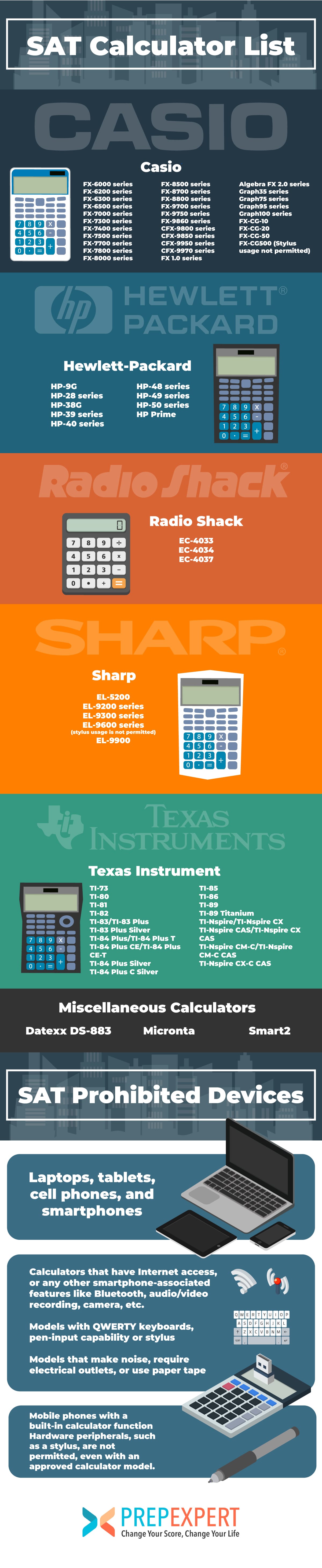
The College Board maintains a strict set of hardware requirements to ensure a level playing field. Unlike the ACT, which bans Computer Algebra Systems (CAS), the SAT is surprisingly permissive regarding high-end computational power. However, the device must still adhere to specific physical and functional constraints.
The Graphing Calculator Hierarchy
Graphing calculators are the gold standard for the SAT. These devices are essentially specialized microcomputers designed for high-speed numerical analysis and visual data representation. The approved list includes heavy hitters from Texas Instruments, Casio, Hewlett-Packard, and NumWorks.
From a technical perspective, a graphing calculator is preferred because of its ability to handle complex functions that a standard scientific calculator cannot. For example, the ability to find intersections of curves or calculate the zeroes of a polynomial through a graphical interface saves precious seconds compared to manual algebraic manipulation.
Scientific and Basic Calculators
While graphing calculators are recommended, they are not the only devices permitted. Any standard scientific calculator is allowed, provided it does not have prohibited features. Basic four-function calculators are also technically allowed, though they are highly discouraged due to their lack of trigonometric and logarithmic functions. If you are using a scientific calculator, ensure it has a multi-line display. Older single-line LCDs can lead to input errors because you cannot see the previous steps of a complex equation.
Hardware Limitations and Prohibitions
To maintain security, several categories of hardware are strictly prohibited:
-
Communication Modules: Any device with a Wi-Fi or Bluetooth chip is banned. This is to prevent any form of external communication or data synchronization during the exam.
-
Input Hardware: Devices with QWERTY keyboards (like the TI-92 or certain HP models) are not allowed. The College Board views these as closer to laptops than calculators.
-
External Power and Peripherals: You cannot use calculators that require a wall outlet or those that use styluses/pens. Touchscreens are generally allowed, provided the device is on the approved list, but the use of a stylus is a violation of testing protocol.
Top-Tier Gadgets: A Comparison of Recommended Hardware
When choosing a device for the SAT, you aren’t just buying a calculator; you are investing in a piece of hardware with specific processing speeds, display resolutions, and user interfaces.
Texas Instruments: The TI-84 Plus CE and TI-Nspire CX II
Texas Instruments remains the dominant force in the testing market. The TI-84 Plus CE is perhaps the most ubiquitous device in high school classrooms. Technically, it features a 320 x 240 pixel full-color backlit display and a rechargeable battery. Its operating system is optimized for “MathPrint” logic, allowing fractions and exponents to look exactly as they do in textbooks.
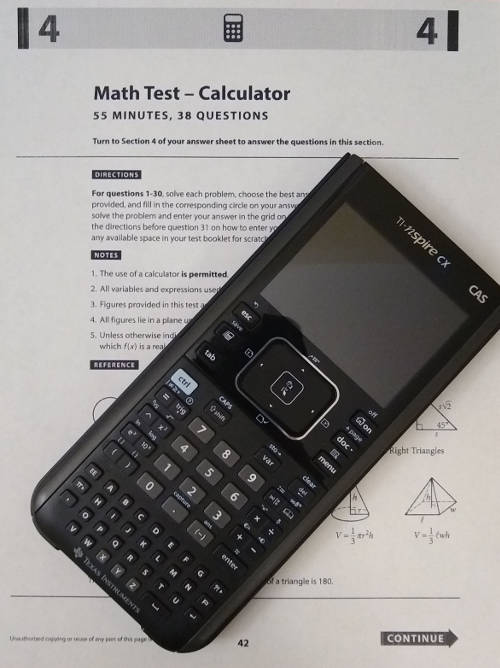
For those seeking more power, the TI-Nspire CX II (and the CAS version) is the peak of SAT-allowed hardware. It functions more like a modern operating system, with a file management system and a touchpad for navigation. The “CAS” version (Computer Algebra System) can manipulate symbolic variables, solving for x in an equation rather than just providing a decimal approximation. Since the SAT allows CAS, this device is a formidable tool for the Math section.
Casio: The fx-CG50 PRIZM
Casio’s flagship testing device, the fx-CG50 PRIZM, is known for its high-contrast “Natural Textbook Display” and rapid 3D graphing capabilities. From a tech standpoint, Casio often outperforms TI in terms of processing speed when rendering complex graphs. It also utilizes a more intuitive menu-driven interface, which some students find easier to navigate under pressure than the nested menus of a TI device.
NumWorks: The Modern Challenger
NumWorks is the newest player in the space, offering a calculator built on an open-source philosophy. It features a high-resolution screen (140 PPI) and a highly simplified, Python-ready operating system. For a student who is also interested in coding, the NumWorks calculator offers a sleek, modern hardware design that feels more like a smartphone than a traditional 90s-era calculator.
Maximizing the Tool: Software, Firmware, and Optimization
Owning the right hardware is only half the battle. To leverage your tech effectively on the SAT, you must understand the software environment of your device.
Firmware Updates
Most modern graphing calculators can be updated via a USB connection to a computer. Before test day, it is vital to ensure your device is running the latest version of its operating system. Manufacturers frequently release updates that optimize battery life, fix bugs in the graphing engine, and sometimes even add new mathematical functions. For example, older TI-84 Plus models received an update to include a “Polynomial Root Finder” app, which is a game-changer for the SAT’s algebra-heavy curriculum.
Utilizing Built-in Applications
Many approved calculators come pre-loaded with “Apps.” On the SAT, these are legal to use as long as they were factory-installed or are standard manufacturer-provided tools.
-
Equation Solvers: Most graphing calculators have a numeric solver that can find the value of a variable in a linear or quadratic equation instantly.
-
Inequality Graphing: This software allows you to shade regions on a coordinate plane, making visual sense of systems of inequalities—a common SAT topic.
-
Statistical Tools: While the SAT doesn’t require heavy data analysis, the “1-Var Stats” function on your calculator can instantly find the mean, median, and standard deviation of a data set.
Memory Management
The SAT has a strict policy regarding the storage of notes or unauthorized programs. While the College Board does not require proctors to clear your calculator’s memory (unlike some AP exams or teacher-led classroom tests), you should avoid having any “suspicious” looking files on your device. Familiarize yourself with the “Reset” function of your hardware just in case a proctor requests a memory clear, but be aware that this will delete any custom settings or archived programs you have legally installed.
Maintenance and Readiness: Ensuring Hardware Reliability
Technology is only useful if it functions when the timer starts. Hardware failure during the SAT is a common source of “test day horror stories.”
Battery Ecosystems
We have moved away from the era of four AAA batteries. Most top-tier calculators (TI-84 Plus CE, TI-Nspire CX, Casio PRIZM) use internal lithium-ion batteries.
-
The Charging Cycle: You should charge your device to 100% the night before the exam. Unlike a smartphone, a graphing calculator can hold a charge for weeks, but the backlit color screens drain power significantly faster than old monochrome models.
-
The “Deep Sleep” Issue: If you haven’t used your calculator in months, the battery may have entered a deep discharge state. Plug it in at least 48 hours before the test to ensure the battery cells are healthy.
Screen Care and Visibility
The SAT testing environment can vary—from bright gymnasiums to dimly lit classrooms. If you are using a device with a backlit screen, know how to adjust the brightness levels quickly. If you are using an older monochrome device (like the TI-84 Plus Silver Edition), ensure the contrast is adjusted correctly. These older LCDs are temperature-sensitive; if the room is too cold, the screen may appear faded, requiring you to manually increase the contrast.
Redundancy as a Strategy
Even with the best tech, things can go wrong. Many high-achieving students carry a “backup” scientific calculator in their bag. While you cannot have two calculators on your desk at the same time, you are permitted to keep a spare underneath your seat. If your primary graphing calculator’s OS crashes or the screen fails, having a reliable, $15 scientific calculator can save your score.
Conclusion: The Synergy of Student and Machine
The SAT is a test of logic, but it is also a test of how effectively you can use the tools at your disposal. Choosing a calculator is a tech-driven decision that should be based on processing power, screen clarity, and your personal comfort with the device’s user interface. Whether you opt for the powerhouse TI-Nspire CX II CAS, the user-friendly Casio PRIZM, or the sleek NumWorks, ensure that your hardware is updated, charged, and within the legal parameters set by the College Board. By mastering your device’s internal software and understanding its hardware limitations, you transform your calculator from a simple counting tool into a high-performance analytical engine.
aViewFromTheCave is a participant in the Amazon Services LLC Associates Program, an affiliate advertising program designed to provide a means for sites to earn advertising fees by advertising and linking to Amazon.com. Amazon, the Amazon logo, AmazonSupply, and the AmazonSupply logo are trademarks of Amazon.com, Inc. or its affiliates. As an Amazon Associate we earn affiliate commissions from qualifying purchases.