
In an era defined by high-definition displays and immersive digital experiences, HDMI (High-Definition Multimedia Interface) has become the undisputed standard for connecting audiovisual devices. From streaming boxes and gaming consoles to laptops and Blu-ray players, HDMI cables are the silent workhorses transmitting crisp video and rich audio signals to our televisions, monitors, and projectors. Yet, despite its ubiquity, a common question persists among users: “What cable is used for HDMI?” This seemingly simple query unravels a nuanced world of specifications, standards, and practical considerations vital for optimizing your home entertainment or professional setup. Understanding the specific cable designed for HDMI isn’t just about plugging in; it’s about unlocking the full potential of your devices, ensuring signal integrity, and future-proofing your connectivity for evolving display technologies.
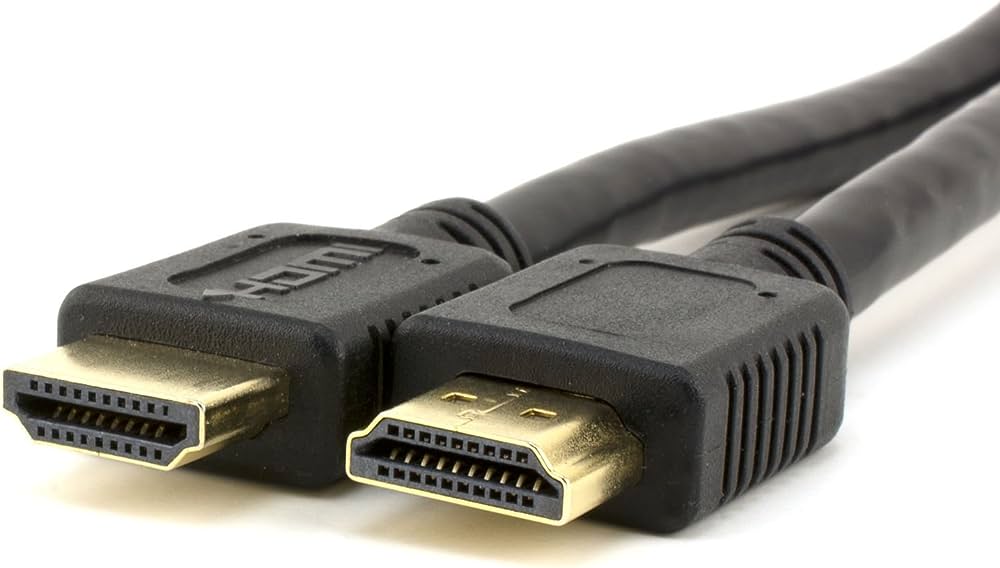
The Core of Connectivity: Understanding HDMI Cables
At its heart, an HDMI cable is a digital conduit, designed to transmit uncompressed video and compressed or uncompressed digital audio data from an HDMI-compliant source device to a compatible computer monitor, video projector, digital television, or digital audio device. Unlike older analog connections that required multiple cables for video and audio, HDMI elegantly consolidates these into a single, user-friendly cable, simplifying setup and reducing cable clutter. This digital nature is key to its superior performance, minimizing signal degradation and preserving the original quality of the content.
More Than Just Wires: The Components of an HDMI Cable
While appearing outwardly simple, an HDMI cable is a marvel of engineering, comprising multiple individually insulated copper wires bundled together, each serving a specific purpose. Inside the robust outer jacket, you’ll typically find several twisted pairs for data transmission (TMDS channels for video and audio), a DDC (Display Data Channel) for communication between devices, and a power conductor. These are meticulously shielded to prevent electromagnetic interference (EMI) and radio-frequency interference (RFI), ensuring a clean, stable signal. The connectors themselves, with their distinctive 19 or 29 pins, are precision-engineered to provide a secure and reliable physical connection. The integrity of these internal components directly impacts the cable’s ability to support higher resolutions, refresh rates, and advanced features.
The Digital Advantage: Why HDMI Reigns Supreme
The transition from analog to digital connectivity marked a significant leap forward in audiovisual technology, and HDMI stands as a prime example of its benefits. Prior to HDMI, users often grappled with a spaghetti of component video cables, S-Video cables, and separate audio cables, each susceptible to noise and signal loss over distance. HDMI’s digital format eliminates the conversion process that analog signals undergo, meaning the data arrives at your display precisely as it left the source, pixel for pixel. This results in sharper images, truer colors, and clearer audio without the artifacts or degradation common in analog systems. Furthermore, HDMI’s ability to carry both audio and video signals on a single cable simplifies installation and streamlines the user experience, solidifying its position as the dominant interface in modern consumer electronics.
Decoding HDMI Cable Types and Standards
The landscape of HDMI cables is not monolithic; it has evolved significantly since its inception in 2002. As display technologies advanced, so too did the requirements for the cables connecting them, leading to a series of specifications and categorizations. Understanding these distinctions is crucial for selecting a cable that aligns with your devices’ capabilities and your content consumption habits.
Standard HDMI Cables: For Everyday Use
The earliest HDMI cables, now often referred to as “Standard HDMI,” were designed to support resolutions up to 1080i (interlaced) or 720p (progressive scan). These cables, also known as Category 1, have a bandwidth of approximately 4.95 Gbps. While still functional for connecting older devices or displays that do not require high resolutions, they are largely superseded by newer standards for most modern applications. If you’re connecting a legacy DVD player to an older TV, a standard cable might suffice, but for anything high-definition, you’ll typically need something more robust.
High-Speed HDMI Cables: The Full HD Experience
Introduced to accommodate the rise of 1080p Full HD content and early 3D video, High-Speed HDMI cables (Category 2) offer a significantly increased bandwidth of 10.2 Gbps. This allows them to transmit 1080p resolution at 60Hz, as well as 4K resolution at 30Hz, and support higher refresh rates for 3D content. These cables also introduced support for Deep Color and an expanded color space. For many common home theater setups today, particularly those focusing on 1080p content or earlier 4K displays, a High-Speed HDMI cable remains a perfectly capable choice.
Premium High-Speed HDMI Cables: Next-Gen Ready
With the advent of 4K Ultra HD TVs and HDR (High Dynamic Range) content, the need for even greater bandwidth became apparent. Premium High-Speed HDMI cables were introduced to meet these demands, rigorously tested to ensure reliable performance for 4K video at 60Hz, HDR, and an expanded BT.2020 color gamut. They guarantee a bandwidth of 18 Gbps, making them ideal for connecting modern 4K HDR sources like UHD Blu-ray players, advanced gaming consoles (e.g., PS4 Pro, Xbox One X), and 4K streaming devices to compatible displays. Look for the “Premium HDMI Cable Certification” label, often a holographic sticker, as a guarantee of their performance and reliability.
Ultra High-Speed HDMI Cables: The Future of Visuals
The latest and most advanced iteration, Ultra High-Speed HDMI cables, are designed for the most demanding future-proof applications. Certified to support an enormous bandwidth of 48 Gbps, these cables are essential for transmitting uncompressed 8K video at 60Hz and 4K video at 120Hz, as well as resolutions up to 10K. They also introduce support for dynamic HDR, eARC (enhanced Audio Return Channel) for advanced audio formats, and crucial gaming features like VRR (Variable Refresh Rate) and ALLM (Auto Low Latency Mode), which reduce input lag and provide smoother gameplay. For those investing in cutting-edge 8K TVs, the latest generation of gaming consoles (PS5, Xbox Series X), or high-refresh-rate 4K monitors, an Ultra High-Speed HDMI cable is the necessary choice to fully leverage these technologies. Like their Premium counterparts, they also come with a certification program for authenticity and performance assurance.
HDMI Cable Versions vs. Cable Types: A Common Confusion
It’s important to distinguish between “HDMI versions” (e.g., HDMI 1.4, 2.0, 2.1) and “HDMI cable types” (Standard, High-Speed, Premium High-Speed, Ultra High-Speed). The versions refer to the capabilities of the ports on your devices, while cable types refer to the physical cables themselves and their ability to transmit data at certain speeds. A higher HDMI version number on your device means it supports more features and higher bandwidth, but you still need a cable capable of handling that bandwidth. For example, an HDMI 2.1 port requires an Ultra High-Speed HDMI cable to transmit 8K@60Hz. A common misconception is that a cable is “HDMI 2.1”; rather, it’s an Ultra High-Speed cable compatible with HDMI 2.1 specifications.
Navigating Lengths, Connectors, and Special Cases
Beyond speed and resolution capabilities, practical aspects such as cable length, connector size, and specific features play a significant role in successful HDMI deployment. Choosing the right physical configuration ensures not only signal quality but also convenient and tidy installations.
The Impact of Cable Length: Signal Degradation and Solutions
While HDMI excels at digital transmission, it is not immune to signal degradation, especially over longer distances. Passive HDMI cables (those without active signal boosting) typically perform reliably up to about 15-20 feet (4.5-6 meters). Beyond this, signal quality can diminish, leading to flickering, “sparkles,” or a complete loss of picture. For extended runs, specialized solutions are required:
- Active HDMI Cables: These cables incorporate a small chip that amplifies the signal, allowing for reliable transmission over distances up to 100 feet (30 meters) or more. They are often directional, meaning one end must be connected to the source and the other to the display.
- Fiber Optic HDMI Cables: For very long distances (hundreds of feet/meters) or environments with high electromagnetic interference, fiber optic HDMI cables are the gold standard. They convert electrical signals into light pulses, which are immune to EMI and can travel much further without loss. These are typically more expensive but indispensable for professional installations or large home theaters.
- HDMI Extenders: These devices use Cat5e/6 Ethernet cables to extend HDMI signals over extremely long distances, often converting the HDMI signal to an IP-based format for transmission and then back again.
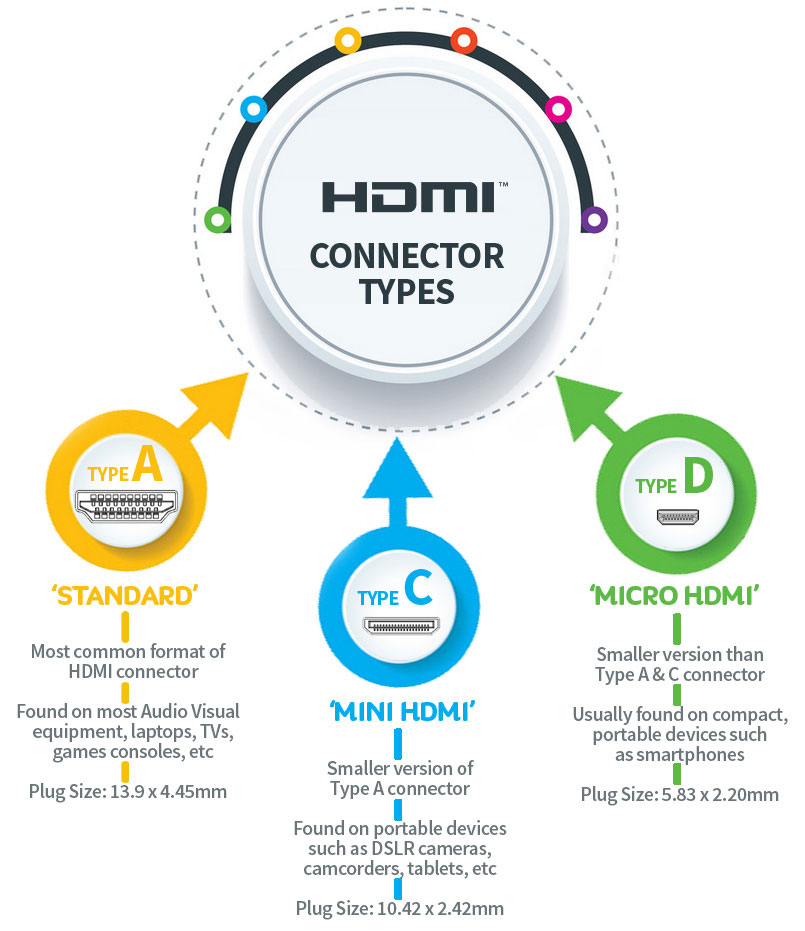
Common Connector Types: Standard, Mini, and Micro HDMI
While the vast majority of consumer electronics use the standard Type A HDMI connector, smaller devices necessitated more compact versions:
- Standard HDMI (Type A): This is the most common connector, found on TVs, monitors, game consoles, Blu-ray players, and many laptops. It features 19 pins and is universally recognized.
- Mini HDMI (Type C): A smaller, more compact 19-pin connector often found on smaller devices like DSLR cameras, camcorders, and some older tablets. It’s about half the size of a Type A connector.
- Micro HDMI (Type D): The smallest 19-pin HDMI connector, roughly the size of a micro-USB port. It’s typically used on smartphones, action cameras (like GoPros), and very thin tablets where space is at an absolute premium.
It’s important to note that while the physical connectors differ, they all transmit the same HDMI digital signal. Adapters are readily available to convert between these types, allowing for versatility when connecting different devices.
Ethernet Over HDMI: A Niche Feature
Some High-Speed and Premium High-Speed HDMI cables (specifically those labeled “with Ethernet”) include a dedicated data channel known as HDMI Ethernet Channel (HEC). This feature allows for IP-based applications over HDMI, enabling connected devices to share an internet connection without the need for a separate Ethernet cable. While an interesting concept, HEC hasn’t seen widespread adoption, and most devices still rely on Wi-Fi or direct Ethernet connections for network access. Consequently, while available, it’s rarely a critical factor in cable selection.
HDMI Alternatives and Adapters
While HDMI is dominant, other digital interfaces exist. DisplayPort is a strong competitor, especially in the PC monitor space, offering similar or sometimes superior capabilities for high-refresh-rate gaming and multiple monitor setups. USB-C with DisplayPort Alternate Mode is also gaining traction, offering a single-cable solution for power, data, and video. For legacy equipment, adapters exist to convert HDMI to DVI (video only), VGA (analog video), or even older component video. However, each conversion risks some degree of signal loss or limitations in features (like HDCP), making native HDMI connections always preferable where possible.
Choosing the Right HDMI Cable for Your Needs
Selecting the appropriate HDMI cable can seem daunting with the array of standards and types available. However, by considering a few key factors, you can make an informed decision that ensures optimal performance without overspending.
Assess Your Devices: Source and Display Capabilities
The most critical step is to understand the HDMI capabilities of both your source device (e.g., Blu-ray player, gaming console, PC graphics card) and your display device (TV, monitor, projector). Check their specifications for the HDMI version they support (e.g., HDMI 1.4, 2.0, 2.1). This will tell you the maximum resolution, refresh rate, and features (like HDR or eARC) that your setup can handle. Your cable only needs to match the lowest common denominator between your source and display. For instance, an 8K TV and a PlayStation 5 (both HDMI 2.1 compatible) will require an Ultra High-Speed HDMI cable to deliver 4K@120Hz or 8K@60Hz. But if you connect a PlayStation 4 (HDMI 1.4) to that same 8K TV, a High-Speed HDMI cable is perfectly adequate, as the PS4 itself won’t output 8K.
Consider Your Content: What Resolution and Features Do You Need?
Think about the content you typically consume. Are you primarily watching standard HD (1080p) movies, or are you a serious gamer aiming for 4K@120Hz with VRR?
- 1080p/720p (HD/Full HD): A High-Speed HDMI cable is sufficient.
- 4K@30Hz or older 4K content: A High-Speed HDMI cable will work.
- 4K@60Hz with HDR: A Premium High-Speed HDMI cable is highly recommended, ideally with certification.
- 4K@120Hz, 8K@60Hz, or advanced gaming features (VRR, ALLM, eARC): An Ultra High-Speed HDMI cable is essential.
Don’t buy a cable that significantly exceeds your current or near-future needs unless you are explicitly future-proofing for next-generation equipment.
Don’t Overspend, But Don’t Undervalue: The Myth of Expensive Cables
A common myth is that more expensive HDMI cables inherently deliver better picture and sound quality. For digital signals, a cable either works perfectly, or it doesn’t. There’s no “better picture” quality from a $100 cable compared to a $10 cable if both meet the required HDMI specification for the given length. As long as the cable is certified to meet the bandwidth requirements (e.g., Premium High-Speed or Ultra High-Speed), the digital data will be transmitted perfectly.
However, “don’t undervalue” means avoiding extremely cheap, uncertified cables, especially for higher bandwidth needs or longer lengths. These may use lower-quality materials, have poor shielding, or fail to meet specifications, leading to intermittent issues or complete signal loss. A reasonably priced, certified cable from a reputable manufacturer is usually the best approach.
Future-Proofing Your Setup: Why Higher Standards Matter
While it’s wise not to overspend unnecessarily, a slight investment in a cable with a higher standard than your current devices strictly demand can be a sensible strategy for future-proofing. For example, even if your current TV is only 4K@60Hz, purchasing an Ultra High-Speed HDMI cable for your new gaming console might be wise if you anticipate upgrading to an 8K TV or a 4K@120Hz monitor within the next few years. This saves you the hassle and potential cost of replacing cables later.

Conclusion
The question “what cable is used for HDMI?” leads us to a clear answer: it’s an HDMI cable, but specifically one that matches the capabilities of your devices and the demands of your content. From the foundational Standard cables to the cutting-edge Ultra High-Speed variants, each type serves a distinct purpose within the evolving ecosystem of digital display technology. By understanding the core components, decoding the various standards, and considering practical aspects like length and connectors, users can confidently navigate the market. Ultimately, selecting the right HDMI cable is not just about connecting two devices; it’s about optimizing your visual and auditory experience, ensuring a seamless flow of high-fidelity data, and future-proofing your setup in an ever-advancing technological landscape.
aViewFromTheCave is a participant in the Amazon Services LLC Associates Program, an affiliate advertising program designed to provide a means for sites to earn advertising fees by advertising and linking to Amazon.com. Amazon, the Amazon logo, AmazonSupply, and the AmazonSupply logo are trademarks of Amazon.com, Inc. or its affiliates. As an Amazon Associate we earn affiliate commissions from qualifying purchases.