
In the rapidly evolving landscape of visual technology, the term “4K” has transitioned from a high-end luxury to a standard expectation for consumers and professionals alike. Whether you are purchasing a new television, upgrading a gaming monitor, or diving into professional video editing, the terminology surrounding resolution can often be confusing. One of the most common questions arises when trying to bridge the gap between pixel count and screen shape: “What aspect ratio is 4K?”
While many assume 4K is a singular, monolithic standard, it actually encompasses different specifications depending on the industry. Understanding the relationship between resolution and aspect ratio is critical for ensuring visual fidelity, avoiding distorted images, and maximizing the potential of modern hardware. This guide explores the technical intricacies of 4K standards, the logic behind aspect ratios, and how these elements impact the digital ecosystem.
Defining 4K: Resolution vs. Aspect Ratio
To understand the aspect ratio of 4K, one must first distinguish between resolution and aspect ratio. Resolution refers to the total number of pixels that make up an image, usually expressed as the number of horizontal pixels by the number of vertical pixels. Aspect ratio, conversely, describes the proportional relationship between a display’s width and its height.
The Consumer Standard: Ultra HD (16:9)
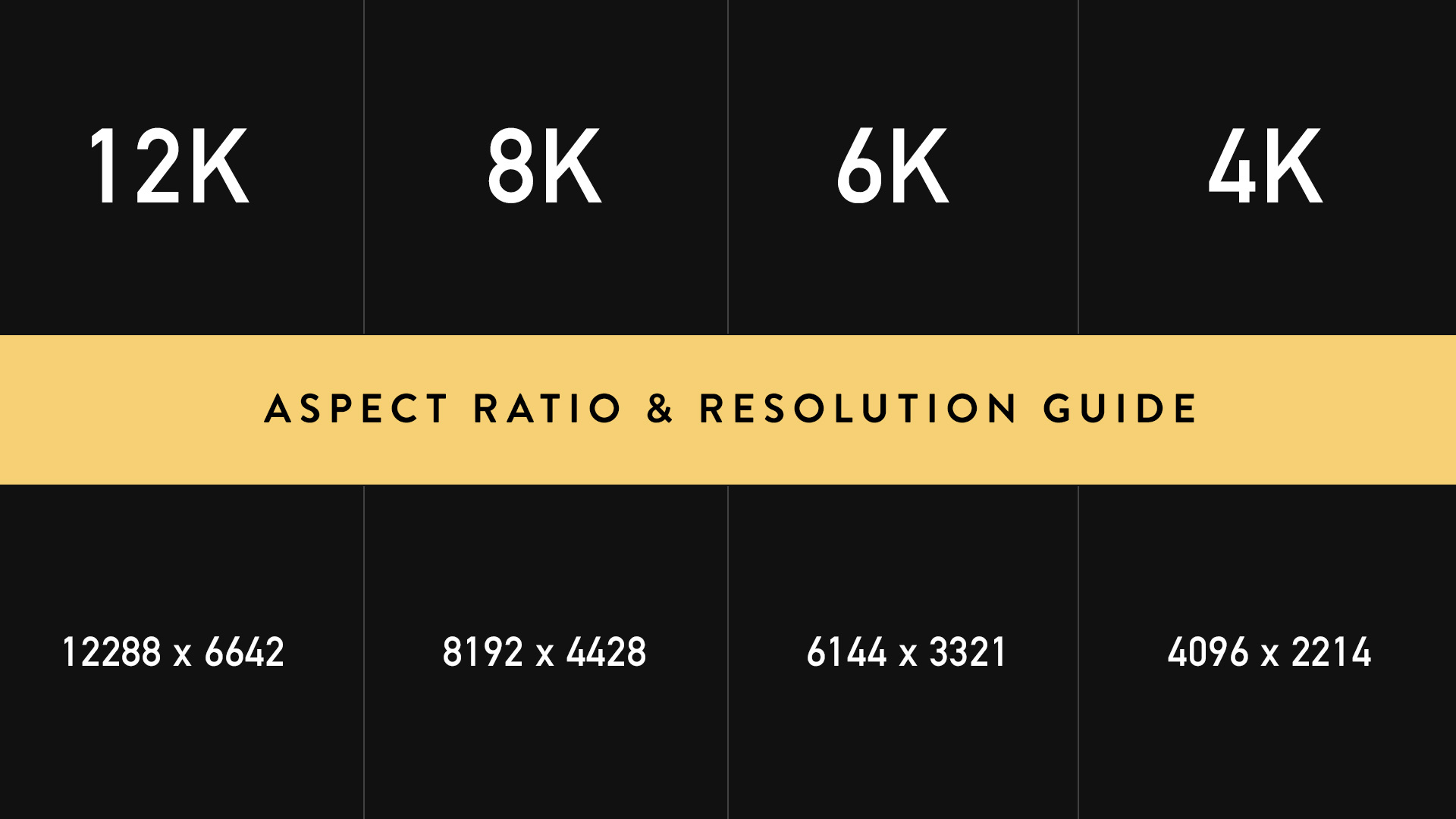
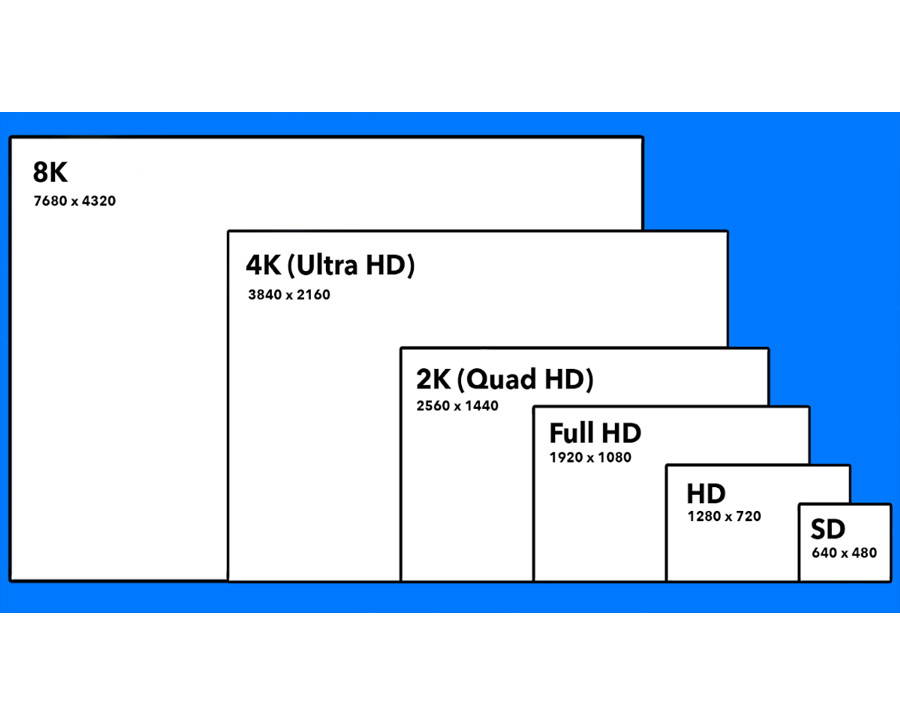
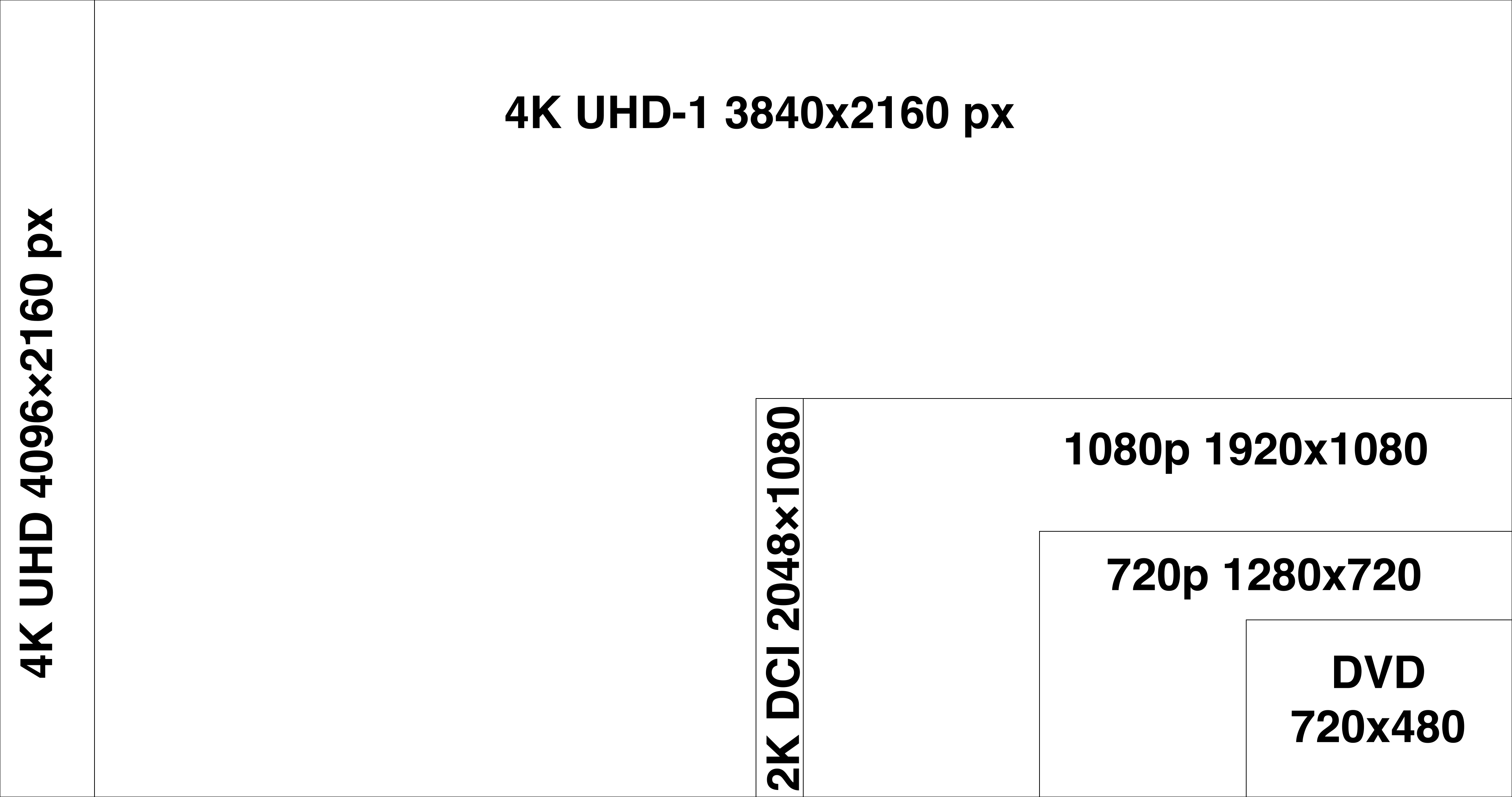
For the vast majority of consumers, 4K refers to Ultra High Definition (UHD). In this context, the resolution is exactly 3840 x 2160 pixels. When you divide 3840 by 2160, you get a ratio of 1.77:1, which is mathematically equivalent to 16:9.
The 16:9 aspect ratio has become the global standard for high-definition television and computer monitors. Its rise was driven by a need to create a “compromise” format that could display both traditional 4:3 television broadcasts and 2.39:1 widescreen cinema films with minimal wasted screen real estate. In the tech world, 4K UHD is the backbone of streaming services like Netflix, Disney+, and YouTube, as well as modern gaming consoles like the PlayStation 5 and Xbox Series X.
The Cinematic Standard: DCI 4K (approx. 1.9:1)
In the professional film industry, 4K is defined by the Digital Cinema Initiatives (DCI). This standard is slightly different from the consumer UHD standard. DCI 4K features a resolution of 4096 x 2160 pixels. Because it has more horizontal pixels than consumer UHD, its aspect ratio is wider, sitting at approximately 1.9:1 (or 256:135).
This distinction is vital for tech professionals in post-production. If a film is shot in DCI 4K and played back on a standard 16:9 4K television, the viewer will see thin black bars at the top and bottom of the screen (letterboxing), or the edges of the frame must be cropped to fit the consumer display. This highlights a fundamental truth in technology: “4K” is an umbrella term for “roughly four thousand horizontal pixels,” but the specific implementation varies by use case.
Why Aspect Ratio Matters in the Modern Tech Ecosystem
The choice of aspect ratio is not merely an aesthetic preference; it is a technical decision that affects hardware performance, software scaling, and the user experience. As we push toward higher pixel densities, the way software handles these ratios becomes increasingly complex.
Visual Consistency and Pixel Mapping
One of the most significant advantages of the 4K 16:9 standard is its “integer scaling” potential with 1080p (Full HD). A 1080p image is 1920 x 1080 pixels. Because 3840 is exactly 1920 times two, and 2160 is exactly 1080 times two, a 4K screen can display a 1080p image by using a perfect 2×2 grid of 4K pixels for every single 1080p pixel.
This technical symmetry ensures that lower-resolution content still looks sharp on high-resolution displays. However, if a user attempts to display a 4K image on an ultrawide monitor (21:9) or an older square monitor (4:3), the hardware must perform complex interpolation or “black-boxing.” In digital security and surveillance, for instance, using the wrong aspect ratio can lead to “stretched” images, potentially distorting critical details like facial features or license plates.
Hardware Demands and Bandwidth
The aspect ratio also dictates the total pixel count, which directly correlates to the processing power required from a Graphics Processing Unit (GPU). While a 16:9 4K screen has roughly 8.3 million pixels, an ultrawide “4K” equivalent (often 3840 x 1600 or 5120 x 2160) demands significantly more bandwidth.
From a technical standpoint, transmitting 4K data at high refresh rates (such as 120Hz or 144Hz) requires advanced interface standards like HDMI 2.1 or DisplayPort 1.4/2.0. The wider the aspect ratio (and thus the higher the pixel count), the more pressure is placed on the hardware’s ability to process and transmit data without latency. For tech enthusiasts and gamers, understanding that “4K” isn’t just about clarity but also about the mathematical shape of the data is essential for hardware optimization.
4K in Content Creation: From Sensors to Software
For creators, the “what aspect ratio is 4k” question is answered during the production phase. The hardware used to capture imagery—the camera sensor—often dictates the native aspect ratio, which may not always align with the final delivery format.
Sensor Dimensions and Native Ratios
Digital camera sensors, such as CMOS or CCD sensors found in professional rigs, often have their own native aspect ratios, such as 3:2 or 4:3 (common in Micro Four Thirds systems). When a camera records in “4K,” it effectively crops a portion of that sensor to meet either the 3840×2160 (UHD) or 4096×2160 (DCI) standard.
Tech-savvy cinematographers often use “anamorphic” lenses to squeeze a wider field of view onto a standard 4K sensor. This creates a highly widescreen look (often 2.39:1) while still utilizing the vertical resolution of the 4K format. In the software environment, tools like Adobe Premiere Pro or DaVinci Resolve allow editors to manage these different ratios by setting “pixel aspect ratios”—a technical workaround where pixels are treated as rectangles rather than squares to ensure the image looks correct on a 16:9 screen.
Post-Production and Aspect Ratio Conversion
The tech side of video editing involves “letterboxing” and “pillarboxing.” Letterboxing refers to the black bars at the top and bottom of the screen when a wide-format film is shown on a 16:9 4K display. Pillarboxing occurs when 4:3 content (like old television shows) is shown on a 4K display, resulting in bars on the left and right.
Modern AI-driven software tools are now being used to solve these ratio discrepancies. Through a process called “content-aware fill” or “generative expand,” AI can actually generate the missing sides of a 4K image to adapt it to different aspect ratios without stretching or cropping the original subject. This represents a major leap in how technology handles the intersection of resolution and geometry.
The Future of High-Resolution Displays: Beyond 16:9
As we look toward the future of display technology, the 16:9 aspect ratio—while dominant—is being challenged by new forms of productivity and immersion. The definition of 4K is expanding to accommodate these innovations.
Ultrawide Monitors and Verticality
In the professional tech and coding world, “Ultrawide” monitors (21:9) are becoming the new gold standard. While not “True 4K” in the traditional sense, many of these displays are marketed as “5K2K” or “Ultra-Wide 4K.” These displays typically offer a resolution of 5120 x 2160. They maintain the 4K vertical resolution (2160p) but extend the horizontal real estate to provide more room for timelines, code editors, and side-by-side windows.
Furthermore, with the rise of mobile-first content (TikTok, Reels, Shorts), we are seeing the emergence of “Vertical 4K.” This is simply a 16:9 4K frame rotated 90 degrees, resulting in a 9:16 aspect ratio (2160 x 3840). This shift is forcing hardware manufacturers to create monitors that can easily pivot and software that can dynamically re-orient UI elements based on the display’s physical orientation.
8K and the Evolution of Screen Real Estate
While 4K remains the current sweet spot for price and performance, 8K technology is already on the horizon. 8K doubles the horizontal and vertical resolution of 4K, resulting in 7680 x 4320 pixels. Interestingly, 8K maintains the 16:9 aspect ratio used by 4K UHD. This suggests that the tech industry has settled on 16:9 as the “permanent” standard for consumer media, even as pixel density continues to scale exponentially.
The transition to higher resolutions like 8K will require even more robust data compression (such as AV1 or VVC codecs) and faster networking infrastructure (WiFi 7 and 6G). As these technologies mature, the core principle remains the same: the aspect ratio provides the framework, while the resolution provides the detail.
Conclusion
So, what aspect ratio is 4K? The answer is that it depends on the context of the technology being used. In the living room and on the desk of the average consumer, 4K is synonymous with a 16:9 aspect ratio (3840 x 2160). In the cinema and high-end production houses, 4K leans toward a wider 1.9:1 ratio (4096 x 2160).
Understanding these distinctions is more than just a matter of trivia; it is a fundamental requirement for navigating the modern tech landscape. Whether you are a developer optimizing an app for different screens, a gamer seeking the best visual experience, or a filmmaker delivering a masterpiece, knowing how pixels relate to the shape of the screen ensures that your digital content remains clear, accurate, and impactful. As display technology continues to innovate with curved panels, foldable screens, and ultra-high resolutions, the synergy between resolution and aspect ratio will remain the cornerstone of our visual experience.
aViewFromTheCave is a participant in the Amazon Services LLC Associates Program, an affiliate advertising program designed to provide a means for sites to earn advertising fees by advertising and linking to Amazon.com. Amazon, the Amazon logo, AmazonSupply, and the AmazonSupply logo are trademarks of Amazon.com, Inc. or its affiliates. As an Amazon Associate we earn affiliate commissions from qualifying purchases.