
In the dynamic landscape of modern business, the ability to identify, track, and convert potential customers is paramount to sustained growth. At the heart of this process for millions of organizations worldwide lies Salesforce, the dominant customer relationship management (CRM) platform. Within Salesforce, the concept of a “lead” is fundamental, serving as the initial touchpoint for all prospective business. Understanding what Salesforce leads are, how they function, and the ecosystem surrounding them is crucial for anyone leveraging or considering this powerful software solution. A Salesforce lead represents an individual or company that has shown some level of interest in your product or service but has not yet been qualified as a sales opportunity. They are the raw material of your sales pipeline, waiting to be nurtured, assessed, and potentially transformed into valuable customers.

The Core Concept of a Lead in CRM
Before diving into the specifics of Salesforce, it’s essential to grasp the universal definition of a “lead” within the context of CRM and sales. This foundational understanding underpins how Salesforce, as a technology platform, structures and manages this critical data.
Defining a Lead: The Raw Potential
A lead, fundamentally, is an unverified prospect. It’s someone (or a company) who has interacted with your brand in some way, indicating a potential — but unconfirmed — interest. This interaction could be anything from downloading an ebook, attending a webinar, filling out a contact form, visiting a specific product page, or even just being identified through market research as fitting a particular demographic or firmographic profile. Critically, a lead is distinct from a contact, an account, or an opportunity. A contact is an individual associated with an existing account (a company you already do business with or are actively pursuing). An opportunity is a qualified sales pursuit linked to an account and contact, representing a concrete potential revenue stream. Leads reside at the very top of the sales funnel, representing potential business that has not yet been fully qualified or connected to an existing account relationship.
Why Leads are Critical for Sales Growth
Leads are the lifeblood of any sales organization. Without a consistent influx of new leads, the sales pipeline stagnates, and business growth becomes unsustainable. Effective lead management, therefore, is not merely an administrative task but a strategic imperative. Leads provide the raw material that sales teams then work to qualify, understand, and ultimately convert into paying customers. This process is iterative and requires systematic tracking, communication, and analysis, all of which are facilitated by a robust CRM platform like Salesforce. By centralizing lead data, businesses can ensure no potential prospect falls through the cracks, allowing for consistent follow-up and targeted engagement.
Salesforce’s Approach to Lead Management
Salesforce is meticulously designed to manage the entire customer journey, and its lead object is the starting point for this journey for new prospects. The platform provides a structured way to capture, store, and manage lead information, ensuring consistency and efficiency in the sales process.
How Salesforce Organizes Lead Data
Within Salesforce, a “Lead” is a standard object, much like an “Account” or “Contact.” Each lead record contains a comprehensive set of fields designed to capture all relevant information about the potential customer. This includes basic contact details (name, email, phone), company information (company name, industry, website, annual revenue), source of the lead (web, referral, event), and details about their interest (product interest, specific inquiries). The power of Salesforce lies in its ability to centralize this disparate information, providing a 360-degree view of the prospect from the moment they enter the system. This structured approach allows sales and marketing teams to quickly assess a lead’s potential and determine the best course of action.
Key Lead Fields and Their Significance
Salesforce offers a rich set of standard fields for leads, which can also be customized with additional fields to suit specific business needs. Some of the most critical standard fields include:
- Lead Source: Identifies where the lead originated (e.g., Web, Phone Inquiry, Partner Referral, Trade Show). This is vital for attributing success to marketing campaigns.
- Lead Status: Tracks the lead’s progress through the sales process (e.g., New, Working, Nurturing, Qualified, Unqualified). This field is critical for workflow automation and reporting.
- Company/Name: Basic identifying information about the prospect and their organization.
- Email/Phone: Primary contact methods.
- Industry/Annual Revenue/Number of Employees: Firmographic data crucial for segmentation and qualification.
- Description: A free-text field for capturing specific notes or inquiries.
The diligent population of these fields ensures that sales representatives have all the necessary context to engage effectively with a lead.
Lead Statuses: Guiding the Sales Journey
The “Lead Status” field is perhaps one of the most important aspects of Salesforce lead management. It represents where a lead stands in your defined sales process. Typical statuses might include:
- New: The lead has just been captured and has not yet been acted upon.
- Working – Contacted: A sales representative has attempted to or successfully made contact with the lead.
- Nurturing: The lead isn’t ready for a direct sales push but is being engaged with marketing content to build interest over time.
- Qualified: The lead meets predefined criteria (e.g., budget, authority, need, timeline – BANT) and is ready to be converted into an opportunity.
- Unqualified: The lead does not meet the criteria, perhaps due to lack of budget, an unfit product, or simply being spam.
Properly managing lead statuses ensures that sales efforts are focused on the most promising prospects and provides clear visibility into the health of the lead pipeline.
The Lead-to-Opportunity Conversion Process
The ultimate goal of managing leads in Salesforce is to convert them into opportunities, and subsequently, into paying customers. Salesforce provides a streamlined process for this critical transition.
Qualification: The First Hurdle
Before a lead can become an opportunity, it must be qualified. This involves a systematic assessment to determine if the prospect has a genuine need for your product/service, the budget to acquire it, the authority to make a purchasing decision, and a realistic timeline for implementation. Sales representatives use a combination of direct communication, data analysis within Salesforce, and sometimes AI-driven insights to qualify leads. Effective qualification prevents sales teams from wasting time on prospects unlikely to close, ensuring resources are optimally allocated.
Conversion to Account, Contact, and Opportunity
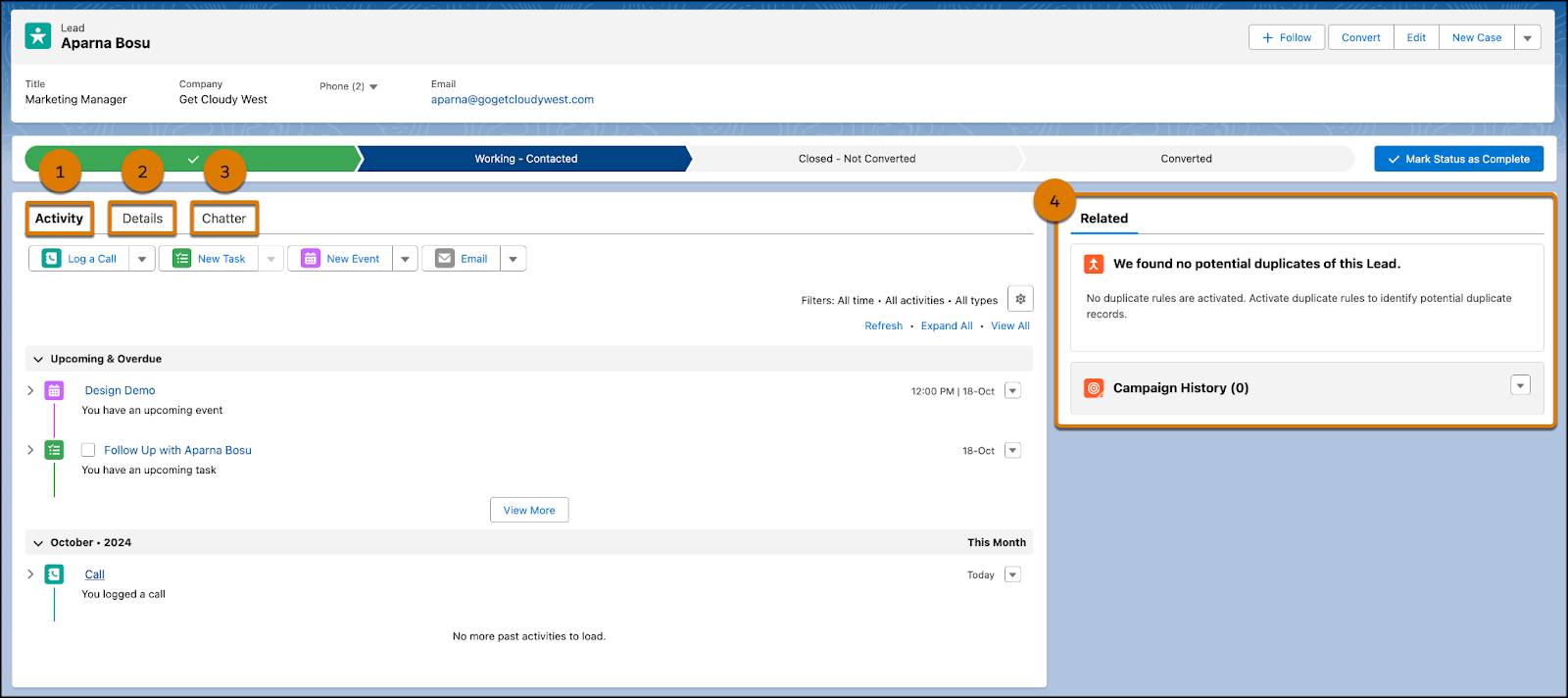
Once a lead is deemed qualified, the sales representative initiates the “Convert” action within Salesforce. This powerful feature transforms a single lead record into three interconnected records:
- Account: A new account record is created for the company the lead works for (unless an existing account with the same name is found).
- Contact: A new contact record is created, linked to the newly created or existing account. This contact represents the individual from the lead record.
- Opportunity: A new opportunity record is created, associated with the new account and contact. This opportunity signifies a potential sale and is where the bulk of the sales cycle management will occur.
This automatic conversion not only saves time but also maintains data integrity, ensuring that all related customer information is linked and organized logically within the CRM. It also moves the prospect down the sales funnel from a general interest to a concrete potential deal.
The Role of Automation and Workflow Rules
Salesforce allows for extensive automation around the lead lifecycle. Workflow rules, Process Builder, and Flow can be configured to automate tasks, email alerts, field updates, and even approvals based on changes in lead status or specific field values. For example, a rule could automatically assign a “New” lead to the appropriate sales queue based on geography or industry. Another rule might send an automated welcome email to a lead once their status changes to “Working – Contacted.” This automation ensures consistent processes, reduces manual effort, and improves the speed and efficiency of lead engagement.
Optimizing Lead Management with Salesforce Features
Beyond the core lead object, Salesforce offers a suite of features designed to enhance lead management, from capture to qualification and beyond.
Lead Assignment Rules: Ensuring Timely Follow-Up
Timeliness is critical in lead follow-up. Salesforce Lead Assignment Rules automate the process of directing new leads to the correct sales representative or queue. Rules can be based on criteria such as lead source, geography, industry, or even custom fields. This ensures that leads are routed to the reps best equipped to handle them, minimizing response times and maximizing the chances of engagement. Round-robin assignments, territory-based routing, and load balancing can all be configured to optimize distribution.
Web-to-Lead and Email-to-Lead: Streamlining Capture
Salesforce provides built-in functionalities to automate lead capture directly from external sources.
- Web-to-Lead: Generates HTML code that can be embedded on a company’s website. When a visitor fills out and submits a form (e.g., contact us, download whitepaper), their information is automatically captured and created as a new lead record in Salesforce, complete with details like lead source and originating URL.
- Email-to-Lead: Allows you to designate an email address (e.g., sales@yourcompany.com) where incoming emails are automatically converted into new lead records in Salesforce. This is particularly useful for inquiries that come directly via email.
These features dramatically reduce manual data entry and ensure that leads are promptly entered into the system for follow-up.
Lead Scoring and Nurturing: Prioritizing and Engaging
Not all leads are created equal. Lead scoring is a methodology that assigns a numerical value to leads based on their demographic information (e.g., job title, company size) and their engagement behavior (e.g., website visits, email opens, content downloads). Salesforce, often integrated with marketing automation platforms like Pardot (now Marketing Cloud Account Engagement), facilitates robust lead scoring. High-scoring leads are prioritized for immediate sales follow-up, while lower-scoring leads may enter nurturing campaigns, where they receive targeted content designed to educate them and build interest over time until they are ready for a sales conversation. This intelligent prioritization ensures sales teams focus on the hottest prospects.
Reports and Dashboards: Gaining Insights
Salesforce’s robust reporting and dashboard capabilities are invaluable for lead management. Businesses can create custom reports to track:
- Number of new leads generated over time.
- Lead source performance.
- Conversion rates from lead to opportunity.
- Lead status distribution.
- Average time to convert a lead.
Dashboards provide a visual, real-time overview of these metrics, allowing sales and marketing leadership to monitor pipeline health, identify bottlenecks, and make data-driven decisions to optimize their lead generation and management strategies.
Best Practices for Effective Salesforce Lead Utilization
Maximizing the value of Salesforce leads requires more than just knowing the features; it demands strategic implementation and ongoing refinement.
Data Hygiene and Enrichment
The quality of your lead data directly impacts the effectiveness of your sales efforts. Regular data hygiene practices, such as deduplication, standardization, and validation, are crucial. Additionally, enriching lead records with third-party data (e.g., company size from a data provider, social media profiles) can provide sales reps with deeper insights before their first interaction, making their outreach more personalized and effective. Salesforce AppExchange offers numerous tools for data enrichment and cleaning.
Alignment Between Sales and Marketing
For lead management to be truly effective, there must be a strong alignment between marketing and sales teams. Marketing is responsible for generating qualified leads, while sales is responsible for converting them. This requires clear definitions of what constitutes a “qualified lead” (Service Level Agreements – SLAs) and seamless communication channels. Salesforce acts as the common platform where both teams can track progress, share insights, and collaborate to optimize the lead-to-revenue funnel.

Continuous Optimization
The lead management process is not static. Market conditions, product offerings, and customer behaviors evolve, necessitating continuous optimization. Regularly review your lead definitions, scoring models, assignment rules, and conversion rates. Gather feedback from sales representatives on the quality of leads they receive and iterate on your processes. Leveraging Salesforce’s reporting and analytics capabilities to conduct A/B tests on lead sources or follow-up strategies can further refine your approach, ensuring that your investment in Salesforce leads translates into measurable business growth.
In conclusion, Salesforce leads are more than just records in a database; they are the starting point of every new customer relationship and the engine of business expansion. By understanding their nature, leveraging Salesforce’s comprehensive features for their management, and adhering to best practices, organizations can transform raw interest into thriving customer partnerships, driving sustainable success in the digital age.
aViewFromTheCave is a participant in the Amazon Services LLC Associates Program, an affiliate advertising program designed to provide a means for sites to earn advertising fees by advertising and linking to Amazon.com. Amazon, the Amazon logo, AmazonSupply, and the AmazonSupply logo are trademarks of Amazon.com, Inc. or its affiliates. As an Amazon Associate we earn affiliate commissions from qualifying purchases.