
Since the release of iOS 10, Apple has transformed its native Messages application from a simple text-delivery service into a robust platform. At the heart of this transformation are iMessage apps—miniature software applications that live directly within the Messages interface. Rather than forcing users to toggle between different programs to share a location, play a game, or send a payment, iMessage apps integrate these functionalities into the conversational flow.
Understanding iMessage apps is essential for anyone looking to maximize the utility of their iPhone, iPad, or Mac. These tools represent a shift toward “contextual computing,” where the software we use meets us where we are already communicating. By bringing external data and interactive features into a chat thread, Apple has created an ecosystem that prioritizes efficiency and rich media engagement.

The Evolution of the iMessage Platform
To understand what iMessage apps are today, it is helpful to look at how they began. Historically, mobile messaging was a utilitarian experience limited to SMS and MMS. When Apple introduced iMessage, it moved messaging from cellular protocols to data-based protocols, allowing for end-to-end encryption and better media handling. However, the real breakthrough occurred when Apple opened the platform to third-party developers.
This move allowed developers to create “app extensions.” These are not necessarily standalone programs that sit on your home screen; instead, they are functional layers that operate within the Messages environment. This evolution reflects a broader trend in technology where the “platform” is no longer just the operating system, but the individual apps where we spend most of our time.
Integrated vs. Standalone iMessage Apps
There are two primary ways iMessage apps exist within the ecosystem. The first is as an extension of a primary iOS app. For example, if you download the Yelp app, you will automatically find an iMessage component in your drawer that allows you to share restaurant details without leaving your conversation.
The second type is the “iMessage-only” app. These do not have an icon on your home screen and exist solely within the Messages app. These are often sticker packs or specialized utilities, like “Polls,” designed specifically for group chat interactions. Distinguishing between these two is vital for managing your device’s storage and your interface’s clutter.
How iMessage Apps Function: Beneath the Surface
At their core, iMessage apps are about reducing friction. In tech terminology, friction refers to any obstacle that prevents a user from completing a task. Before iMessage apps, if you wanted to split a dinner bill, you would have to leave Messages, open a banking app, find the contact, send the money, and then return to Messages to confirm it was sent. With iMessage apps, that entire workflow is compressed into a few taps within the chat bubble.
The App Drawer and Interface
The gateway to these tools is the “App Drawer,” the row of icons located just above the keyboard. Since the launch of iOS 17, Apple has streamlined this interface, moving the apps into a vertical list accessed via a “+” button. This design choice reflects a commitment to a cleaner UI while keeping the powerful tools of the ecosystem easily accessible.
When you interact with an iMessage app, you are often interacting with a live, mini-interface. If you send a weather update via a weather app extension, the recipient doesn’t just see a static screenshot; they often see a rich link that can be updated in real-time or interacted with to show more details.
Collaborative Real-Time Interaction
One of the most technically impressive features of iMessage apps is their ability to handle collaborative data. In certain apps, such as those used for document signing or group scheduling, both parties can interact with the same “message.” If one person makes a change to a shared list or a game move, the message bubble itself updates for everyone in the thread. This creates a synchronous experience that standard SMS could never replicate.
Navigating the iMessage App Store and Interface
Accessing the world of iMessage apps requires a visit to the iMessage App Store, a curated version of the standard App Store accessible within the Messages app. Here, users can browse through thousands of extensions categorized by their utility, from travel and finance to entertainment.
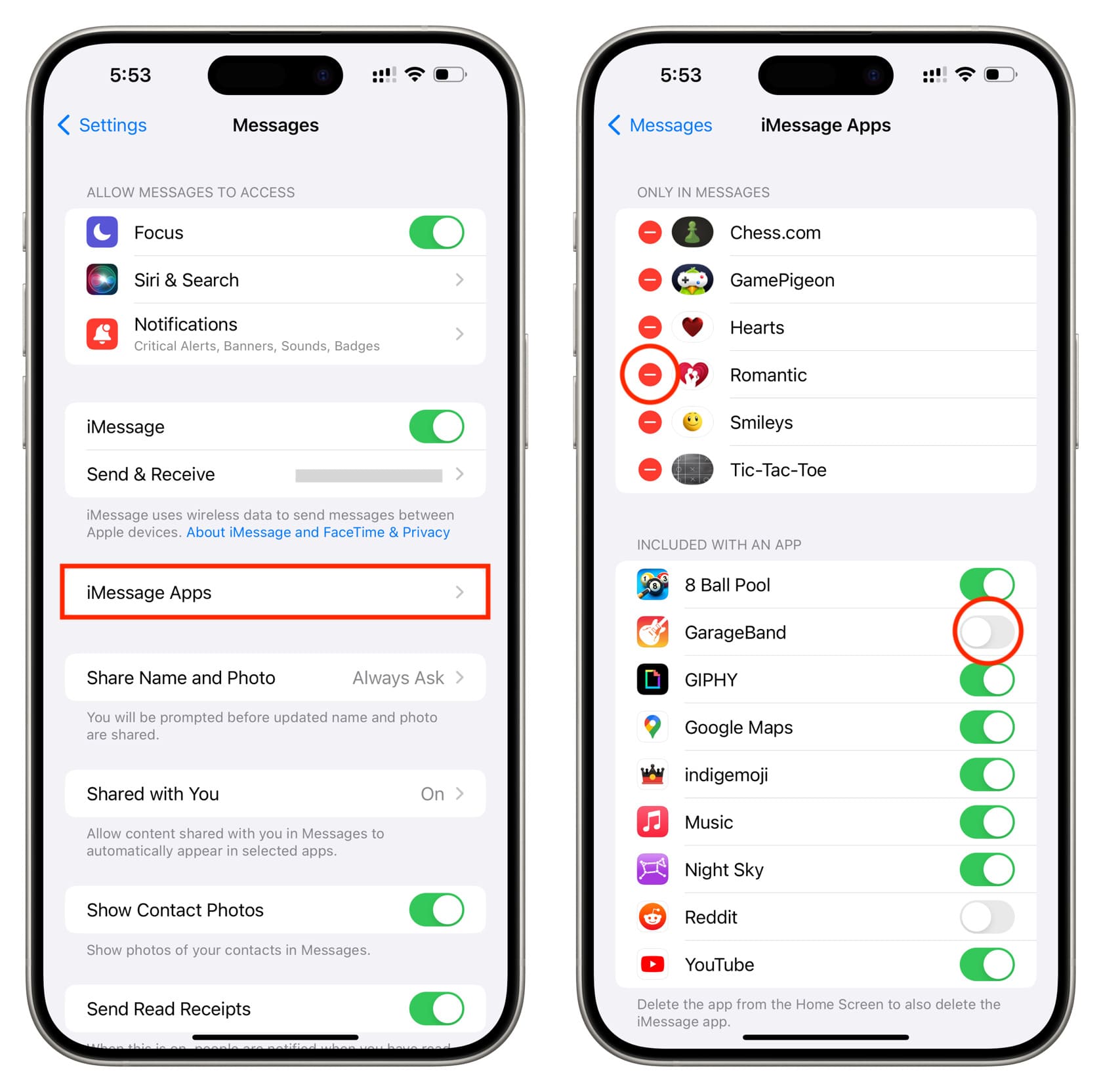
Installation and Management
Installing an iMessage app is as simple as tapping the “Get” button. Once installed, the app appears in the selection list. However, because the list can quickly become crowded, Apple provides tools to manage and reorder these apps. Users can hide apps they rarely use or “pin” their favorites to the top of the list. This level of customization is crucial for power users who rely on specific tools for their daily digital workflow.
Compatibility Across the Apple Ecosystem
While iMessage apps are most prominent on the iPhone, they also exist within the iPadOS and macOS environments. However, there is a technical caveat: not all iMessage apps are cross-compatible. A sticker pack will work seamlessly across all three, but a complex game or a specialized productivity tool might only function on iOS. When a recipient on an unsupported device (like an Android user or someone on an older Mac) receives an iMessage app interaction, it usually defaults to a static image or a web link, ensuring that the communication loop isn’t completely broken.
Key Categories: From Productivity to Social Engagement
The diversity of the iMessage App Store is vast. To understand the full scope of what these apps can do, it is helpful to categorize them by their primary function.
Productivity and Utility
This is perhaps the most transformative category for professional users.
- Scheduling: Apps like “Doodle” or “Google Calendar” allow groups to find meeting times directly in the chat.
- File Sharing: Cloud services like Dropbox or OneDrive have iMessage extensions that allow users to browse their cloud storage and drop a file link directly into a conversation without switching windows.
- Polls: In group chats, making a decision (like where to eat or what time to meet) can be chaotic. iMessage apps dedicated to polling allow users to create structured votes that tally results in real-time.
Finance and Payments
The integration of financial tools into messaging has redefined how we handle small transactions. Apple’s own “Apple Cash” is the gold standard here, allowing users to send money as easily as sending a text. Other third-party apps like Venmo and Cash App also offer extensions, making the “request and pay” cycle incredibly fast.
Entertainment and Gaming
“Social gaming” takes on a new meaning within iMessage. Apps like “GamePigeon” allow users to play 8-ball pool, chess, or word games in an asynchronous format. You make your move, send it, and the other person plays when they have a free moment. This “turn-based” architecture is perfectly suited for the stop-and-start nature of mobile communication.
Stickers and Personalization
While perhaps the “lightest” use case, stickers are the most popular iMessage apps. They allow for a level of expressive communication that goes beyond standard emojis. Developers and artists can create static or animated sticker packs that users can “peel and stick” onto message bubbles, photos, or even other stickers.
Security, Privacy, and the Future of Message-Based Extensions
As with any technology that involves third-party access to a communication platform, security is a primary concern. Apple has implemented several layers of protection to ensure that iMessage apps do not compromise user data.
The Sandboxing Mechanism
iMessage apps operate within a “sandbox.” This means that while an app can interact with the message thread to deliver its specific service, it does not have unfettered access to your entire message history or your personal data unless you explicitly grant permission. When you use a third-party app to share a photo, the app only sees the photo you selected, not your entire library.
End-to-End Encryption
One of iMessage’s selling points is end-to-end encryption. Apple ensures that the data sent through iMessage apps maintains this level of security. If you send a payment or a private document via an iMessage extension, that data is encrypted from the moment it leaves your device until it reaches the recipient.

The Road Ahead: RCS and AI Integration
The landscape of iMessage apps is currently facing two major shifts. The first is the adoption of RCS (Rich Communication Services), which aims to bring iMessage-like features to cross-platform conversations between iPhones and Android devices. While it is unlikely that third-party iMessage apps will work on Android anytime soon, the push for richer communication may force Apple to expand the capabilities of what these apps can do.
Secondly, the rise of Generative AI is set to redefine iMessage apps. We are already seeing the emergence of AI-powered assistants that can be summoned within a chat to draft responses, summarize long threads, or generate custom imagery. In the future, “What is an iMessage app?” might be answered by pointing to a sophisticated AI agent that manages your calendar, orders your groceries, and translates your messages in real-time, all from within the blue bubble.
In conclusion, iMessage apps are more than just a novelty; they are a sophisticated extension of the mobile operating system. By integrating external functionality into the most-used app on the iPhone, Apple has created a platform that enhances productivity, simplifies finance, and enriches social interaction. As the technology continues to mature, these apps will likely become even more invisible and indispensable, further blurring the line between talking about doing something and actually getting it done.
aViewFromTheCave is a participant in the Amazon Services LLC Associates Program, an affiliate advertising program designed to provide a means for sites to earn advertising fees by advertising and linking to Amazon.com. Amazon, the Amazon logo, AmazonSupply, and the AmazonSupply logo are trademarks of Amazon.com, Inc. or its affiliates. As an Amazon Associate we earn affiliate commissions from qualifying purchases.