
In an increasingly digitized world, the ability to manage, analyze, and collaborate on data is paramount for individuals, teams, and enterprises alike. Among the myriad of tools available, Google Sheets stands out as a robust, accessible, and incredibly versatile cloud-based spreadsheet application. More than just a free alternative to desktop spreadsheet software, Sheets has evolved into a powerhouse for data processing, project management, and collaborative innovation. Its integration within the broader Google ecosystem, coupled with its real-time capabilities and extensibility, makes it an indispensable tool for a vast array of applications. This article delves into the multifaceted uses of Google Sheets, demonstrating why it has become a cornerstone of digital productivity and a fundamental component in many tech-driven workflows.

The Core Functionality: Data Management and Analysis
At its heart, Google Sheets is a sophisticated engine for handling, organizing, and interpreting data. Its intuitive grid interface belies a powerful set of features designed to transform raw information into actionable insights, making it a fundamental tool in the tech landscape for anyone dealing with structured data.
Organizing and Structuring Information
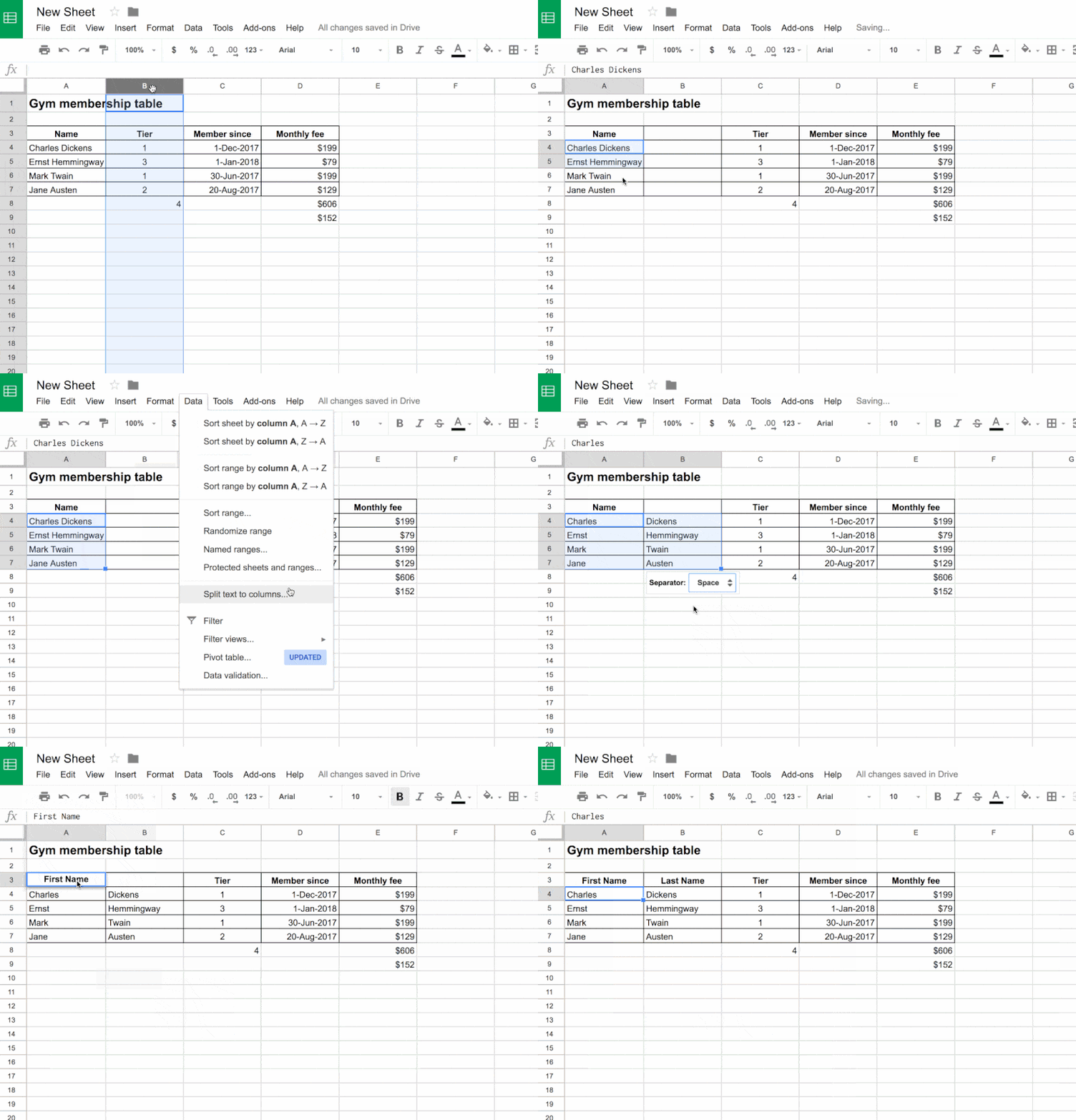
The most basic yet critical use of Google Sheets lies in its ability to systematically organize information. From simple lists to complex databases, Sheets provides the structure needed to keep data coherent and accessible. Users can create comprehensive contact lists, track inventory with granular detail, manage client pipelines, or even compile extensive resource libraries. Features like data validation ensure consistency by restricting input to predefined types or values, preventing errors and maintaining data integrity. Rows, columns, and sheets can be easily rearranged, filtered, and sorted, allowing for dynamic presentation and quick retrieval of specific information, which is crucial for efficient data management in any tech-oriented role.
Powerful Data Analysis Tools
Beyond mere organization, Google Sheets excels in its analytical capabilities. It boasts a comprehensive suite of formulas and functions that empower users to perform complex calculations, identify trends, and extract meaningful patterns from their data. Essential functions such as SUM, AVERAGE, COUNT, and IF are just the tip of the iceberg. More advanced functions like VLOOKUP and INDEX/MATCH are critical for combining data from different tables, while SUMIF and COUNTIFS allow for conditional aggregation. Pivot tables offer an intuitive way to summarize large datasets, enabling users to group data by various criteria and instantly reveal aggregate insights. Conditional formatting visually highlights specific data points based on rules, making outliers, trends, or critical thresholds immediately apparent. Furthermore, the built-in charting and graphing tools allow for the creation of compelling visual representations of data, transforming numbers into easily digestible insights for reports, presentations, or dashboards.
Data Import and Export
Google Sheets’ utility is significantly amplified by its seamless integration with other data sources and its flexible import/export options. It can directly pull data from Google Forms, making it an excellent backend for surveys and feedback collection. Integration with Google Analytics allows for direct reporting on website performance, while Google Finance functions provide real-time financial data. Users can easily import data from various file formats, including CSV, TSV, and Microsoft Excel files, facilitating migration and interoperability with other systems. Conversely, data can be exported in multiple formats, making it simple to transfer information to other applications, databases, or for offline use. This interoperability is key in tech environments where data often originates from disparate sources and needs to be consolidated or distributed.
Collaborative Workflows and Real-time Productivity
One of the defining features that sets Google Sheets apart in the modern workspace is its unparalleled support for real-time collaboration. This capability transforms data management and analysis from a solitary task into a dynamic, shared experience, fostering efficiency and transparency within teams.
Seamless Real-time Collaboration
Google Sheets was built from the ground up for the cloud, and its collaborative functionality is arguably its strongest asset. Multiple users can open and edit the same spreadsheet simultaneously, watching each other’s cursor movements and changes in real-time. This eliminates the need for endless email attachments and version control headaches that plague traditional desktop applications. Built-in features like comments and chat facilitate direct communication within the sheet itself, allowing teams to discuss specific data points or sections without leaving the document. Crucially, the comprehensive version history feature meticulously tracks every change made, by whom, and when, allowing users to revert to previous states or review the evolution of a document, providing an invaluable safety net and audit trail for collaborative projects.
Project Management and Task Tracking
The collaborative nature and structural capabilities of Google Sheets make it an excellent, often overlooked, tool for project management and task tracking, particularly for small to medium-sized teams or individual projects. Teams can create dynamic Gantt charts to visualize project timelines, assign tasks to specific team members, set deadlines, and track progress with simple status updates. A shared sheet can serve as a centralized dashboard, offering immediate visibility into project health, resource allocation, and pending items. This allows team leaders to monitor workloads, identify bottlenecks, and ensure accountability, all within an easily accessible and updateable format that can be accessed by all stakeholders from anywhere with an internet connection.
Shared Databases and Information Hubs
Beyond formal project management, Google Sheets serves as an ideal platform for creating shared databases and central information hubs. Teams can consolidate critical information such as meeting notes, shared resource lists, employee directories, or frequently asked questions (FAQs) into a single, accessible document. This ensures that all team members are working from the most current and accurate information, reducing miscommunication and improving decision-making. The ability to access these shared sheets from any device—laptops, tablets, or smartphones—means that vital information is always at hand, fostering a flexible and responsive work environment critical for modern tech operations.
Automation and Integration with the Google Ecosystem
The true power of Google Sheets extends beyond its core spreadsheet functionalities through its robust automation capabilities and deep integration with the broader Google ecosystem and beyond. This transforms Sheets from a mere data grid into a highly customizable and dynamic application hub.
Google Apps Script for Custom Automation
For users looking to push the boundaries of what a spreadsheet can do, Google Apps Script is a game-changer. This JavaScript-based scripting language allows users to create custom functions, automate repetitive tasks, and integrate Sheets with other Google services and external APIs. With Apps Script, users can develop custom menus, automate email sending based on spreadsheet data, perform complex data cleansing operations, or even build entire web applications that interact with a Sheet’s data. Examples include automatically updating a dashboard when new data is added, sending reminder emails for overdue tasks, or creating a custom workflow for data approval. Apps Script empowers both developers and advanced users to tailor Google Sheets precisely to their unique needs, unlocking a level of customization and automation rarely found in standard spreadsheet applications.
Integrations with Other Google Services
Google Sheets’ deep integration with other Google services streamlines workflows and amplifies its utility. As mentioned, Google Forms feeds data directly into Sheets for easy collection and analysis. Google Data Studio (now Looker Studio) leverages Sheets as a data source for creating sophisticated, interactive dashboards and reports, enabling powerful business intelligence. Google Finance functions pull real-time stock data directly into cells, making it invaluable for portfolio tracking. Integration with Gmail allows for automated email generation based on spreadsheet content, while connectivity with Google Calendar can automate event scheduling or reminders. This ecosystem synergy means that Sheets often acts as the central data hub for a variety of tasks across the Google suite, creating a cohesive and highly efficient operational environment.
Third-Party Add-ons and APIs
Beyond the Google ecosystem, Sheets’ functionality can be vastly expanded through its marketplace of third-party add-ons. These extensions provide specialized tools for a wide range of tasks, from advanced data cleaning and mail merges to project management templates and analytics integrations. Furthermore, Google Sheets offers a robust API (Application Programming Interface), allowing developers to programmatically interact with spreadsheets from external applications. This means Sheets can serve as a lightweight backend for custom apps, integrate with CRM systems, marketing automation platforms, or proprietary business software, effectively turning it into a flexible data layer within a broader tech stack. This openness to external tools and custom development ensures that Google Sheets remains adaptable to virtually any data-centric challenge.
Beyond the Obvious: Creative and Specialized Applications
While Google Sheets is widely recognized for its utility in business and data analysis, its flexibility and extensibility allow for numerous creative and specialized applications that extend far beyond conventional uses, touching various aspects of personal and professional life.
Educational Tools and Resource Management
In educational settings, Google Sheets proves to be an invaluable tool for both educators and students. Teachers use it for creating dynamic grade books, tracking attendance, and managing student progress. Its collaborative features are perfect for group projects, allowing students to work together on data collection, analysis, or presentation creation. Furthermore, Sheets can be used for lesson planning, curriculum mapping, and organizing educational resources, making complex information digestible and accessible. For administrators, it can help manage budgets for school projects, track inventory of educational materials, or compile student demographic data, streamlining various administrative tasks within the academic environment.
Content Planning and Digital Marketing
For digital marketers and content creators, Google Sheets is a secret weapon for organization and strategy. It’s commonly used to build comprehensive editorial calendars for blogs, social media, and email campaigns, helping teams plan, schedule, and track content creation from ideation to publication. Marketers leverage Sheets for detailed SEO keyword tracking and analysis, monitoring search rankings, and identifying content gaps. It serves as an excellent platform for managing advertising campaign performance data, lead tracking, and conversion rate analysis. Its ability to handle large datasets and integrate with marketing platforms makes it an indispensable tool for optimizing digital strategies and demonstrating ROI through clear data visualization and reporting.
Personal Organization and Life Management
On a personal level, Google Sheets offers an incredibly flexible framework for organizing various aspects of daily life. Individuals use it for detailed household budgeting, tracking expenses, and managing savings goals, often utilizing its financial functions for forecasting. Chore charts, grocery lists, and meal planners can be created and shared among family members for improved household management. For travel enthusiasts, Sheets can organize travel itineraries, track bookings, and manage shared expenses for group trips. Habit trackers, goal setting worksheets, and personal project planners are other popular applications, leveraging the structured nature of spreadsheets to bring order and clarity to personal endeavors. Its accessibility from any device ensures that personal organization is always within reach.

Conclusion
Google Sheets has transcended its origins as a basic spreadsheet application to become a cornerstone of digital productivity, data management, and collaborative innovation. Its powerful core functionalities for organizing and analyzing data, combined with its unparalleled real-time collaboration features, make it an indispensable tool for teams across every industry. Furthermore, its deep integration with the Google ecosystem, the extensibility offered by Google Apps Script, and support for third-party add-ons and APIs transform it into a highly customizable and automated platform. From complex business analytics and project management to creative content planning and personal organization, Google Sheets’ versatility is truly remarkable. As technology continues to evolve, the adaptive and accessible nature of Google Sheets ensures its continued relevance as a fundamental tech tool, empowering users to unlock deeper insights, streamline workflows, and achieve greater efficiency in a connected world. Its ongoing development promises even more powerful features, solidifying its position as a vital asset for anyone looking to harness the power of data.
aViewFromTheCave is a participant in the Amazon Services LLC Associates Program, an affiliate advertising program designed to provide a means for sites to earn advertising fees by advertising and linking to Amazon.com. Amazon, the Amazon logo, AmazonSupply, and the AmazonSupply logo are trademarks of Amazon.com, Inc. or its affiliates. As an Amazon Associate we earn affiliate commissions from qualifying purchases.