
In the early 1980s, the concept of a “gigabyte” was almost mythical. It was a unit of measurement reserved for room-sized supercomputers and government research facilities. To the average consumer using a Commodore 64 or an early IBM PC, storage was measured in kilobytes, and a megabyte was considered an enormous amount of space. Fast forward to the present day, and the gigabyte (GB) has become the fundamental currency of our digital lives. We see it on our smartphone specifications, our cloud storage subscriptions, and our monthly cellular data plans. Yet, despite its ubiquity, few users truly understand the technical nuances, the historical evolution, or the practical implications of what a gigabyte actually represents in a world increasingly dominated by high-definition media and artificial intelligence.
Defining the Gigabyte: More Than Just a Number
To understand what a gigabyte is, we must first look at the language of computers. Computers operate using binary code—a series of ones and zeros known as bits. A “byte” is a collection of eight bits, which is traditionally the amount of memory needed to store a single character of text. As technology progressed, we needed larger prefixes to describe increasing amounts of data: kilo, mega, giga, tera, and beyond.
The Anatomy of a Byte and Its Multiples
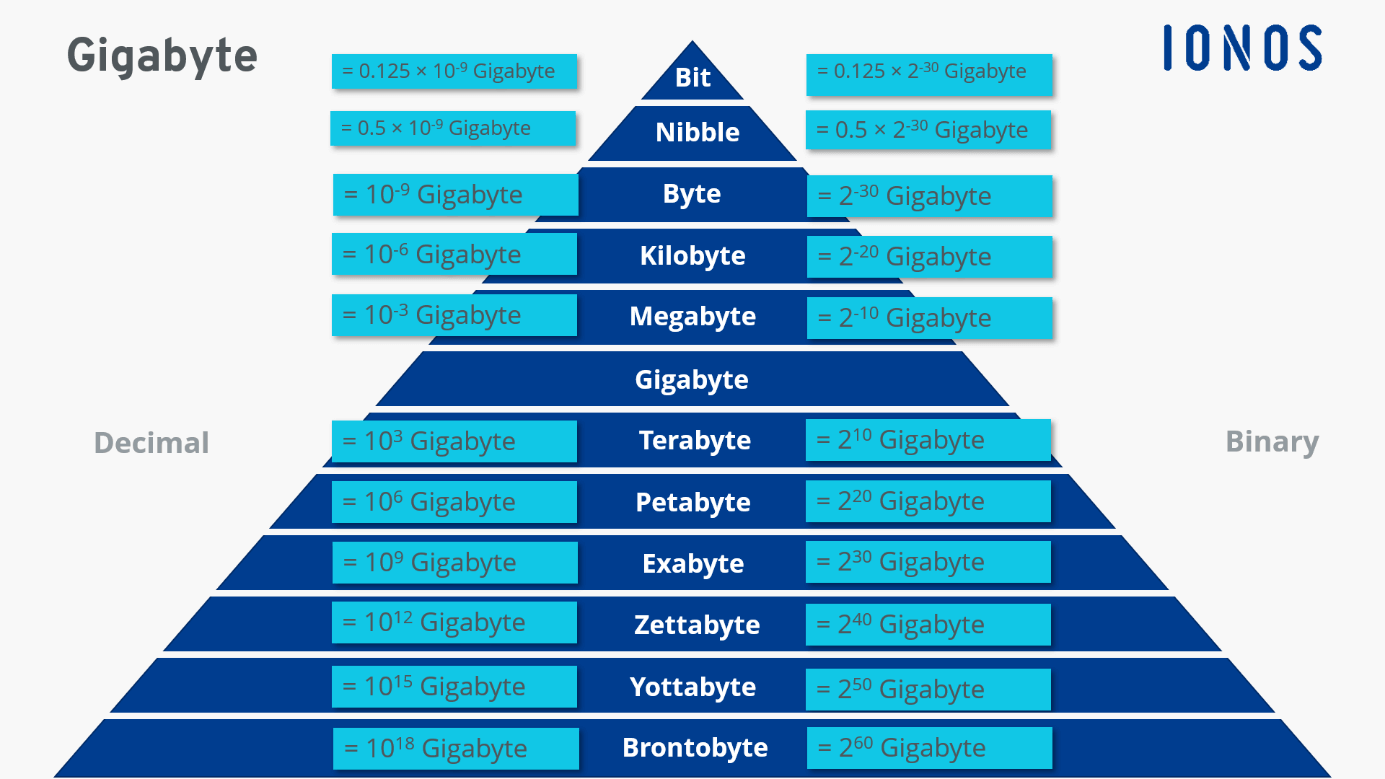
The term “giga” comes from the Greek word for “giant.” In the International System of Units (SI), the prefix giga- denotes a factor of one billion ($10^9$). Therefore, strictly speaking, one gigabyte is one billion bytes. However, in the realm of computing, things are rarely that simple. Because computers operate on base-2 (binary) logic rather than base-10 (decimal), the mathematical definition often shifts depending on whether you are a hardware manufacturer or a software developer. This distinction is the root of much confusion when a consumer buys a 500GB hard drive and finds that their operating system reports only 465GB of available space.
A Historical Journey from Megabytes to Gigabytes
The transition from megabytes to gigabytes marked a paradigm shift in software capabilities. In the 1990s, the “Gigabyte Era” began in earnest for the consumer market. The first consumer-grade one-gigabyte hard drive, the Hitachi 0663, was released in 1990; it was the size of a large briefcase and cost thousands of dollars. Today, a microSD card the size of a fingernail can hold 1,000 gigabytes (one terabyte) for less than the price of a fancy dinner. This rapid scaling has allowed for the transition from text-based computing to the rich, graphical, and interconnected digital ecosystem we inhabit today.
The Technical Discrepancy: Why Your Drive Shows “Less” Space
One of the most common tech support questions involves the perceived loss of storage space on new devices. This isn’t a case of “missing” data, but rather a conflict between two different systems of measurement: decimal and binary. This technical nuance is essential for anyone looking to understand the true capacity of their hardware.
Binary vs. Decimal Measurement
Hardware manufacturers typically use the decimal system (Base 10). In this system, 1 kilobyte is 1,000 bytes, and 1 gigabyte is exactly 1,000,000,000 bytes. This makes sense for marketing and simplicity. However, operating systems like Microsoft Windows often use the binary system (Base 2). In binary, a kilobyte is $2^{10}$ (1,024) bytes. Consequently, a “binary gigabyte”—more accurately called a gibibyte (GiB)—is $1,024 times 1,024 times 1,024$ bytes, which equals 1,073,741,824 bytes.
Because the binary gigabyte is larger than the decimal gigabyte, the number of “gigabytes” reported by the OS will always be lower than the number printed on the box. This roughly 7% difference grows more pronounced as we move into terabytes and petabytes, making it a critical consideration for IT professionals and hardware enthusiasts.
The Role of Formatting and File Systems
Beyond the mathematical discrepancy, the physical reality of how data is stored also consumes “gigabytes.” When you format a drive, the file system (such as NTFS, APFS, or exFAT) creates a map or an index to keep track of where files are located. This index, along with the “partition table,” occupies a portion of the storage. Furthermore, many modern devices come with pre-installed operating systems and recovery partitions. When you buy a smartphone with “128GB” of storage, a significant portion of those gigabytes is already occupied by the system software before you even take your first photo.
Data Consumption in the 2020s: What a Gigabyte Buys You
As our screens get sharper and our software more complex, the value of a single gigabyte in terms of “usage time” has diminished. Understanding the relationship between file formats and storage is key to managing digital resources effectively.
Multimedia: Video, Music, and Photography
In the era of dial-up internet, a single gigabyte could hold hundreds of low-resolution images or an entire library of MIDI music files. Today, the math has changed. A standard 4K video recorded on a modern smartphone can consume roughly 350MB to 400MB per minute. This means a single gigabyte provides less than three minutes of high-quality footage.
On the audio front, high-resolution lossless streaming is becoming the standard. While a standard MP3 might take up 5MB, a high-fidelity FLAC file can easily exceed 50MB. For photography, the transition from 12-megapixel to 48-megapixel or 108-megapixel sensors means that a single RAW image file can take up nearly 100MB. In this context, the gigabyte is no longer a vast ocean of space; it is a small container that fills up rapidly.
Software and Gaming: The Bloat of Modern Code
Nowhere is the “gigabyte explosion” more evident than in the gaming industry. In the early 2000s, a flagship game might fit on a 700MB CD-ROM. Today, major titles like Call of Duty or Red Dead Redemption 2 frequently exceed 150GB. This increase is driven by ultra-high-resolution textures, uncompressed audio, and massive open-world environments. For the modern gamer, a 500GB console drive is barely enough to hold three or four major titles, highlighting how the gigabyte has been dwarfed by the sheer scale of modern software engineering.
The Scaling Challenge: From Gigabytes to Petabytes
As we look toward the future, the gigabyte is slowly losing its status as the primary unit of measurement for heavy-duty computing, giving way to the Terabyte (TB) and Petabyte (PB). This shift is driven by two main forces: Big Data and Artificial Intelligence.
The Era of Big Data and AI Training
Artificial Intelligence models, particularly Large Language Models (LLMs) like GPT-4, require astronomical amounts of data for training. We are no longer talking about gigabytes; we are talking about terabytes of text data and petabytes of multimodal data (images, video, and audio). The infrastructure required to store and process this information has necessitated a revolution in data center technology. In these environments, a gigabyte is a negligible rounding error. The focus has shifted to “data throughput”—how fast these gigabytes can be moved between the storage arrays and the processing units (GPUs).
Cloud Computing and the Infrastructure of Tomorrow
The rise of cloud computing has fundamentally changed our relationship with the gigabyte. For the end-user, storage now feels infinite. Services like Google Drive, AWS, and iCloud allow us to offload our gigabytes to remote servers. However, this creates a new challenge: bandwidth. While we may have terabytes of storage in the cloud, our ability to access it is limited by our internet connection speed, which is measured in megabits or gigabits per second. The “gigabyte” has thus moved from being a physical limitation on our desks to a logistical challenge in the cables under our streets.
Managing Your Digital Footprint: Practical Tech Tips
Regardless of how much storage you have, “digital hoarding” is a common problem. Efficiently managing your gigabytes can improve device performance and save money on subscription services.
Strategies for Efficient Data Storage
The first step in managing your gigabytes is understanding what is occupying them. Tools like “Disk Inventory X” for Mac or “WinDirStat” for Windows provide a visual representation of your storage, allowing you to see which folders are the biggest culprits. Often, the “Other” or “System” categories are bloated with temporary cache files, old software updates, and redundant backups. Utilizing HEIF (High Efficiency Image Format) for photos and HEVC (High Efficiency Video Coding) for videos can also cut your storage needs in half without a noticeable loss in quality.
Selecting the Right Capacity for Modern Hardware
When purchasing new technology, the “storage tax” is a significant factor. Manufacturers often charge a premium for higher-capacity models. To future-proof your purchase, consider your workflow. If you are a professional video editor or a heavy gamer, 512GB is the absolute minimum, with 1TB being the sweet spot. However, for a casual user who relies primarily on web-based apps and cloud streaming, 256GB is often more than sufficient. Understanding “what a gigabyte” means in the context of your specific needs can prevent you from overpaying for storage you will never use or suffering the frustration of a “Storage Full” notification.
In conclusion, the gigabyte is a testament to the incredible pace of technological advancement. It has transformed from a gargantuan unit of professional storage into a modest increment of everyday data. As we move further into the decade, we will likely see the gigabyte fade into the background, much like the kilobyte before it, as the terabyte becomes the new standard for our digital lives. Understanding this unit of measurement is not just a technical necessity—it is a way to better navigate the increasingly complex digital world we inhabit.
aViewFromTheCave is a participant in the Amazon Services LLC Associates Program, an affiliate advertising program designed to provide a means for sites to earn advertising fees by advertising and linking to Amazon.com. Amazon, the Amazon logo, AmazonSupply, and the AmazonSupply logo are trademarks of Amazon.com, Inc. or its affiliates. As an Amazon Associate we earn affiliate commissions from qualifying purchases.