
In an increasingly complex financial world, clarity, precision, and efficiency are paramount. While smartphones and advanced software offer a myriad of financial tools, the dedicated financial calculator remains an indispensable device for anyone serious about understanding and navigating personal finance, investing, business valuation, and real estate. Far more than just a glorified arithmetic machine, a financial calculator is engineered to perform complex time value of money (TVM) calculations with speed and accuracy, empowering users to make informed decisions. This guide will demystify its functions, walk you through its core applications, and provide you with the insights needed to master this powerful financial tool.

The Indispensable Tool for Financial Acumen
At its heart, a financial calculator is designed to solve problems involving the time value of money – the concept that a dollar today is worth more than a dollar tomorrow due to its potential earning capacity. This principle underpins virtually all financial decisions, from saving for retirement to evaluating investment opportunities and structuring loan repayments. Without a firm grasp of TVM, financial planning is akin to navigating without a compass. A financial calculator brings this abstract concept into tangible, solvable equations, providing concrete answers that drive strategic financial choices.
Who Needs a Financial Calculator?
The utility of a financial calculator extends across a broad spectrum of users and professions. For students of finance, accounting, or business, it’s a fundamental learning instrument, cementing theoretical concepts with practical application. Individual investors use it to project future portfolio values, compare investment returns, and evaluate annuity options. Real estate professionals rely on it for calculating mortgage payments, loan amortizations, and property valuations. Financial advisors and planners find it invaluable for creating detailed financial plans, demonstrating investment outcomes, and explaining complex concepts to clients. Even for the average person managing their personal finances, a financial calculator can illuminate the true cost of a loan, the growth potential of savings, or the impact of inflation over time, transforming abstract financial goals into achievable milestones.
Why Not Just Use a Spreadsheet?
While robust spreadsheet software like Excel undoubtedly offers powerful financial functions, a dedicated financial calculator presents distinct advantages in specific scenarios. Firstly, speed and portability: it’s an immediate, always-on device that doesn’t require booting up a computer or navigating through menus. For quick calculations in meetings, during client consultations, or in exam settings, its immediacy is unmatched. Secondly, its dedicated functions are intuitively grouped and accessible, reducing the learning curve for specific financial operations. There’s less room for error compared to manually setting up complex formulas in a spreadsheet, especially for users who aren’t advanced Excel experts. Finally, the physicality and tactile feedback of a dedicated device can aid in understanding the input and output relationships, fostering a deeper comprehension of the underlying financial principles. It’s a specialized tool built for a specialized purpose, optimizing for efficiency and accuracy in financial computations.
Deciphering the Core Functions and Layout
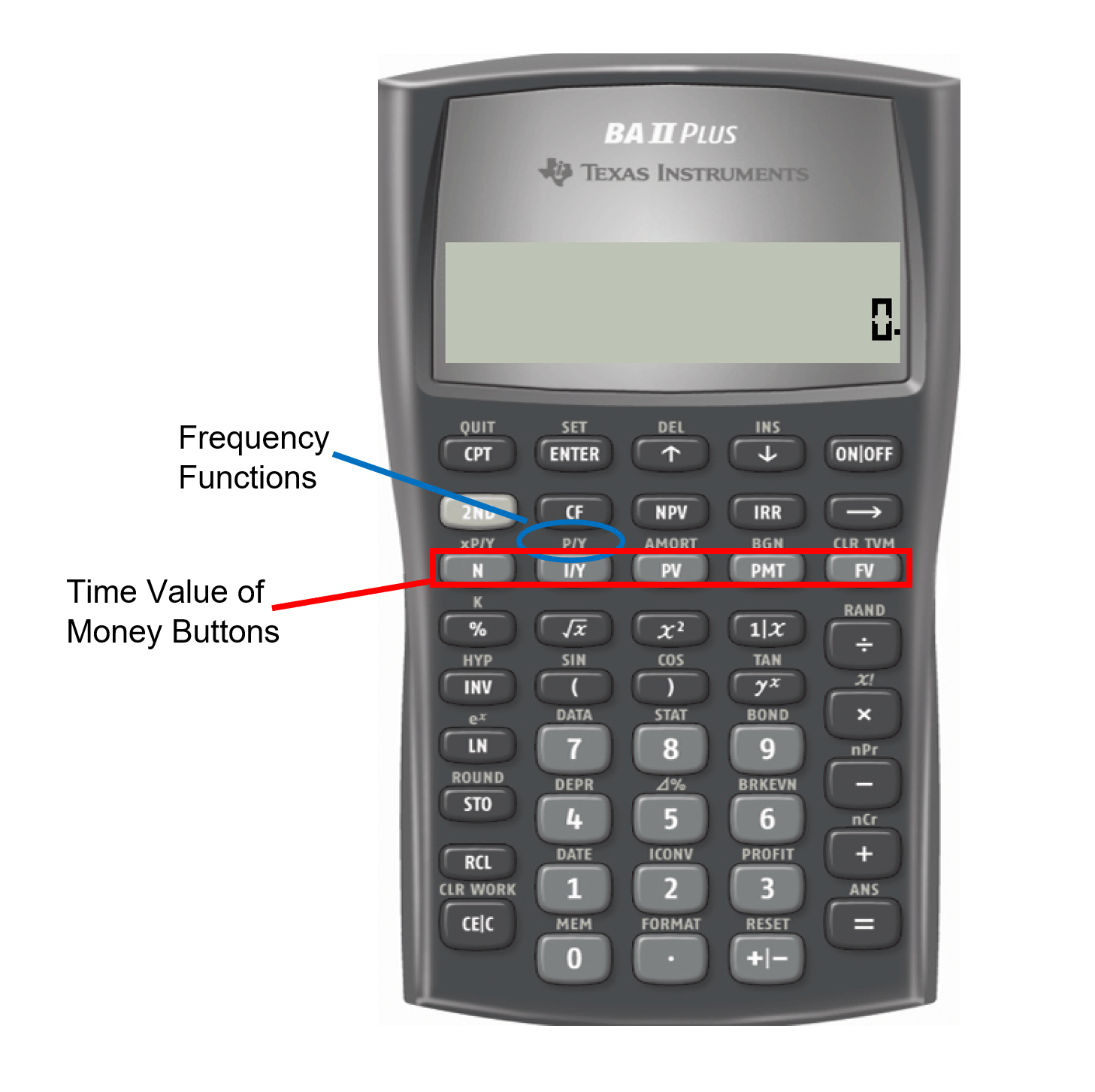
Before diving into specific calculations, it’s crucial to familiarize yourself with the anatomy of a financial calculator. While models vary (e.g., Texas Instruments BA II Plus, HP 12c), the fundamental layout and core functions remain largely consistent. Understanding these foundational elements is the first step toward effectively harnessing its power.
Keypad Anatomy: Essential Buttons Explained
A financial calculator typically features standard arithmetic operations (+, -, *, /) along with specialized financial keys. The most critical financial keys, collectively known as the Time Value of Money (TVM) row, are usually prominently placed. These are:
-
N (Number of periods): Represents the total number of compounding or payment periods in a transaction.
-
I/Y (Interest per year): The annual interest rate. Note that most calculators require this to be entered as a percentage (e.g., enter 5 for 5%), but internally divide it by 100 and then by the number of compounding periods per year.
-
PV (Present Value): The current value of an investment or a loan. Often entered as a negative value if it represents an outflow of cash (e.g., money invested).
-
PMT (Payment): A series of equal, periodic payments. Can be an inflow (receiving payments) or an outflow (making payments).
-
FV (Future Value): The value of an investment or a loan at a specified future date.
Beyond the TVM row, you’ll find:
-
CLR TVM/CLR WORK: Clears all stored TVM variables or current worksheet data.
-
CPT (Compute): Used to calculate the unknown variable after inputting the known values.
-
ENT (Enter): Used to input data into certain functions (e.g., cash flow worksheet).
-
+/- (Change Sign): Essential for maintaining correct cash flow conventions (inflows vs. outflows).
-
2ND/SHIFT: Accesses secondary functions printed above the keys.
-
Decimal, CE/C (Clear Entry/Clear All), ON/OFF: Standard calculator functions.
Understanding Time Value of Money (TVM) Fundamentals
The core conceptual framework for using a financial calculator revolves around the TVM principle. Every TVM problem involves at least four of the five core variables (N, I/Y, PV, PMT, FV). The goal is typically to solve for the fifth unknown variable.
Crucially, cash flow signs are vital. Money you pay out (invest, loan, make a payment) is typically entered as a negative number, representing an outflow. Money you receive (loan proceeds, investment returns, future value) is entered as a positive number, an inflow. Maintaining consistent sign conventions ensures accurate results.
Additionally, pay close attention to the compounding frequency and payment frequency. Most financial calculators default to annual compounding (P/Y = 1, C/Y = 1). If your problem involves monthly payments or quarterly compounding, you’ll need to adjust these settings (e.g., P/Y = 12 for monthly payments, C/Y = 4 for quarterly compounding). Similarly, understand the difference between ordinary annuities (payments at the end of the period, the default) and annuities due (payments at the beginning of the period). These settings significantly impact the outcome of your calculations.
Step-by-Step TVM Calculations: Real-World Applications
With the basics understood, let’s explore how to apply these functions to solve common financial problems. For each scenario, we’ll outline the problem, identify the known variables, and demonstrate the steps to find the unknown.
Calculating Future Value (FV): Saving for Retirement
Problem: You invest $10,000 today in an account that earns an annual interest rate of 7%, compounded annually. How much will you have in 20 years if you make no further contributions?
Steps:
-
Clear any previous TVM entries:
2NDCLR TVM(orCLR WORK). -
Input known variables:
-
20N(20 years) -
7I/Y(7% annual interest) -
10000+/-PV(Initial investment, outflow) -
0PMT(No additional payments)
-
-
Compute Future Value:
CPTFV- Result: Approximately $38,696.84 (a positive number, as it’s an inflow you’ll receive).
Determining Present Value (PV): Valuing an Investment
Problem: You want to have $50,000 in 15 years for a down payment on a house. If your savings account earns 6% interest compounded annually, how much do you need to deposit today to reach your goal?
Steps:
-
Clear TVM:
2NDCLR TVM. -
Input known variables:
-
15N(15 years) -
6I/Y(6% annual interest) -
0PMT(No additional payments) -
50000FV(Target future value)
-
-
Compute Present Value:
CPTPV- Result: Approximately -$20,888.75 (a negative number, representing the initial outflow you need to deposit).
Solving for Payments (PMT): Mortgage and Loan Analysis

Problem: You’re taking out a $300,000 mortgage at 4.5% annual interest, compounded monthly, for a 30-year term. What will your monthly mortgage payment be? (Assume payments are made at the end of the period – ordinary annuity).
Steps:
-
Clear TVM:
2NDCLR TVM. -
Adjust payment/compounding periods:
2NDP/Y12ENTER2NDQUIT. (This sets both P/Y and C/Y to 12). -
Input known variables:
-
30x12=360N(30 years * 12 months/year) -
4.5I/Y(4.5% annual interest) -
300000PV(Loan amount received, inflow) -
0FV(Loan will be paid off)
-
-
Compute Payment:
CPTPMT- Result: Approximately -$1,520.06 (a negative number, representing your monthly outflow).
Unraveling Interest Rates (I/Y) and Periods (N): Investment Returns
Problem (I/Y): You invested $5,000 five years ago, and it’s now worth $7,000. What annual rate of return did you earn?
Steps:
-
Clear TVM:
2NDCLR TVM. -
Input known variables:
-
5N(5 years) -
5000+/-PV(Initial investment, outflow) -
0PMT(No additional payments) -
7000FV(Current value, inflow)
-
-
Compute Interest Rate:
CPTI/Y- Result: Approximately 6.96% (annual return).
Problem (N): You want to double your money. If your investment earns 8% annually, how many years will it take?
Steps:
-
Clear TVM:
2NDCLR TVM. -
Input known variables (using an arbitrary PV and FV that represent doubling, e.g., $100 and $200):
-
100+/-PV -
8I/Y -
0PMT -
200FV
-
-
Compute Number of Periods:
CPTN- Result: Approximately 9.01 years.
Beyond the Basics: Advanced Financial Applications
While TVM functions form the core of a financial calculator’s utility, many models offer more advanced worksheets and functions that extend their capabilities significantly, catering to more complex financial analysis.
Cash Flow Analysis (NPV, IRR): Evaluating Projects
The cash flow worksheet allows you to analyze irregular streams of cash flows. This is particularly useful for evaluating investment projects or business ventures where cash inflows and outflows are not uniform.
-
Net Present Value (NPV): Measures the profitability of an investment by discounting all future cash flows back to their present value and subtracting the initial investment. A positive NPV generally indicates a worthwhile investment.
-
Internal Rate of Return (IRR): The discount rate at which the NPV of all cash flows from a project equals zero. It’s often used to compare the profitability of different projects, with a higher IRR generally being more desirable.
To use these functions, you typically input an initial outflow (CF0) followed by a series of subsequent cash flows (CF1, CF2, etc.), specifying their frequencies. Then, given a discount rate, the calculator can compute NPV and IRR. This function is a cornerstone of corporate finance and investment analysis.
Amortization Schedules: Understanding Loan Repayments
For loans like mortgages or car loans, understanding how your payments are allocated between principal and interest over time is crucial. The amortization worksheet (often accessed via 2ND AMORT after a PMT calculation) allows you to break down a loan into specific periods. You can calculate:
-
The total interest paid over a given range of payments.
-
The total principal paid over that same range.
-
The remaining balance of the loan after a certain number of payments.
This feature provides transparent insights into how quickly you’re paying down your principal versus covering interest costs, which can inform decisions about extra payments or refinancing.
Interest Rate Conversions: Effective vs. Nominal
Financial markets often quote nominal (stated) interest rates, but interest can be compounded more frequently than once a year. The “interest conversion” or “ICONV” worksheet (often 2ND ICONV) allows you to convert between nominal and effective annual interest rates.
-
Nominal Rate (NOM): The stated annual interest rate without considering the effect of compounding.
-
Effective Rate (EFF): The actual annual rate of interest earned or paid due to compounding.
Understanding the effective rate is crucial for accurately comparing different investment opportunities or loan products, as a higher compounding frequency (even with the same nominal rate) will result in a higher effective rate.
Tips for Mastering Your Financial Calculator
Becoming proficient with your financial calculator requires more than just knowing where the buttons are; it demands practice, careful setup, and an understanding of common pitfalls.
Practice Makes Perfect: Consistent Usage
The best way to master your financial calculator is to use it frequently. Work through textbook examples, apply it to your personal financial planning, and challenge yourself with hypothetical scenarios. The more you use it, the more intuitive the functions and cash flow conventions will become. Don’t just memorize steps; strive to understand the underlying financial concepts each calculation represents. Repetition builds muscle memory and reinforces comprehension.
Setting Up Your Calculator Correctly
Before starting any calculation, always ensure your calculator is set up correctly for the problem at hand:
-
Clear Memory: Always
2NDCLR TVM(orCLR WORK) to eliminate residual data from previous calculations. -
Payments Per Year (P/Y) and Compounding Periods Per Year (C/Y): These are critical. If your problem has monthly payments, set P/Y to 12. If interest compounds quarterly, set C/Y to 4. On some calculators (like the BA II Plus), changing P/Y automatically changes C/Y, but it’s always good to double-check.
-
Payment Mode (END/BGN): Most loans and standard investments are ordinary annuities (payments at the END of the period). If payments occur at the beginning of the period (annuity due), you must change the setting (
2NDBGN/END). An indicator like “BGN” will usually appear on the display if it’s set to beginning mode.
Troubleshooting Common Errors
Even experienced users make mistakes. Here are some common errors and how to troubleshoot them:
-
Incorrect Sign Conventions: The most frequent error. If you get an unexpected positive or negative result, or an “error” message, recheck your cash flow signs. Inflows are positive, outflows are negative.
-
Forgetting to Clear TVM Memory: Old data can corrupt new calculations. Always clear the memory.
-
Incorrect P/Y and C/Y Settings: If your monthly payment seems off, or your future value isn’t matching expectations, verify these settings.
-
Using Annual vs. Periodic Interest Rates Incorrectly: The
I/Ybutton on most financial calculators expects an annual rate. The calculator then handles the division byP/Yinternally. Don’t manually divide the annual rate by 12 before entering it intoI/YifP/Yis set to 12. -
Mode Mismatch (END vs. BGN): Ensure your payment mode aligns with the problem statement.
A financial calculator is a powerful ally in navigating the world of money. By understanding its fundamental operations, mastering TVM calculations, exploring its advanced features, and adhering to best practices, you can unlock its full potential, transforming complex financial problems into manageable solutions and empowering you to make smarter, more confident financial decisions.
aViewFromTheCave is a participant in the Amazon Services LLC Associates Program, an affiliate advertising program designed to provide a means for sites to earn advertising fees by advertising and linking to Amazon.com. Amazon, the Amazon logo, AmazonSupply, and the AmazonSupply logo are trademarks of Amazon.com, Inc. or its affiliates. As an Amazon Associate we earn affiliate commissions from qualifying purchases.