
In an increasingly digitized world, peer-to-peer payment applications have revolutionized how we manage and transfer funds. Among these, Cash App stands out as a popular platform, simplifying everything from sending money to friends to investing in stocks and Bitcoin. For many users, however, the critical step after receiving or accumulating funds is understanding how to efficiently withdraw them. This guide delves into the technical intricacies and user-friendly processes of cashing out your balance from Cash App, ensuring you can access your money securely and seamlessly.
Understanding Cash App’s Withdrawal Mechanisms
Cash App, at its core, is a sophisticated financial application designed for convenience. When it comes to withdrawing funds, it offers several distinct mechanisms, each with its own advantages and operational nuances. Understanding these options is the first step toward effective fund management within the app.

Instant vs. Standard Deposits
The primary distinction in Cash App withdrawals lies in the speed at which funds are transferred to your linked bank account.
- Standard Deposits: This is the default and most common method. When you initiate a standard deposit, Cash App processes the transfer through the Automated Clearing House (ACH) network. This interbank transfer system typically takes 1 to 3 business days to complete, depending on your bank’s processing times and the time of day you initiate the transfer. Standard deposits are free of charge, making them an economical choice for those who are not in a hurry to access their funds. The technology behind ACH prioritizes security and reliability, albeit at a slower pace than real-time payment systems.
- Instant Deposits: For situations requiring immediate access to funds, Cash App offers an instant deposit option. As the name suggests, funds are typically transferred to your linked debit card (which is tied to your bank account) within minutes, often less than 30 minutes, even on weekends and holidays. This expedited service comes with a small fee, typically 0.5% to 1.75% of the transferred amount, with a minimum fee often applied. The technology facilitating instant deposits leverages faster payment rails, allowing for near real-time settlement, a feature highly valued for its immediacy in urgent financial situations. Users must weigh the convenience of speed against the associated cost.
Linking and Verifying Your Bank Account
Before any withdrawal can occur, your Cash App account must be securely linked to an external bank account. This crucial step ensures that there’s a destination for your funds.
- Step-by-Step Linking Process:
- Open the Cash App on your mobile device.
- Tap on the “Banking” tab (the house icon) on the home screen.
- Select “Link Bank.”
- Cash App will prompt you to search for your bank by name.
- Once you find your bank, you’ll be redirected to a secure portal (often powered by Plaid or similar financial technology) where you’ll log in with your online banking credentials. This establishes a secure, read-only connection between Cash App and your bank account.
- After successful login, you’ll select the specific bank account you wish to link (e.g., checking or savings).
- Confirm the link.
- Importance of Verification: Linking your bank account often involves a verification process. This might include micro-deposits (small amounts, usually cents, deposited and then withdrawn from your account, which you confirm in the app) or instant verification through your online banking login. This digital security measure is critical to prevent fraudulent activities and ensure that funds are transferred to the legitimate owner’s account. Using an active, legitimate bank account is paramount, as discrepancies can lead to transfer failures or account suspension.
- Troubleshooting Common Linking Issues: Users might encounter issues like incorrect login credentials, unsupported banks, or security blocks from their bank. In such cases, double-checking credentials, trying an alternative bank account, or contacting either Cash App support or their bank’s customer service can resolve most problems. The app’s design aims for a seamless experience, but external factors can sometimes interfere.
Step-by-Step Guide to Cashing Out Your Balance
Once your bank account is linked, withdrawing money from your Cash App balance is a straightforward process designed for user convenience. The app’s intuitive interface guides users through each step, whether they choose a standard or instant transfer.
Initiating a Standard Transfer
For those prioritizing cost-effectiveness over speed, a standard transfer is the go-to option.
- Accessing Your Balance:
- Open the Cash App.
- Tap on the “Banking” tab (the house icon) on the bottom navigation bar. Here, you’ll see your current Cash App balance.
- Initiating the Withdrawal:
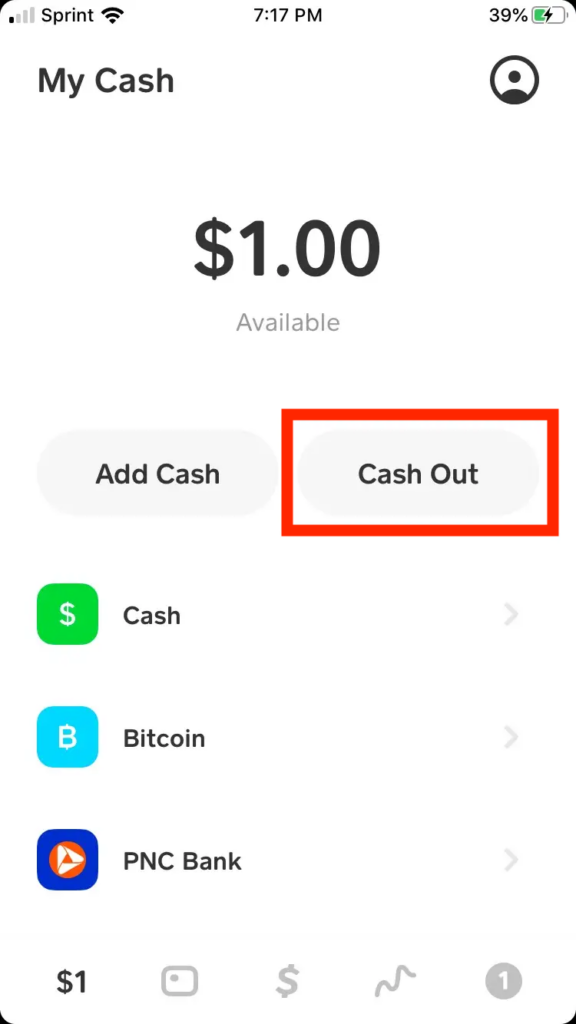
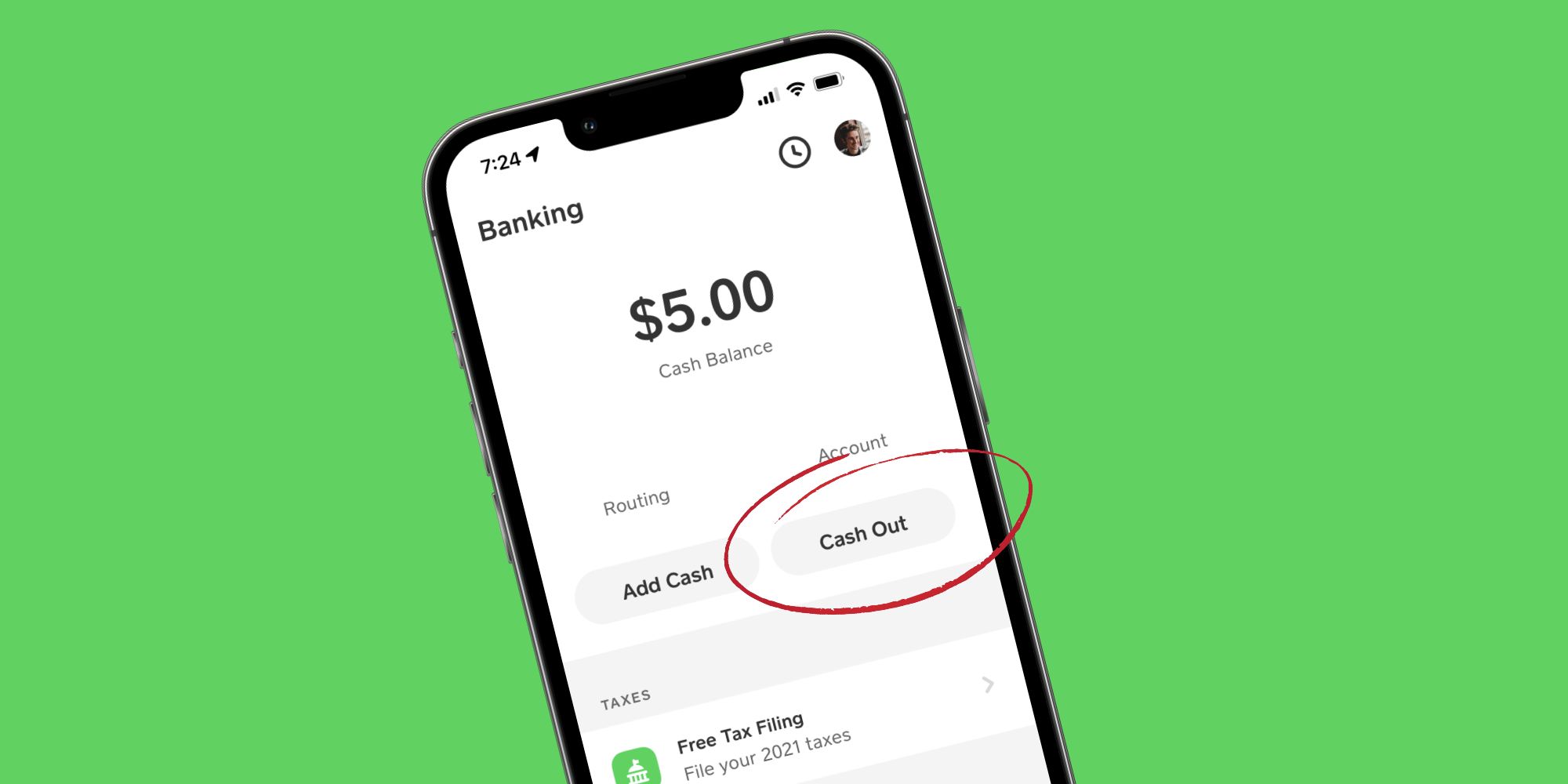
- Tap the “Cash Out” button, usually located directly below your balance.
- Enter the amount you wish to withdraw. You can opt to withdraw your full balance or a specific portion.
- Review the details on the confirmation screen, ensuring the amount and the destination linked bank account are correct.
- Select “Standard” (typically the default option) if prompted.
- Confirm the transaction by entering your PIN or using your fingerprint/Face ID, depending on your device’s security settings.
- Confirmation and Tracking: After confirmation, Cash App will display a message indicating that your funds are on their way. You’ll also receive an in-app notification and often an email confirmation. While real-time tracking within Cash App for standard deposits isn’t available beyond the initial confirmation, you can typically expect funds to reflect in your bank account within the 1-3 business day window. This automated process minimizes user intervention while maintaining transparency.
Opting for Instant Deposit
When time is of the essence, the instant deposit feature offers immediate access to your funds, albeit with a small service charge.
- Following Initial Steps: The process begins identically to a standard transfer:
- Open Cash App.
- Navigate to the “Banking” tab.
- Tap “Cash Out.”
- Enter the desired withdrawal amount.
- Selecting Instant Deposit:
- On the confirmation screen, explicitly select the “Instant” option. Cash App will clearly display the exact fee associated with your chosen amount. This fee is automatically deducted from the total amount transferred.
- Finalizing the Transaction:
- Review the amount and the fee, then confirm.
- Authenticate the transaction using your PIN or biometric ID.
- Immediate Fund Access: Within moments, typically under 30 minutes, the funds (minus the instant deposit fee) should appear in your linked bank account. This swift transfer is particularly beneficial for unexpected expenses or urgent payments, leveraging advanced payment processing technologies for speed and reliability.
Withdrawing Cash Without a Bank Account: Cash Card & ATMs
While linking a bank account is the primary method for withdrawals, Cash App also provides a physical solution for accessing your funds, especially useful for those who prefer cash or don’t have a traditional bank account linked: the Cash Card.
Utilizing the Cash Card for ATM Withdrawals
The Cash Card is a free, customizable debit card issued by Cash App (powered by Visa), allowing you to spend funds directly from your Cash App balance. It also serves as a critical tool for withdrawing physical cash.
- Ordering and Activating Your Cash Card:
- To get a Cash Card, navigate to the “Cash Card” tab (the card icon) in your Cash App.
- Tap “Get Free Cash Card” and follow the prompts to customize and order it. It typically arrives within 5-10 business days.
- Once received, activate it in the app by scanning the QR code on the packaging or manually entering the card details.
- Finding Fee-Free ATMs: Cash App partners with the Allpoint ATM network, which boasts thousands of fee-free ATMs across the United States.
- Use the in-app map feature (accessible from the Cash Card tab) to locate nearby Allpoint ATMs. This saves users from incurring additional surcharges from ATM operators.
- Steps for ATM Withdrawal:
- Insert your Cash Card into the ATM.
- Enter your Cash Card PIN (set during activation, or can be managed in the app).
- Select “Withdrawal” and then “Checking” when prompted (even if it’s drawing from your Cash App balance, which functions like a checking account for this purpose).
- Enter the desired cash amount.
- Confirm the transaction.
- Daily Withdrawal Limits and Fees: Cash App imposes daily and weekly limits on ATM withdrawals using the Cash Card, typically around $310 per transaction and $1,000 per day (limits can vary and are subject to change, so always check the latest in-app information). While Allpoint ATMs are fee-free for Cash App, using an out-of-network ATM will incur both a Cash App fee (usually $2.50) and a potential surcharge from the ATM operator, making the Allpoint network highly recommended for cost-effective withdrawals.
Cash App In-Store Withdrawal
While not as universally implemented as ATM withdrawals, Cash App has explored and, in some regions, offered limited in-store cash-out options. This feature typically involves partnering with retail locations where users can present a barcode or similar identifier within the app to a cashier, who then dispenses the requested cash from the register. These programs are often pilot initiatives or limited to specific retail chains and may not be available everywhere. Users interested in this option should check the latest updates within their Cash App, as availability and specific instructions can vary. For the majority of users requiring physical cash without a bank transfer, the Cash Card and ATM network remain the most reliable and widespread solution.
Digital Security and Best Practices for Withdrawals
Security is paramount when dealing with financial applications. Cash App incorporates robust security features, but users also play a critical role in safeguarding their funds, especially during withdrawal processes. Adhering to best practices for digital security ensures that your money remains safe from unauthorized access.
Protecting Your Account and Funds
Cash App employs several layers of security to protect user accounts and transactions. Users should actively leverage these features.
- Strong Passwords and PINs: Always use a unique, complex password for your Cash App account and a strong PIN for transactions. Avoid easily guessable information like birthdays or sequential numbers. Regularly updating these credentials adds an extra layer of protection.
- Two-Factor Authentication (2FA): Enable 2FA for your Cash App account. This requires a second form of verification (like a code sent to your phone or email) in addition to your password/PIN, making it significantly harder for unauthorized individuals to access your account even if they somehow obtain your password. This technological safeguard is crucial for modern digital finance.
- Recognizing Phishing Attempts and Scams: Be vigilant against phishing emails, texts, or calls impersonating Cash App support. Never share your password, PIN, full Cash Card number, or SSN with anyone who contacts you, even if they claim to be from Cash App. Cash App will never ask for your sign-in code, PIN, or other sensitive information outside of the app’s secure environment. Scammers often target withdrawal processes, promising instant cash or asking for “verification” funds. Always verify the legitimacy of any communication directly through the official Cash App support channels.
Common Issues and Troubleshooting
Despite the app’s robust design, users might occasionally encounter issues during withdrawals. Understanding common problems and their solutions can help resolve them quickly.
- Delayed Transfers: While standard transfers take 1-3 business days, occasional delays can occur due to bank holidays, weekend processing, or unforeseen technical glitches. If a standard transfer takes longer than 3 business days, first check your bank statement to ensure it hasn’t arrived. If not, contact Cash App support with the transaction details. For instant transfers, if funds don’t appear within 30 minutes, immediately contact Cash App support.
- Incorrect Bank Account Linked: If you inadvertently linked the wrong bank account or if your linked account is inactive, a withdrawal attempt will likely fail. Ensure your primary bank account is correctly linked and verified before initiating any transfer. You can update or change your linked bank account within the “Banking” tab of the app.
- Account Limits and Verification Requirements: Cash App imposes limits on transactions (sending, receiving, and withdrawing) for unverified accounts. To increase these limits, you must verify your identity within the app by providing your full name, date of birth, and the last four digits of your Social Security Number (SSN). Full verification can significantly expand your withdrawal capabilities, demonstrating Cash App’s adherence to regulatory compliance and security protocols.
- Contacting Cash App Support: For any unresolved issues, including failed transfers, suspicious activity, or technical difficulties, the Cash App support team is your primary resource. You can contact them directly through the app (Profile Icon > Support), via their website, or by phone. Providing detailed information about your issue and transaction IDs will expedite the resolution process.
Maximizing Your Cash App Experience (Beyond Basic Withdrawals)
Cash App is more than just a tool for withdrawing money; it’s a versatile financial platform. Understanding its broader features and limitations helps users leverage its full potential, staying within the realm of its technological capabilities.
Understanding Cash App Limits and Verification
As a financial technology application, Cash App operates under specific regulatory frameworks that mandate identity verification to combat financial crime.
- Impact of Verification on Limits: Unverified Cash App accounts have significantly lower limits for sending, receiving, and withdrawing funds. For instance, an unverified account might only be able to send up to $250 per week and receive up to $1,000 per month. Withdrawal limits are similarly restricted.
- Guide to Identity Verification: To lift these restrictions and unlock higher limits (including larger withdrawal amounts), users must complete identity verification. This typically involves:
- Opening Cash App and tapping the profile icon.
- Scrolling down to “Limits” or “Personal.”
- Following the prompts to enter your full name, date of birth, and the last four digits of your Social Security Number (SSN).
- In some cases, Cash App may request additional information, such as your full SSN or a photo ID, to comply with “Know Your Customer” (KYC) regulations. This process is secure and designed to protect both the user and the platform.
The Ecosystem of Cash App
Beyond its core functionality of sending, receiving, and withdrawing money, Cash App has evolved into a comprehensive digital finance ecosystem. These additional features highlight its technological advancement and utility:
- Investing in Stocks and Bitcoin: Cash App allows users to buy, sell, and hold fractional shares of stocks and Bitcoin directly within the app, democratizing access to investment opportunities through an intuitive interface. This positions Cash App not just as a payment app but as a micro-investment platform.
- Cash Card Boosts: The Cash Card comes with “Boosts,” which offer instant discounts at specific merchants when you use your card. Users can select and change their Boosts directly in the app, providing a dynamic reward system.
- Direct Deposit: Users can set up direct deposit to receive their paychecks or government benefits directly into their Cash App account, effectively using it as a primary bank account. This feature streamlines personal finance management for many.
These expanded capabilities demonstrate Cash App’s commitment to being an all-encompassing financial technology tool, making it a powerful application for managing a wide array of financial activities.
Conclusion
Withdrawing money from Cash App is a well-designed process, offering both speed and flexibility to meet diverse user needs. Whether you opt for a free standard bank transfer, a quick instant deposit, or leverage the Cash Card for ATM withdrawals, the application provides clear, step-by-step guidance. Critical to a smooth experience is ensuring your bank account is correctly linked and verified, and that you are always mindful of digital security best practices. By understanding the various mechanisms, embracing the security features, and familiarizing yourself with the broader Cash App ecosystem, you can effectively manage your funds, leveraging this powerful financial technology tool to its fullest potential.
aViewFromTheCave is a participant in the Amazon Services LLC Associates Program, an affiliate advertising program designed to provide a means for sites to earn advertising fees by advertising and linking to Amazon.com. Amazon, the Amazon logo, AmazonSupply, and the AmazonSupply logo are trademarks of Amazon.com, Inc. or its affiliates. As an Amazon Associate we earn affiliate commissions from qualifying purchases.