
The landscape of sports broadcasting has undergone a seismic shift over the last decade, migrating from the rigid structures of linear cable television to the fluid, data-driven world of Over-the-Top (OTT) streaming. For basketball enthusiasts, the integration of NBA TV into YouTube TV represents a pinnacle of this technological evolution. NBA TV, the league’s dedicated 24-hour network, offers everything from live out-of-market games to original programming and deep-dive analytics. Accessing this through YouTube TV—Google’s premier cord-cutting service—requires an understanding of the software interface, subscription tiers, and hardware optimization.
This guide explores the technical nuances of accessing NBA TV on YouTube TV, ensuring that your digital setup is optimized for high-definition, low-latency performance.
Understanding the Integration of NBA TV into the YouTube TV Ecosystem
YouTube TV has positioned itself as a leader in the streaming space by prioritizing a seamless User Interface (UI) and a robust backend infrastructure. Unlike traditional satellite providers, YouTube TV utilizes cloud-based delivery systems to provide live content, making the addition of niche sports networks like NBA TV a matter of software licensing rather than hardware installation.
The Role of NBA TV in Modern Digital Broadcasting
NBA TV serves as the technological hub for the league’s broadcast identity. It isn’t just a channel; it is a repository of high-bitrate live feeds, historical archives, and real-time statistical overlays. When you access NBA TV via YouTube TV, you are tapping into a stream that is optimized for Google’s global Content Delivery Network (CDN). This ensures that whether you are watching a preseason matchup or a documentary on the 1992 Dream Team, the packet delivery is prioritized to minimize jitter and frame drops.
YouTube TV’s Technical Infrastructure for Live Sports
Live sports present a unique challenge for streaming services: latency. There is often a “spoiler gap” where a phone notification alerts you to a score before the stream catches up. YouTube TV employs advanced encoding profiles—typically using H.264 or VP9 codecs—to balance image quality with transmission speed. By hosting NBA TV on their servers, YouTube TV can offer features like “Low Latency Mode,” which reduces the buffer window at the slight risk of minor playback stability, a trade-off many tech-savvy sports fans are willing to make.
The Transition from Traditional Cable to Cloud-Based DVR
One of the most significant tech advantages of watching NBA TV on YouTube TV is the Cloud DVR. Traditional DVRs rely on local hard drive space and physical tuners. YouTube TV’s backend allows for unlimited concurrent recordings. When you “add” an NBA game to your library, the system doesn’t record it to your device; it flags the stream on the server side, allowing you to access it instantly from any logged-in device.
Step-by-Step Technical Setup for Accessing NBA TV
Navigating the software layers of a streaming app can be daunting if you aren’t familiar with the layout. Ensuring that NBA TV is active and optimized within your account is the first step toward a premium viewing experience.
Checking Your Subscription Tier and Add-ons
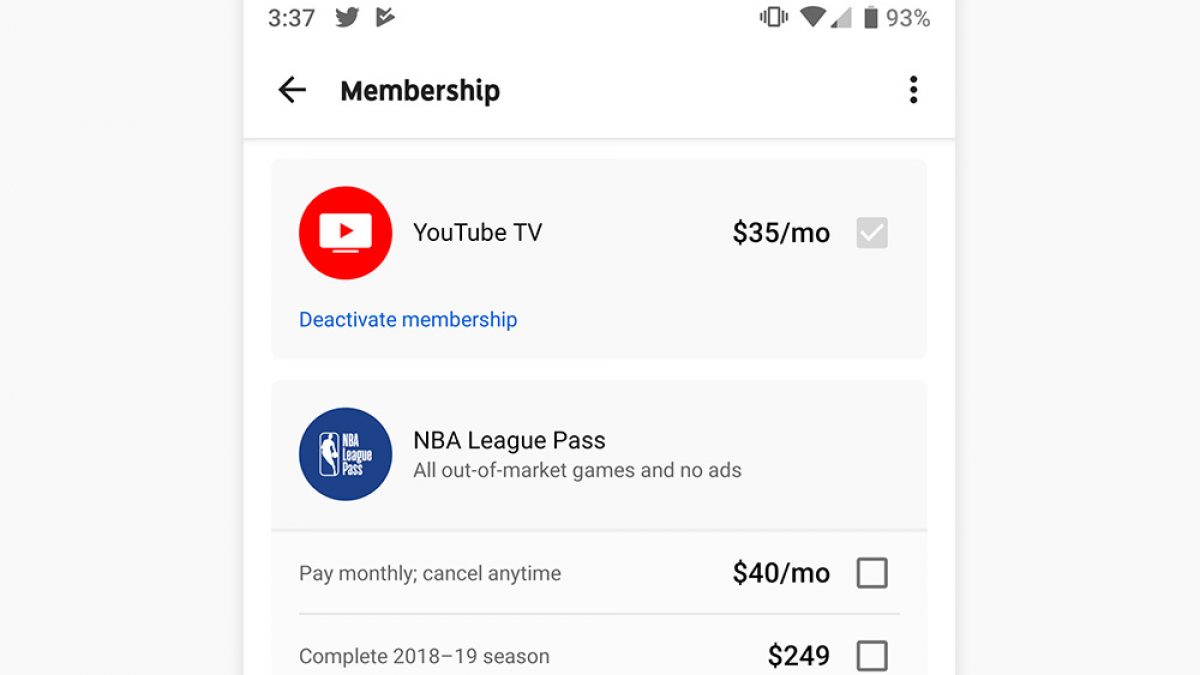
As of the current service architecture, NBA TV is included in the “Base Plan” of YouTube TV. This is a significant technological value proposition, as many other services gatekeep league-specific networks behind “Sports Plus” tiers. To verify your access, navigate to the “Settings” menu within the YouTube TV app, select “Membership,” and ensure your Base Plan is active. If you are looking for more intensive coverage, such as NBA League Pass (which offers every out-of-market game), this can be added as a secondary software module within the same interface.
Navigating the YouTube TV Interface
The YouTube TV UI is built on a “Living Room” framework designed for rapid navigation via remote or touch. To find NBA TV, you can utilize the “Live” guide. Technically, the guide is a dynamic XML or JSON feed that updates in real-time. You can customize this guide by clicking on the “Sort” button, allowing you to move NBA TV to the top of your channel list. This customization is saved to your user profile in the cloud, syncing across your smart TV, smartphone, and tablet.
Using the Search and Filter Functions for Live Games
YouTube TV leverages Google’s powerful search algorithms. By typing “NBA” into the search bar, the app’s API pulls data from the upcoming broadcast schedule, the VOD (Video On Demand) library, and your personal DVR. This cross-referencing technology makes it significantly easier to find specific games compared to the manual scrolling required by legacy cable boxes.
Maximizing the Viewership Experience with Tech Features

Simply having access to the stream is only half the battle. To truly experience NBA TV on YouTube TV, you must leverage the platform’s unique software features designed for the modern “second-screen” era.
Key Plays and Real-Time Stats Integration
YouTube TV’s “Key Plays” feature is a marvel of machine learning and metadata tagging. During an NBA TV broadcast, the system identifies pivotal moments—such as a three-point flurry or a game-winning block—and creates a highlight reel that viewers can jump through in real-time. Furthermore, the “Stats” tab integrates live API data from the NBA, providing player efficiency ratings, shooting charts, and box scores that update without interrupting the video feed.
4K Plus Add-on: Is it Necessary for NBA TV?
While NBA TV broadcasts primarily in 1080i or 720p at the source, YouTube TV offers a “4K Plus” add-on. It is important to understand the technical limitation here: if the original broadcast on NBA TV isn’t produced in 4K, the 4K Plus add-on will not magically increase the resolution. However, the add-on does provide a higher bitrate for the 1080p stream, which reduces compression artifacts (the “blocky” look in dark areas of the screen) and offers unlimited simultaneous streams on your home network.
Multi-View and Picture-in-Picture Functionality
For the tech-savvy fan who needs to monitor multiple games, YouTube TV has introduced “Multi-View.” This feature allows the server to combine up to four live feeds—such as NBA TV and three local broadcasts—into a single 4K stream that is then sent to your device. This prevents your local hardware from having to decode four separate video streams at once, which would otherwise lead to overheating or app crashes on lower-end devices like older streaming sticks.
Device Compatibility and Hardware Requirements
The quality of your NBA TV experience is heavily dependent on the hardware decoding the signal. From the processor in your Smart TV to the version of your HDMI cable, every link in the chain matters.
Streaming Sticks and Smart TV Optimization
For the best performance, devices with dedicated hardware decoders for the VP9 or AV1 codecs are recommended. Devices like the Chromecast with Google TV, Roku Ultra, and Apple TV 4K (2022 or later) offer the snappiest UI response times. When using integrated Smart TV apps (like those on Tizen or webOS), the bottleneck is often the TV’s internal processor, which may struggle with the high-bitrate demands of live sports.
Mobile App vs. Desktop Browser Performance
Watching NBA TV on a desktop browser involves different technical hurdles, primarily related to DRM (Digital Rights Management) and browser resource allocation. For the best quality on a PC, use a Chromium-based browser (Chrome or Edge) and ensure “Hardware Acceleration” is enabled in the settings. On mobile, the YouTube TV app utilizes adaptive bitrate streaming (ABR), which dynamically adjusts the video resolution based on your 5G or Wi-Fi signal strength to prevent buffering.
Troubleshooting Connection and Buffering Issues
If you encounter buffering while watching NBA TV, the issue is often related to “Bufferbloat” or Wi-Fi interference. For a stable 1080p/60fps sports stream, a consistent 25 Mbps connection is the baseline. Tech-focused users should consider using an Ethernet adapter for their streaming devices or upgrading to a Wi-Fi 6 (802.11ax) router to handle the high-frequency data packets required for live video.
The Future of Sports Streaming: What’s Next for NBA on YouTube TV?
As we look toward the future, the partnership between the NBA and Google (YouTube TV’s parent company) suggests even deeper technological integrations. We are moving toward a more personalized, data-rich environment that blurs the line between a broadcast and a video game.
Potential for VR and AR Integration
With the rise of headsets like the Apple Vision Pro and Meta Quest, there is a technical pathway for YouTube TV to offer “Immersive NBA TV.” Imagine a virtual courtside seat where the NBA TV broadcast is just one element of a 360-degree environment filled with live data visualizations. The infrastructure YouTube TV has built is already capable of handling the high-bandwidth 3D video required for such an evolution.

AI-Driven Personalized Highlights
Artificial Intelligence is already being used to generate highlights, but the next step is personalization. In the near future, the YouTube TV algorithm could technically curate a version of NBA TV specifically for you—automatically prioritizing clips of your favorite players or fantasy team members based on your viewing history and Google account data.
By understanding the technical underpinnings of YouTube TV—from its cloud DVR and low-latency modes to its hardware requirements—fans can ensure they never miss a moment of the action on NBA TV. The transition from cable to cloud is complete; the only thing left to do is optimize your settings for tip-off.
aViewFromTheCave is a participant in the Amazon Services LLC Associates Program, an affiliate advertising program designed to provide a means for sites to earn advertising fees by advertising and linking to Amazon.com. Amazon, the Amazon logo, AmazonSupply, and the AmazonSupply logo are trademarks of Amazon.com, Inc. or its affiliates. As an Amazon Associate we earn affiliate commissions from qualifying purchases.