
In the intricate and ever-evolving landscape of digital entertainment, accessing your favorite content can sometimes feel like navigating a labyrinth. For fans of critically acclaimed dramas, thrilling horror, and captivating original series, AMC (American Movie Classics) has long been a go-to destination. From iconic shows like The Walking Dead and Mad Men to more recent hits and a curated collection of classic films, AMC’s offerings span a wide spectrum of genres. However, with the proliferation of streaming services, live TV platforms, and hybrid viewing models, understanding the most efficient and effective ways to watch AMC requires a clear guide. This article delves into the technological pathways available, offering a comprehensive tutorial for both traditionalists and cord-cutters alike, ensuring you can enjoy AMC’s programming wherever and whenever you choose.

Navigating AMC’s Content Landscape: Linear vs. On-Demand Paradigms
The journey to watching AMC begins with understanding its dual presence: as a linear television channel and as a robust on-demand streaming service. This distinction is crucial for determining which technological approach best suits your viewing habits and existing digital infrastructure. The evolution from a purely broadcast model to a hybrid one reflects broader industry shifts, demanding adaptability from viewers and service providers alike.
The Traditional Cable/Satellite Experience
For decades, the most straightforward method to watch AMC was through a traditional cable or satellite television subscription. If you maintain a legacy TV package from providers like Xfinity, Spectrum, Dish Network, or DirecTV, AMC is likely included in your channel lineup. This method offers the classic scheduled viewing experience, where content airs at specific times, mimicking a curated broadcast schedule.
Technologically, accessing AMC via cable or satellite involves a set-top box connected to your television. These boxes act as decoders, receiving the broadcast signal and translating it into viewable content. While seemingly dated in an age of on-demand, this method remains reliable for many, requiring minimal technical setup beyond the initial installation. It also often comes bundled with DVR capabilities, allowing viewers to record live broadcasts and watch them at their convenience, blurring the lines between linear and on-demand, albeit through a hardware-centric solution. Furthermore, many cable/satellite subscriptions now include access to provider-specific apps (e.g., Xfinity Stream, Spectrum TV), which allow subscribers to stream live AMC content and on-demand libraries on mobile devices, tablets, and web browsers, effectively extending the traditional viewing experience into the digital realm without requiring a separate streaming subscription.
The Rise of AMC+ and Standalone Streaming
The digital revolution prompted AMC Networks to launch its dedicated premium streaming service, AMC+. This platform represents a significant technological leap, offering a comprehensive on-demand library of AMC’s acclaimed series, exclusive originals, full seasons of popular shows, and content from sister networks like Shudder, SundanceNow, and IFC Films Unlimited—all ad-free. AMC+ is designed for the modern streaming consumer who prioritizes flexibility, convenience, and a commercial-free experience.
Accessing AMC+ primarily involves a dedicated application available across a wide array of smart devices and web browsers. This app-centric approach allows for personalized viewing, where users can browse, search, and stream content on demand. The underlying technology relies on adaptive bitrate streaming, which adjusts video quality based on the user’s internet connection speed, ensuring a smooth playback experience. Unlike traditional broadcasting, AMC+ utilizes cloud-based content delivery networks (CDNs) to deliver media files directly to the user’s device, bypassing traditional broadcast infrastructure entirely. This shift empowers users with unparalleled control over their viewing schedule and content selection, epitomizing the “watch what you want, when you want” ethos.
Free Content and Promotional Offers
While premium access often comes with a subscription fee, AMC occasionally offers free content or promotional viewing opportunities. This can include free episodes available on the AMC website or through partner platforms, often as a teaser for a new series or season. Technologically, these free offerings typically leverage ad-supported streaming models, where commercials are interspersed within the content, similar to how broadcast television operates. These free windows are valuable for sampling AMC’s programming before committing to a paid subscription, often requiring nothing more than a web browser or a specific app download. Keep an eye on AMC’s official announcements and social media channels for these limited-time opportunities, which serve as an entry point for potential subscribers to experience the platform’s user interface and content quality without initial investment.
Essential Platforms and Services for AMC Access
The decision to cut the cord doesn’t mean cutting off AMC. A variety of streaming platforms and digital services now serve as conduits for accessing AMC’s diverse content library, catering to different preferences for live TV, on-demand viewing, and bundling options. Each platform leverages distinct technological architectures to deliver AMC to your screens.
Streaming Services with Live TV Integration
For those who crave the live TV experience without a traditional cable subscription, several “cord-cutting” services offer AMC as part of their channel bundles. These include:
- Sling TV: Known for its customizable channel packages, Sling TV offers AMC in its “Sling Blue” and “Sling Orange” core bundles. Sling’s technology is built around live streaming channels, delivering broadcasts over the internet. It provides a familiar channel guide interface, akin to cable, but through an app on your smart device.
- YouTube TV: A comprehensive live TV streaming service, YouTube TV includes AMC in its single base package. Its interface is designed for ease of use, integrating live TV with an unlimited cloud DVR feature, allowing users to record AMC shows and store them digitally for later viewing.
- Hulu + Live TV: Combining Hulu’s extensive on-demand library with a robust selection of live channels, AMC is a staple here. Hulu’s platform seamlessly blends live TV with its massive VOD (Video On Demand) catalog, often featuring next-day access to new episodes of AMC shows.
- Philo: For a more budget-friendly option focused on entertainment and lifestyle channels, Philo includes AMC. While it lacks sports and news, its streamlined approach makes it an attractive choice for AMC fans who don’t need a full-spectrum live TV package.
These services operate on a subscription model, providing access to AMC and dozens of other channels via their respective apps across a multitude of streaming devices. Their technological backbone relies on robust internet infrastructure to deliver high-definition video streams with minimal latency, emulating the reliability of traditional broadcast while adding the flexibility of internet-based access.
Direct Subscription via AMC+ App and Website
The most direct route to AMC’s premium content is through a standalone subscription to AMC+. This involves downloading the AMC+ app directly onto your preferred streaming device (Roku, Amazon Fire TV, Apple TV, smart TVs, mobile phones, tablets) or accessing it via a web browser on your computer.
The AMC+ app serves as the central hub for its content. Technologically, it features a user-friendly interface designed for content discovery, with categories, search functions, and personalized recommendations. It supports adaptive streaming, allowing for high-quality video playback that adjusts to your internet speed. Features typically include watchlist creation, playback history, and parental controls. Signing up directly often provides access to a broader library of exclusive content, including early access to episodes of popular shows and a deeper dive into content from its partner channels like Shudder.
On-Demand Access Through Cable Provider Apps
Even if you have a traditional cable subscription, your provider likely offers a companion app or website that grants you on-demand access to AMC content. Apps like Xfinity Stream, Spectrum TV, and others allow authenticated subscribers to watch live AMC and a selection of its on-demand library. This method leverages your existing cable subscription credentials to unlock digital access, effectively extending your home TV experience to portable devices. These apps often support casting features (e.g., Chromecast, AirPlay) to project content from a mobile device to a larger screen, enhancing viewing flexibility within your home network.
Leveraging Amazon Prime Video Channels and Apple TV Channels
For users already invested in ecosystems like Amazon Prime Video or Apple TV, AMC+ can be added as a “channel” directly within these platforms. This integration offers a streamlined billing and content management experience, as all subscriptions are managed under a single account (Amazon or Apple).
When subscribed through Prime Video Channels or Apple TV Channels, AMC+ content appears alongside other Prime Video or Apple TV content, accessible through their respective apps. This is particularly convenient for users who prefer a consolidated viewing experience, avoiding the need to switch between multiple apps for different streaming services. The technical advantage here is often improved integration with the host platform’s search, watchlists, and recommendation engines, making content discovery more seamless within a familiar user interface. It leverages the existing robust streaming infrastructure of Amazon and Apple, which are renowned for their global content delivery capabilities and device compatibility.
Optimizing Your Viewing Experience Across Devices
Once you’ve chosen your preferred method for accessing AMC, the next step is to ensure your viewing experience is as seamless and high-quality as possible. This involves understanding device compatibility, internet requirements, and various settings that can enhance your enjoyment.
Compatible Streaming Devices
AMC’s content, whether through AMC+ or other streaming platforms, is designed for broad compatibility. Key device categories include:
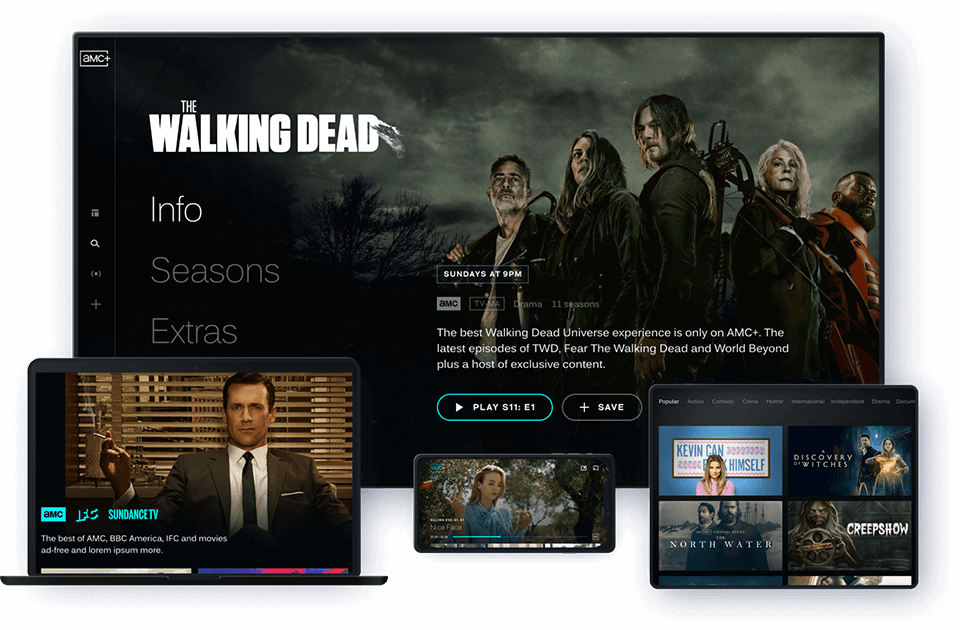
- Smart TVs: Modern smart televisions from manufacturers like Samsung, LG, Sony, Vizio, and others typically have built-in app stores where you can download the AMC+ app or apps for services like YouTube TV and Hulu.
- Streaming Sticks/Boxes: Dedicated streaming devices like Roku, Amazon Fire TV (Stick/Cube), Apple TV, and Google Chromecast are excellent choices. They offer a unified interface for all your streaming apps and often support 4K HDR playback for the best visual quality.
- Gaming Consoles: PlayStation (PS4, PS5) and Xbox (One, Series X/S) consoles also support various streaming apps, turning your gaming rig into a versatile entertainment hub.
- Mobile Devices & Tablets: Android and iOS smartphones and tablets are fully supported, allowing for on-the-go viewing. The apps are optimized for touch interfaces and screen sizes.
- Web Browsers: For desktop and laptop users, content is accessible via official websites (amc.com, amcplus.com) or through the web interfaces of live TV streaming services.
Ensuring your device’s operating system and apps are up-to-date is crucial for performance and security, as updates often include bug fixes and performance enhancements.
Mobile and Tablet Viewing: The AMC+ App Experience
The AMC+ mobile and tablet app is specifically engineered for portability and touch interaction. It typically features offline download capabilities, allowing subscribers to download select movies and episodes to their device for viewing without an internet connection—perfect for commutes or travel. The app’s interface is optimized for smaller screens, with intuitive navigation and playback controls. Push notifications can keep users informed about new episodes or content, enhancing engagement. For optimal mobile viewing, consider using Wi-Fi whenever possible to save cellular data and ensure a stable stream.
Ensuring Optimal Internet Connection for Seamless Streaming
A stable and sufficiently fast internet connection is the backbone of any good streaming experience. For high-definition (HD) streaming, a minimum speed of 5-10 Mbps is generally recommended per stream. For 4K Ultra HD content, this jumps to 25 Mbps or higher. Factors like household size, the number of simultaneous users, and other online activities (gaming, video calls) will influence your actual speed requirements.
- Wired vs. Wireless: Whenever possible, connect your primary streaming device (Smart TV, streaming box) directly to your router via an Ethernet cable. A wired connection offers superior stability, speed, and reduced latency compared to Wi-Fi.
- Wi-Fi Optimization: If wireless is necessary, ensure your router is centrally located, away from obstructions, and consider upgrading to a newer Wi-Fi standard (e.g., Wi-Fi 6) for better performance and range. Using a mesh Wi-Fi system can extend coverage in larger homes.
- Router Settings: Check your router’s settings. Quality of Service (QoS) features can prioritize streaming traffic over other network activities, ensuring bandwidth is allocated where it’s most needed.
Regularly performing internet speed tests can help you identify if your connection is meeting the demands of high-quality AMC streaming.
Customizing Playback and Accessibility Settings
Most streaming apps, including AMC+, offer various settings to enhance your viewing comfort and accessibility.
- Video Quality: While adaptive streaming typically handles this automatically, some apps allow manual adjustment of video quality. If you have bandwidth concerns, you might opt for a lower resolution to prevent buffering.
- Audio Settings: Check for options like surround sound (Dolby Digital, Dolby Atmos) if your home theater system supports it. Adjusting dynamic range can also be useful for late-night viewing to reduce sudden loud sounds.
- Subtitles/Closed Captions: All reputable streaming services provide comprehensive subtitle and closed captioning options. You can usually customize their appearance (font size, color, background) to suit your preferences.
- Parental Controls: For households with children, setting up parental controls is essential. These allow you to restrict content based on ratings, ensuring younger viewers only access age-appropriate programming.
Familiarizing yourself with these settings can significantly personalize and improve your AMC viewing experience.
Troubleshooting Common Issues and Maximizing Value
Even with the most robust technology, occasional hiccups can occur. Knowing how to troubleshoot common streaming problems and manage your subscriptions effectively ensures a smooth and continuous enjoyment of AMC content.
Resolving Buffering and Quality Problems
Buffering (pausing during playback) and low video quality are typically indicative of network issues.
- Check Internet Connection: First, confirm your internet connection is active and stable. Restart your modem and router.
- Reduce Network Congestion: If multiple devices are using the internet heavily, pause other activities or disconnect unnecessary devices.
- Restart Device/App: Close and reopen the AMC+ app or restart your streaming device (Smart TV, Roku, etc.). A fresh start can clear temporary glitches.
- Clear Cache: On some devices, clearing the app’s cache can resolve performance issues by removing old, corrupted data.
- Update App/Firmware: Ensure the AMC+ app and your device’s operating system/firmware are running the latest versions. Updates often include stability and performance improvements.
- Server Status: Occasionally, the issue might be on AMC’s end. Check social media or their support pages for any reported service outages.
If problems persist, contacting your internet service provider or AMC+ customer support may be necessary.
Managing Subscriptions and Account Settings
Effective management of your AMC+ subscription prevents unintended charges and ensures uninterrupted access.
- Subscription Cancellation: If you subscribed directly through AMC+, you’ll typically manage your subscription via the AMC+ website or within the app’s settings. If subscribed via a third-party (Amazon, Apple, Roku, Google Play), you’ll need to manage it through that specific platform’s subscription settings. Be mindful of billing cycles to avoid being charged for another month if you intend to cancel.
- Password Management: Use strong, unique passwords for your AMC+ account. If you forget your password, most services offer a straightforward password reset process. Consider using a password manager for convenience and security.
- Profile Management: If AMC+ supports multiple user profiles, setting them up can help personalize recommendations and tracking for each family member.
Regularly reviewing your account settings and subscriptions ensures you’re getting the most value and only paying for what you actively use.
Exploring Offline Viewing and Download Features
As mentioned, the AMC+ mobile and tablet apps often support offline downloads. This feature is a significant technological advantage, allowing you to download selected episodes and movies to your device’s local storage.
- How it Works: Content is encrypted and stored temporarily on your device. The app typically manages DRM (Digital Rights Management) to ensure compliance with content licenses, meaning downloaded content usually has an expiration period or requires occasional online re-authentication.
- Maximizing Use: Utilize this feature before travel, during commutes, or in areas with poor internet connectivity. Remember that downloads consume device storage, so manage your downloaded library to free up space when needed.
This offline capability transforms how and where you can consume AMC content, truly embodying the flexibility of modern streaming technology.
Staying Updated with AMC Content and Platform Changes
The digital entertainment landscape is in constant flux. New shows are added, old ones might leave, and platform features can evolve.
- Newsletter and Social Media: Subscribe to AMC+ newsletters and follow their social media channels to stay informed about new releases, platform updates, and special offers.
- In-App Notifications: Enable in-app notifications for personalized alerts about content you might enjoy or news relevant to your viewing habits.
- App Updates: Always keep your AMC+ app updated to benefit from the latest features, security patches, and performance improvements. Developers frequently push updates to enhance user experience and address technical issues.
By staying engaged with AMC’s digital ecosystem, you ensure you’re always leveraging the most current and efficient methods to watch your favorite programming. In an age where content is king, knowing how to access that content is paramount, and with these technological insights, your AMC viewing experience can be effortlessly enjoyable.
aViewFromTheCave is a participant in the Amazon Services LLC Associates Program, an affiliate advertising program designed to provide a means for sites to earn advertising fees by advertising and linking to Amazon.com. Amazon, the Amazon logo, AmazonSupply, and the AmazonSupply logo are trademarks of Amazon.com, Inc. or its affiliates. As an Amazon Associate we earn affiliate commissions from qualifying purchases.