
In an increasingly digitized world, managing personal finances and fulfilling civic duties like tax filing has been profoundly transformed by technology. TurboTax stands at the forefront of this evolution, offering a robust software solution that empowers millions to navigate the complexities of tax season with confidence. Far more than just a digital form filler, TurboTax is a sophisticated application designed to guide users through every step of their tax journey, leveraging intuitive interfaces, powerful algorithms, and robust security protocols. This comprehensive guide will demystify the process, demonstrating how to effectively utilize TurboTax to ensure accurate, optimized, and securely filed tax returns. We’ll explore its features from a technical perspective, focusing on the software’s capabilities and how to interact with its digital ecosystem.
Setting Up Your TurboTax Experience: Initial Software Configuration
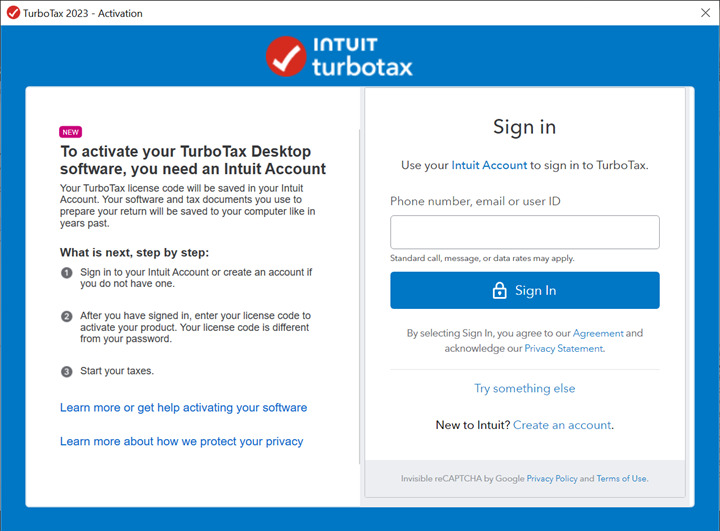
Before diving into the intricacies of tax data entry, establishing a solid foundation within the TurboTax software is crucial. This initial setup phase involves selecting the appropriate software version, securing your account, and familiarizing yourself with the platform’s user interface. These steps are fundamental to a smooth and efficient digital tax preparation process.
Selecting the Optimal TurboTax Software Version
TurboTax offers a spectrum of products, each tailored to different tax situations and user needs. Understanding these distinctions from a feature-set perspective is the first step. The “Free Edition” caters to simple tax returns, handling basic W-2 income and limited credits. “Deluxe” introduces advanced tools for maximizing deductions and credits, particularly beneficial for homeowners or those with significant itemized deductions. “Premier” expands on Deluxe, adding features for investments (stocks, bonds, mutual funds) and rental property income. Finally, “Self-Employed” is designed for freelancers, independent contractors, and small business owners, integrating expense tracking, Schedule C guidance, and industry-specific deductions. Choosing the right version ensures you have access to the necessary computational modules and advisory prompts without overpaying for unnecessary features. This selection directly impacts the digital tools and workflows available to you within the application.
Account Creation and Essential Digital Security Measures
Your TurboTax account serves as the central hub for all your tax data, making its security paramount. The account creation process is straightforward but demands attention to digital security best practices. Beyond a strong, unique password – ideally generated by a password manager and comprising a mix of upper/lowercase letters, numbers, and symbols – enabling multi-factor authentication (MFA) is non-negotiable. MFA adds an extra layer of protection, typically requiring a code from your smartphone in addition to your password. TurboTax’s platform is built with robust encryption and security protocols, but your personal vigilance is the first line of defense against unauthorized access. Understanding and utilizing these integrated security features safeguards your highly sensitive financial information throughout the filing process.
Navigating the User Interface and Dashboard
Upon logging in, you’ll encounter TurboTax’s intuitive user interface (UI), designed for clarity and ease of use. The main dashboard typically presents a summary of your progress, pending tasks, and links to key sections of the application. Navigation usually occurs via a left-hand sidebar or a prominent “Continue” button, guiding you sequentially through the tax interview. Familiarize yourself with icons representing different tax sections (e.g., income, deductions, credits), the help menu, and the ability to review your return at any point. The UI is engineered to minimize confusion, employing clear language and visual cues to simplify complex tax concepts. Learning to efficiently navigate this digital environment is key to a streamlined experience.
Mastering Data Input: Efficiently Populating Your Digital Return
The core function of any tax software is to accurately collect and process financial data. TurboTax excels in this area by offering multiple advanced methods for data input, designed to reduce manual effort and minimize errors. These technological capabilities streamline the often-tedious process of gathering and entering financial information.
Leveraging Data Import Functionality (W-2s, 1099s)
One of TurboTax’s most powerful technological advantages is its ability to electronically import data directly from thousands of financial institutions and payroll providers. For W-2 forms, you often only need your employer’s Employer Identification Number (EIN) and sometimes a box D control number; TurboTax then securely fetches your wages, taxes withheld, and other relevant information directly. Similarly, for 1099 forms (investment income, independent contractor income), you can connect to brokerage accounts, banks, and payment platforms. This secure, API-driven integration not only saves significant time but also dramatically reduces the chance of transcription errors, ensuring the accuracy of your foundational data. It’s a prime example of how software interoperability enhances user efficiency.
Guided Interview Process: Step-by-Step Digital Assistance
The cornerstone of TurboTax’s user experience is its guided interview process. This isn’t just a series of static questions; it’s an intelligent, adaptive algorithm that tailors the interview flow based on your previous answers. As you respond to questions about your life events, income sources, and expenses, the software dynamically adjusts, presenting relevant follow-up questions and skipping irrelevant sections. This interactive, decision-tree logic ensures that you only address applicable tax scenarios, preventing overwhelm and guiding you logically through complex regulations. The software essentially acts as a virtual tax assistant, interpreting your inputs and directing you toward the correct forms and calculations, all without requiring you to understand specific tax codes.
Manual Entry and Document Upload Features
While automated imports are ideal, there are always scenarios requiring manual data entry or the submission of physical documents. TurboTax provides intuitive interfaces for manually typing in information from forms that can’t be imported, such as certain K-1s or less common income statements. For supporting documentation, the software typically includes options to upload scanned images or PDFs directly to your account. This digital attachment feature allows you to keep an organized, electronic record of all pertinent documents alongside your tax return, facilitating a paperless workflow and easy retrieval should you ever need to reference them. The platform supports various common file formats, ensuring broad compatibility for users’ digital archives.
Utilizing Advanced Software Features for Accuracy and Optimization
Beyond basic data collection, TurboTax incorporates sophisticated features designed to enhance the accuracy of your return and help you uncover opportunities for tax savings. These are the intelligent components of the software that truly elevate it from a simple data entry tool to a powerful financial assistant.
Intelligent Deduction and Credit Finders

One of the most valuable aspects of TurboTax’s software design is its ability to proactively identify potential deductions and credits. As you input your financial data and answer interview questions, the software’s algorithms continuously analyze your profile against an extensive database of tax laws. It will prompt you with questions related to common deductions (e.g., student loan interest, medical expenses, charitable contributions) and credits (e.g., child tax credit, education credits, energy credits). These automated prompts ensure that you don’t overlook opportunities to reduce your taxable income or tax liability, acting as a digital safety net to maximize your financial benefit. It’s an expert system working in the background to apply complex tax rules to your unique situation.
Real-time Error Checking and Audit Risk Assessment Tools
Accuracy is paramount in tax filing. TurboTax integrates robust, real-time error-checking mechanisms that flag inconsistencies, missing information, or potential calculation errors as you proceed. If the software detects an anomaly – for instance, a deduction that seems unusually high for your income level or conflicting entries – it will issue an alert, prompting you to review and correct the data. Furthermore, some versions offer an “Audit Risk Assessment” tool, which uses historical IRS data and tax law interpretations to estimate your likelihood of being audited based on your return’s characteristics. While not a guarantee, this algorithmic analysis provides valuable insight, allowing you to double-check areas that might draw scrutiny, ensuring your digital return is as defensible as possible.
Accessing In-Software Support and Knowledge Bases
Even with the most intuitive software, questions can arise. TurboTax provides multiple layers of integrated support. Within the application, you’ll find context-sensitive help buttons that offer explanations for specific questions or fields. The comprehensive knowledge base, accessible through the software, contains articles, FAQs, and video tutorials covering a vast array of tax topics. For more personalized assistance, higher-tier TurboTax products (or an add-on service) offer direct access to tax experts (CPAs or EAs) via phone or live chat, all within the digital ecosystem. This multi-channel support system ensures that expert guidance is always just a few clicks away, complementing the software’s automated capabilities.
Finalizing and Electronically Submitting Your Tax Return
The culmination of your tax preparation journey is the submission of your return. TurboTax guides you through a rigorous final review and offers secure electronic filing options, along with crucial post-submission protocols to ensure your data is managed responsibly.
The Digital Review Process: Ensuring Data Integrity
Before submitting, TurboTax leads you through a final, comprehensive digital review. This typically includes a summary of your income, deductions, credits, and tax liability, often presented in a simplified format that highlights key figures. The software performs one last automated check for completeness and accuracy, presenting a list of any remaining potential issues. It also often provides a section comparing your current year’s return to the previous year’s, highlighting significant changes that might warrant further inspection. This structured digital checklist and comparative analysis allow you to confidently verify the integrity of all data before finalization.
E-Filing Your Return: The Electronic Submission Protocol
Electronic filing (e-filing) is the standard and most efficient method for submitting your tax return, and TurboTax makes this process seamless and secure. Once your review is complete and you’re ready, the software electronically transmits your return directly to the IRS and relevant state tax authorities through encrypted channels. You’ll receive immediate confirmation that your return has been successfully transmitted and, crucially, a second confirmation once the IRS (and state) officially accepts it. This digital paper trail is a vital record, proving that your return was filed and received on time. The underlying technology ensures that your sensitive data is sent securely, adhering to all governmental electronic filing standards.
Digital Record Keeping and Archiving Your Tax Files
After e-filing, the digital management of your tax records remains important. TurboTax allows you to download and save PDF copies of your complete return, including all forms and schedules, for your personal archives. Many users opt to keep these digital files on a secure local drive, cloud storage, or both. TurboTax also typically stores your past returns within your online account for several years, providing convenient access if you need to reference them later or easily import prior year data for future filings. Establishing a robust digital archiving strategy ensures you have accessible and secure records for future reference, audits, or financial planning.
Enhancing Your Digital Tax Management Year-Round
TurboTax’s utility extends beyond the immediate tax season. Leveraging its features for ongoing digital tax management can simplify future filings and enhance your overall financial organization from a technological standpoint.
Proactive Data Security Practices for Financial Information
While TurboTax employs strong security measures, your proactive steps are vital for year-round data protection. Regularly update your operating system and web browser, use antivirus software, and be extremely wary of phishing attempts targeting your tax information. Never click on suspicious links or provide personal data in response to unsolicited emails claiming to be from TurboTax or the IRS. Periodically review your TurboTax account for any unusual activity. Understanding these digital threats and maintaining good cyber hygiene are crucial for protecting your financial and tax data beyond the specific filing period.
Utilizing TurboTax Tools for Year-End Tax Planning
Certain versions of TurboTax, or related companion apps, offer features that can assist with year-round tax planning. These might include tools for estimating quarterly taxes, tracking income and expenses (especially for self-employed individuals), or forecasting potential tax outcomes based on hypothetical financial changes. By engaging with these digital planning functionalities throughout the year, you can avoid surprises during tax season, make informed financial decisions, and ensure your data is organized and ready for the next filing cycle. This integration of planning tools within the software ecosystem transforms it into a continuous financial management assistant.

Conclusion
TurboTax represents a significant leap forward in personal financial technology, transforming what was once a daunting, paper-intensive task into a manageable and often empowering digital experience. By understanding its various software versions, leveraging its sophisticated data import and guided interview functionalities, utilizing its intelligent error-checking and optimization features, and embracing its secure e-filing protocols, users can navigate the complexities of tax season with unparalleled ease and accuracy. Furthermore, by adopting year-round digital security practices and employing its planning tools, TurboTax becomes more than just a tax filing application – it evolves into a comprehensive digital partner for managing your tax obligations. Mastering this powerful software empowers you to take control of your financial responsibilities, secure in the knowledge that your taxes are prepared and filed with precision and technological integrity.
aViewFromTheCave is a participant in the Amazon Services LLC Associates Program, an affiliate advertising program designed to provide a means for sites to earn advertising fees by advertising and linking to Amazon.com. Amazon, the Amazon logo, AmazonSupply, and the AmazonSupply logo are trademarks of Amazon.com, Inc. or its affiliates. As an Amazon Associate we earn affiliate commissions from qualifying purchases.