
In today’s fast-paced digital economy, the ability to accept credit card payments is not just a convenience; it’s a fundamental requirement for most businesses. From bustling retail stores and vibrant food trucks to freelancers and service providers, Square has emerged as a quintessential financial tool, democratizing access to modern payment processing. For many, the phrase “Square credit card” immediately conjures images of small businesses swiping, dipping, or tapping customer cards. However, understanding how to truly leverage Square extends beyond simple transaction processing. It encompasses a suite of financial tools designed to streamline operations, manage cash flow, and foster business growth.
This guide will demystify the use of Square within the context of credit card transactions, covering everything from initial setup and secure processing to utilizing Square’s integrated financial products like the Square Debit Card, and exploring advanced strategies for business scaling. By understanding the breadth of Square’s capabilities, entrepreneurs can transform their approach to payments and financial management, making their businesses more efficient, secure, and profitable.
Setting Up Square to Accept Credit Card Payments
Embarking on your journey with Square begins with a straightforward setup process designed to get you processing payments quickly and efficiently. This foundational stage is critical for establishing a robust system for all your credit card transactions.
Getting Started with Your Square Account
The first step is to create a Square account. This is a simple online process that requires basic business information, including your business name, type, and bank account details for payouts. Square’s user-friendly interface guides you through the necessary steps, ensuring you meet all compliance requirements. During this phase, you’ll set up your business profile, which will appear on customer receipts, and link your existing bank account where your Square payouts will be deposited. Accurate and complete information here is vital for smooth operations and to avoid any delays in receiving your funds. Ensure your business name matches your legal entity and bank account to prevent verification issues.
Choosing the Right Square Hardware
Square offers a variety of hardware options tailored to different business needs, all designed to facilitate credit card acceptance.
-
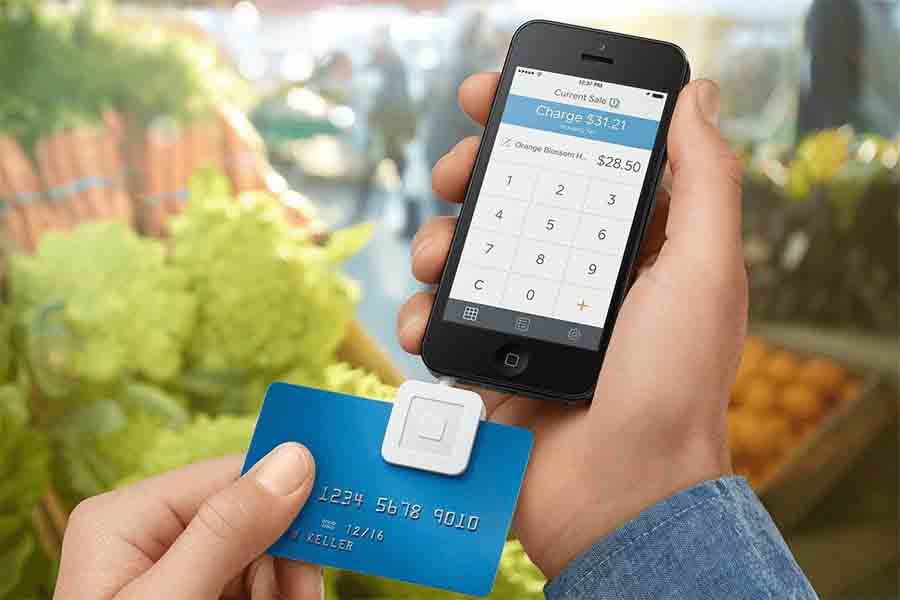
Square Reader for magstripe: This is the iconic small, white square device that plugs into your phone or tablet’s headphone jack (or lightning port with an adapter) for swiping older credit cards. It’s often free upon signing up, making it ideal for mobile businesses or those just starting out.
-
Square Reader for contactless and chip: This compact device connects wirelessly via Bluetooth and accepts tap payments (NFC) and chip cards (EMV). It’s a significant upgrade for speed and security, crucial in today’s contactless-preferred environment.
-
Square Stand: This transforms your iPad into a complete point-of-sale (POS) system, integrating an iPad holder with a built-in magstripe reader and optional accessories like a receipt printer and cash drawer. Perfect for retail and counter-service businesses.
-
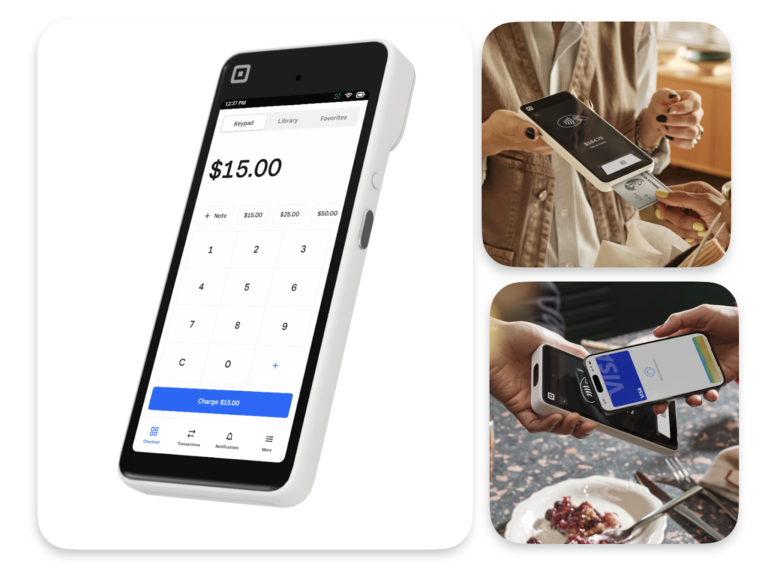
Square Terminal: An all-in-one device that handles payments, prints receipts, and runs your POS software. It’s fully portable and great for businesses needing flexibility without a separate tablet.
-
Square Register: A sophisticated, dual-screen POS system that offers a dedicated display for both the cashier and the customer, providing a professional and efficient checkout experience for larger operations.
Your choice of hardware should align with your business volume, mobility needs, and desired customer experience. Most businesses will benefit from at least the Square Reader for contactless and chip to accommodate modern payment methods.
Navigating the Square Point-of-Sale App
The Square Point-of-Sale (POS) app is the command center for your credit card transactions, available on iOS and Android devices. This intuitive app allows you to:
-
Create Items: Input your products or services, including prices, descriptions, and even inventory tracking. Organized item libraries make checkout faster and reduce errors.
-
Process Sales: Easily add items to a cart, apply discounts, and select payment methods. The app seamlessly integrates with your chosen hardware to prompt customers for their card information.
-
Manage Orders: Track open orders, customize modifiers for food items, or manage appointments.
-
Generate Reports: Access real-time sales data, understand your busiest hours, and monitor product performance. This data is invaluable for making informed business decisions.
-
Manage Employees: Set up individual employee accounts with specific permissions, track their sales, and manage their time clocks.
Familiarizing yourself with the app’s features is paramount to efficient credit card processing and overall business management. Regular updates from Square continually enhance its capabilities, so staying abreast of new features can further optimize your operations.
Processing Credit Card Transactions with Confidence
Processing credit card payments with Square is designed to be user-friendly, but understanding the nuances of different transaction types and ensuring security are key to building customer trust and protecting your business.
Swipe, Dip, Tap: Understanding Transaction Types
Square supports all major credit card transaction methods, each with its own advantages and security features:
-
Swipe (Magstripe): The traditional method where a card’s magnetic stripe is swiped through a reader. While still supported, it offers the lowest level of security and is increasingly being phased out due to higher fraud risk.
-
Dip (EMV Chip): The industry standard for in-person transactions, where a card’s EMV chip is inserted into the reader. EMV chips generate a unique encryption code for each transaction, significantly reducing counterfeit card fraud. This is generally the most secure physical card transaction method.
-
Tap (NFC/Contactless): Also known as “tap to pay,” this method involves holding a contactless card or mobile wallet (like Apple Pay or Google Pay) near the reader. NFC transactions are fast, convenient, and provide the same high level of security as EMV chip transactions.
-
Manual Entry: When a physical card isn’t present, you can manually enter the card number, expiration date, and CVV into the Square POS app. This method carries the highest processing fees due to increased fraud risk and should be used judiciously, often with additional verification steps.
-
Online Payments: Square also facilitates online credit card payments through its e-commerce solutions, invoicing, and payment links, allowing customers to pay remotely and securely.
Encouraging customers to use chip or contactless payments whenever possible is a best practice to minimize fraud and ensure compliance with liability shifts.
Ensuring Secure and Compliant Transactions
Security is paramount in credit card processing. Square is PCI DSS compliant, meaning it adheres to the stringent security standards set by major credit card companies. When you use Square, much of the burden of compliance is handled for you, but there are still steps you must take:
-
Use EMV and NFC: Always prioritize chip and contactless transactions. If you process a magstripe transaction when a chip card is present, you may be liable for any resulting fraud.
-
Keep Software Updated: Regularly update your Square POS app and hardware firmware to ensure you have the latest security patches and features.
-
Physical Security: Keep your Square hardware in a secure location, especially when not in use. Protect your devices and network.
-
Data Protection: Never store sensitive cardholder data on your own systems. Square handles the encryption and storage of this information securely.
-
Be Vigilant: Train your staff to identify suspicious activity or unusual transaction patterns.
-
Implement Best Practices: For manual entry or phone orders, consider requesting additional verification like the customer’s billing address or a photo ID if appropriate and legally permissible.
Adhering to these security measures not only protects your business from financial loss but also builds trust with your customer base.
Handling Returns, Disputes, and Voids
Managing the aftermath of a transaction is just as important as processing the initial payment. Square provides straightforward tools for:
-
Voids: If an error occurs immediately after a transaction, you can void it before it settles (typically before the end of your business day). This cancels the transaction entirely, and funds are not transferred.
-
Refunds: For settled transactions, you can issue a full or partial refund. Square processes the refund back to the original payment method. Be aware that the original processing fees for the transaction are typically not returned when a refund is issued, impacting your net profit.
-
Disputes (Chargebacks): When a customer disputes a charge with their bank, it results in a chargeback. Square assists businesses by providing tools to submit evidence to the customer’s bank to fight illegitimate chargebacks. Understanding the reasons for disputes and providing clear evidence (e.g., sales receipts, proof of delivery, communication logs) is crucial for a successful resolution. Proactive customer service can often prevent disputes before they escalate.
Efficiently managing these scenarios is vital for maintaining good customer relations and protecting your business’s financial integrity.
Optimizing Square’s Financial Tools Beyond Basic Processing
Square isn’t just a payment processor; it’s a comprehensive financial ecosystem designed to empower small and medium-sized businesses. Leveraging its integrated tools can significantly enhance your financial management and operational efficiency.
Mastering Transaction Reporting and Analytics
At the heart of effective business finance lies data. Square’s robust reporting features provide invaluable insights into your sales performance:
-
Real-Time Sales Data: Access up-to-the-minute information on sales, average transaction size, and payment types.
-
Customizable Reports: Generate reports on specific timeframes, product categories, or employee performance. This allows you to identify trends, popular products, and peak sales periods.
-
Customer Insights: Track customer purchase history, frequency, and spending habits, helping you tailor marketing efforts and loyalty programs.
-
Tax Reporting: Square simplifies tax season by generating sales tax reports, making it easier to prepare for filing.
Regularly reviewing these reports is essential for making data-driven decisions, optimizing inventory, refining marketing strategies, and understanding the financial health of your business.
Understanding Square’s Fee Structure and Payouts
Transparency in fees is a cornerstone of Square’s appeal. Understanding how they work is crucial for managing your profit margins:
-
Per-Transaction Fees: Square typically charges a flat rate per transaction, which varies slightly based on the transaction type (e.g., in-person swipe/chip/tap vs. manual entry vs. online). There are no monthly fees, setup fees, or hidden costs, making it highly accessible for businesses of all sizes.
-
Payout Schedule: Funds from credit card transactions are typically deposited into your linked bank account within 1-2 business days. Square also offers an instant deposit option for a small additional fee, allowing you to access funds immediately.
-
No PCI Compliance Fees: Unlike many traditional processors, Square does not charge separate PCI compliance fees, as it handles most of the complex requirements for you.
By clearly understanding Square’s fee structure, you can accurately project your costs and price your products and services accordingly, ensuring healthy profit margins.
Leveraging Integrated Features: Invoicing, Online Store, and Loyalty Programs
Square’s strength lies in its ecosystem of integrated tools that extend beyond basic POS functionality:
-
Invoicing: Send professional invoices directly from your Square account, track payment status, and accept online credit card payments. This is invaluable for service-based businesses or those that offer payment terms.
-
Online Store: Easily create a full-fledged e-commerce website with Square Online, seamlessly integrating your inventory and payment processing. This allows you to expand your reach beyond your physical location.
-
Loyalty Programs: Implement a customer loyalty program directly through Square, rewarding repeat business and encouraging customer retention. This is a powerful tool for building a loyal customer base.
-
Gift Cards: Sell physical or digital gift cards through Square, providing an additional revenue stream and attracting new customers.
-
Appointments: For service businesses, Square Appointments offers online booking, automated reminders, and integrated payment processing.
These integrated features empower businesses to manage more aspects of their operations from a single platform, saving time, reducing administrative overhead, and fostering growth.
The Square Debit Card: A Strategic Tool for Business Expenses
While “Square credit card” is often interpreted as accepting credit cards via Square, the company also offers the Square Debit Card, which serves as a powerful financial management tool for business owners. It provides a direct link to your Square balance, offering immediate access to your earnings for business expenses.
What is the Square Debit Card and How It Works
The Square Debit Card is a physical Visa debit card linked directly to your Square balance. Instead of waiting for funds to transfer to your traditional bank account, your sales proceeds are available on your Square Debit Card almost instantly after a transaction.
-
Instant Access: Once a payment is processed and deposited into your Square balance, you can use those funds immediately with your Square Debit Card, without waiting for bank transfers.
-
Works Anywhere Visa is Accepted: You can use the Square Debit Card for online purchases, in-store payments, and ATM withdrawals, just like any other debit card.
-
No Monthly Fees: There are no monthly fees, subscription fees, or minimum balance requirements associated with the Square Debit Card.
It essentially acts as a direct conduit from your business earnings to your business spending, designed to simplify cash flow management for entrepreneurs.
Benefits for Managing Business Finances
The Square Debit Card offers several distinct advantages for business owners:
-
Improved Cash Flow: Instant access to funds means you can pay for supplies, utilities, or unexpected expenses without delay, improving your overall cash flow management.
-
Simplified Expense Tracking: All transactions made with the Square Debit Card are automatically recorded and categorized within your Square dashboard, making expense tracking and reconciliation much easier, especially during tax season.
-
Separate Business and Personal Expenses: By using the Square Debit Card exclusively for business purchases, you create a clear separation between personal and business finances, a critical practice for accurate accounting and tax preparation.
-
Budgeting Assistance: Seeing your available balance in real-time can help you stay within your budget for various business categories.
-
Eligibility for Square Capital: Consistent use of Square for payments and utilizing features like the Square Debit Card can sometimes contribute to your eligibility for Square Capital loans, demonstrating financial activity and health.
The Square Debit Card effectively closes the loop on your Square financial ecosystem, enabling you to not just accept payments but also manage your outflow efficiently.
Integrating with Your Square Balance and Cash Flow
The Square Debit Card is seamlessly integrated into your Square balance. When you receive payments via Square, those funds become part of your available balance. You can then choose to:
-
Spend directly with the Square Debit Card.
-
Transfer funds to your linked bank account.
-
Hold funds within your Square balance for future use.
This flexibility provides complete control over your cash flow. For businesses with fluctuating income or immediate expense needs, the instant access offered by the Square Debit Card can be a game-changer, preventing overdrafts or delays in critical payments. It simplifies the movement of money within your business, allowing you to focus more on operations and less on waiting for funds to clear.
Advanced Strategies and Future-Proofing Your Business with Square
Beyond its core payment processing and immediate financial tools, Square offers a suite of advanced features and integrations designed to support business growth and ensure long-term sustainability. Strategic utilization of these offerings can transform your Square ecosystem into a powerful engine for scaling.
Exploring Square Capital for Growth Funding
One of Square’s most compelling offerings for growing businesses is Square Capital. Based on your processing history and financial health within the Square ecosystem, Square Capital can offer business loans to help you fund initiatives like:
-
Inventory expansion: Purchasing more stock to meet growing demand.
-
Equipment upgrades: Investing in new machinery or technology.
-
Marketing campaigns: Funding advertising to reach a wider audience.
-
Storefront renovations: Improving your physical location.
The application process is typically streamlined, and repayment is often automatically deducted as a percentage of your daily Square sales, making it manageable and tied directly to your business performance. Access to capital is often a significant hurdle for small businesses, and Square Capital provides an accessible and flexible solution for those who qualify based on their consistent use of Square for payments.
Integrating Payroll and Team Management
As your business grows, so does your team, and managing payroll can become complex. Square Payroll offers an integrated solution to simplify this crucial aspect of business finance:
-
Automated Payroll: Pay employees and contractors with ease, including direct deposit and automatic tax filings. Square handles federal and state tax calculations and submissions, reducing the administrative burden.
-
Time Tracking: Employees can clock in and out directly through the Square POS app or a dedicated Square Team App, seamlessly integrating with payroll for accurate wage calculations.
-
Team Management: Create employee profiles, manage permissions for POS access, and track individual sales performance.
By integrating payroll with your existing Square account, you centralize financial management, save time, and ensure compliance, allowing you to focus on leading your team rather than wrestling with spreadsheets and tax forms.
Scaling Your Operations with Square’s Ecosystem
Square’s platform is designed to scale with your business. As you expand, its various tools can be adapted to meet evolving needs:
-
Multi-Location Management: Manage multiple business locations from a single Square dashboard, tracking sales, inventory, and employees across all sites.
-
API Integrations: For businesses with unique needs, Square’s robust API (Application Programming Interface) allows for custom integrations with other software, extending its functionality even further.
-
Specialized Software: Beyond the core POS, Square offers specialized solutions like Square for Retail (with advanced inventory features), Square for Restaurants (with table management and kitchen display systems), and Square Appointments (for service businesses). These industry-specific solutions provide tailored features to optimize operations.
-
Hardware Expansion: Easily add more card readers, POS systems, printers, or cash drawers as your business volume increases.
By embracing Square’s scalable ecosystem, businesses can confidently grow without outgrowing their financial management tools, maintaining efficiency and control at every stage.

Conclusion
The journey of understanding “how to use Square credit card” ultimately leads to a deeper appreciation for Square as a holistic financial partner for modern businesses. From the initial swipe, dip, or tap of a customer’s credit card to the strategic management of business expenses via the Square Debit Card, and from insightful analytics to powerful funding solutions like Square Capital, the platform offers a comprehensive suite of tools.
By diligently setting up your account, mastering transaction processing, and strategically leveraging Square’s integrated features, you empower your business with efficiency, security, and a clear path to financial growth. Square simplifies the complexities of credit card transactions and business finance, allowing entrepreneurs to focus on what they do best: building and growing their ventures in an increasingly cashless world. Embrace the full potential of Square, and transform the way your business handles money.
aViewFromTheCave is a participant in the Amazon Services LLC Associates Program, an affiliate advertising program designed to provide a means for sites to earn advertising fees by advertising and linking to Amazon.com. Amazon, the Amazon logo, AmazonSupply, and the AmazonSupply logo are trademarks of Amazon.com, Inc. or its affiliates. As an Amazon Associate we earn affiliate commissions from qualifying purchases.