
In an era defined by digital convenience and instant access, managing healthcare expenses, particularly prescription costs, can often feel like navigating a complex, archaic system. Enter GoodRx, a groundbreaking technology solution that has revolutionized how millions access affordable medication. Far more than just a discount provider, GoodRx is a sophisticated digital platform—available as a mobile app and website—designed to demystify prescription pricing and empower consumers with unprecedented transparency and savings. This article serves as your comprehensive tutorial, guiding you through the ins and outs of leveraging GoodRx as a powerful tech tool to take control of your pharmaceutical expenditures. We will explore its interface, features, and the seamless digital processes that make it an indispensable part of modern health management.
Getting Started with GoodRx: Setting Up Your Digital Savings Tool
The journey to smarter prescription savings begins with integrating GoodRx into your digital ecosystem. Whether you prefer the agility of a mobile application or the broader view of a web interface, GoodRx offers a user-friendly entry point designed for immediate utility. Understanding the initial setup and familiarizing yourself with its core interface are crucial steps in unlocking its full potential.
Downloading the App or Visiting the Website
The first step in using GoodRx is accessing its platform. For smartphone users, the GoodRx app is available for free download on both the Apple App Store and Google Play Store. The app provides the ultimate convenience, offering on-the-go access to pricing information and digital coupons directly from your device. Its design is optimized for mobile interaction, featuring intuitive touch controls and location-based services that enhance the user experience. Simply search “GoodRx” in your respective app store, initiate the download, and follow the standard installation prompts.
Alternatively, for those who prefer a desktop experience or do not use a smartphone, the GoodRx website (www.goodrx.com) offers the full suite of features through any standard web browser. The website mirrors the app’s functionality, providing a clear, navigable interface for searching, comparing, and managing prescriptions. Both platforms are engineered for accessibility, ensuring that regardless of your preferred digital medium, the power of GoodRx is readily available.
Creating an Account for Enhanced Features
While GoodRx can be used anonymously for basic price lookups, creating a free account significantly enhances your experience and unlocks a range of personalized features. Registration is a straightforward digital process, typically requiring an email address and a password. Once logged in, your account acts as a central hub for managing your prescription history, saving favorite pharmacies, setting up price alerts, and accessing exclusive offers like GoodRx Gold.
An account also enables the synchronization of your prescription data across multiple devices. For instance, you could search for a prescription on your desktop, save it, and then easily access that information from your mobile app when you’re at the pharmacy. This seamless data transfer is a key technological advantage, ensuring continuity and convenience regardless of where or when you access the service. Moreover, your account can store digital versions of your discount cards, eliminating the need for physical printouts and streamlining the redemption process at the pharmacy counter.
Understanding the User Interface (UI)
GoodRx prides itself on a clean, intuitive user interface (UI) designed for quick and efficient navigation. Upon opening the app or visiting the website, you’ll typically be greeted by a prominent search bar. This is your primary tool for finding prescription medications. Below the search bar, you might find trending searches, popular medications, or quick access to features like the GoodRx Gold program or telehealth services.
The layout is generally organized with clear icons and labels, guiding users through the process of searching, comparing, and saving. Key elements include:
- Search Bar: For entering medication names.
- Navigation Menu/Tabs: Often found at the bottom of the app or top of the website, these provide access to your saved prescriptions, account settings, GoodRx Gold, and a pharmacy locator.
- Result Displays: When you search for a drug, results are presented in an easy-to-read list or map view, showing prices at various pharmacies. Colors and clear typography are used to highlight savings and important information.
The design philosophy behind GoodRx’s UI is to minimize friction and maximize clarity, allowing users of all tech proficiencies to quickly grasp how to find and utilize the information they need. This focus on user-centric design is fundamental to its success as a widely adopted digital health tool.
Navigating the Digital Pharmacy: Finding Your Best Deals
With your GoodRx platform set up, the next step involves actively using its core functionality: searching for prescriptions and comparing prices. This process leverages sophisticated algorithms and a vast database to present you with the most cost-effective options, transforming what was once a time-consuming manual effort into a few taps or clicks.
Searching for Your Prescription
The central feature of GoodRx is its robust prescription search engine. To begin, simply type the name of your medication into the search bar. As you type, the platform often provides autofill suggestions, helping you accurately identify the drug. Once you’ve selected the correct medication, you’ll typically be prompted to specify key details:
- Dosage: The strength of the medication (e.g., 10mg, 500mg).
- Quantity: The number of pills or units (e.g., 30, 60, 90).
- Form: Tablet, capsule, liquid, cream, etc.
These specifications are crucial because prices can vary significantly based on these factors. GoodRx’s backend technology processes these inputs against its extensive database of drug prices from various pharmacies, ensuring the generated results are tailored to your specific prescription.
Comparing Prices and Pharmacies
Once you’ve entered your prescription details, GoodRx instantly displays a list of prices at local pharmacies, often accompanied by a map view. This comparison feature is where GoodRx truly shines as a technological marvel, aggregating real-time pricing data from thousands of pharmacies across the nation. For each pharmacy, you’ll see:
- The discounted price: The price you would pay using the GoodRx coupon.
- The original retail price: Often shown alongside to highlight the savings.
- Pharmacy name and location: Making it easy to find a convenient pick-up spot.
- Ratings/Reviews: Sometimes included for individual pharmacies, offering community feedback.
The list is usually sorted by the lowest price, but you can often filter or re-sort based on other criteria, such as proximity. This dynamic data presentation empowers you to make an informed decision, selecting not just the cheapest option, but also the most practical one based on your location and preferences. The ability to visualize and compare multiple options simultaneously is a core strength of this digital platform.
Utilizing GoodRx Coupons and Codes
The core mechanism for savings on GoodRx comes in the form of digital coupons or discount codes. Once you’ve identified the best price at your chosen pharmacy, GoodRx provides you with a unique coupon or a set of digital codes. These are not traditional printable coupons that you clip from a newspaper; they are digitally generated identifiers specific to your medication and pharmacy.
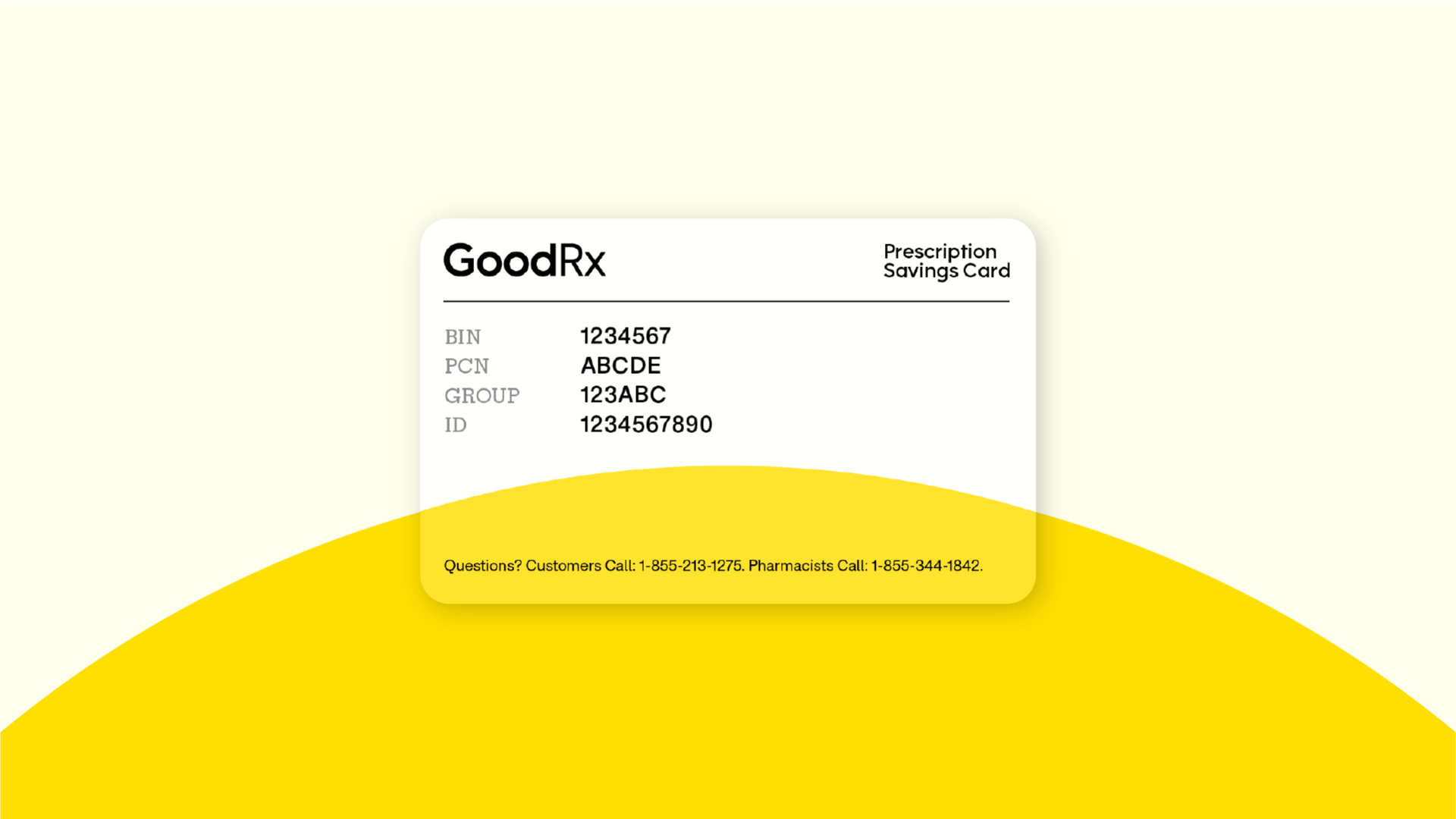
In the app, you can simply tap to retrieve the coupon. On the website, you might print it, email it to yourself, or send it to your phone via text message. These digital coupons typically contain a BIN (Bank Identification Number), PCN (Processor Control Number), Group ID, and Member ID—all the necessary information for the pharmacy’s point-of-sale system to apply the discount. This digital infrastructure eliminates the need for physical cards or membership fees, making the discount redemption process incredibly streamlined and accessible.
Seamless Savings at the Pharmacy Counter: Digital Redemption
The final step in utilizing GoodRx is redeeming your digital coupon at the pharmacy. This process is designed to be as smooth as possible, bridging the gap between your digital search and the physical transaction. Understanding how to present your information and troubleshoot any minor issues ensures a hassle-free experience.
Presenting Your GoodRx Information
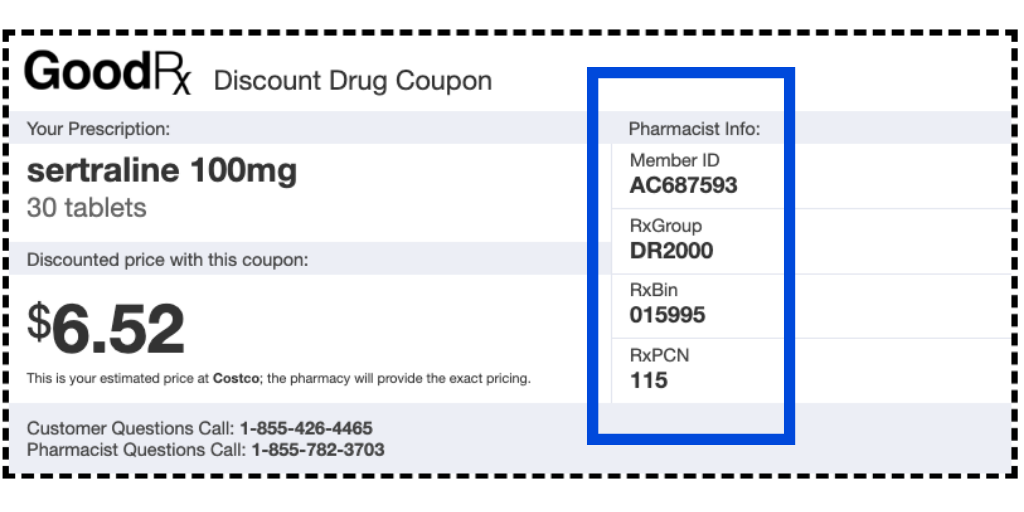
When you arrive at the pharmacy, simply present your GoodRx coupon to the pharmacist or technician. This can be done in several ways, all leveraging digital convenience:
- Show the app: The easiest method is to simply display the coupon directly on your smartphone screen. The pharmacist will key in the provided codes (BIN, PCN, Group ID, Member ID) into their system.
- Printout: If you prefer a physical copy or don’t have your phone, a printed version of the coupon works just as effectively.
- Text/Email: If you’ve sent the coupon details to your phone via text or email, you can open that message and show it to the pharmacist.
It’s important to present the GoodRx coupon before the pharmacy processes your prescription with your insurance. GoodRx discounts are generally not combinable with insurance, so you’ll typically choose to use one or the other based on which offers the better price. The pharmacist will then input the GoodRx codes, and your discounted price will be applied.
Troubleshooting Common Digital Redemption Issues
While the process is generally smooth, occasional hiccups can occur. Most are easily resolved:
- Pharmacist unfamiliarity: Some pharmacies, especially smaller or independent ones, might be less familiar with GoodRx. Politely explain that it’s a digital discount program and ask them to try inputting the BIN, PCN, and Group ID. You can also show them the “How It Works” section within the app or website.
- Pricing discrepancies: If the price at the counter doesn’t match what GoodRx quoted, confirm that the dosage, quantity, and specific drug (generic vs. brand) are exactly what you searched for. If everything matches, politely ask the pharmacist to re-enter the codes or double-check their system. GoodRx’s customer support can also be contacted directly for assistance.
- Technical glitches: In rare cases, a pharmacy’s system might temporarily have an issue. In such instances, you might need to try another pharmacy listed on GoodRx or check back later.
GoodRx’s technology team continuously works to ensure broad compatibility with pharmacy systems, but understanding these common points can help you navigate rare issues with confidence.
Linking GoodRx to Digital Wallets or Health Platforms
While GoodRx primarily functions as a standalone app, its developers are exploring integrations that enhance its digital utility. Some users might find ways to save their GoodRx card details or coupon information within digital wallet apps (like Apple Wallet or Google Pay) for even quicker access, though this isn’t an officially supported feature for all coupons.
Furthermore, as the digital health landscape evolves, there’s potential for GoodRx to integrate more deeply with broader health platforms or electronic health records (EHR) systems, allowing for a more holistic view of a patient’s medication regimen and cost-saving opportunities. This future-forward approach highlights GoodRx’s commitment to remaining at the forefront of health tech innovation.
Maximizing GoodRx Features: Beyond Basic Price Comparison
GoodRx is more than just a simple price comparison tool; it’s a comprehensive digital platform offering a suite of advanced features designed to enhance your medication management. Leveraging these additional functionalities can lead to even greater convenience and savings, further solidifying GoodRx’s role as a sophisticated health tech solution.
Setting Up Price Alerts and Reminders
For medications you take regularly, prices can fluctuate. GoodRx’s price alert feature is a crucial technological convenience. By setting up an alert for a specific drug, dosage, and quantity, GoodRx will notify you via email or app notification if the price drops below a certain threshold or if a better deal becomes available at a nearby pharmacy. This proactive monitoring eliminates the need for manual checks, ensuring you’re always getting the best possible price without constant vigilance.
Similarly, the app can help you manage your medication schedule through customizable reminders. This feature transforms GoodRx into a practical adherence tool, helping users remember to refill prescriptions before they run out or take their medication at specific times. Both price alerts and reminders exemplify how GoodRx integrates advanced notification systems to streamline health management.
Exploring GoodRx Gold and Telehealth Services
GoodRx has expanded its digital offerings beyond free coupons to include premium services. GoodRx Gold is a subscription program that offers even lower prices on thousands of prescriptions, often surpassing the savings from standard GoodRx coupons. It’s accessed through a monthly digital membership, which typically covers an entire family. This tiered service model allows users to choose the level of digital savings that best suits their needs, catering to those with higher prescription volumes or more expensive medications. The Gold program also centralizes all your family’s prescriptions under one digital account, simplifying management.
Additionally, GoodRx has ventured into telehealth, offering virtual doctor visits for various conditions. This service leverages digital communication technology to connect patients with licensed healthcare providers from the comfort of their homes. After a virtual consultation, if a prescription is needed, it can often be filled directly using GoodRx discounts, creating a seamless digital healthcare experience from diagnosis to discounted medication. This integration of virtual care and prescription savings showcases GoodRx’s ambition to be a holistic digital health partner.
Managing Multiple Prescriptions and Family Profiles
For individuals managing several medications or for families needing to track prescriptions for multiple members, GoodRx offers powerful organizational tools within your digital account. You can create and manage distinct profiles for each family member, securely storing their specific prescription needs, dosages, and pharmacy preferences.
This feature allows you to quickly switch between profiles to search for and save coupons for different individuals, preventing mix-ups and streamlining the entire process. Your account becomes a centralized digital repository for all your family’s medication information, making it easy to review prescription histories, compare past prices, and ensure everyone is getting the best deal on their necessary medications. This robust data management capability underscores GoodRx’s commitment to facilitating comprehensive digital health management.
Digital Security and Privacy: Using GoodRx Responsibly
In an age where digital data is both invaluable and vulnerable, understanding the security and privacy implications of any online service, especially one handling health-related information, is paramount. GoodRx takes user privacy seriously, implementing various measures to protect your data.
Protecting Your Personal Health Information (PHI)
GoodRx operates under strict privacy policies designed to safeguard your Personal Health Information (PHI). While you provide medication details to search for prices, GoodRx typically does not require sensitive identifiers like your full name, date of birth, or insurance policy number to use its basic coupon service. If you create an account, the information collected is primarily for service enhancement and personalization.
GoodRx employs industry-standard security protocols, including encryption, to protect data transmitted between your device and their servers. They are transparent about their data practices, which are generally focused on providing you with discount services, not selling individual health data to third parties. However, as with any online service, it’s crucial for users to review their privacy policy to understand how their data is collected, used, and protected.
Understanding Data Usage and Permissions
When you download the GoodRx app, it may request certain permissions, such as access to your location. This permission is primarily used to provide localized pharmacy prices and help you find nearby pharmacies quickly. Understanding and managing these permissions is a core part of responsible tech usage. You can often adjust app permissions within your device’s settings.
It’s also important to differentiate between GoodRx’s data usage for improving its services and its potential use of aggregated, de-identified data for broader market analysis or research, which is a common practice across many digital platforms. For the average user, the focus should remain on how their direct personal inputs contribute to their savings experience while trusting GoodRx’s commitment to responsible data handling. Staying informed about app updates and privacy policy changes ensures you’re always aware of how your digital health tool is managing your information.
In conclusion, GoodRx stands as a shining example of how technology can simplify complex systems and empower individuals. By providing an intuitive digital platform for prescription price comparison, coupon redemption, and medication management, it transforms the often-daunting task of affording medications into a transparent, manageable process. From its accessible app and web interface to its advanced features like price alerts and telehealth integrations, GoodRx continues to evolve as a vital digital companion in the journey towards smarter, more affordable healthcare. Embracing this tech tool is not just about saving money; it’s about regaining control and peace of mind in managing your health in the digital age.
aViewFromTheCave is a participant in the Amazon Services LLC Associates Program, an affiliate advertising program designed to provide a means for sites to earn advertising fees by advertising and linking to Amazon.com. Amazon, the Amazon logo, AmazonSupply, and the AmazonSupply logo are trademarks of Amazon.com, Inc. or its affiliates. As an Amazon Associate we earn affiliate commissions from qualifying purchases.