
In an increasingly digital world, managing personal health and expenses has evolved significantly. From wearable fitness trackers to online doctor consultations, technology is reshaping how we approach wellness. Among these innovations, applications designed to streamline prescription costs have emerged as invaluable tools. GoodRx stands out as a leading example, a platform engineered to help consumers navigate the often-complex and opaque landscape of prescription drug pricing. This guide delves into the practical aspects of leveraging GoodRx specifically at Walgreens, a ubiquitous pharmacy chain, to ensure you’re making the most of this powerful digital resource. We’ll explore the technology behind GoodRx, provide a step-by-step tutorial on its usage, and offer insights into optimizing your experience within the broader context of digital health management.
Understanding GoodRx: Your Digital Prescription Companion
At its core, GoodRx is a technology platform designed to aggregate prescription drug prices and provide digital coupons, making medication more affordable and accessible. It’s an exemplary piece of software that simplifies a historically complex process, placing pricing power directly into the hands of the consumer.
What is GoodRx and How Does it Work?
GoodRx functions as an advanced price comparison engine for prescription medications. When you use GoodRx, you’re tapping into a vast database that pulls current pricing from thousands of pharmacies across the United States. This database is continuously updated, reflecting real-time pricing and available discounts. The app and website then present you with a range of options for your specific medication, often revealing significant price discrepancies between different pharmacies, even those located just blocks apart.
The “magic” of GoodRx lies in its coupon generation system. GoodRx isn’t insurance; rather, it’s a discount program that negotiates prices directly with pharmacies and pharmaceutical benefit managers (PBMs). When you search for a medication, GoodRx displays a list of prices at various pharmacies. Each listing comes with a unique discount code or coupon. This digital coupon acts like a virtual voucher, which you present to the pharmacist. The pharmacist then enters the codes into their system, bypassing standard cash prices or even some insurance co-pays, and applies the GoodRx discounted rate. This process leverages existing pharmacy infrastructure and PBM networks through a technological interface that is remarkably user-friendly from the consumer’s perspective.
The technology behind GoodRx also allows for seamless integration with user profiles, prescription tracking, and even price alerts, transforming it from a simple coupon provider into a comprehensive digital health savings tool. It demystifies drug pricing by centralizing information and making it actionable through a few taps on a screen.
Why Walgreens? A Common User Scenario
Walgreens is one of the largest pharmacy chains in the United States, boasting thousands of locations in nearly every community. Its widespread presence makes it a frequent destination for prescription fulfillment. For many GoodRx users, Walgreens represents a convenient and accessible option. The integration of GoodRx at Walgreens pharmacies is robust, making it a common and effective scenario for savings.
When a GoodRx user searches for a medication, Walgreens locations often appear prominently in the search results, reflecting their competitive pricing and participation in the GoodRx network. The ease of access, combined with the familiarity of the brand, makes Walgreens a natural choice for many individuals seeking to utilize their GoodRx coupons. Understanding how to smoothly navigate the process at Walgreens specifically can save time and reduce potential friction at the pharmacy counter, ensuring that the digital convenience translates into real-world efficiency. This synergy between a powerful digital tool and a major retail presence underscores the evolution of consumer-driven healthcare management.
Getting Started with the GoodRx App
The journey to lower prescription costs with GoodRx begins with its intuitive mobile application. The app is meticulously designed for ease of use, guiding users through the process from initial download to presenting a digital coupon at the pharmacy.
Downloading and Setting Up Your Profile
The GoodRx app is readily available for both iOS and Android devices, accessible through the Apple App Store and Google Play Store, respectively. The download and installation process is straightforward, much like any other mobile application. Once installed, opening the app prompts users to either sign up for a new account or log in. While it’s possible to use GoodRx anonymously for basic price comparisons, creating an account unlocks a suite of enhanced features and a more personalized experience.
Setting up your profile involves providing basic information, typically an email address and creating a password. You may also be prompted to enter your zip code, which is crucial for GoodRx to provide localized pricing information relevant to your area. The app may also ask for optional information, such as your current medications, to help you track them and set up refill reminders. This initial setup is quick and designed to get you to the core functionality—finding savings—as efficiently as possible. GoodRx’s user interface prioritizes clarity and minimal steps, ensuring that even those less technologically savvy can navigate it with ease.
Searching for Medications and Comparing Prices
The core functionality of the GoodRx app is its medication search and price comparison tool. From the app’s home screen, a prominent search bar invites you to “Search for a drug.” You can type in the generic or brand name of your prescription. As you type, the app often provides autofill suggestions, speeding up the process.
Once you’ve selected your medication, GoodRx will prompt you for specific details:
- Dosage: For example, 20mg, 50mg.
- Quantity: Such as 30 pills, 90 pills.
- Form: Tablet, capsule, liquid, etc.
These details are critical because prescription prices can vary significantly based on these parameters. After entering this information, the app will display a list of prices for your medication at various pharmacies in your vicinity, ordered by the lowest cost. Each listing includes the pharmacy name (e.g., Walgreens, CVS, Walmart), the discounted price, and the original estimated retail price, clearly showing your potential savings. The interface is clean, making it easy to scan and compare options at a glance. You can further refine your search results by filtering based on factors like pharmacy chain or specific location, giving you precise control over your options.
Locating the Best Deals Near You
GoodRx integrates location-based services to enhance the user experience. By granting the app access to your device’s location, it can automatically detect your current position and display relevant pharmacy prices nearby. This feature is particularly useful when you’re on the go or need to pick up a prescription while traveling.
For each pharmacy listed in your search results, GoodRx typically provides additional information:
- Address: Exact street address.
- Phone Number: For calling ahead if needed.
- Directions: Often linking directly to your device’s mapping application (e.g., Google Maps, Apple Maps) for turn-by-turn navigation.
This robust integration of mapping technology ensures that finding the best deal isn’t just about identifying the lowest price, but also about the practical logistics of getting to the pharmacy. The app empowers users to make informed decisions that balance cost savings with convenience, all within a single, seamless digital experience.
Seamless Integration: Using GoodRx at the Walgreens Pharmacy Counter
The moment of truth for any digital coupon service is its real-world application. GoodRx excels in this area, providing a streamlined process for presenting your digital coupons at a Walgreens pharmacy.
Presenting Your Digital Coupon
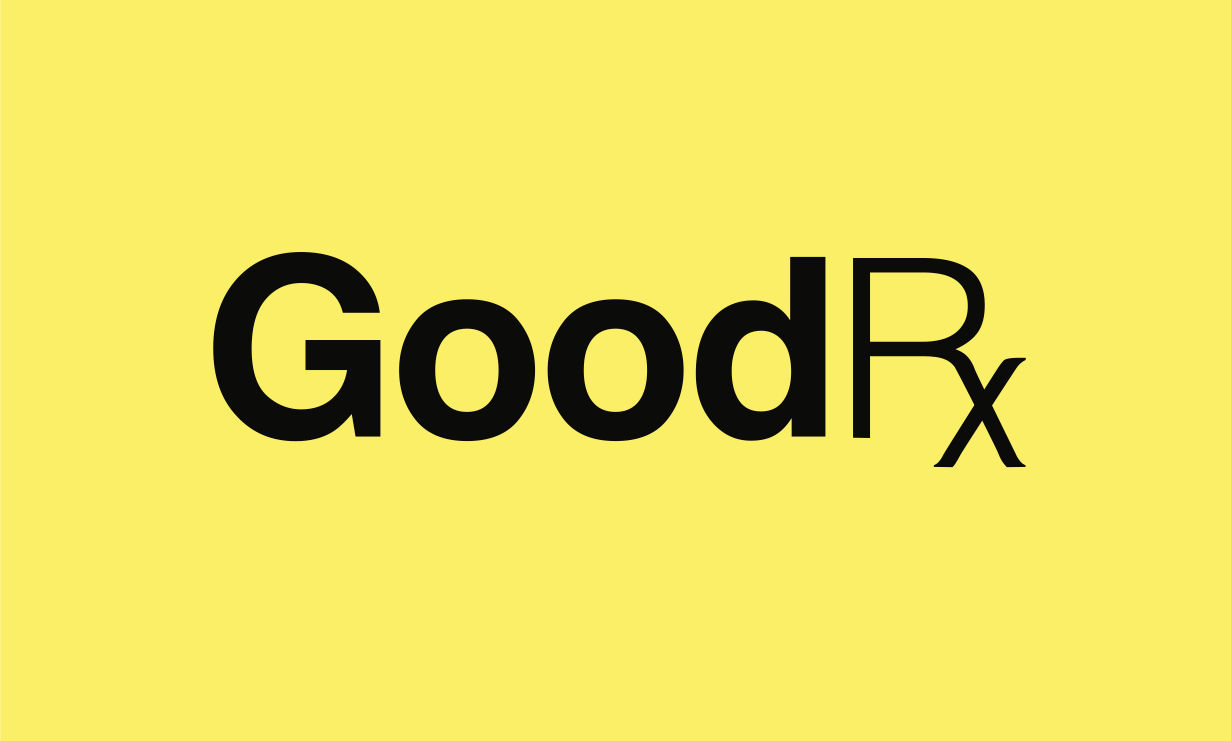
Once you’ve identified the best price for your medication at Walgreens through the GoodRx app, the next step is to obtain your digital coupon. Each pharmacy listing in the app will have an option to “Get Free Coupon.” Tapping this will reveal the unique coupon details, which typically include:
- A numerical discount code (Rx Group, Rx BIN, PCN, Member ID): These are the critical pieces of information the pharmacist will need to enter into their system.
- A barcode or QR code: Many pharmacies, including Walgreens, have scanners that can read these codes directly from your phone screen.
- Option to email or print the coupon: If you prefer a physical copy or don’t want to rely solely on your phone.
When you arrive at the Walgreens pharmacy counter, simply inform the pharmacy technician or pharmacist that you have a GoodRx coupon. You can then:
- Show your phone: Display the digital coupon directly on your app screen. The pharmacist can either scan the barcode/QR code or manually input the numerical codes.
- Provide the codes verbally: If scanning isn’t an option, clearly read out the Rx Group, Rx BIN, PCN, and Member ID to the pharmacist.
- Present a printed coupon: If you chose to email and print the coupon, hand the physical printout to the pharmacist.
The process is generally quick and efficient. Walgreens pharmacists are highly familiar with GoodRx and regularly process these digital discounts, making the experience smooth for most users.
Troubleshooting Common Scenarios
While using GoodRx at Walgreens is typically straightforward, occasional issues can arise. Knowing how to troubleshoot these can save time and frustration:
- Pharmacist is Unfamiliar: Though rare at Walgreens, if a pharmacist seems unfamiliar, politely explain that it’s a discount card and provide the specific numerical codes. You can also point to the GoodRx logo or information on your screen.
- Coupon Doesn’t Work/Price is Different:
- Double-check details: Ensure the dosage, quantity, and specific medication form on your coupon exactly match your prescription. A small discrepancy can lead to a different price.
- Verify the pharmacy: Confirm you’re at the exact Walgreens location specified on your coupon, as prices can vary by store.
- GoodRx is not insurance: Remind the pharmacist that GoodRx functions as a cash price discount, not insurance. Sometimes, insurance processes differently, and they might default to trying your insurance first. You must explicitly request to use GoodRx instead of insurance if GoodRx offers a better price.
- Contact GoodRx support: If the issue persists, GoodRx has an excellent customer support line (often provided on the coupon itself or within the app) that can mediate directly with the pharmacy.
- App/Phone Issues: If your phone battery dies or the app isn’t loading, having a screenshot of the coupon or a printed copy as a backup can be a lifesaver.
Understanding these potential hiccups and having a strategy to address them ensures a more seamless experience and reinforces the reliability of the digital tool.
Understanding Different GoodRx Options
GoodRx offers a few tiers and types of savings that are important to distinguish for maximum benefit:
- Standard GoodRx Coupons (Free): These are the most common and are completely free to use. They provide significant discounts on a wide range of generic and brand-name medications. This is what most users interact with.
- GoodRx Gold (Subscription Service): For a monthly fee, GoodRx Gold offers even deeper discounts on thousands of prescriptions, often at a lower price than the free coupons. It’s particularly beneficial for individuals or families with multiple prescriptions or high-cost medications. The Gold membership is accessible through the same app, providing a digital ID card to present at the pharmacy.
- Manufacturer Coupons and Patient Assistance Programs: GoodRx also helps users find and apply for manufacturer coupons and patient assistance programs, especially for expensive brand-name drugs. While these aren’t GoodRx’s direct discounts, the platform acts as a digital aggregator, linking users to these external savings opportunities.
When using GoodRx at Walgreens, you’ll primarily be using the free coupons or your GoodRx Gold membership. It’s crucial to remember that you typically cannot combine GoodRx with your health insurance or other discount programs. You choose whichever option (GoodRx, insurance, or another discount) provides the best price for that particular prescription. The GoodRx app usually makes this comparison clear by showing you the GoodRx price alongside an estimated insurance co-pay (if you input your insurance details).
Maximizing Your GoodRx Experience for Digital Health Management
GoodRx is more than just a coupon app; it’s a sophisticated digital tool that can integrate into a broader strategy for personal health management and financial wellness. Leveraging its full suite of features can significantly enhance your ability to manage prescriptions effectively and securely.
Managing Multiple Prescriptions and Refills
For individuals managing multiple ongoing prescriptions, the GoodRx app offers features that bring a new level of organization and control. Once you’ve used a coupon for a specific medication, the app can “remember” it. You can save your prescriptions to your profile, creating a digital medication list. This allows you to:
- Track past purchases: Easily view the medications you’ve picked up, along with the price you paid and the pharmacy used.
- Set refill reminders: GoodRx can send notifications when it’s time to refill a prescription, helping you stay on schedule and avoid lapses in medication. This proactive digital assistant feature is invaluable for adherence.
- Quickly re-search: For recurring prescriptions, you don’t need to re-enter all the details. A saved prescription allows for a quick tap to re-check the best current prices before each refill, ensuring you always get the lowest cost.
This level of digital organization transforms prescription management from a potentially chaotic task into a streamlined, automated process, putting the power of information at your fingertips.
Exploring Additional App Features
GoodRx continually evolves its platform, adding features that extend beyond basic price comparisons. These enhancements further cement its role as a holistic digital health resource:
- Price Alerts: If a medication you track is particularly expensive, or if you’re waiting for a better deal, you can set up price alerts. GoodRx will notify you if the price drops at a pharmacy in your area, or if a new, lower-cost coupon becomes available. This is a passive yet powerful way to save money without constant manual checking.
- Health Articles and Information: The app often includes a section with articles, guides, and information about various health conditions, medications, and general wellness tips. While not a substitute for professional medical advice, this content can be a valuable educational resource, expanding the app’s utility beyond just discounts.
- Telehealth Integration: GoodRx has expanded into telehealth services, offering access to online doctor visits for certain conditions. This allows users to consult with healthcare professionals, often at a reduced cost, and then potentially use GoodRx for any prescribed medications, creating an end-to-end digital healthcare solution.
- Pill Identifier: A practical feature for those who need to identify an unknown pill, perhaps found at home, GoodRx includes a pill identifier tool based on shape, color, and imprints.
These additional features demonstrate GoodRx’s commitment to leveraging technology to address multiple facets of healthcare access and affordability, positioning it as a versatile digital health companion.

Digital Security and Privacy Considerations
In an era of increasing digital awareness, understanding how an app handles your personal and health information is paramount. GoodRx, like any reputable health tech platform, emphasizes the importance of data security and user privacy.
- Data Encryption: GoodRx uses industry-standard encryption protocols to protect your personal information and prescription data transmitted through its app and website.
- HIPAA Compliance (where applicable): While GoodRx is not a covered entity under HIPAA in the same way a doctor’s office is, it adheres to best practices for data privacy, especially concerning sensitive health information. Users should review GoodRx’s privacy policy, which clearly outlines what data is collected, how it’s used, and with whom it might be shared (e.g., for analytics to improve services, or as required by law).
- Account Security: Users are encouraged to use strong, unique passwords for their GoodRx accounts and to enable any multi-factor authentication options if available. This adds an extra layer of protection against unauthorized access.
- Control over Information: GoodRx typically provides users with controls over their data, allowing them to review, modify, or delete certain personal information within their profile.
By being transparent about its data practices and implementing robust security measures, GoodRx aims to build user trust, ensuring that the convenience of digital savings doesn’t come at the cost of personal privacy. As users increasingly rely on digital tools for health management, understanding and trusting their data security protocols becomes a non-negotiable aspect of the user experience.
GoodRx at Walgreens epitomizes the convergence of digital innovation and practical consumer benefit. By mastering the app’s features and understanding its seamless integration with a major pharmacy chain, users can confidently navigate the complexities of prescription pricing, ensuring both health and financial well-being.
aViewFromTheCave is a participant in the Amazon Services LLC Associates Program, an affiliate advertising program designed to provide a means for sites to earn advertising fees by advertising and linking to Amazon.com. Amazon, the Amazon logo, AmazonSupply, and the AmazonSupply logo are trademarks of Amazon.com, Inc. or its affiliates. As an Amazon Associate we earn affiliate commissions from qualifying purchases.