
In the rapidly evolving landscape of personal finance, mobile payment applications like Cash App have become indispensable tools for many, offering convenience for sending, receiving, and managing money. While Cash App is primarily known for its seamless integration with debit cards and bank accounts, the option to link and utilize a credit card also exists, presenting both opportunities and important financial considerations. Understanding how to effectively leverage this feature, while remaining mindful of the associated costs and implications, is crucial for anyone looking to optimize their digital financial interactions. This comprehensive guide delves into the mechanics of using a credit card on Cash App, dissecting the process, financial implications, and best practices for responsible management.
Understanding Cash App and Credit Card Integration
Cash App, developed by Square Inc., has emerged as a powerhouse in the peer-to-peer (P2P) payment sector, alongside giants like PayPal and Venmo. Its intuitive interface and diverse functionalities have made it a go-to choice for millions. However, extending its utility to credit cards introduces a layer of financial complexity that merits careful examination.
What is Cash App?
At its core, Cash App is a mobile payment service that facilitates quick and easy money transfers between users. Beyond P2P payments, it offers a suite of financial services, including direct deposit, buying and selling Bitcoin, investing in stocks, and a customizable debit card known as the Cash Card, which is linked directly to the user’s Cash App balance. The platform’s simplicity and speed are its main draws, enabling users to split bills, pay friends, or even receive their paychecks directly into their Cash App account. While primarily designed for transactions using linked bank accounts or debit cards, the ability to add a credit card expands its utility, albeit with specific financial implications.
The Allure and Nuance of Credit Card Use on Payment Apps
The appeal of using a credit card on Cash App is multifaceted. For many, it offers an immediate solution when their debit card balance is low, or they need to make a payment and want to leverage their credit line. Credit cards also often come with rewards programs—cashback, travel points, or other incentives—which can be attractive. The idea of earning rewards on everyday transactions, even those processed through a P2P app, can be a significant draw.
However, the nuance lies in the financial architecture of these transactions. Unlike debit card transactions, which typically draw directly from your checking account, credit card transactions on P2P apps are often treated as “cash advances” by the credit card issuer, or at the very least, incur a service fee from the payment app itself. This distinction is paramount in the “Money” niche, as it directly impacts the cost of convenience and the overall financial health of the user. Understanding these nuances is the first step towards making informed decisions about integrating your credit card with Cash App.
Step-by-Step Guide to Linking Your Credit Card
Adding a credit card to your Cash App account is a straightforward process, designed for user convenience. However, it’s essential to follow each step carefully to ensure successful integration and security.
Initial Setup and Account Verification
Before you can add a credit card, ensure your Cash App account is fully set up and verified. This typically involves linking a bank account or debit card first, and providing necessary personal information for identity verification. Verification helps to increase transaction limits and enhances the security of your account, which is crucial when dealing with credit lines. If you’ve just installed the app, you’ll need to create an account, which involves providing your email or phone number, linking a debit card (this is often a prerequisite for full functionality), and entering your legal name and zip code. Some features, including higher transaction limits or the ability to invest, might require further identity verification, such as providing your date of birth and the last four digits of your Social Security Number. While not strictly mandatory for linking a credit card, a fully verified account offers a smoother and more secure experience.
Adding Your Credit Card Details Securely
Once your account is ready, you can proceed to link your credit card:
- Open Cash App: Launch the application on your smartphone.
- Navigate to the Banking Tab: Tap the banking icon (usually a house or a bank building) on the bottom left corner of the screen.
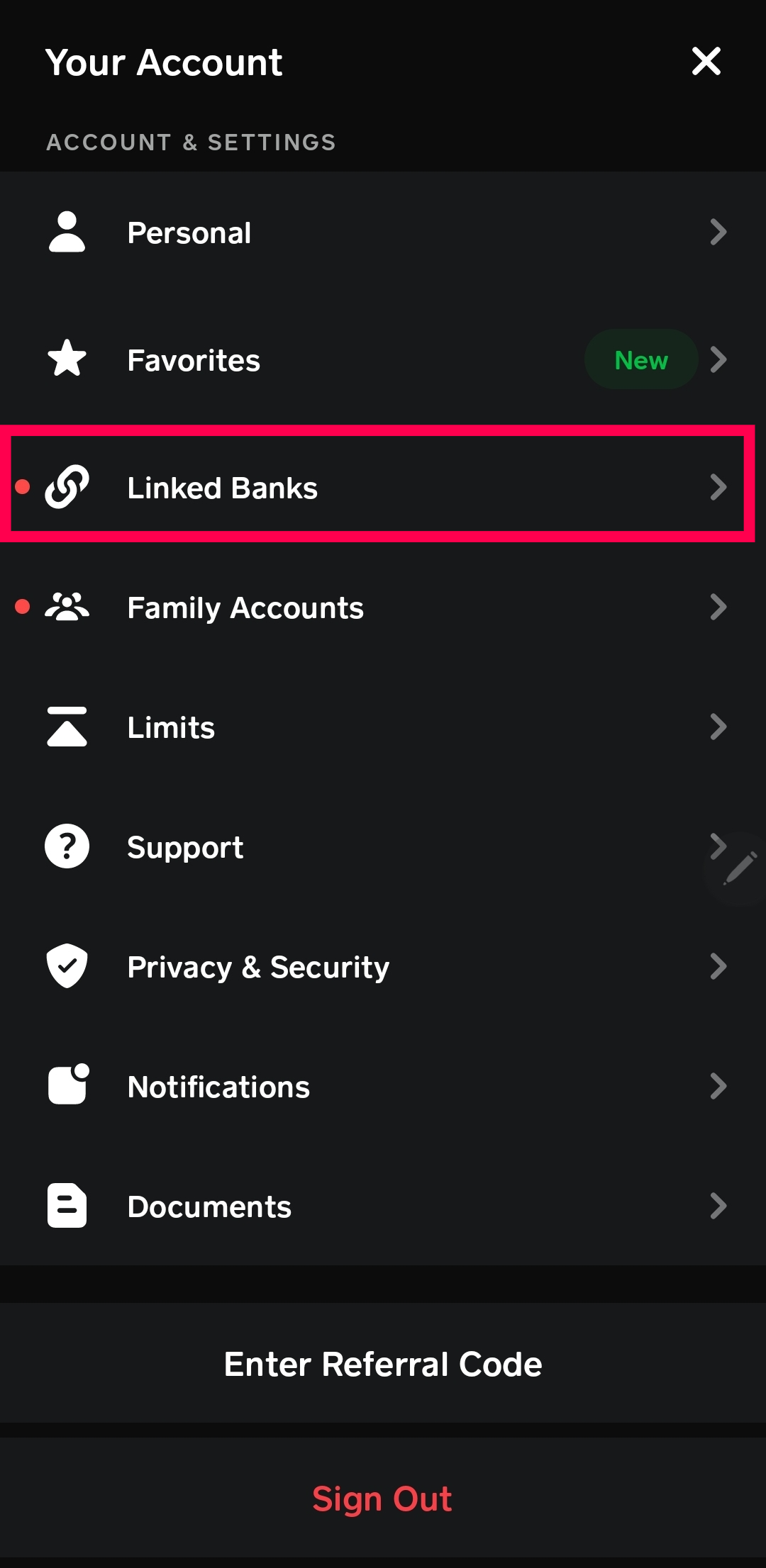
- Link Bank Option: Under the “Cash Balance” section, you’ll see an option like “Link Bank” or “Linked Accounts.” Tap on this.
- Add Credit Card: Look for an option that says “Link Credit Card.” Tap it.
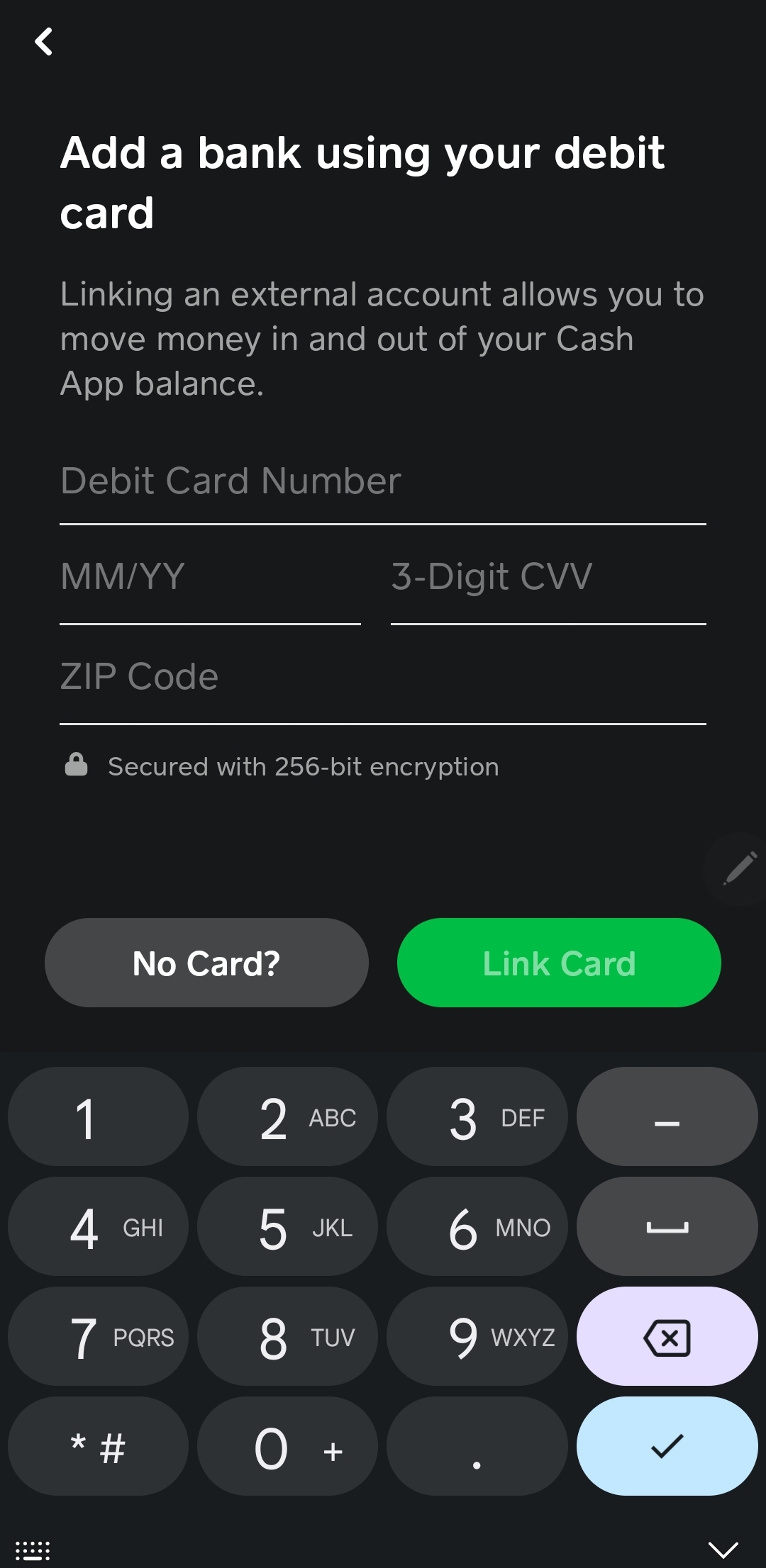
- Enter Card Information: You will be prompted to enter your credit card number, expiration date, CVV (Card Verification Value, the three or four-digit security code on the back/front of your card), and billing zip code.
- Confirm: Double-check all the entered information for accuracy and then tap “Link Card” or “Add Card.”
Cash App uses encryption and other security measures to protect your financial data during this process. However, it’s always prudent to ensure you are on a secure network (not public Wi-Fi) when entering sensitive information. Upon successful linking, your credit card will appear in your list of linked payment methods, ready for use.
Sending Money with Your Credit Card on Cash App
With your credit card successfully linked, you can now use it to send money to other Cash App users. This process is similar to sending money with a debit card, but with a critical difference in how fees are applied.
Initiating a Payment
To send money using your linked credit card:
- Tap the Dollar Sign Icon: This is usually in the center of the bottom navigation bar and takes you to the payment screen.
- Enter the Amount: Input the desired amount you wish to send.
- Tap “Pay”: This will prompt you to enter the recipient’s $Cashtag, phone number, or email address.
- Add a Note (Optional): You can include a brief description of the payment.
- Select Your Payment Method: This is the crucial step. By default, Cash App might try to use your Cash App balance or linked debit card. Before tapping “Pay” again to confirm the transaction, you’ll see an option to choose the funding source. Tap on the current source and select your linked credit card from the list.
- Review and Confirm: Carefully review the transaction details, including the amount, recipient, and the chosen payment method (your credit card). The associated fee will also be displayed at this stage.
- Confirm Payment: Tap “Pay” one last time to finalize the transaction.
The money will typically be sent instantly to the recipient’s Cash App balance. They can then choose to keep it in their Cash App account, spend it using their Cash Card, or transfer it to their linked bank account.
Navigating Fees and Confirmation
This is where the financial implications of using a credit card on Cash App become most apparent. Cash App charges a 3% fee for sending money using a linked credit card. This fee is added to the total amount of the transaction and is borne by the sender. For example, if you send $100 using your credit card, you will be charged $103, and the recipient will receive $100. This 3% fee is Cash App’s way of covering the processing costs associated with credit card transactions, which are typically higher than debit card transactions.
It’s vital to acknowledge this fee before confirming any transaction. This 3% is often non-negotiable within the app’s standard usage. When you select your credit card as the funding source, Cash App explicitly displays this fee, allowing you to confirm or cancel the transaction. Always scrutinize this final screen to ensure you understand the total cost before proceeding. Unlike many debit card transactions on Cash App which are free, credit card payments always incur this additional charge.
Financial Implications: Fees, Limits, and Responsible Usage
Using a credit card on Cash App extends beyond simply linking and sending. It involves a critical understanding of the financial ecosystem – the fees, transaction limits, and the overarching principles of responsible credit management. For the financially savvy user, these details are paramount.
Deconstructing Cash App Credit Card Fees
As mentioned, the primary fee for using a credit card on Cash App is 3% of the transaction amount. This percentage can quickly add up, turning seemingly small transactions into more costly endeavors. For instance, sending $500 via credit card will incur a $15 fee, meaning your card will be charged $515. Over time, these fees can significantly erode any potential rewards you might earn from your credit card. If your credit card offers 1% or 2% cashback, the 3% Cash App fee effectively negates those rewards and adds an extra cost on top.
Furthermore, it’s crucial to be aware that some credit card issuers might classify Cash App transactions as a “cash advance,” rather than a standard purchase. Cash advances typically come with their own set of hefty fees, often 3-5% of the amount, applied by the credit card issuer, in addition to the Cash App’s 3% fee. Cash advances also usually start accruing interest immediately, without a grace period, and at a higher APR than regular purchases. While Cash App aims for transactions to be processed as standard purchases, the final categorization rests with your credit card issuer. Always check your credit card’s terms and conditions regarding P2P app transactions to avoid unexpected charges.
Understanding Transaction Limits and Restrictions
Cash App, like most financial platforms, imposes limits on how much money you can send and receive, both daily and weekly. These limits are in place for security reasons and to comply with financial regulations. While linking a credit card does not inherently alter these overarching limits, it’s an important consideration within the broader context of using the app.
For unverified accounts, limits are generally low (e.g., sending $250 weekly, receiving $1,000 monthly). Verified accounts, however, have significantly higher limits (e.g., sending up to $7,500 weekly and receiving unlimited amounts). While your credit card’s own credit limit will be the ultimate cap on how much you can spend, you must also adhere to Cash App’s internal sending limits. These limits apply universally, regardless of the funding source (debit card, bank account, or credit card). It’s prudent to familiarize yourself with your specific account limits by checking the “Profile” or “Support” section within the Cash App.
Strategies for Smart and Responsible Credit Card Use
Given the fees and potential complications, responsible use of a credit card on Cash App requires a strategic approach:
- Prioritize Debit Cards/Bank Accounts: Whenever possible, use your linked debit card or Cash App balance to send money, as these methods are generally free for standard transfers.
- Evaluate the Necessity: Only use a credit card on Cash App when absolutely necessary – perhaps for urgent payments when other funds are unavailable, or if the convenience truly outweighs the 3% fee (e.g., an emergency situation).
- Calculate the True Cost: Always factor in the 3% Cash App fee, and potentially any cash advance fees/interest from your credit card issuer, into the total cost of the transaction.
- Monitor Your Statements: Regularly review your credit card statements to ensure transactions are categorized correctly and to identify any unexpected fees or interest charges.
- Avoid Carrying a Balance: If you use a credit card, always aim to pay off the entire balance before the due date to avoid interest charges, which would further escalate the cost of your Cash App transaction. Using a credit card for P2P payments only to carry a balance at a high APR is a financially detrimental practice.
Maximizing Benefits and Mitigating Risks
While using a credit card on Cash App comes with its financial caveats, an informed approach can help users maximize convenience while minimizing exposure to unnecessary costs and risks. The key lies in a balanced perspective, weighing the immediate benefits against the long-term financial implications.
Weighing Convenience Against Cost
The primary benefit of using a credit card on Cash App is unparalleled convenience. It provides a quick way to send money when a linked debit card or bank account might be low on funds, or when you simply prefer not to deplete your checking account instantly. For emergencies or last-minute payments, this convenience can be invaluable. However, this convenience comes at a explicit cost: the 3% Cash App fee.
For most routine transactions, this fee makes using a credit card suboptimal from a financial perspective. If the transaction isn’t urgent, transferring funds from a linked bank account directly to your Cash App balance, or using a debit card, are always more economical options. The “Money” mindset here dictates that every percentage point matters. Only when the immediacy or specific reward (e.g., hitting a sign-up bonus spending requirement, though with caution regarding how the transaction is categorized) truly outweighs that 3% fee should a credit card be the chosen funding source. Always ask yourself: is the ability to send this money instantly worth an extra 3% of the amount?
Security Best Practices for Your Financial Data
Security is paramount when dealing with financial applications and credit cards. While Cash App employs robust security measures, users also have a critical role to play:
- Strong, Unique Passwords/PINs: Use a strong, unique password for your Cash App account and enable a PIN or biometric authentication (fingerprint/Face ID) for all transactions.
- Two-Factor Authentication (2FA): Enable 2FA for your Cash App account. This adds an extra layer of security, requiring a code from your phone in addition to your password.
- Monitor Account Activity: Regularly check your Cash App transaction history and credit card statements for any suspicious activity. Report any unauthorized transactions immediately.
- Beware of Scams: Be vigilant against phishing attempts and social engineering scams. Cash App will never ask for your password, PIN, or full credit card number via email or text. Only send money to people you know and trust.
- Secure Device: Keep your smartphone’s operating system and the Cash App updated to the latest versions to benefit from the newest security patches. Use a secure screen lock on your device.
- Avoid Public Wi-Fi: Do not perform sensitive financial transactions on unsecured public Wi-Fi networks, as they can be vulnerable to eavesdropping.
Alternative Payment Methods and Their Advantages
For most everyday transactions, especially those where avoiding fees is a priority, consider these alternatives:
- Debit Card / Bank Account (Free): This is the most cost-effective way to send money on Cash App. Linking your debit card or direct bank account typically incurs no fees for standard P2P transfers.
- Cash App Balance (Free): If you have funds in your Cash App balance, using them is free and instant. This is ideal for receiving payments and then using those funds to pay others.
- Other P2P Apps with Different Fee Structures: While many P2P apps charge similar fees for credit card transactions, some might have different policies or promotional offers. Always compare if you frequently use different platforms.
- ACH Bank Transfers: For larger, non-urgent transfers, direct ACH bank transfers (via your bank’s online portal) are usually free and secure, although they take longer to process (1-3 business days).
In conclusion, using a credit card on Cash App is a viable option for sending money, offering unmatched convenience in certain situations. However, it is a financial decision that demands careful consideration of the associated 3% fee and the potential for additional costs from your credit card issuer. By understanding these financial mechanics, employing robust security practices, and strategically choosing your payment method, you can harness the power of Cash App responsibly and effectively within your personal finance strategy. Always prioritize financially sound choices to ensure convenience doesn’t come at an exorbitant price.
aViewFromTheCave is a participant in the Amazon Services LLC Associates Program, an affiliate advertising program designed to provide a means for sites to earn advertising fees by advertising and linking to Amazon.com. Amazon, the Amazon logo, AmazonSupply, and the AmazonSupply logo are trademarks of Amazon.com, Inc. or its affiliates. As an Amazon Associate we earn affiliate commissions from qualifying purchases.