
In an increasingly digital world, where personal information is constantly shared, stored, and sometimes inadvertently exposed, the demand for robust privacy tools has never been higher. Among the ingenious solutions that have emerged are “calculator hide apps.” These seemingly innocuous applications, designed to mimic the everyday utility of a calculator, secretly serve as sophisticated vaults for your most private files, photos, videos, and even other apps. Far from being a novelty, these tools represent a crucial layer of digital discretion, offering users peace of mind in an environment where personal boundaries are constantly challenged. This comprehensive guide will delve into the mechanics, benefits, usage, and ethical considerations surrounding calculator hide apps, equipping you with the knowledge to leverage them effectively for your digital privacy.
Understanding the Concept: What Are Calculator Hide Apps?
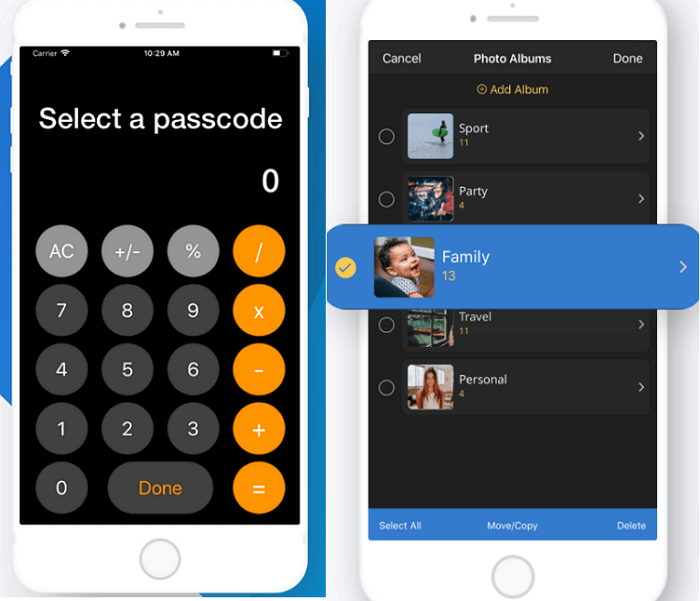
At its core, a calculator hide app is a stealth application designed to appear as a fully functional calculator on your smartphone or tablet. However, upon entering a specific passkey or pattern into the calculator interface, it transforms, revealing a hidden compartment. This hidden space is a secure, encrypted area where users can store sensitive data, photos, videos, documents, or even hide other applications from prying eyes. The brilliance lies in its simplicity and deceptive nature: an outsider merely sees a calculator, never suspecting the sophisticated privacy tool beneath the surface.
The Illusion of Simplicity: How They Function
The magic of calculator hide apps lies in their dual-interface functionality. When launched, the app presents a standard calculator interface, complete with arithmetic operations. This is the public face, designed to fool anyone who might casually browse your device. Behind this façade, a sophisticated security mechanism awaits activation. Typically, the user sets a unique PIN, password, or pattern that, when input into the calculator’s numerical keypad, unlocks the hidden vault.
Technologically, these apps employ various methods to secure the hidden content. Many utilize robust encryption algorithms (like AES-256) to scramble files, making them unreadable without the correct decryption key (your password). Furthermore, they often operate in a sandboxed environment, meaning the hidden content is isolated from the rest of the device’s file system, further enhancing security. Some advanced versions even feature decoy modes, where entering a different, less sensitive password reveals a less private vault, adding another layer of plausible deniability.
Why the Need? Unveiling the Use Cases for Digital Privacy
The reasons for using a calculator hide app are as varied as individual privacy concerns. In an age where smartphones are repositories of our entire lives, safeguarding certain information becomes paramount.
-
Personal Photos and Videos: Perhaps the most common use, protecting intimate memories, sensitive personal photos, or private family videos from accidental exposure or unauthorized access.
-
Confidential Documents: Storing financial statements, identification documents, work-related files, or legal papers that require an extra layer of security beyond standard device passwords.
-
Private Conversations and Apps: Hiding messaging apps with sensitive conversations, social media profiles, or dating apps from curious onlookers, partners, or family members.
-
Parental Controls and Child Safety: Parents might use these apps to hide certain applications or content from children, or to keep sensitive work documents separate from child-friendly games.
-
Multiple Accounts: Managing multiple social media or gaming accounts without them being visible on the main app drawer.
-
Discretion and Peace of Mind: For anyone who values their personal space and wishes to maintain control over what information is readily accessible on their device, these apps offer an invaluable sense of security and discretion.
Navigating the Features: What to Look for in a Secure Hide App
Not all calculator hide apps are created equal. When choosing one, it’s crucial to look beyond the basic premise and assess the underlying technology and feature set. A robust app will offer a combination of strong security, intuitive design, and reliable performance.
Core Functionality: Disguise and Dual Interface
The fundamental requirement is a convincing calculator interface. It should look and feel like a real calculator, complete with accurate arithmetic functions, history, and perhaps even scientific modes. Any hint of artificiality can compromise the disguise. The transition from calculator to vault should be seamless and quick, avoiding suspicious delays or animations. Some apps offer customizable calculator skins to blend in even better with your phone’s aesthetic.
Advanced Security Measures: Encryption and Beyond
Beyond the disguise, the actual security of your hidden data is paramount.
-
Strong Encryption: Look for apps that explicitly state the use of industry-standard encryption protocols (e.g., AES-256) for stored files. This ensures that even if someone manages to bypass the calculator interface, your data remains unreadable without the encryption key.
-
Intruder Selfies and Break-in Alerts: Many advanced apps include features that take a photo using the front camera if an incorrect password is entered multiple times, and then silently alert the user. This can help identify who tried to access your vault.
-
Decoy Vaults: As mentioned, a decoy vault allows you to set up a secondary, less sensitive vault that opens with a different password, providing an additional layer of protection if you’re ever forced to reveal a hidden space.
-
App Icon Disguise: Some apps allow you to change their icon to something completely unrelated, like a weather app or a note-taking tool, adding another layer of misdirection in your app drawer.
-
Anti-Uninstall Protection: This feature makes it harder for someone to simply uninstall the app, potentially alerting you if an unauthorized person tries to remove it.
User Experience and Accessibility: Seamless Integration
A good calculator hide app should be easy to use and integrate smoothly into your digital life.
-
Intuitive Interface: The hidden vault should be well-organized, making it easy to categorize and locate your hidden files, photos, and apps.
-
File Import/Export Options: The ability to easily import various file types (photos, videos, PDFs, etc.) from your device’s gallery or file manager, and export them back when needed, is essential.
-
In-App Camera/Browser: Some apps feature an integrated camera that saves photos directly to the vault, bypassing the public gallery. Similarly, a private browser within the app can ensure your browsing history remains entirely secret.
-
Cloud Backup Integration: While less common due to privacy concerns, some apps offer encrypted cloud backup options for your hidden vault, adding a layer of data recovery.
A Step-by-Step Guide to Installation and Operation
Using a calculator hide app is generally straightforward once you understand the basic process. While specific steps may vary slightly between apps, the core mechanics remain consistent.
Initial Setup: Downloading and Configuration
-
Download from a Trusted Source: Always download calculator hide apps from official app stores (Google Play Store for Android, Apple App Store for iOS). Avoid third-party app stores or direct APK downloads, as these can harbor malicious software.
-
Grant Permissions: Upon installation, the app will request various permissions (e.g., storage access, camera access, drawing over other apps). Review these carefully. Storage access is essential for hiding files, and camera access for intruder selfies.
-
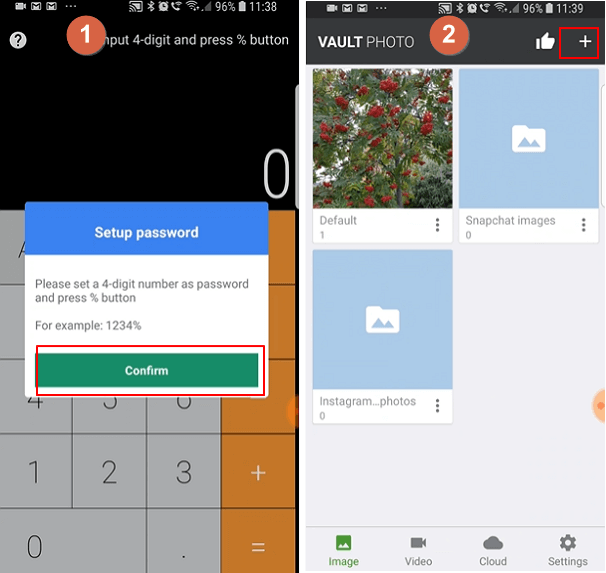
Set Your Master Password/PIN: This is the most crucial step. Choose a strong, memorable PIN or password that you will input into the calculator. This is your key to the vault. Write it down in a secure, offline location if you’re prone to forgetting.
-
Security Question/Email: Many apps will ask for a security question or a recovery email. Configure this carefully, as it’s your only way back in if you forget your master password.
Hiding Your Digital Assets: Files, Photos, and Videos
-
Enter Your Password: Open the calculator app and enter your master PIN/password, followed by the ‘=’ or a designated button (check app instructions). The calculator interface will disappear, and your hidden vault will open.
-
Navigate to the Desired Section: Within the vault, you’ll typically find sections for photos, videos, files, and sometimes apps.
-
Import Content: Use the ‘+’ or ‘import’ button to select items from your device’s gallery or file manager. Once imported, the original files are usually removed from their public location (or you’ll be prompted to delete them) and only reside within the encrypted vault.
-
Organize and Manage: Most vaults allow you to create folders, rename files, and organize your content for easy access.
App Management: Cloaking Sensitive Applications
-
Locate the App Hider Feature: Within the vault, there’s usually a dedicated section for “App Lock” or “App Hider.”
-
Select Apps to Hide: The app will display a list of all applications installed on your device. Select the ones you wish to hide.
-
Create a Clone or Disguise: Some apps create a “clone” of the selected app within the vault, allowing you to use it privately. Others simply remove the app’s icon from your main app drawer and make it accessible only through the vault.
-
Launch from Vault: To use a hidden app, you must first access the calculator vault and launch it from there.
Accessing Your Hidden Vault: The Secret Code
The process is always the same: open the disguised calculator app, input your pre-set PIN or password, and then press the designated activation key (often ‘=’ or a custom button). The calculator interface will then transition to reveal your private vault. Remember that repeated incorrect entries might trigger intruder alerts if enabled.
Maximizing Security and Addressing Potential Risks
While calculator hide apps offer a significant boost to digital privacy, they are not foolproof. Understanding their limitations and adhering to best practices is essential for true security.
Best Practices for Enhanced Protection
-
Strong, Unique Passwords: Your master PIN/password is the single most critical element. Avoid obvious sequences (1234, 0000) or personal information (birth dates).
-
Regular Updates: Keep the calculator hide app updated. Developers frequently release updates that patch security vulnerabilities and improve performance.
-
Review App Permissions: Be vigilant about the permissions the app requests. If an app requests unnecessary permissions (e.g., microphone access for a photo vault), it might be a red flag.
-
Two-Factor Authentication (if available): Some advanced hide apps might offer 2FA for accessing the vault, adding an extra layer of security.
-
Backup Your Data: While the app secures data on your device, it’s wise to have an independent, encrypted backup of truly critical files on an external drive or secure cloud service.
-
Avoid Rooted/Jailbroken Devices: These devices compromise the inherent security layers of your operating system, potentially making any hide app less secure.
Common Vulnerabilities and How to Mitigate Them
-
Forgetting Your Password: This is the most common issue. Ensure you have a reliable recovery method set up (email, security question) and keep that information secure.
-
App Discovery by Savvy Users: While designed to deceive, someone who knows about these types of apps might still suspect. The quality of the disguise and your general device habits play a role.
-
Malicious Apps: Downloading from untrusted sources is a major risk. A malicious hide app could itself be a front for data theft. Stick to official app stores.
-
Device Theft/Compromise: If your entire device is compromised (e.g., through malware or a sophisticated hack), even encrypted data might be at risk if the attacker gains root access. A strong device password/biometric lock remains your first line of defense.
-
Physical Coercion: No digital tool can protect against someone physically forcing you to reveal passwords. In such extreme scenarios, a decoy vault can be a strategic asset.
Ethical Considerations: Responsible Use of Discretion Tools
The power of discretion comes with ethical responsibilities. Calculator hide apps are powerful tools for personal privacy and security, but they can also be misused.
-
Personal Privacy vs. Deception: The primary, ethical use is for safeguarding one’s own legitimate privacy. Using these apps to deceive or spy on others, or to hide illegal activities, is unethical and often illegal.
-
Transparency in Relationships: While maintaining personal boundaries is healthy, extreme secrecy can erode trust in close relationships. Users should reflect on why they are hiding content and the implications of such secrecy.
-
Data Sovereignty: These tools reinforce the idea that individuals have a right to control their personal data. However, this right comes with the responsibility to use such control wisely.
The Future of Digital Privacy: Evolving Hide Technologies
The landscape of digital privacy is constantly shifting, and calculator hide apps are likely to evolve in sophistication alongside emerging threats and technologies.
AI and Machine Learning in Stealth Applications
Future iterations might incorporate AI for smarter disguise mechanisms, dynamically adapting their interface based on user habits or ambient device usage to appear even more authentic. Machine learning could enhance intruder detection, recognizing subtle patterns in failed login attempts that suggest a malicious actor.
Balancing Privacy with Transparency
As governments and platforms push for greater transparency and data access, the development of privacy tools like calculator hide apps will become even more critical. There will be a continuous cat-and-mouse game between those seeking to maintain privacy and those seeking to access information.

The Continuous Pursuit of Digital Anonymity
The desire for digital anonymity and control over personal information is fundamental. Calculator hide apps are a testament to this ongoing pursuit, offering a practical, accessible solution for everyday users. As our digital lives become more intertwined with our personal identities, these tools will remain relevant, adapting to new challenges and continuing to empower individuals to draw their own lines in the sand of digital privacy.
In conclusion, calculator hide apps are more than just a clever trick; they are a vital component in the modern digital security toolkit. By understanding how they work, selecting the right one, and using it responsibly, individuals can significantly enhance their personal privacy and maintain greater control over their digital footprint. As technology advances, these tools will undoubtedly become even more sophisticated, continuing to serve as silent guardians of our most private data.
aViewFromTheCave is a participant in the Amazon Services LLC Associates Program, an affiliate advertising program designed to provide a means for sites to earn advertising fees by advertising and linking to Amazon.com. Amazon, the Amazon logo, AmazonSupply, and the AmazonSupply logo are trademarks of Amazon.com, Inc. or its affiliates. As an Amazon Associate we earn affiliate commissions from qualifying purchases.