
In the dynamic world of premium credit card benefits, the American Express (Amex) Resy credit stands out as a compelling perk for cardholders who appreciate fine dining and culinary experiences. Designed to reward loyalty and enhance the lifestyle of eligible members, this credit offers a tangible way to offset dining expenses at a curated selection of restaurants available through the Resy platform. For the financially savvy individual, understanding and effectively utilizing this benefit isn’t just about saving money; it’s about optimizing your personal finance strategy, extracting maximum value from your annual fees, and enriching your social and culinary life.
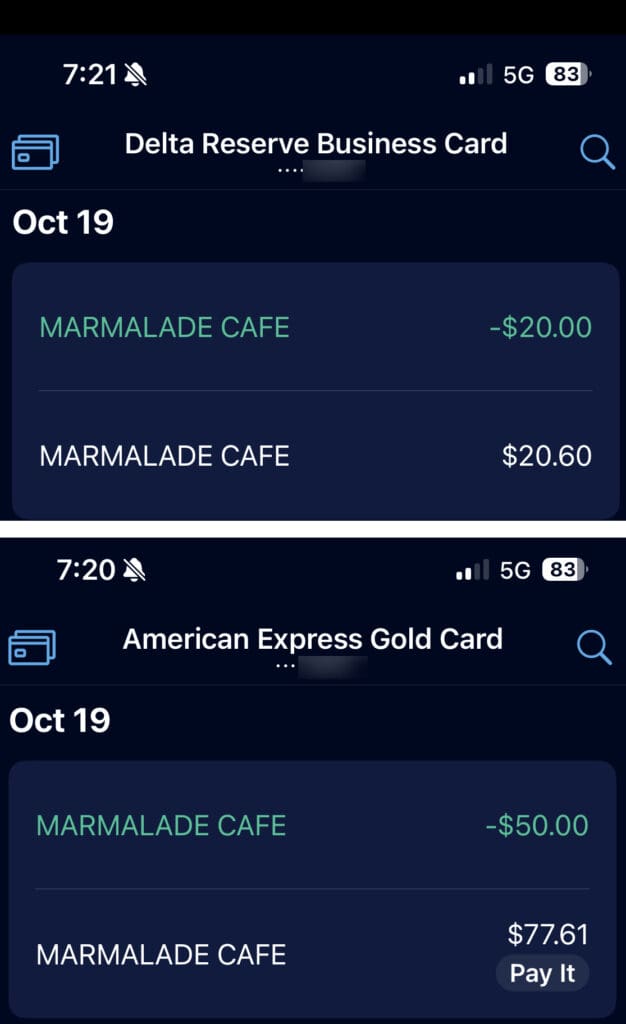
This guide delves into the mechanics of the Amex Resy credit, offering a comprehensive roadmap for activating, using, and maximizing this valuable benefit. We will explore which cards offer this exclusive perk, how to navigate the Resy platform to find eligible restaurants, and provide expert tips to ensure you never leave money on the table. Embrace the opportunity to transform your dining experiences from mere transactions into strategically optimized indulgences.
Understanding the Amex Resy Credit Program
Before diving into the practicalities of using the credit, it’s crucial to establish a foundational understanding of what the Amex Resy credit entails, which cards are eligible, and the underlying terms and conditions that govern its use. This knowledge forms the bedrock of a successful credit utilization strategy.
What is the Amex Resy Credit?
At its core, the Amex Resy credit is a statement credit provided by American Express to eligible cardholders when they make qualifying purchases at restaurants reserved through the Resy platform. Typically, this credit is offered on a monthly basis, providing a consistent stream of savings throughout the year. For instance, an eligible card might offer a $10 or $15 monthly credit, accumulating to $120 or $180 in annual savings. The credit is usually applied automatically to your statement within a few business days after a qualifying transaction posts, effectively reducing your out-of-pocket dining costs. It’s a direct financial incentive designed to encourage exploration of Resy’s network of restaurants, which often includes highly sought-after and critically acclaimed establishments. This isn’t just a discount; it’s a strategic rebate that significantly enhances the value proposition of your Amex card, directly impacting your personal finance budget for dining and entertainment.
Which Amex Cards Offer This Benefit?
The Resy credit is primarily a premium benefit, usually associated with American Express’s top-tier travel and lifestyle cards. While offerings can evolve, the most common card currently known to offer a significant Resy credit is the Amex Platinum Card. Platinum cardholders typically receive a monthly statement credit for Resy purchases, often totaling a substantial amount annually. It’s important to note that specific credit amounts and terms can vary based on card product, country of issuance, and any special offers or promotions.
Occasionally, other Amex cards or co-branded cards might feature dining benefits or special offers that intersect with Resy, but the dedicated monthly Resy credit is a hallmark of the Platinum Card experience. Always verify the specific benefits associated with your particular Amex card through your online account or the official Amex website, as these benefits are subject to change and are an integral part of assessing the overall value of your card’s annual fee.
Key Terms and Conditions
Like all financial benefits, the Amex Resy credit comes with specific terms and conditions designed to clarify its usage and prevent misuse. Understanding these is paramount to ensuring your transactions qualify:
- Enrollment: Often, you must first enroll your eligible Amex card in the Resy credit program. This is usually a one-time process via your Amex online account or the Amex app. Failure to enroll will result in credits not being applied.
- Eligible Purchases: The credit typically applies to purchases made through the Resy platform at restaurants that accept American Express. This usually means the reservation must be made via Resy, and the payment processed by the restaurant must be linked to your enrolled Amex card. Some terms might specify dining within the restaurant, potentially excluding take-out or delivery unless explicitly stated.
- Monthly Cycle: The credit is generally awarded on a calendar month basis. Any unused portion of the credit within a given month is typically forfeited and does not roll over to the next month. This “use it or lose it” aspect emphasizes consistent utilization.
- Exclusions: Be mindful of exclusions. Gift card purchases, catering services, or purchases made directly with the restaurant (not through a Resy reservation) might not qualify. Furthermore, taxes, tips, and service charges are usually included in the qualifying spend, but always check the fine print.
- Statement Credit Timing: Credits are usually posted to your statement within a few business days of the qualifying purchase but can sometimes take up to 6-8 weeks. Patience and regular statement checks are advised.
Thoroughly reviewing the specific terms and conditions linked to your card’s benefit will prevent disappointment and ensure seamless credit redemption.
Activating and Utilizing Your Resy Credit
Once you understand the fundamentals, the next step is to put that knowledge into action. This section guides you through the practical process of getting started with Resy and making sure your dining experiences translate into valuable statement credits.
Linking Your Amex Card to Resy
The very first practical step is to ensure your eligible American Express card is correctly linked to your Resy account. This is a critical prerequisite for the credit to apply.
- Create a Resy Account: If you don’t already have one, download the Resy app or visit Resy.com and sign up for an account.
- Add Your Amex Card: Within your Resy account settings, navigate to the payment methods section. Add your eligible Amex card as a payment option. Ensure the card number, expiration date, and security code are entered accurately.
- Enroll in the Amex Benefit: Separately, you will need to enroll your Amex card for the Resy credit benefit through your American Express online account or the Amex app. Look for the “Benefits” or “Offers” section associated with your specific card and activate the Resy credit. This step often establishes the direct link between Amex recognizing your Resy activity. Some benefits might be automatically enrolled, but it’s always best to confirm.
Finding Eligible Restaurants on Resy
Not all restaurants on Resy qualify for the Amex credit, although the vast majority within the network do. To identify eligible establishments:
- Use the Resy App/Website: Open the Resy app or visit their website.
- Search for Restaurants: Browse or search for restaurants in your desired location.
- Look for Amex Indicator: While browsing, many restaurants that are part of the Amex Global Dining Access program or directly participate in the credit scheme will have an Amex logo or specific notation. More reliably, any restaurant that is part of Resy’s general booking platform usually qualifies for the credit, provided you use your enrolled Amex card.
- Filter Options: Resy often provides filters, and while there might not be a direct “Amex credit eligible” filter, focusing on restaurants within the premium dining category that accept American Express generally leads to success. When in doubt, checking a restaurant’s profile on Resy or their website for accepted payment methods can offer clarity.
Making a Reservation and Paying

The process of making a reservation and ensuring your credit applies is straightforward:
- Book Your Reservation: Once you’ve found an eligible restaurant, use the Resy platform to book your desired table and time.
- Use Your Enrolled Amex Card: When it comes time to pay at the restaurant, make sure you use the exact Amex card that is enrolled in the Resy credit program and linked to your Resy account. This is crucial. If you use a different card, even another Amex card, the credit will not apply.
- The Transaction: The restaurant will process your payment as a standard Amex transaction. There is no special code or mention required at the point of sale. The Amex system recognizes that the purchase originated from a Resy reservation and was made with an enrolled card.
Tracking Your Credits
Patience is key when tracking your Amex Resy credits.
- Check Your Amex Statements: The credit will appear as a statement credit on your Amex account, typically labeled as “Resy Credit” or similar. Review your online statements regularly.
- Amex App Notifications: If you have the Amex app, you might receive notifications when a benefit is used or a credit is applied.
- Timing: While many credits post within a few days, some can take up to several weeks. If a credit hasn’t appeared after a reasonable timeframe (e.g., two weeks), cross-reference your purchase date with the benefit terms. If it still doesn’t appear after the maximum stated processing time, it might be time to contact Amex customer service.
Strategies for Maximizing Your Monthly Credit
The “use it or lose it” nature of the Amex Resy credit necessitates a proactive approach to ensure you extract full value each month. Strategic planning can turn this benefit into a consistent saving opportunity.
Don’t Leave Money on the Table: Consistent Usage
The most fundamental strategy is simply to use the credit every month. Since unused credit typically expires at the end of the calendar month, failing to make a qualifying purchase means you’re effectively paying more for your annual fee.
- Integrate into Routine: Incorporate dining out into your monthly budget and social calendar. Plan at least one meal a month at a Resy restaurant that meets or exceeds the credit amount.
- Small Indulgences: Even if you don’t have a grand dinner planned, a casual brunch, lunch, or even just drinks and appetizers can often satisfy the credit requirement. Don’t feel obligated to overspend; aim to meet or slightly exceed the credit amount.
- Calendar Reminders: Set a recurring calendar reminder for the middle or end of each month to check if you’ve used your Resy credit.
Exploring New Culinary Experiences
The Amex Resy credit isn’t just a discount; it’s an invitation to explore.
- Venture Out: Use the credit as an excuse to try that new restaurant you’ve heard about or revisit an old favorite.
- Diverse Options: Resy features a wide array of dining experiences, from casual eateries to Michelin-starred establishments. Don’t limit yourself to one type of cuisine or price point. This benefit encourages culinary adventure without the full financial burden.
- Special Occasions: While the credit is monthly, it can significantly reduce the cost of a meal for a birthday, anniversary, or celebration. Plan these events around Resy-eligible restaurants.
Stacking with Other Amex Offers or Benefits
Savvy cardholders know that the true power of Amex benefits lies in their ability to be stacked.
- Amex Offers: Keep an eye out for targeted Amex Offers that might be available for specific Resy restaurants or dining categories. Sometimes, you can combine a general Amex Offer (e.g., “Spend $50, Get $10 Back at XYZ Restaurant”) with your monthly Resy credit, leading to even greater savings.
- Other Dining Credits: If your Amex card has other dining-related credits (e.g., annual dining credits for specific partners like Uber Eats, Grubhub, or specific restaurants), strategize how to use them in conjunction with your Resy credit to maximize overall savings. While direct stacking on the same transaction might be limited, you can strategically allocate different dining expenses to different credit types throughout the month.
- Global Dining Access: For Platinum Card holders, the Resy credit often works in tandem with the Global Dining Access program, which provides priority reservations and special access at sought-after restaurants. This enhances the overall value beyond just the monetary credit.
Common Pitfalls and Troubleshooting
Even with careful planning, issues can arise. Knowing how to identify and address common problems related to the Amex Resy credit can save you time and frustration.
Enrollment Issues
The most common reason for a credit not applying is often related to enrollment.
- Verify Enrollment: Double-check your Amex online account or app to confirm that your specific card is indeed enrolled in the Resy credit program. Some benefits require a manual opt-in.
- Correct Card: Ensure you are using the exact Amex card that is enrolled. If you have multiple Amex cards, it’s easy to accidentally use the wrong one.
Credit Not Appearing
If the credit isn’t posting to your statement, consider these factors:
- Processing Time: Remember that credits can take time to appear. Allow up to 6-8 weeks, though it’s usually faster.
- Eligible Purchase: Confirm the purchase met all eligibility criteria. Was the reservation made via Resy? Was the payment made at an eligible restaurant? Did you use the correct Amex card?
- Merchant Category Code: Sometimes, a restaurant’s merchant category code (MCC) might not align with what Amex considers a “restaurant” for the purpose of the credit. While rare for Resy-booked establishments, it can happen.
- Monthly Cycle: Ensure the purchase was made within the correct calendar month for which you expect the credit. If you make a purchase late in the month, it might post to your statement in the next month, potentially counting towards that month’s credit or missing the previous month’s window entirely if not processed quickly.
Understanding Exclusions and Limitations
Revisit the terms and conditions if you suspect an exclusion is at play.
- Gift Cards: Purchases of restaurant gift cards typically do not qualify.
- Takeout/Delivery: Unless explicitly stated, many dining credits are for in-restaurant dining experiences. Confirm if your order type was eligible.
- Minimum Spend: Some benefits might have a minimum spend requirement, though the Resy credit typically applies dollar-for-dollar up to the monthly limit.

Contacting Amex or Resy Support
If you’ve exhausted all troubleshooting steps and believe a credit is genuinely missing:
- Contact Amex First: As the issuer of the credit, American Express customer service is usually the first point of contact. Have your card details, transaction date, merchant name, and any relevant Resy reservation details ready. Explain the situation clearly.
- Resy Support (If Needed): If Amex directs you, or if the issue seems specific to the reservation or the restaurant’s reporting to Resy, you might need to contact Resy support. However, for credit application issues, Amex is typically the primary channel.
By diligently managing your Amex Resy credit, you transform a premium card benefit into a consistent and enjoyable financial advantage. It’s a prime example of how understanding and actively utilizing your credit card perks can significantly enhance your personal finance landscape, allowing you to indulge in culinary delights while optimizing your budget.
aViewFromTheCave is a participant in the Amazon Services LLC Associates Program, an affiliate advertising program designed to provide a means for sites to earn advertising fees by advertising and linking to Amazon.com. Amazon, the Amazon logo, AmazonSupply, and the AmazonSupply logo are trademarks of Amazon.com, Inc. or its affiliates. As an Amazon Associate we earn affiliate commissions from qualifying purchases.