
American Express gift cards offer a convenient and secure way to manage your spending, providing the flexibility of a traditional credit card without the complexities of a credit line. For many, the goal is to efficiently utilize these cards on one of the largest and most versatile online marketplaces: Amazon.com. This guide delves into the practical aspects of integrating your Amex gift card into your Amazon shopping experience, offering insights into financial best practices, maximizing value, and navigating potential challenges. Understanding the mechanics of using prepaid cards for online purchases is a fundamental aspect of modern personal finance, empowering consumers to make informed decisions and optimize their spending.
Understanding Amex Gift Cards and Their Financial Versatility
Before diving into the specifics of Amazon, it’s crucial to grasp the financial nature and operational nuances of an Amex gift card. These aren’t credit cards; they are prepaid instruments, acting more like a debit card with a fixed, finite balance. This distinction is vital for financial planning and avoiding common pitfalls during online transactions.
What is an Amex Gift Card? A Prepaid Financial Instrument
An Amex gift card is essentially a prepaid debit card backed by American Express. Unlike a credit card, which allows you to borrow money up to a certain limit, a gift card is loaded with a specific amount of money upfront. Once that money is spent, the card is depleted. They typically come in various denominations and can be purchased from retail stores, online, or directly from American Express. From a financial perspective, they offer a controlled spending mechanism, making them ideal for budgeting, gifting, or as a tool to manage discretionary funds without impacting your primary bank accounts or credit lines. They usually do not require activation, though sometimes a quick online registration may be recommended for security and balance tracking, especially for larger denominations.
Key Benefits and Limitations for Online Shopping
The appeal of Amex gift cards lies in their broad acceptance and the security they offer. Most online merchants that accept American Express credit cards will also accept their gift cards, making them highly versatile. On the financial benefits front, they typically carry no monthly fees or dormancy fees, meaning the full face value is available for your use until expiration. However, they are non-reloadable; once the funds are exhausted, the card becomes unusable. A significant financial limitation to be aware of is that some online retailers, including Amazon, may place a temporary authorization hold on the card, which can briefly tie up a small portion of the balance, although this is usually released quickly. Furthermore, while they offer robust fraud protection similar to credit cards, lost or stolen gift cards are generally not replaceable unless you’ve registered them and have proof of purchase, underscoring the importance of treating them like cash.
Why Amazon is a Prime Destination for Gift Card Redemption
Amazon’s vast marketplace, unparalleled product selection, and competitive pricing make it an incredibly attractive platform for redeeming gift cards. From everyday essentials to high-value electronics, virtually anything can be purchased, ensuring that the value of your Amex gift card can be fully utilized. The sheer volume of transactions and the seamless checkout process further solidify Amazon as a preferred destination. For personal finance management, consolidating purchases on Amazon allows for efficient tracking of spending against the gift card’s balance, helping consumers deplete the card effectively without leaving small, unusable residual amounts scattered across various retailers.
The Step-by-Step Process for Amazon Purchases
Using your Amex gift card on Amazon is straightforward, akin to using any other credit or debit card. However, there are specific steps and considerations to ensure a smooth transaction, particularly concerning balance management and split payments.
Preparing Your Amex Gift Card
Before you add your Amex gift card to your Amazon account, it’s a good practice to check its balance. While gift cards often don’t require activation, knowing the exact amount available is crucial for budgeting your Amazon purchase. You can typically check the balance by visiting the American Express gift card website and entering the card details. This pre-check prevents issues with insufficient funds during checkout and helps you plan your purchase effectively. Occasionally, if you encounter issues, some cards might benefit from a quick online registration, linking it to your name, which can sometimes aid in online transaction verification, although this is less common for standard gift cards.
Adding the Gift Card as a Payment Method on Amazon
Adding your Amex gift card to Amazon is a simple process:
- Log in to your Amazon account: Navigate to “Your Account” from the homepage.
- Go to “Payment options”: Under the “Ordering and shopping preferences” section, select “Payment options.”
- Add a new payment method: Click on “Add a credit or debit card.”
- Enter card details: Input the 15-digit card number, the “valid thru” date (expiration date), and the 4-digit security code (CID) found on the front of the card.
- Enter your name and billing address: For the billing address, you’ll generally use your own billing address. While it’s a gift card and not directly tied to a personal account, using a consistent billing address helps with payment processing, especially if you had to register the card online.
Once added, the Amex gift card will appear alongside your other payment methods, ready for use during checkout.
Navigating Split Payments and Residual Balances
One of the most common challenges when using gift cards online, especially for amounts less than the total purchase, is managing split payments. Amazon allows you to use multiple payment methods for a single order.
- For purchases less than or equal to your gift card balance: Simply select the Amex gift card as your payment method during checkout. The full amount will be deducted from the card.
- For purchases greater than your gift card balance: This is where split payments come in. Select your Amex gift card first to apply its full balance. Amazon will then prompt you to choose a second payment method (e.g., a personal credit card or debit card) to cover the remaining balance. This is a critical financial management feature that allows you to fully deplete the gift card.
After making a purchase, especially if it was less than the full amount, remember that a residual balance might remain. It’s crucial to track this to ensure no funds are wasted.
Troubleshooting Common Issues
While using an Amex gift card is generally smooth, you might occasionally encounter issues:
- “Card Declined” or “Payment Error”:
- Insufficient Funds: The most common reason. Double-check your gift card balance before attempting the purchase.
- Incorrect Details: Verify the card number, expiration date, and security code (CID). Even a single digit error can cause a decline.
- Temporary Hold: As mentioned, some online retailers place a small authorization hold. If your card’s balance is very close to your purchase amount, this hold might temporarily make it seem like you have insufficient funds. Waiting a few minutes or attempting a slightly smaller purchase might help.
- Billing Address Mismatch: Though less frequent for gift cards, some systems might be sensitive to the billing address. Ensure the address you entered on Amazon matches what was potentially used if you registered the card.
- Expired Card: Amex gift cards have an expiration date. Ensure your card is still valid.
- Merchant Restrictions: While rare for Amex gift cards on Amazon, some prepaid cards have restrictions on certain merchant categories.
If issues persist after checking these points, contacting American Express customer service for your gift card is the next step.
Maximizing Your Amex Gift Card Value on Amazon
Beyond the basic transaction, there are strategic financial approaches to ensure you extract the maximum value from your Amex gift card on Amazon, avoiding common pitfalls like small, unusable residual balances.
Strategic Purchase Planning
Effective use of a gift card begins with thoughtful planning. If you have a gift card for a specific amount, consider creating a shopping list that either matches or is slightly below that amount. This prevents leaving negligible residual balances that are hard to spend. Alternatively, if your desired purchase exceeds the card’s value, plan to use the gift card in conjunction with another payment method from the outset. Monitoring Amazon’s deals and promotions can also enhance the card’s purchasing power, allowing you to acquire more for the same dollar value loaded on your card. This proactive budgeting and opportunistic shopping align perfectly with sound personal finance principles.
Converting to Amazon Gift Card Balance: A Savvy Financial Hack
Perhaps the most ingenious way to fully utilize an Amex gift card on Amazon, especially for small, awkward residual balances, is to convert its value directly into an Amazon gift card balance.
- Purchase an Amazon.com Gift Card: Go to Amazon’s gift card section.
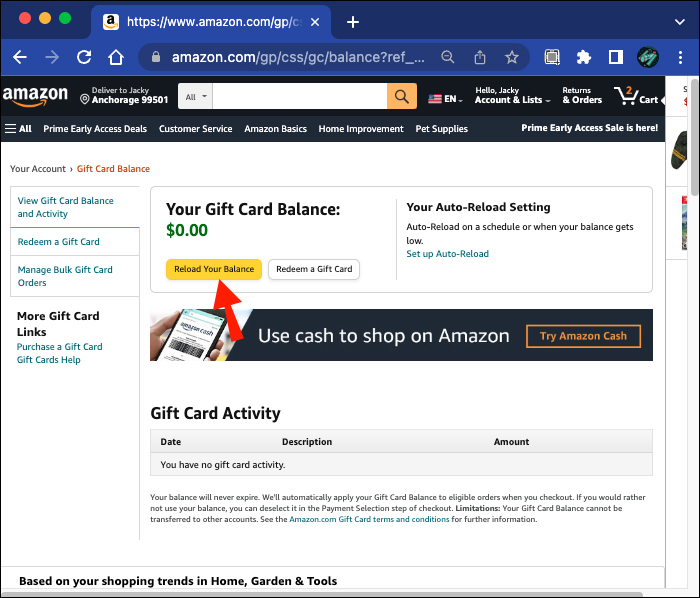
- Select “Email” or “Reload Your Balance”: Choose to send an e-gift card to yourself or, more directly, use the “Reload Your Balance” option.
- Enter the Exact Remaining Amount: Input the precise balance remaining on your Amex gift card (e.g., $3.47).
- Pay with Your Amex Gift Card: During checkout, select your Amex gift card as the payment method.
This instantly transfers the full remaining balance from your Amex card into your Amazon account, where it becomes part of your permanent Amazon Gift Card balance, usable for any future purchase without expiration. This effectively eliminates stranded funds and maximizes the utility of every dollar.
Understanding Transaction Fees and Restrictions
A significant financial advantage of Amex gift cards is that they generally do not incur activation or usage fees for the recipient. When you use the card on Amazon, you are not charged extra fees by American Express for the transaction itself. The amount deducted from your gift card will be exactly the purchase price. However, be mindful of the initial purchase fees when acquiring the gift card itself, as these can slightly reduce the overall value from the buyer’s perspective. Also, remember that Amex gift cards cannot be used for recurring subscriptions or services that require a persistent payment method, like some Prime membership fees (unless you buy a fixed-term membership). They also cannot be used to purchase other Amex gift cards.
Financial Prudence and Security Considerations
Treating your Amex gift card with the same care you would a debit or credit card is essential for financial security and peace of mind.
Protecting Your Gift Card: Treat it Like Cash
Because Amex gift cards are prepaid, their value is effectively cash. If a physical card is lost or stolen, and you haven’t registered it, retrieving the funds can be challenging or impossible. Keep the card details (card number, expiration, CID) in a secure place separate from the card itself. Also, be wary of phishing scams or fraudulent websites that might try to illicitly obtain your card information. Always ensure you are on the official Amazon website when making purchases. This vigilance is a cornerstone of personal financial security in the digital age.
Monitoring Your Spending and Balances
Good financial practice dictates that you keep track of your gift card balance. After each purchase, ideally, you should verify the remaining balance on the Amex gift card website. This ensures you’re aware of how much you have left for future purchases and helps in planning how to fully exhaust the card, especially for smaller amounts. Consistent monitoring prevents overspending (attempting to purchase more than available) and helps in strategic use, aligning with sound budgeting principles.
What to Do with Small Remaining Balances
As discussed, small residual balances are a common headache. Beyond converting them to Amazon Gift Card balance, you could:
- Combine with another payment method: For small items that are cheap (e.g., add-on items, digital content).
- Pay for a portion of a larger item: Use it as partial payment for an item, as Amazon allows split payments.
- Consider a micro-purchase: Buy an e-book, a song, or a small digital product that perfectly matches the remaining amount.
The goal is always to avoid leaving behind an unusable sum, thus maximizing your financial return from the card.
Beyond the Basics: Advanced Tips for Savvy Spenders
For those who wish to optimize their Amex gift card usage further, a few advanced strategies can enhance the shopping experience and financial efficiency.
Combining Multiple Gift Cards (If Applicable)
While you cannot directly merge multiple Amex gift cards into a single balance, you can effectively combine their value on Amazon. If you have several Amex gift cards, simply add each one as a separate payment method. When checking out, apply the full balance of one card, then the full balance of another, and so on, until the total purchase amount is covered. Amazon’s flexible payment system makes this a seamless process, allowing you to liquidate multiple gift cards in a single transaction or across several. This is an excellent way to consolidate disparate gift values into a meaningful purchase.
Leveraging Amazon Prime Benefits
While not directly related to the Amex gift card itself, using the card to pay for purchases while holding an Amazon Prime membership significantly enhances its value. Prime benefits, such as free two-day shipping, exclusive deals, and access to Prime Video and Music, mean that your gift card dollars go further. For example, if you’re using your Amex gift card to buy essentials, the free shipping saves you money that would otherwise come out of your pocket or the gift card’s balance. Financially, this means maximizing the utility of your gift card within an optimized shopping ecosystem.
Gifting Amex Cards for Amazon Shopping
When considering giving a financial gift, an Amex gift card offers flexibility to the recipient, allowing them to choose where to spend it, including Amazon. From a gifting strategy perspective, an Amex gift card can be more thoughtful than a store-specific card if the recipient has diverse shopping preferences or if you’re unsure of their favorite retailers. By providing a universally accepted payment method, you empower the recipient to make purchases on Amazon with ultimate freedom, knowing they can follow the steps outlined in this guide to make their spending efficient and enjoyable.
In conclusion, using an Amex gift card on Amazon is a straightforward and financially astute way to leverage prepaid funds. By understanding the card’s mechanics, employing strategic payment methods, and adopting diligent financial practices, consumers can unlock the full potential of these versatile financial tools, ensuring every dollar is spent wisely and efficiently on the world’s largest online marketplace.
aViewFromTheCave is a participant in the Amazon Services LLC Associates Program, an affiliate advertising program designed to provide a means for sites to earn advertising fees by advertising and linking to Amazon.com. Amazon, the Amazon logo, AmazonSupply, and the AmazonSupply logo are trademarks of Amazon.com, Inc. or its affiliates. As an Amazon Associate we earn affiliate commissions from qualifying purchases.