
In the current era of digital consumption, the “Streaming Wars” have led to a highly fragmented landscape of Software-as-a-Service (SaaS) entertainment. Paramount Plus, as a major player in this vertical, offers a robust library of content, yet the technical complexity of managing various digital subscriptions often leaves users caught in a web of third-party billing and platform-specific interfaces. Understanding the technical architecture of how these subscriptions are tethered to your digital identity is crucial for maintaining a clean, efficient, and secure digital footprint.
Whether you are looking to prune your digital overhead or simply transitioning to a different service provider, knowing how to navigate the specific UI/UX pathways of various platforms is essential. This guide provides an in-depth technical walkthrough on how to unsubscribe from Paramount Plus across the entire modern tech ecosystem.
Navigating the Fragmentation of Modern Digital Subscriptions
The transition from traditional linear television to over-the-top (OTT) media services has fundamentally changed how we interact with software. Subscriptions are no longer simple monthly bills; they are integrated into complex ecosystems that involve app stores, hardware manufacturers, and identity providers. To successfully unsubscribe from a service like Paramount Plus, one must first identify the “billing anchor”—the specific platform that holds the financial handshake with the service provider.
The Shift from Cable to SaaS-based Entertainment
Streaming services operate on a subscription-based software model that prioritizes recurring revenue. From a technical standpoint, this involves encrypted billing tokens and automated API calls that trigger every 30 days. When you decide to cancel, you are essentially revoking the authorization of these automated scripts. Because Paramount Plus is accessible via browsers, smart TVs, mobile devices, and gaming consoles, the point of entry often dictates the point of exit.
Understanding the “Third-Party Billing” Maze
One of the primary hurdles in subscription management is the “Third-Party Billing” architecture. If you signed up for Paramount Plus through an interface like the Apple App Store, Google Play, or Amazon Prime Channels, Paramount Plus itself does not hold your credit card information. Instead, they receive a verification signal from the third party. Consequently, attempting to cancel on the Paramount Plus website will often result in a redirect, as the website lacks the administrative permission to modify your third-party financial records.
Step-by-Step Technical Guide: Unsubscribing via Web and Mobile Apps
For users who registered directly through the official website or via mobile applications, the process is streamlined but requires navigating through several layers of account settings. This is where “Digital Hygiene” comes into play—ensuring that your account status is updated across all cached versions of your profile.
Desktop Browser Method (Direct Billing)
The most direct way to manage a subscription is via a desktop browser, as it provides the most comprehensive view of your account’s backend settings.
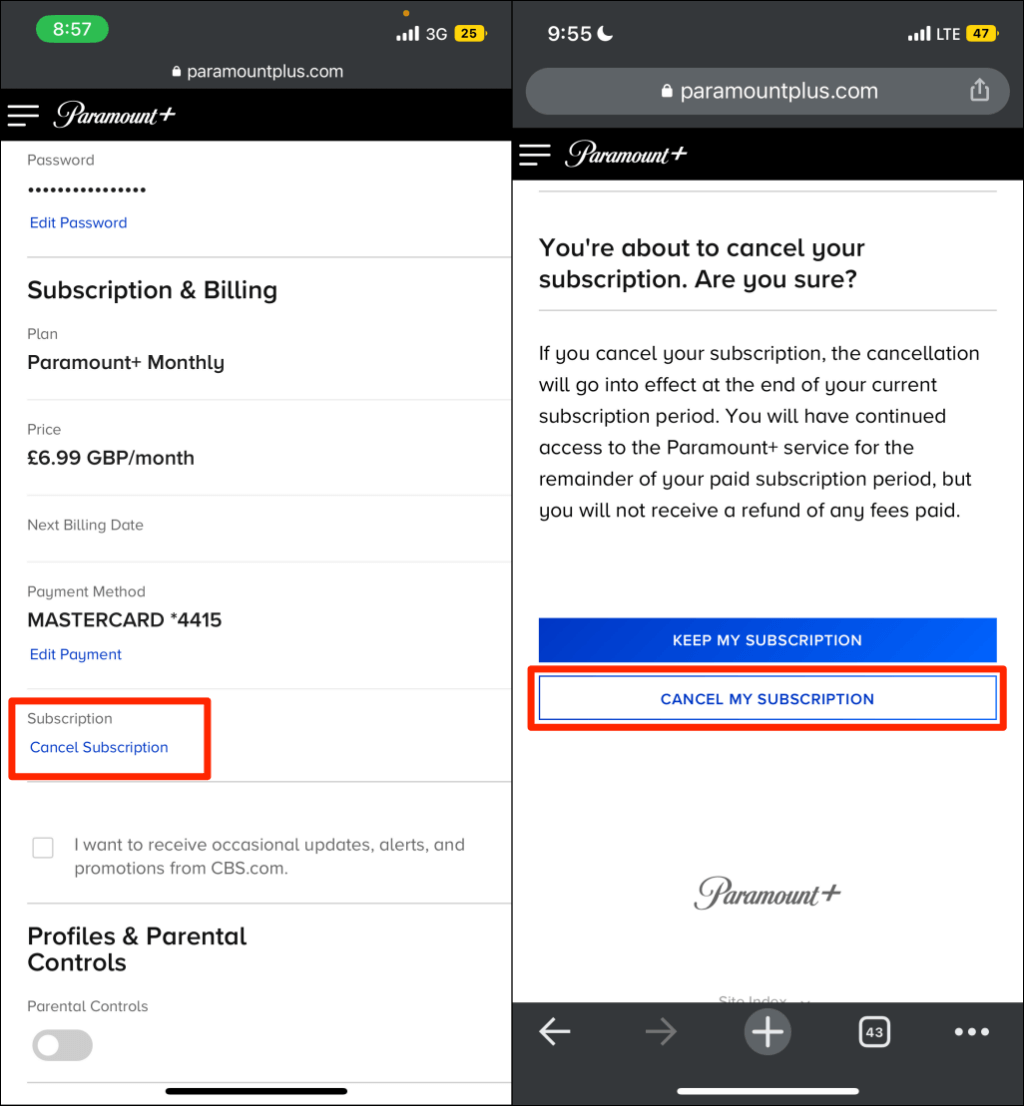
- Authentication: Navigate to the Paramount Plus official website and log in. This establishes a secure session via HTTPS.
- Account Access: Click on your user profile icon in the top right corner and select “Account.” This page serves as the central hub for your subscription’s metadata.
- Subscription Management: Locate the “Subscription & Billing” section. Here, you will see your plan details and the next billing date.
- Cancellation Trigger: Click “Cancel Subscription.” You may be prompted with a retention offer or a survey; these are UI patterns designed to reduce churn.
- Verification: Complete the process until you receive a confirmation email. This email is your digital receipt and proof that the server-side status of your account has been updated to “Pending Cancellation.”
Managing Paramount Plus via the Android and iOS Ecosystems
Mobile operating systems utilize integrated “Subscription Managers” to centralize payments. This is a security feature that prevents individual apps from accessing your raw financial data.
- For Android Users: Open the Google Play Store app. Tap your profile icon, go to “Payments & subscriptions,” then “Subscriptions.” Locate Paramount Plus and select “Cancel subscription.” This sends a command to the Google Play billing API to cease further transactions.
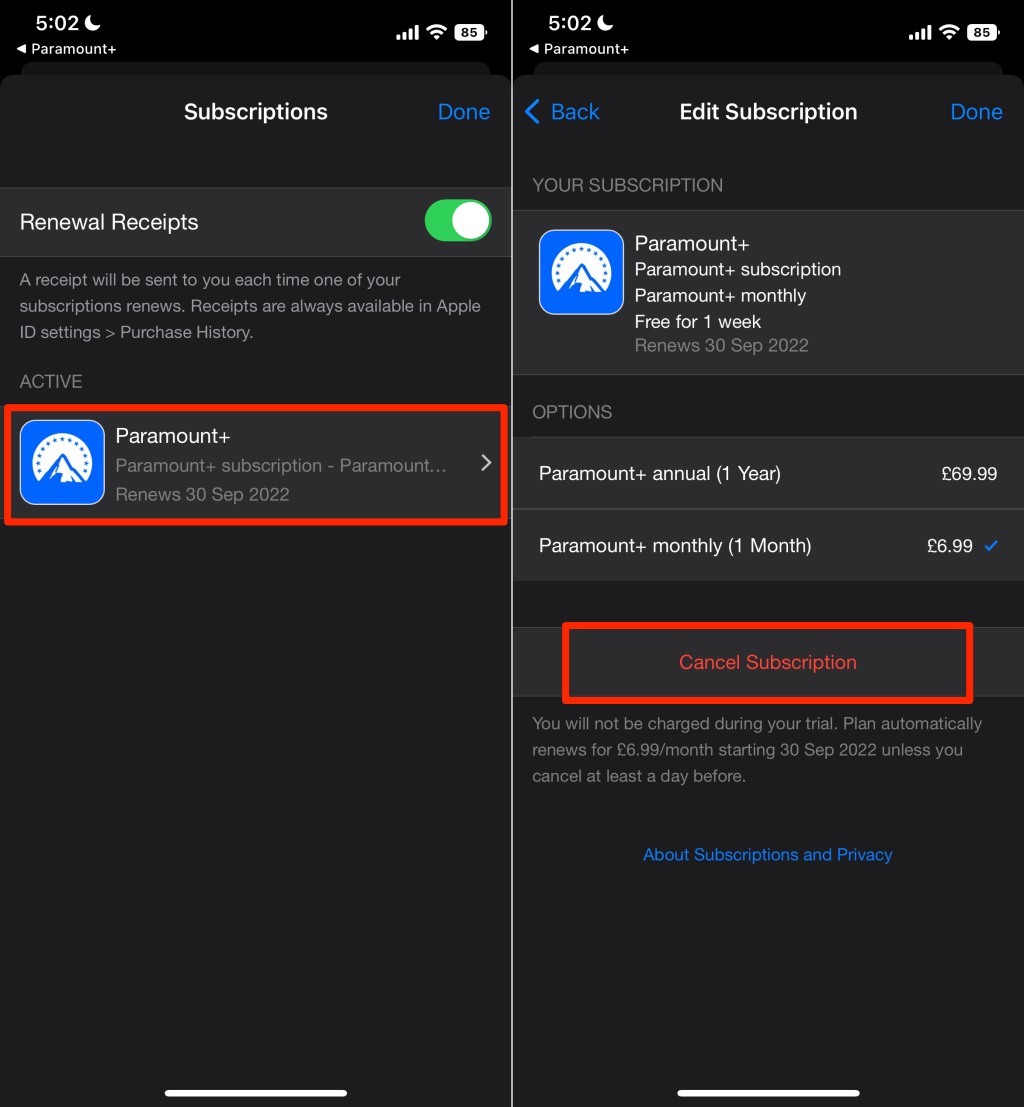
- For iOS/iPadOS Users: Navigate to the “Settings” app on your iPhone or iPad. Tap your Apple ID (Name) at the top, and select “Subscriptions.” Under the “Active” list, select Paramount Plus and tap “Cancel Subscription.” This modifies your Apple ID’s payment keychain, ensuring the recurring charge is disabled at the OS level.
Decoupling from Third-Party Ecosystems: Amazon, Roku, and Apple TV
Many users opt for “Channel” subscriptions, where Paramount Plus is treated as an add-on to an existing platform. This integration simplifies the user experience but complicates the cancellation process, as the subscription is nested within another service’s dashboard.
Terminating Subscriptions through Amazon Prime Channels
If you access Paramount Plus via the Amazon Prime Video interface, your subscription is managed through Amazon’s “Digital Orders” backend. To cancel, you must log into your Amazon account, navigate to “Accounts & Lists,” and select “Memberships & Subscriptions.” From there, you can enter the “Prime Video Channels” settings. This is a critical distinction: canceling your Prime membership will not always automatically cancel the individual Channel subscriptions attached to it.
Navigating the Roku Account Portal
Roku creates a proprietary billing layer for its users. To unsubscribe on a Roku device, highlight the Paramount Plus app on your home screen and press the Star (*) button. Select “Manage Subscription” and then “Cancel Subscription.” Alternatively, you can log into the Roku website and manage all integrated “Roku Pay” services from the dashboard. This ensures that the Roku billing engine stops processing the specific SKU associated with Paramount Plus.
Managing via Apple TV and Integrated Billing
For those using the Apple TV hardware or the Apple TV app (separate from the iOS App Store), the subscription is often tied to the “Apple TV Channels” API. This requires navigating to the “Settings” menu on the Apple TV device itself, or using a Mac/PC to access the Media & Purchases section of your account. Because Apple uses a unified billing system, ensuring the Apple ID matches the one used for the initial purchase is the most common technical hurdle during this process.
Troubleshooting Digital Access and Post-Cancellation Security
Once the cancellation command has been issued, there are several technical nuances regarding data retention and access permissions that users should be aware of to ensure their digital security.
What Happens to Your Data After Unsubscribing?
Most streaming services, including Paramount Plus, retain your viewing history and profile metadata for a “grace period” (often 6 to 12 months). This is done to facilitate an easy “re-onboarding” process if you decide to return. From a data privacy perspective, if you wish to have your data completely purged, you may need to exercise your rights under the GDPR or CCPA by submitting a formal data deletion request to their privacy office.
Managing Lingering Digital Permissions and Auto-Renewals
One common technical glitch is the “Ghost Subscription,” where a user cancels on one platform but a secondary billing trigger remains active elsewhere. It is highly recommended to check your bank statements or digital wallet (like PayPal or Apple Pay) the month after cancellation to ensure no automated clearing house (ACH) transfers or credit hits occur. Additionally, ensure that you have signed out of all devices. While canceling the subscription stops the billing, it doesn’t always revoke the OAuth tokens on every logged-in device immediately.
The Future of Streamlined Subscription Management
As the number of available streaming apps continues to grow, the tech industry is moving toward more automated solutions to handle the “subscription bloat.” We are seeing a rise in specialized software designed to act as a middleware between consumers and their various digital services.
The Rise of Subscription Management Software
Tools like Rocket Money or specialized features within banking apps (such as Revolut or Chase) now use AI-driven transaction analysis to identify recurring software costs. These tools can sometimes automate the cancellation process by interacting with the service’s API or by sending automated legal notices to the provider. This represents a shift toward “Consumer-Side Tech” that empowers users to manage their digital finances with greater granularity.
Implementing Best Practices for Digital Hygiene
To avoid future technical headaches with subscriptions, tech-savvy users are increasingly adopting a “Single Point of Entry” strategy. By consistently subscribing through one specific ecosystem (e.g., only using Apple Subscriptions or only using Direct Billing), you create a centralized “kill switch” for your digital overhead.
In conclusion, unsubscribing from Paramount Plus is not merely a matter of clicking a button; it is a process of navigating the complex interplay between different software platforms and billing architectures. By understanding the underlying technical framework—from API handshakes to third-party billing integrations—you can maintain control over your digital environment and ensure that your software expenditures remain aligned with your actual usage. Stay vigilant with your digital receipts, understand your platform’s specific UI pathways, and always verify that the backend status of your account matches your intentions.
aViewFromTheCave is a participant in the Amazon Services LLC Associates Program, an affiliate advertising program designed to provide a means for sites to earn advertising fees by advertising and linking to Amazon.com. Amazon, the Amazon logo, AmazonSupply, and the AmazonSupply logo are trademarks of Amazon.com, Inc. or its affiliates. As an Amazon Associate we earn affiliate commissions from qualifying purchases.