
In the realm of digital transactions, convenience often comes with the necessity for robust security and user control. Cash App, a prominent mobile payment service, empowers its users with features to manage their interactions, including the ability to block businesses or individuals. While blocking offers a crucial layer of protection, there are instances where a business, once blocked, needs to be re-engaged. Understanding the technical intricacies of this process is essential for seamless digital financial management.
Understanding Why a Business Might Be Blocked
Before delving into the unblocking procedure, it’s insightful to consider the common reasons why a business might find itself on your blocked list or even be flagged by Cash App’s internal systems. These reasons typically stem from user discretion, security protocols, or behavioral flags within the application’s ecosystem.
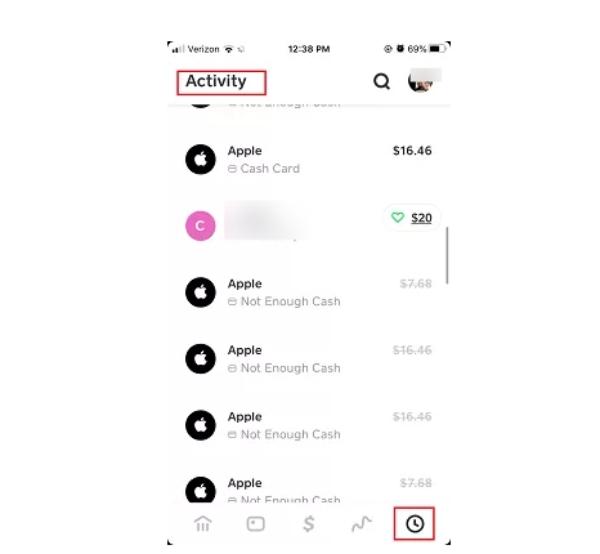
User-Initiated Blocks
The most straightforward reason is a direct action taken by the user. This usually occurs after a negative experience, such as a dispute over a transaction, receipt of unsolicited payment requests, or a misunderstanding that leads to a desire to cease all communication and transaction capabilities with a particular entity. Users might block a business to:
-
Prevent unwanted contact: Stopping messages, payment requests, or notifications.
-
Avoid future transactions: Ensuring no accidental payments are made or received from that specific business.
-
Manage privacy: Limiting who can see their Cash App profile or send them money.
This direct user control is a fundamental privacy feature designed to empower individuals in their digital financial interactions.
Cash App’s Automated Security Measures
Beyond user discretion, Cash App employs sophisticated algorithms and security protocols to protect its user base. In some cases, a business might be effectively “blocked” or restricted from interacting with users not directly by a user’s action, but by Cash App itself. This can happen if:
-
Suspicious activity is detected: Algorithms might flag unusual transaction patterns, high chargeback rates, or behaviors indicative of fraud.
-
Violation of Terms of Service: Businesses operating outside Cash App’s guidelines regarding acceptable use, prohibited transactions, or scamming practices can face automated restrictions.
-
Multiple user reports: A cumulative number of reports from various users against a specific business can trigger an internal review and potential blocking or suspension.
These automated systems are critical for maintaining the integrity and security of the platform, acting as a preventative measure against widespread fraud and misuse.
Reporting and Reputation
A business’s digital reputation within a payment platform can significantly impact its accessibility. If a business has been reported multiple times for issues such as non-delivery of services, deceptive practices, or refusal to issue refunds, it can lead to various forms of restriction. While not always a direct “block” in the user’s interface, a business with a poor reputation or multiple unresolved complaints might find its ability to transact or interact with a broad user base severely limited by platform policies. Understanding the context of the block is crucial, as an unblock initiated by a user does not override platform-level restrictions imposed by Cash App itself.
Step-by-Step Guide to Unblocking a Business
The process of unblocking a business on Cash App is straightforward, primarily involving navigation through the app’s privacy and security settings. This guide will walk you through the precise steps to regain transaction and communication capabilities with a previously blocked business.
Accessing Your Cash App Profile
The initial step in managing any personal settings, including blocked accounts, is to access your profile within the Cash App application.
-
Launch Cash App: Open the Cash App on your mobile device. Ensure you are using the latest version of the application for optimal functionality and security features.
-
Navigate to Profile Icon: On the Cash App home screen, locate and tap the profile icon. This icon is typically represented by a circle with a person’s silhouette or your profile picture, usually found in the top-right corner of the screen. Tapping this icon will take you to your personal account settings and options menu.
Navigating to Privacy & Security Settings
Once you are in your profile menu, the next step is to locate the section dedicated to security and privacy controls, as this is where blocking features are managed.
-
Scroll Through Profile Options: Within your profile menu, scroll down until you find an option related to “Privacy & Security” or simply “Security” or “Privacy.” The exact label may vary slightly based on app updates, but it will generally be self-explanatory.
-
Select Privacy & Security: Tap on the “Privacy & Security” option to enter the dedicated settings interface. This section houses various controls related to who can interact with you, your account visibility, and blocked user management.
Locating the Blocked Accounts List
Within the Privacy & Security settings, there will be a specific list or section dedicated to managing accounts you have blocked.
-
Find “Blocked Accounts” or “Blocked Users”: Look for a subsection explicitly labeled “Blocked Accounts,” “Blocked People,” or a similar designation. This list compiles all individuals or businesses you have previously chosen to block.
-
Tap to View List: Tap on this option to view the full list of accounts you have blocked. This list will display the Cash App usernames (or Cashtags) of the entities you have restricted.
Initiating the Unblock Process
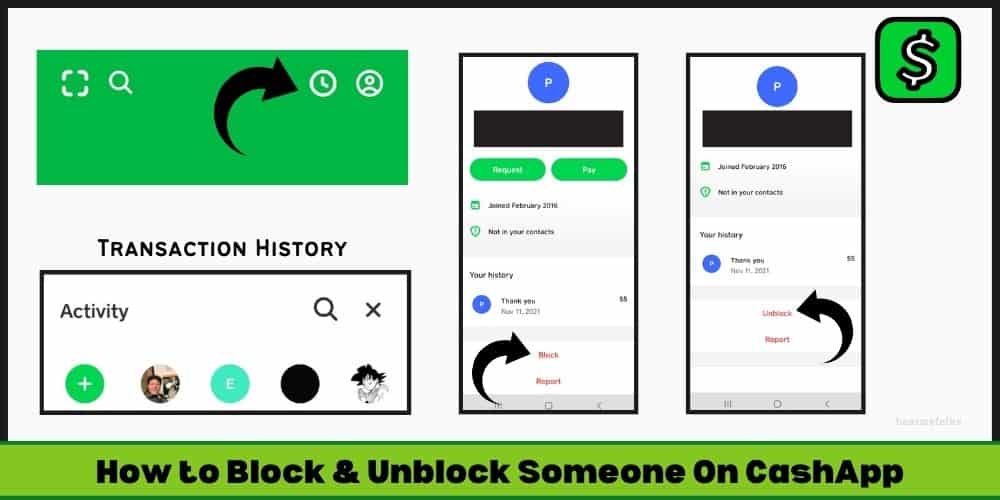
Once you have identified the business you wish to unblock from the list, the process to reverse the block is simple.
-
Identify the Business: Scroll through your list of blocked accounts until you find the Cashtag or name associated with the business you intend to unblock.
-
Select the Account: Tap on the specific business’s entry within the blocked list. This action will typically reveal further options pertaining to that particular account.
-
Tap “Unblock”: A prompt or button labeled “Unblock” should appear. Tap this “Unblock” button to initiate the reversal of the block.
It’s important to note that if you cannot find the business on your blocked list, it’s possible that the block was not user-initiated, but rather a system-level restriction by Cash App itself. In such cases, unblocking from your end will not resolve the issue, and further investigation with Cash App support may be necessary.
Confirmation and Verification
After tapping “Unblock,” the app may ask for a confirmation to ensure it’s an intentional action.
-
Confirm Action: A confirmation dialog might appear, asking if you are sure you want to unblock the business. Confirm your decision.
-
Verify Unblock: The business should now be removed from your “Blocked Accounts” list. To further verify, you can try searching for their Cashtag or initiating a payment; if the unblock was successful, you should be able to interact with them normally again.
Implications of Unblocking and Best Practices
Unblocking a business on Cash App re-establishes the connection, allowing for transactions and communications. However, it’s crucial to understand the implications of this action and adopt best practices to safeguard your financial interactions.
Re-enabling Transactions and Communications
Upon successfully unblocking a business, the following capabilities are immediately restored:
-
Sending and Receiving Money: You can now send payments to and receive payments from the unblocked business.
-
Direct Messaging: Any previous restrictions on direct communication via Cash App’s messaging feature are lifted.
-
Visibility: The business may be able to view your public Cash App profile information, depending on your broader privacy settings.
It’s vital to remember that unblocking essentially reverts the relationship to its state prior to the block. All previous reasons for blocking should be carefully considered before proceeding.
Assessing Trustworthiness Post-Unblock
Before engaging in new transactions or extensive communication, it’s prudent to reassess the trustworthiness of the business, especially if the initial block was due to negative experiences or security concerns.
-
Review Past Interactions: Reflect on the reasons for the original block. Have the underlying issues been resolved?
-
Communicate Clearly: If applicable, initiate a polite conversation to clarify any past misunderstandings or confirm changes in their service or policy.
-
Verify Identity (if necessary): Ensure you are indeed interacting with the legitimate business and not an imposter, especially if you encountered scam attempts in the past. Cross-reference their Cashtag with official business websites or verified social media accounts.
Monitoring for Suspicious Activity
Even after unblocking, maintaining vigilance is a critical best practice in digital finance.
-
Scrutinize Transaction Details: Always double-check recipient details, amounts, and notes before confirming any payment.
-
Beware of Unusual Requests: Be cautious of requests for personal information, login credentials, or payments outside the usual scope of your interaction with the business.
-
Review Transaction History: Regularly review your Cash App transaction history for any unauthorized or suspicious activity.
-
Enable Notifications: Keep transaction notifications enabled to stay informed of all activity on your account in real-time.
When Unblocking Isn’t Enough: Advanced Troubleshooting and Support
There are scenarios where simply unblocking a business within your app settings doesn’t resolve the issue, particularly if the block or restriction originated from Cash App’s side. In these cases, more advanced troubleshooting or direct intervention from support is required.
Contacting Cash App Support
If you’ve followed the unblocking steps and still encounter issues interacting with a business (e.g., transactions fail, the business remains unreachable, or it reappears on your blocked list automatically), it’s time to contact Cash App support.
-
In-App Support: The most efficient way to reach support is directly through the Cash App. Navigate to your profile icon, scroll down, and select “Support.” From there, you can browse FAQs or initiate a chat with a support agent.
-
Provide Detailed Information: When contacting support, be prepared to provide specific details: the Cashtag of the business, dates of block/unblock attempts, error messages received, and a clear description of the problem. This will help them diagnose the issue more quickly.
-
Be Patient: Depending on the complexity of the issue, resolution may take some time. Keep a record of your communication with support for future reference.
Addressing Account Restrictions
If Cash App has placed a restriction on the business’s account (or even your own), an unblock from your end will not bypass these system-level controls.
-
Understanding Restrictions: Restrictions can range from temporary payment limits to full account suspensions. These are typically imposed due to detected violations of Cash App’s Terms of Service, fraudulent activity, or ongoing investigations.
-
Role of Support: Only Cash App support can lift platform-imposed restrictions. They will conduct an internal review and communicate any necessary actions or resolutions. Businesses facing such restrictions usually have a direct channel to appeal or resolve the issues.
-
User Impact: If a business’s account is severely restricted, even if you unblock them, you might still be unable to transact. This is for your protection, as it indicates a potential risk associated with that entity.
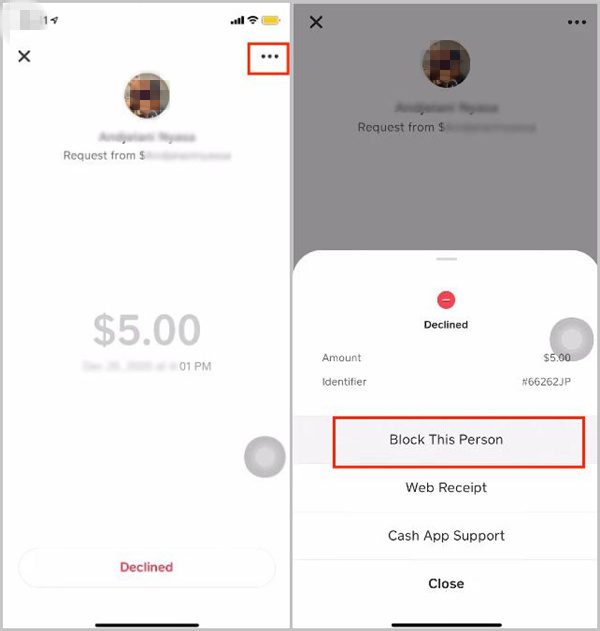
Understanding Cash App’s Terms of Service
Both individual users and businesses operating on Cash App are bound by its comprehensive Terms of Service. Familiarizing yourself with these terms can provide insights into why certain actions might be restricted or why a business might be flagged.
-
Prohibited Activities: The terms outline specific types of transactions and behaviors that are forbidden. Engaging in or attempting to engage with a business involved in such activities can lead to issues.
-
Dispute Resolution: Understanding the dispute resolution process can be crucial if you find yourself in a disagreement with a business after unblocking them.
-
Security Best Practices: The terms also often provide guidelines for maintaining account security, which can help prevent future incidents that might lead to blocking or restrictions.
Navigating the blocking and unblocking features on Cash App is a critical aspect of managing your digital finance security. By understanding the underlying reasons for blocks, following the precise technical steps for unblocking, and adhering to best practices, users can confidently maintain control over their interactions and ensure a secure transactional environment. When in doubt, leveraging Cash App’s dedicated support channels provides the necessary escalation path for more complex issues.
aViewFromTheCave is a participant in the Amazon Services LLC Associates Program, an affiliate advertising program designed to provide a means for sites to earn advertising fees by advertising and linking to Amazon.com. Amazon, the Amazon logo, AmazonSupply, and the AmazonSupply logo are trademarks of Amazon.com, Inc. or its affiliates. As an Amazon Associate we earn affiliate commissions from qualifying purchases.