
In an increasingly digital age, the fundamental skills of arithmetic often intersect with the nuances of technology. While calculators have evolved from simple four-function devices to sophisticated graphing powerhouses, a common hurdle for many users remains: accurately inputting and manipulating fractions. Far from being an outdated concept, fractions are integral to various fields, from engineering and finance to culinary arts and everyday problem-solving. Mastering their input on a calculator is not just about performing a specific mathematical operation; it’s about enhancing your technological literacy and ensuring precision in a world that demands it. This guide delves into the mechanisms, quirks, and best practices for typing fractions into your calculator, transforming a potential point of frustration into a seamless process.
The Ubiquity of Fractions in Our Digital World
Despite the dominance of decimal representations in digital displays, the conceptual power and practical necessity of fractions persist. Understanding how to interact with them on technological devices is crucial for anyone engaged in STEM fields, trade professions, or even just managing personal projects. The ability to precisely represent parts of a whole, without the rounding errors inherent in many decimal approximations, underscores their enduring relevance.
Beyond Basic Arithmetic: Why Fractions Still Matter
Fractions are more than just rudimentary mathematical concepts learned in grade school; they are foundational elements of advanced mathematics, physics, chemistry, and various engineering disciplines. In computer science, concepts like bit rates and data compression often involve fractional relationships. Architects use fractions for precise measurements, while stock traders might analyze fractional changes in share prices. Even in baking, recipes frequently call for fractional quantities, and scaling them up or down accurately on a calculator can prevent costly mistakes. The digital world, despite its bias towards decimals, relies on the underlying precision that fractions offer in many contexts.
The Calculator: A Gateway to Mathematical Proficiency
For generations, the calculator has served as an indispensable tool, democratizing complex calculations and allowing users to focus on problem-solving rather than rote computation. However, its effectiveness hinges on the user’s ability to communicate with it accurately. Inputting fractions correctly unlocks a deeper level of mathematical proficiency, enabling users to tackle problems that require exact fractional answers, rather than being limited to decimal approximations. This skill not only saves time but also builds confidence in interpreting and applying mathematical principles within a technological framework.
Understanding Your Calculator’s Interface: Key Buttons and Modes
The method for typing fractions varies significantly depending on the type and model of calculator you’re using. While some have dedicated buttons, others rely on specific syntax or a combination of function keys. Familiarity with your specific device’s layout and operational modes is the first step toward fraction mastery.
Standard Scientific Calculators: The a b/c Button
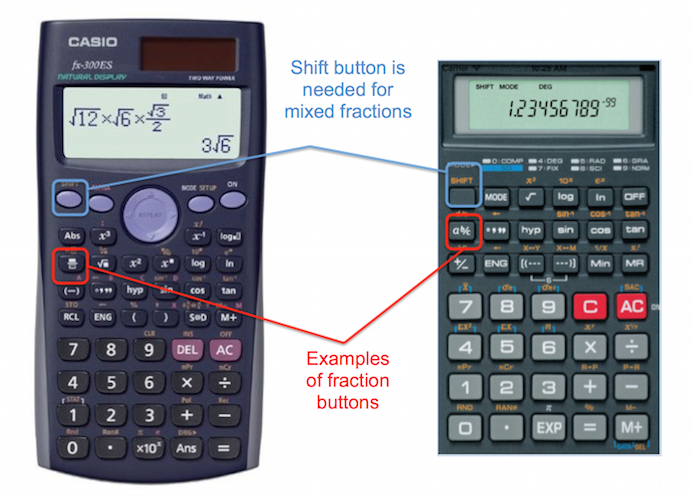
Most scientific calculators, such as those from Casio, Texas Instruments (TI-30X series), or Sharp, feature a dedicated fraction button, often labeled a b/c, d/c, or a similar symbol. This button is your primary interface for inputting fractions and mixed numbers.
- To input a simple fraction (e.g., 3/4): Type the numerator (3), press the
a b/cbutton, then type the denominator (4). The display might show3┘4or3/4. - To input a mixed number (e.g., 2 ½): Type the whole number (2), press the
a b/cbutton, type the numerator (1), pressa b/cagain, then type the denominator (2). The display might show2┘1┘2or2_1/2. - To convert between mixed numbers and improper fractions: After calculating or inputting a fraction, press
SHIFT(or2nd) followed by thea b/cbutton. This often toggles the display between mixed number, improper fraction, and decimal forms.
Graphing Calculators: Inputting Fractions with Specific Syntax
Graphing calculators, like those in the TI-83, TI-84, or Casio FX-CG series, offer more advanced methods, often allowing for “natural display” input that mimics how you would write fractions on paper.
- Using the Fraction Template: Many modern graphing calculators have a fraction template function. This is typically accessed through a menu (e.g.,
ALPHA+Y=on TI-84, or a dedicated button on Casio models). Selecting this option brings up a template on the screen with a numerator over a denominator, where you can directly type your values. - Using Division Symbol: In some older models or when the natural display isn’t active, you might simply use the division symbol (
/) to represent fractions. For example,3/4would be entered as3 ÷ 4. However, to ensure the calculator treats it as a single fraction for operations, it’s often best to enclose it in parentheses:(3/4). - Mixed Numbers: For mixed numbers, you typically enter the whole number, then add the fractional part, often using parentheses for clarity:
2 + (1/2). Alternatively, you can convert mixed numbers to improper fractions before inputting.
Online and App-Based Calculators: A Diverse Landscape of Input Methods
The digital realm offers a vast array of calculators, from simple web tools to sophisticated mobile apps. Their input methods can vary widely, reflecting a diverse landscape of user interfaces.
- Direct Text Input: Many online calculators and apps allow you to type fractions directly using the
/symbol (e.g.,1/2). Some advanced ones might even auto-format it into a visual fraction as you type. - Virtual Keyboards: Apps often feature virtual keypads that mimic physical scientific calculators, complete with
a b/cor fraction template buttons. - Symbolic Input: More powerful computational tools like Wolfram Alpha or GeoGebra allow for symbolic input, where you can type
1/2orfraction(1,2)and the system understands it mathematically. Familiarize yourself with the specific syntax or virtual buttons offered by your chosen platform.
Step-by-Step Guide to Inputting Fractions
Regardless of your calculator type, a systematic approach to inputting fractions will prevent errors and ensure accurate results. The key is to understand the sequence of operations your calculator expects.
Inputting Simple Fractions (e.g., 1/2)
For a basic fraction where the numerator is less than the denominator:
- Identify the Numerator: This is the top number (e.g., 1).
- Identify the Denominator: This is the bottom number (e.g., 2).
- Use the Fraction Button (Scientific Calculators): Type the numerator, press
a b/c, then type the denominator. - Use the Division Symbol (Basic/Graphing Calculators): Type the numerator, press
÷, then type the denominator. Remember to use parentheses( )if the fraction is part of a larger expression to maintain the correct order of operations. - Use the Fraction Template (Graphing Calculators/Apps): Access the template, navigate to the numerator field, type, then navigate to the denominator field and type.
Handling Mixed Numbers (e.g., 2 1/3)
Mixed numbers combine a whole number with a proper fraction.
- Identify the Whole Number: (e.g., 2).
- Identify the Numerator of the Fraction: (e.g., 1).
- Identify the Denominator of the Fraction: (e.g., 3).
- Using
a b/c(Scientific Calculators): Type the whole number, pressa b/c, type the numerator, pressa b/cagain, then type the denominator. - Using Addition (Graphing/Online): Enter the whole number, then press
+and enter the fraction in parentheses:2 + (1/3). - Using Fraction Templates: Some templates have a dedicated field for the whole number, or you can enter the improper fraction equivalent.
Dealing with Improper Fractions and Their Conversion
An improper fraction has a numerator greater than or equal to its denominator (e.g., 7/3). Calculators handle these just like simple fractions.
- Input: Use the same method as simple fractions: Numerator,
a b/c(or÷with parentheses), Denominator. - Conversion: Most scientific and graphing calculators can convert an improper fraction to a mixed number and vice versa. After calculation, press
SHIFT(or2nd) and then thea b/cbutton. This is incredibly useful for presenting answers in the desired format.
Performing Operations with Fractions: Addition, Subtraction, Multiplication, Division
Once you’ve mastered inputting fractions, performing operations is straightforward. Simply type the first fraction, then the operation symbol (+, -, ×, ÷), then the second fraction, and finally =.
- Example (Scientific Calculator):
(1 a b/c 2) + (3 a b/c 4) = - Example (Graphing Calculator using templates): Access template, type 1/2, exit template,
+, access template, type 3/4, exit template,ENTER. - Example (Graphing Calculator using division):
(1 ÷ 2) + (3 ÷ 4) =
Always double-check your input, especially when dealing with complex expressions.
Common Pitfalls and Troubleshooting Tips
Even with a solid understanding of the input methods, users can encounter issues. Knowing how to diagnose and resolve these common problems can save significant time and prevent calculation errors.
Display Issues: Decimal vs. Fraction Output
A frequent point of confusion is when a calculator defaults to displaying answers as decimals instead of fractions, or vice versa.
- Solution: Most scientific and graphing calculators have a function to toggle the display mode. Look for buttons like
F↔D(Fraction to Decimal),S↔D(Standard to Decimal), or aMODEsetting that allows you to choose between “Math Output” (fractions, roots) and “Line Output” (decimals, linear expressions). You might also need to useSHIFTor2ndwith a specific button to initiate the conversion.
Order of Operations (PEMDAS/BODMAS) with Fractions
The rules of PEMDAS (Parentheses, Exponents, Multiplication and Division, Addition and Subtraction) or BODMAS (Brackets, Orders, Division and Multiplication, Addition and Subtraction) apply rigorously to fractions.
- Problem: Forgetting parentheses around fractions in complex expressions can lead to incorrect results (e.g.,
1/2 + 3/4vs.(1/2) + (3/4)). While basic arithmetic might handle1/2 + 3/4correctly due to operator precedence, operations like1 ÷ 2 + 3 ÷ 4might first divide 1 by 2, then add 3, then divide by 4. - Solution: When in doubt, use parentheses
()to explicitly group your fractions and ensure the calculator performs operations in the intended order.
Parentheses and Grouping for Complex Expressions
Beyond individual fractions, parentheses are vital for grouping entire fractional expressions, especially when they are part of a larger calculation or when nested fractions are involved.
- Example: Calculating
(2/3) / (4/5). If you simply type2 a b/c 3 ÷ 4 a b/c 5, the calculator might interpret it as(2/3) ÷ 4thena b/c 5(which is meaningless). Correct input would be(2 a b/c 3) ÷ (4 a b/c 5). - Tip: Always visualize your mathematical expression and translate it into a calculator-friendly sequence, using parentheses as necessary to enforce grouping.
Memory Functions and Fraction Storage
For repetitive calculations involving the same fraction, utilizing your calculator’s memory functions can be a time-saver.
- Solution: Input your fraction, then store it to a memory variable (e.g.,
STOthenAfor variable A). You can then recall this variable in subsequent calculations. This is particularly useful for constants or frequently used fractional values.
Leveraging Advanced Calculator Features for Fractional Calculations
Modern calculators are packed with features that go beyond simple input. Exploring these can significantly enhance your efficiency and accuracy when working with fractions.
Fraction-to-Decimal and Decimal-to-Fraction Conversion
This is perhaps one of the most frequently used advanced features.
- Functionality: Almost all scientific and graphing calculators allow for conversion between fractional and decimal forms. This is usually done by pressing a dedicated button (like
F↔DorS↔D) or through a menu option after a calculation has been performed or a number displayed. - Use Case: Sometimes, an exact fractional answer is required, but intermediate steps might be easier to visualize as decimals. Or, you might need to convert a decimal repeating pattern back into its fractional equivalent.
Simplifying Fractions Automatically
Many calculators have the ability to simplify fractions to their lowest terms.
- Process: When you perform an operation that results in a fraction (e.g.,
2/4), the calculator might automatically simplify it to1/2upon displaying the answer. If not, there’s often a dedicatedSimplifyfunction or it happens automatically when toggling between fraction forms. - Benefit: This feature ensures that your answers are presented in a standard, concise format, reducing the need for manual simplification.
Using Solver Functions for Fractional Equations
For more complex scenarios, graphing calculators often include “solver” functions or equation editors that can handle fractional inputs within algebraic equations.
- Application: If you have an equation like
x + 1/3 = 5/6, you can input the equation directly into the solver, ensuring all fractional terms are correctly formatted, and the calculator will find the value ofx. - Advantage: This moves beyond basic arithmetic to solving fractional equations, making the calculator a powerful tool for algebra and pre-calculus.

Conclusion: Mastering Fractions for Enhanced Technological Literacy
Typing fractions on a calculator is more than just a specific key sequence; it’s a demonstration of technological literacy and an essential skill for accurate mathematical work across numerous disciplines. From understanding the nuanced a b/c button on a scientific calculator to leveraging the natural display templates on a graphing model, each method requires a thoughtful approach. By mastering these input techniques, troubleshooting common pitfalls, and exploring advanced features, you unlock the full potential of your calculator. In a world increasingly driven by precise data and calculations, the ability to fluently communicate with your digital tools, especially concerning foundational concepts like fractions, is not just helpful—it’s indispensable for anyone seeking to navigate and contribute to the technological landscape.