
In an era of dynamic financial transactions and increasingly digital money management, safeguarding your checking account from unexpected shortfalls is a cornerstone of sound personal finance. Overdraft protection serves as a vital safety net, preventing declined transactions, avoiding hefty fees, and maintaining the seamless flow of your financial life. For millions, the Chase Mobile App has become an indispensable tool for managing accounts on the go, offering a convenient portal to a suite of banking services, including the critical feature of overdraft protection.
This comprehensive guide will delve into the intricacies of overdraft protection, elucidate its profound importance in personal finance, and provide a detailed walkthrough on how to activate and manage it directly from your Chase app. By taking these proactive steps, you can fortify your financial security and ensure peace of mind in an unpredictable world.

Understanding Overdraft Protection: A Cornerstone of Personal Finance Management
Before diving into the activation process, it’s essential to grasp what overdraft protection entails and why it holds such significance in prudent financial management. It’s more than just a banking feature; it’s a strategic layer of defense against common financial pitfalls.
What is Overdraft Protection and Why Does It Matter?
An overdraft occurs when you attempt to spend or withdraw more money than is available in your checking account. This can happen through a debit card purchase, an ATM withdrawal, a check, or an automatic bill payment. Without protection, such a transaction could be declined, or worse, processed by the bank, leading to an overdraft fee – a charge for covering your negative balance. Banks often charge substantial fees for each overdraft, which can quickly accumulate and severely impact your financial health.
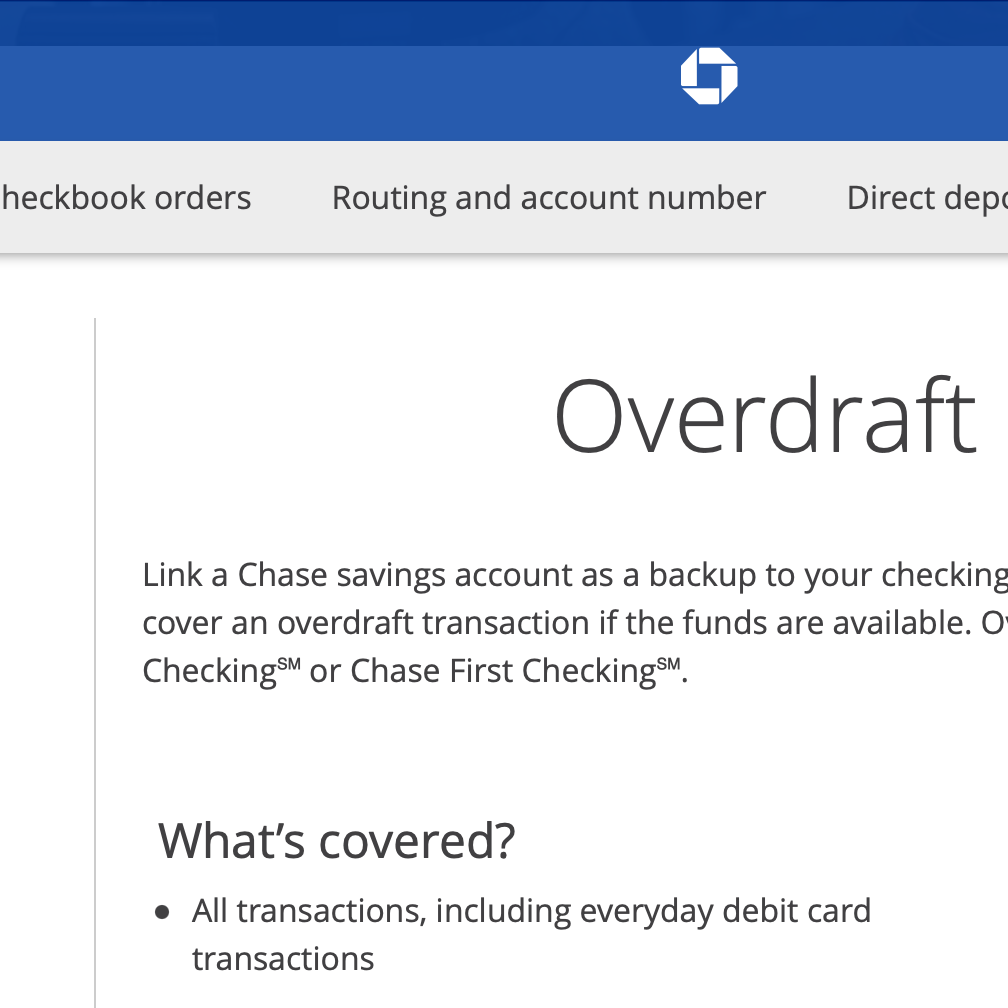
Overdraft protection is a service that helps prevent these scenarios by automatically transferring funds from a linked account or providing a short-term line of credit to cover the shortfall. Its primary purpose is to bridge the gap between your available balance and your spending, ensuring that critical payments go through and you avoid punitive fees. This service is not merely about convenience; it’s about financial resilience, preventing small missteps from escalating into significant financial burdens.
Different Types of Overdraft Protection Offered by Chase
Chase, like most major financial institutions, offers several mechanisms for overdraft protection, each with its own advantages and implications. Understanding these options is crucial for selecting the one that best aligns with your financial habits and risk tolerance.
-
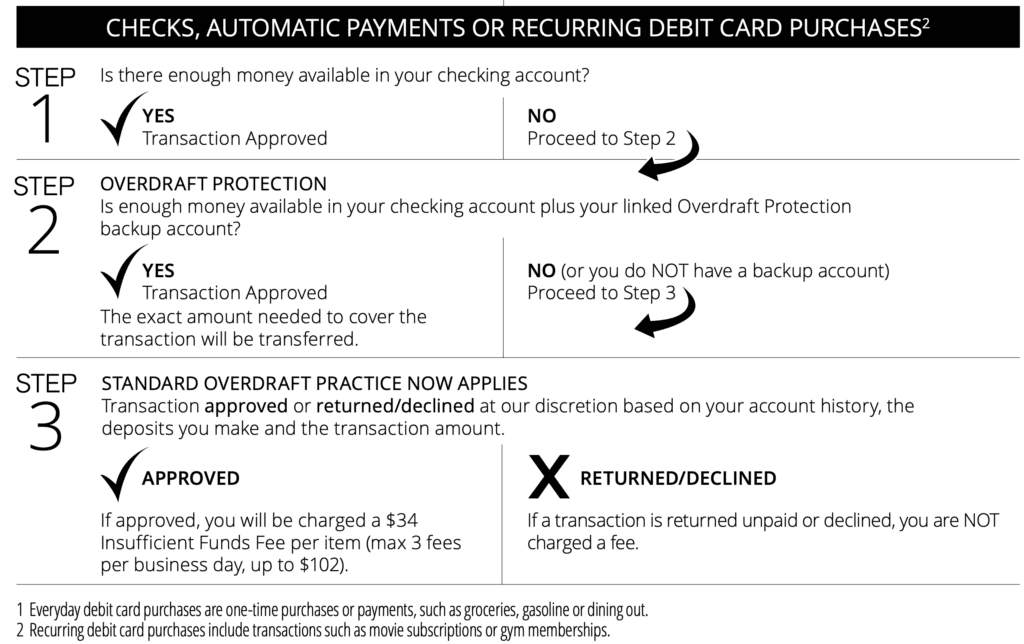
Linked Savings Account: This is one of the most common and often recommended forms of protection. If your checking account balance drops below zero, Chase will automatically transfer funds from a linked Chase savings account to cover the transaction. This method typically incurs a small transfer fee per incident, but it’s usually much lower than a standard overdraft fee, and you’re simply using your own money.
-
Linked Line of Credit or Credit Card: For those with a Chase line of credit or a qualifying Chase credit card, you can link one of these accounts for overdraft protection. When an overdraft occurs, funds are drawn from your line of credit or credit card. While this ensures transactions are covered, it’s important to remember that these are borrowed funds, meaning they will accrue interest immediately from the date of the transfer if not paid back promptly. This option should be used cautiously and understood clearly.
-
Standard Overdraft Practices (Overdraft Services): If you don’t opt for a linked protection account, Chase may, at its discretion, choose to pay certain overdrawn transactions (like debit card purchases and ATM withdrawals). However, this comes with a significant overdraft fee for each transaction covered. Crucially, you must opt-in for this service for debit card transactions and ATM withdrawals. If you do not opt-in, these types of transactions will simply be declined if you don’t have sufficient funds. For checks and automatic payments, Chase typically covers them and charges an overdraft fee, regardless of whether you’ve opted in for the other services.
Choosing the right option requires an honest assessment of your financial discipline and emergency fund status. Linking to a savings account is generally the most cost-effective and financially responsible approach, as it utilizes your own existing funds.
The Financial Benefits of Proactive Overdraft Management
Actively managing your overdraft protection offers a multitude of financial advantages that contribute to overall financial health and stability.
-
Avoiding Costly Fees: The most immediate and tangible benefit is sidestepping the hefty overdraft and non-sufficient funds (NSF) fees that can quickly erode your balance and budget.
-
Maintaining Transaction Continuity: Overdraft protection ensures that crucial payments, such as rent, utilities, loan installments, or subscriptions, are processed without interruption. This prevents late fees from other creditors, service disruptions, and potential damage to your credit score.
-
Peace of Mind and Reduced Financial Stress: Knowing you have a safety net in place alleviates the anxiety associated with managing a tight budget or an unexpected expense. It offers a buffer, allowing you to focus on broader financial goals rather than constant micro-management of your checking balance.
-
Protecting Your Financial Reputation: Consistently declined transactions or returned checks can sometimes lead to issues with merchants or even impact your ability to open accounts elsewhere in the future. Overdraft protection helps maintain a positive banking record.
Preparing for Activation: What You Need Before Using the Chase App
While the Chase app simplifies the process, a bit of preparation can ensure a smooth and informed activation of your overdraft protection. Taking these steps beforehand will help you make the best financial decision for your needs.
Essential Account Information and App Access
Before you begin, ensure you have the following readily available:
-
A Chase Checking Account: Overdraft protection is typically tied to your primary checking account.
-
A Linked Account (Savings, Credit Card, or Line of Credit): Decide which existing Chase account you wish to use as your backup source. Ensure this account has sufficient funds or available credit.
-
Chase Mobile App: Download and install the latest version of the Chase Mobile App on your smartphone or tablet.
-
Login Credentials: Have your Chase.com username and password at hand. If you’ve forgotten them, use the app’s recovery options before proceeding.
Assessing Your Financial Needs and Linked Account Options
Consider your typical spending habits and financial stability. Are you prone to occasional minor shortfalls, or do you anticipate larger, infrequent ones?
-
Review Current Balances: Check the balances of your checking and potential backup accounts.
-
Consider Emergency Funds: If you have an emergency savings fund, linking that account for overdraft protection can be a wise choice, as it utilizes your own money and incurs minimal fees.
-
Understand Credit Line Implications: If you opt to link a credit card or line of credit, be acutely aware that any funds transferred will be treated as a cash advance or credit draw, immediately incurring interest. This option is generally more expensive and should be reserved for situations where other options are not viable.
-
Evaluate Standard Overdraft Services: Understand that if you only rely on Chase’s standard overdraft practices (without a linked account), you will likely incur the highest fees per incident. Opting in for this specifically for debit card transactions can be convenient but costly.
Reviewing Chase’s Specific Overdraft Protection Terms and Fees
It is paramount to read and understand Chase’s specific terms and conditions regarding overdraft protection. These documents outline:
-
Transfer Fees: The exact cost for each transfer from a linked savings account.
-
Overdraft Fees: The fee charged if a transaction is paid without a linked protection account, or if the linked protection account is insufficient.
-
Interest Rates: Applicable if you link a credit card or line of credit.
-
Transaction Limits: Any daily or per-transaction limits on how much can be transferred to cover an overdraft.
You can typically find this information within the Chase Mobile App under your account details, on the Chase website (www.chase.com), or by contacting Chase customer service. Being informed empowers you to make financially sound decisions.
A Step-by-Step Guide: Activating Overdraft Protection via the Chase App
The Chase Mobile App is designed for intuitive navigation, making the activation of overdraft protection a straightforward process. Follow these steps to secure your account.
Logging In and Navigating to Account Settings
-
Open the Chase Mobile App: Launch the app on your smartphone or tablet.
-
Log In: Enter your username and password. You may also use biometric authentication (fingerprint or facial recognition) if enabled.
-
Select Your Checking Account: From the app’s home screen, tap on the checking account for which you want to set up overdraft protection. This will take you to its account details page.
-
Locate Settings/Manage Account Options: Scroll down or look for an icon (often a gear or three dots) that leads to “Account services,” “Manage account,” or “Settings” for that specific checking account.
Locating and Customizing Overdraft Protection Preferences
-
Find “Overdraft Protection”: Within the account services or settings menu, look for an option explicitly labeled “Overdraft Protection,” “Overdraft Services,” or “Backup Savings.” Tap on it.
-
Review Available Options: The app will present you with the various overdraft protection options available for your account. These might include:
-
Link to Savings: If you have a Chase savings account, this option will allow you to select it as the backup.
-
Link to Credit Card/Line of Credit: If you have qualifying Chase credit products, you’ll see options to link them.
-
Standard Overdraft Services (Debit Card & ATM Transactions): This is where you typically opt-in to allow Chase to pay debit card purchases and ATM withdrawals when you don’t have enough money, incurring a fee.
-
-
Select Your Desired Method: Choose the method that best suits your financial strategy. As previously mentioned, linking to a savings account is often the most cost-effective.
-
Confirm Backup Account (if applicable): If you’re linking to a savings account or credit product, the app will ask you to confirm which specific account you wish to link.
Reviewing and Confirming Your Selections
-
Review Details: Before finalizing, the app will display a summary of your selections and often reiterate key terms, such as potential fees or interest implications. Read this information carefully.
-
Agree to Terms and Conditions: You will likely need to check a box or tap a button indicating that you have read and agree to Chase’s terms and conditions for overdraft protection.
-
Confirm/Submit: Tap the “Confirm,” “Enroll,” or “Save Changes” button to finalize your settings.
-
Verification: You should receive an in-app confirmation message, and often an email or text message, confirming that your overdraft protection settings have been updated. Keep this confirmation for your records.
Beyond Activation: Best Practices for Ongoing Financial Health
Activating overdraft protection is a crucial step, but it’s part of a larger ecosystem of sound financial practices. It should be seen as a safety net, not a substitute for responsible money management.
Regularly Monitoring Account Balances and Transactions
Even with protection, vigilance is key. Make it a habit to:
-
Check Your App Daily/Weekly: Regularly review your checking account balance and recent transactions through the Chase app.
-
Set Up Alerts: Utilize the Chase app’s alert features to receive notifications for low balances, large transactions, or when an overdraft protection transfer occurs. This helps you stay informed and address issues promptly.
-
Reconcile Statements: Periodically compare your transactions in the app with your bank statements to catch any discrepancies.
Understanding Limits and Potential Fees with Overdraft Protection
Remember that even with overdraft protection, there are limits and potential costs:
-
Protection Limits: There might be a maximum amount that can be transferred from your linked account or covered by a line of credit. If an overdraft exceeds this limit, the transaction may still be declined, or you could still incur an overdraft fee.
-
Cost of Transfers: If you’re using a linked savings account, you’ll likely incur a small transfer fee each time the protection is activated. If using a credit line, interest will accrue.
-
Not a License to Overspend: Overdraft protection is for unforeseen circumstances. Consistently relying on it can be an indicator of a deeper budgeting issue and lead to accumulated fees or interest.
Integrating Overdraft Protection into a Broader Financial Strategy
For truly robust financial health, integrate overdraft protection into a holistic strategy:
-
Budgeting and Expense Tracking: Use the Chase app’s budgeting tools or third-party apps to track your income and expenses. A clear budget is your first line of defense against overdrafts.
-
Building an Emergency Fund: Aim to build a separate emergency fund that can cover 3-6 months of living expenses. This fund can also serve as a strong primary source for overdraft protection, reducing reliance on credit lines.
-
Regular Savings Habits: Automate transfers to your savings account. A healthy savings buffer naturally reduces the risk of overdrafts.
-
Utilizing Other Financial Tools: Explore other features within the Chase app, such as setting savings goals or viewing spending insights, to enhance your overall financial literacy and control.
By thoughtfully activating and prudently managing overdraft protection through the convenient Chase Mobile App, you equip yourself with a powerful tool for maintaining financial stability. It’s a proactive measure that, when combined with diligent budgeting and savings, forms an impregnable shield against unexpected financial challenges, ensuring your money works for you, rather than against you.
aViewFromTheCave is a participant in the Amazon Services LLC Associates Program, an affiliate advertising program designed to provide a means for sites to earn advertising fees by advertising and linking to Amazon.com. Amazon, the Amazon logo, AmazonSupply, and the AmazonSupply logo are trademarks of Amazon.com, Inc. or its affiliates. As an Amazon Associate we earn affiliate commissions from qualifying purchases.