
Understanding the Cash App-Debit Card Ecosystem
In the evolving landscape of personal finance, mobile payment applications like Cash App have become indispensable tools for managing daily transactions. These platforms offer unparalleled convenience for sending, receiving, and spending money. However, the ability to seamlessly transition funds from a digital wallet back into a traditional banking system via a debit card remains a fundamental requirement for many users, impacting everything from bill payments to savings strategies.
The Role of Cash App in Personal Finance
Cash App, developed by Block, Inc., serves as a multifaceted financial tool, facilitating peer-to-peer payments, direct deposits, stock investing, and even Bitcoin trading. Its primary appeal lies in its simplicity and speed, making it a go-to for splitting bills, paying friends, or receiving income. For many, Cash App balances represent liquid assets that need to be accessible beyond the app’s internal ecosystem, particularly when physical cash is required or when integrating funds into broader financial accounts. The convenience of keeping funds within the app is often balanced by the necessity of moving them to a linked bank account for larger expenditures or consolidation.

Debit Cards: A Bridge to Your Bank Account
A debit card acts as a direct conduit to your primary checking account. Unlike credit cards, which offer a line of credit, debit card transactions draw directly from your available balance. This makes them ideal for everyday spending, ATM withdrawals, and online purchases, firmly linking digital funds to tangible banking services. When transferring money from Cash App to a debit card, the card essentially serves as the identifier for your bank account, enabling the electronic transfer of funds from your Cash App balance to your traditional financial institution. This integration is crucial for users who rely on their bank accounts for rent, mortgage payments, or other significant financial obligations that may not be directly payable via Cash App.
Why Immediate Access Matters
The demand for immediate access to funds is a driving force behind the popularity of instant transfer options. Whether it’s an unexpected expense, an urgent bill, or the need to move funds between accounts for strategic financial management, the ability to quickly transfer money from Cash App to a debit card can prevent overdrafts, ensure timely payments, and provide peace of mind. While standard transfers offer a cost-effective solution, the instant transfer feature, despite a small fee, provides the financial agility that modern life often demands. Understanding the speed and cost implications of each option is key to making informed financial decisions.
The Step-by-Step Process for Initiating a Transfer
Transferring money from your Cash App balance to your linked debit card is a straightforward process designed for user convenience. Adhering to the correct steps ensures a smooth and secure transaction, bringing your digital funds into your accessible bank account.
Linking Your Debit Card
Before you can initiate any transfer, your debit card must be securely linked to your Cash App account. This one-time setup establishes the necessary connection between the app and your bank.
-
Open Cash App: Launch the application on your mobile device.
-
Navigate to the Banking Tab: Tap the banking icon (which often looks like a house or a bank building) on the bottom left corner of the home screen.
-
Link Bank: Under the “Cash Out” section, you’ll see an option to “Link Bank” or “Linked Banks.” Tap this.
-
Add Debit Card: Select “Link Debit Card.”
-
Enter Details: Carefully input your debit card number, expiration date, CVV (the three-digit security code on the back), and your ZIP code.
-
Confirm: Follow any additional prompts to verify your card and link it to your account. This may involve a micro-deposit verification from your bank to ensure the card belongs to you.
It’s crucial to use a valid, active debit card. Credit cards cannot be used for transferring funds out of Cash App; they are primarily for adding funds.
Executing a Standard Transfer
Once your debit card is linked, initiating a transfer is simple:
-
Access Your Cash App Balance: From the home screen, tap the banking icon (bottom left). This will display your current Cash App balance.
-
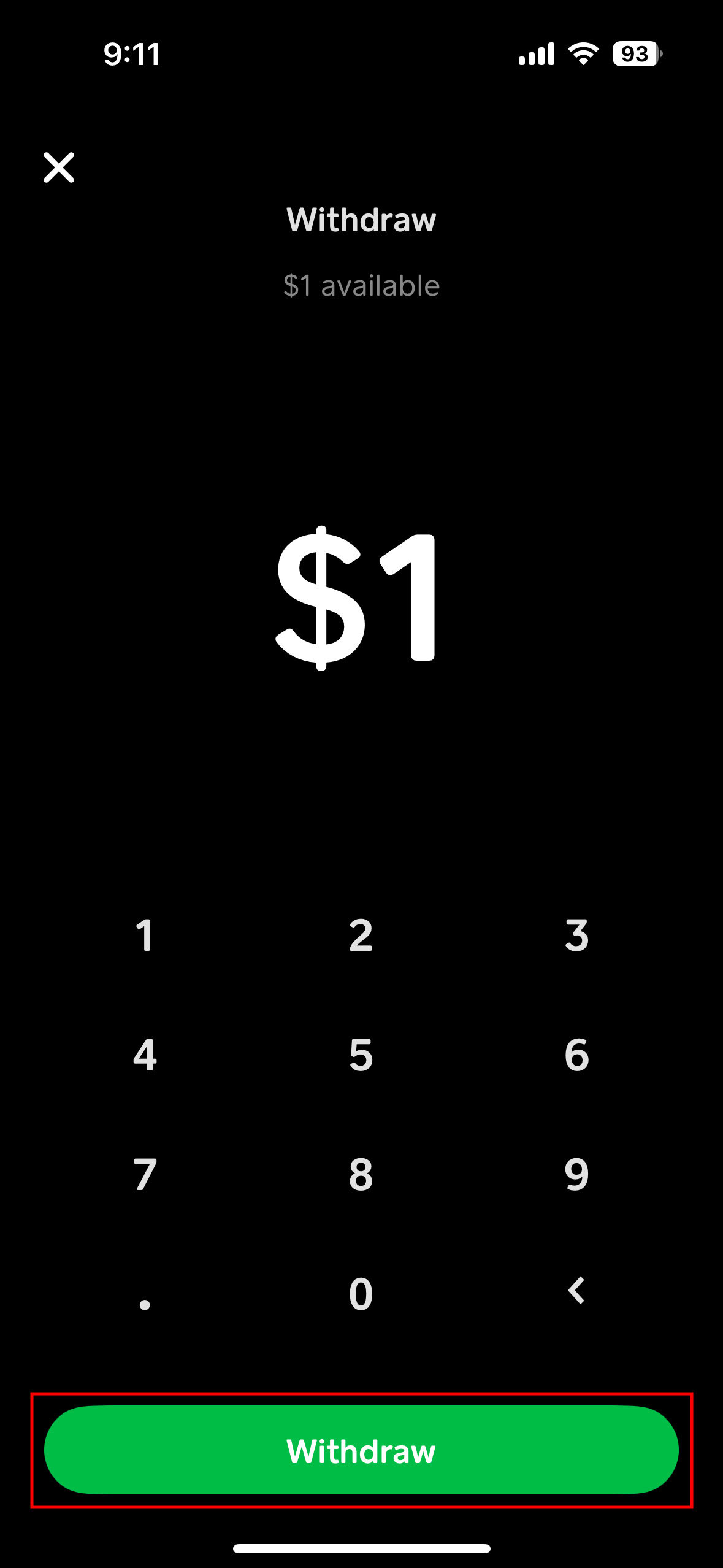
Select “Cash Out”: Below your balance, you will see the “Cash Out” button. Tap this to begin the transfer process.
-
Enter Amount: Input the exact amount of money you wish to transfer from your Cash App balance to your linked debit card.
-
Choose Transfer Speed: Cash App will present you with two primary options:
-
Standard (1-3 business days): This option is typically free and funds usually arrive within one to three business days, depending on your bank’s processing times.
-
Instant (Immediately): This option incurs a small fee (typically 0.5% to 1.75% of the transfer amount, with a minimum fee), but the funds are deposited to your linked debit card almost instantly.
-
-
Confirm Transfer: Review the details of your transfer, including the amount and chosen speed. Tap “Confirm” or “Cash Out” to finalize the transaction.
You will receive an in-app notification and often an email confirming that your transfer request has been initiated.
Expedited Transfers: When Speed is Critical
For situations requiring immediate access to funds, Cash App’s instant transfer option is invaluable. While it comes with a minor fee, the ability to have money available in your bank account within minutes can be a significant advantage. This feature is particularly useful for covering last-minute expenses, making urgent payments, or consolidating funds swiftly. Financial planning often involves balancing convenience against cost, and the instant transfer option is a prime example of a service where a small fee can yield substantial financial utility. Users should always be aware of the exact fee percentage displayed before confirming an instant transfer to ensure it aligns with their financial planning.
Navigating Fees, Limits, and Timelines
Understanding the financial mechanics of Cash App transfers – specifically fees, limits, and processing times – is essential for effective personal finance management. Misjudging these factors can lead to unexpected charges or delays in accessing your funds, potentially disrupting your financial stability.
Standard vs. Instant Transfer Fees
Cash App implements a tiered fee structure based on the transfer speed chosen:
-
Standard Transfers: These transfers are generally free of charge. Funds typically arrive in your linked bank account within 1-3 business days. This option is ideal for non-urgent situations where cost-effectiveness is a priority.
-
Instant Transfers: For immediate access to funds, Cash App charges a fee, usually ranging from 0.5% to 1.75% of the total transfer amount, with a minimum fee often applied (e.g., $0.25). The exact fee is clearly displayed before you confirm the transaction, allowing you to make an informed decision based on your urgency and the amount being transferred. This fee compensates for the expedited processing and real-time availability of funds.
It is crucial to factor these fees into your budgeting, especially if you frequently rely on instant transfers. For example, transferring $100 instantly with a 1.75% fee would cost $1.75, meaning $98.25 would arrive in your bank account.
Daily, Weekly, and Monthly Transfer Limits
Cash App imposes limits on how much money you can send and receive, as well as how much you can transfer out of the app. These limits are primarily for security purposes and vary based on whether your account is verified.
-
Unverified Accounts: Typically have lower limits. For instance, you might be able to cash out up to $2,500 per week.
-
Verified Accounts: Users who verify their identity with their full legal name, date of birth, and the last four digits of their Social Security number (SSN) often have significantly higher limits, potentially cashing out tens of thousands of dollars per week.
It is advisable to verify your Cash App account if you anticipate frequent or large transfers to avoid hitting these limits and disrupting your financial plans. Checking your specific limits within the app’s settings under the “Profile” or “Privacy & Security” section is always a good practice.
Understanding Transfer Timelines
The timeline for funds reaching your bank account depends entirely on the transfer method chosen:
-
Standard Transfers: As mentioned, these typically take 1 to 3 business days. “Business days” generally exclude weekends and public holidays. A transfer initiated on a Friday afternoon might not appear until the following Tuesday or Wednesday, depending on your bank’s processing schedule.
-
Instant Transfers: Funds are usually available in your linked debit card account within minutes, often almost instantaneously. While rare, bank-specific processing delays or network issues can sometimes cause slight hold-ups, but these are exceptions rather than the norm.
Always consider the cut-off times for transfers, especially for standard options, as initiating a transfer late in the day may push its processing to the next business day.
Potential Holds and Delays
While most Cash App transfers are smooth, certain situations can lead to holds or delays:
-
Bank Processing Times: Even instant transfers are subject to your bank’s internal processing. Some banks might take a few extra minutes to make the funds fully available.
-
Security Reviews: Large or unusual transfer amounts, or activity flagged as potentially suspicious, can trigger a security review by Cash App or your bank, leading to temporary holds.
-
Incorrect Information: Ensuring your debit card details are accurate and up-to-date is paramount. Expired cards or incorrect numbers will lead to failed transfers.
-
Account Verification Issues: If there are discrepancies in your verified information or if your account activity triggers a need for further verification, transfers may be paused.
In case of a significant delay, first check your in-app notifications and email for any messages from Cash App regarding the transfer. If no information is provided, contacting Cash App support and then your bank is the next logical step.
Optimizing Your Cash App Transfer Experience
Maximizing the efficiency and security of your Cash App transfers involves adopting strategic habits and understanding the platform’s features beyond basic functionality. This ensures your funds are always where they need to be, when they need to be, without unnecessary complications.
Ensuring Account Security
Security is paramount when dealing with financial applications. Protecting your Cash App account directly impacts the safety of your funds and the integrity of your transfers.
-
Enable Two-Factor Authentication (2FA): This adds an extra layer of security, requiring a code from your phone in addition to your password, making unauthorized access significantly harder.
-
Use Strong, Unique Passwords: Never reuse passwords, and ensure yours is complex, combining letters, numbers, and symbols.
-
Be Wary of Phishing Scams: Cash App will never ask for your login credentials via email, text, or social media. Always verify the legitimacy of communications.
-
Monitor Account Activity: Regularly review your transaction history for any unauthorized activity. Report suspicious transactions immediately.
-
Secure Your Device: Keep your mobile operating system updated, and use screen locks (PIN, fingerprint, face ID) to prevent unauthorized access to your phone itself.
Best Practices for Fund Management
Integrating Cash App into a broader financial strategy requires thoughtful fund management.
-
Regular Reconciliation: Periodically compare your Cash App transactions with your bank statements to ensure accuracy and track spending.
-
Maintain a Buffer: Avoid leaving a minimal balance in your bank account if you frequently rely on standard Cash App transfers, to prevent potential overdrafts due to delayed fund availability.
-
Strategize Instant Transfers: Use instant transfers judiciously, only when the urgency justifies the fee. For non-urgent funds, leverage the free standard transfer option to save on costs.
-
Budgeting Integration: Incorporate Cash App spending and transfers into your overall budget. Many budgeting apps can link to your bank, allowing you to track where your transferred funds go.
Troubleshooting Common Transfer Issues
Even with best practices, issues can arise. Knowing how to troubleshoot them efficiently can save time and stress.
-
Failed Transfers: Check your internet connection, ensure your debit card is still valid and linked, and confirm you have sufficient funds in your Cash App balance. Sometimes, a temporary system glitch can be resolved by trying again later.
-
Delayed Funds: For standard transfers, remember the 1-3 business day window. For instant transfers, if funds aren’t visible within an hour, contact your bank first to confirm if they’ve received the pending deposit, then reach out to Cash App support.
-
Incorrect Amount Transferred: If you accidentally transferred the wrong amount, contact Cash App support immediately. Reversing a completed transfer can be challenging but is sometimes possible under specific circumstances.
-
Unlinked Card: If your debit card becomes unlinked, re-link it following the steps outlined earlier. This can happen due to security updates or if you’ve recently changed banking information.
Exploring Alternatives and Advanced Features
Cash App offers more than just basic transfers. Leveraging its advanced features can enhance your financial flexibility.
-
Cash Card: This free, customizable debit card linked directly to your Cash App balance allows you to spend funds directly from the app, eliminating the need to transfer money to a separate bank account for everyday purchases. It also enables ATM withdrawals.
-
Direct Deposit: You can set up direct deposit with Cash App to receive paychecks, tax refunds, or government benefits directly into your account, offering a convenient way to manage incoming funds.
-
Investing and Bitcoin: For those interested in growing their wealth, Cash App allows easy access to stock investing and Bitcoin purchases directly within the app, integrating investment options into your daily financial toolset.
By understanding and utilizing these aspects, users can transform Cash App from a simple payment app into a comprehensive financial management companion, seamlessly connecting their digital funds with their traditional banking needs and broader financial goals.
Financial Implications and Best Practices
Effectively integrating Cash App transfers into your financial routine goes beyond just knowing the steps; it involves understanding the broader financial implications and adopting best practices to ensure financial health and security.
Budgeting and Tracking Cash App Transactions
For comprehensive personal finance management, it’s critical to track all money movement, including Cash App transfers. Funds moved from Cash App to a debit card eventually merge with your primary bank account balance, making it essential to understand their origin and purpose.
-
Categorize Transfers: When funds arrive in your bank account from Cash App, ensure they are correctly categorized in your budgeting software (e.g., “Income – Cash App,” “Savings Transfer”).
-
Maintain a Cash App Log: For those with active Cash App usage, consider a simple spreadsheet or a dedicated section in your budgeting app to log incoming funds, outgoing payments, and transfers to your debit card. This offers granular insight into your mobile money flow.
-
Allocate Funds Purposefully: Decide in advance why you’re transferring money out of Cash App. Is it for bills, savings, or general spending? This intentionality prevents funds from being “lost” in your overall bank balance.
-
Monitor Fees: Factor instant transfer fees into your budget. While small, they can accumulate over time, impacting your available funds. Regular review helps you decide if the convenience outweighs the cost.
Avoiding Scams and Fraud
The digital nature of money transfers makes them a target for fraudsters. Vigilance is a key component of financial best practices.
-
Verify Recipients: Always double-check the recipient’s $Cashtag before sending money, especially for peer-to-peer payments. Once funds are sent, they are often difficult to retrieve.
-
Beware of “Too Good to Be True” Offers: Any offer promising free money or unusually high returns through Cash App is likely a scam. Legitimate financial opportunities rarely require you to send money first or share personal login details.
-
Recognize Phishing Attempts: Be suspicious of unsolicited messages asking for your Cash App login, PIN, or other sensitive information. Cash App support will never ask for your password or full SSN via phone, email, or social media.
-
Use Strong Passwords and 2FA: As previously mentioned, these are your first lines of defense against unauthorized access.
-
Report Suspicious Activity: If you suspect fraudulent activity on your account or encounter a scam, report it to Cash App support immediately. Timely reporting can sometimes help recover funds or prevent further loss.
Integrating Cash App into Your Overall Financial Strategy
Cash App can be a powerful tool when integrated thoughtfully into a holistic financial strategy.
-
Emergency Funds: Use Cash App for quick access to a portion of your emergency savings if held separately, or to quickly move funds to your main emergency account from elsewhere.
-
Budgeting for Variable Expenses: Utilize Cash App for categories with variable spending, such as entertainment or dining out, allowing for easy tracking and separation from fixed expenses.
-
Side Hustle Payments: If you earn income through a side hustle that pays via Cash App, promptly transfer these funds to your main bank account for budgeting and tax purposes.
-
Savings Goals: While Cash App itself doesn’t offer robust savings accounts, you can use its transfer function to regularly move money into dedicated savings accounts at your primary bank, contributing to larger financial goals.
-
Understanding Tax Implications: Remember that certain transactions on Cash App, particularly those related to business income, may have tax implications. Keep accurate records of all relevant income received and transferred.
By adopting these financial best practices and maintaining a keen awareness of security risks, users can leverage Cash App transfers to enhance their financial flexibility, control, and overall well-being, ensuring that this digital tool serves their broader financial objectives effectively.
aViewFromTheCave is a participant in the Amazon Services LLC Associates Program, an affiliate advertising program designed to provide a means for sites to earn advertising fees by advertising and linking to Amazon.com. Amazon, the Amazon logo, AmazonSupply, and the AmazonSupply logo are trademarks of Amazon.com, Inc. or its affiliates. As an Amazon Associate we earn affiliate commissions from qualifying purchases.