
In today’s fast-paced digital economy, tools like Venmo have become indispensable for managing everyday financial interactions, especially for peer-to-peer payments. However, the true utility of such platforms extends beyond just sending and receiving money; it’s about seamlessly integrating these digital funds into your broader personal finance strategy. This often involves the critical step of transferring your Venmo balance to your traditional bank account. This guide will walk you through the process, offering insights into optimizing your financial flow, understanding the costs involved, and ensuring the security of your assets.
Understanding Venmo’s Role in Your Personal Finance Ecosystem
Venmo, at its core, is a peer-to-peer (P2P) payment service designed to simplify the exchange of money between individuals. But its integration into your financial life goes deeper, serving as a dynamic tool that, when understood correctly, can enhance your financial management.
Venmo as a Peer-to-Peer Payment Tool
Primarily, Venmo excels at facilitating casual financial transactions among friends, family, and even small businesses. Whether it’s splitting a dinner bill, sharing rent, or contributing to a group gift, Venmo provides an immediate, social, and convenient way to handle these common scenarios. Funds received through Venmo reside within your Venmo balance, ready to be used for future Venmo payments or, as this guide will detail, transferred to a more liquid bank account. Understanding this initial holding phase is crucial for effective cash flow management within your personal finance strategy.
When to Use Venmo for Transfers vs. Payments
While you can technically keep a balance on Venmo and use it for subsequent payments to other Venmo users, this isn’t always the most financially prudent approach. For larger sums, or for money you intend to use for expenses not payable via Venmo (e.g., mortgages, investments, utility bills), transferring funds to your bank account is generally advisable. Keeping significant balances on P2P apps can be riskier than in an FDIC-insured bank account, as P2P apps often have different regulatory oversight and less robust protection in case of account compromise. Furthermore, consolidating funds in your bank account offers a clearer picture of your overall financial standing, aiding in budgeting and financial planning.
Integrating Venmo into Your Financial Strategy
For many, Venmo is an auxiliary financial tool rather than a primary banking platform. Integrating it effectively means understanding its strengths (quick, social payments) and its limitations (not a savings or investment vehicle). Regular transfers from Venmo to your bank can ensure that funds received are promptly moved to an account where they can earn interest, contribute to savings goals, or be used to pay off debts, aligning with your overarching financial objectives. It’s about ensuring that your digital funds actively serve your financial wellbeing, rather than simply sitting idly in an app.
The Mechanics of Fund Transfer: Step-by-Step Financial Transaction
Transferring money from your Venmo balance to your bank account is a straightforward process, but understanding each step ensures a smooth and secure transaction.
Linking Your Bank Account: The Foundation of Transfers
Before you can transfer funds, you must link a valid bank account to your Venmo profile. This is typically done through one of two methods:
- Instant Verification: Venmo uses third-party services to securely connect to your online banking portal, allowing for immediate verification. This is generally the quickest and most common method.
- Manual Verification: If instant verification isn’t an option or preferred, you can manually enter your bank’s routing number and your account number. Venmo will then send two small deposits (usually a few cents) to your bank account, which you’ll need to verify within the Venmo app. This process can take 1-3 business days.
It is imperative to double-check all account details to prevent errors that could delay or misdirect your funds. This linked account will be the destination for all your Venmo cash-outs.
Initiating a Standard Bank Transfer (Free Option)
The standard transfer is the most common method for moving funds and comes with no additional fees.
- Access Your Balance: Open the Venmo app and tap the “You” tab, which displays your Venmo balance.
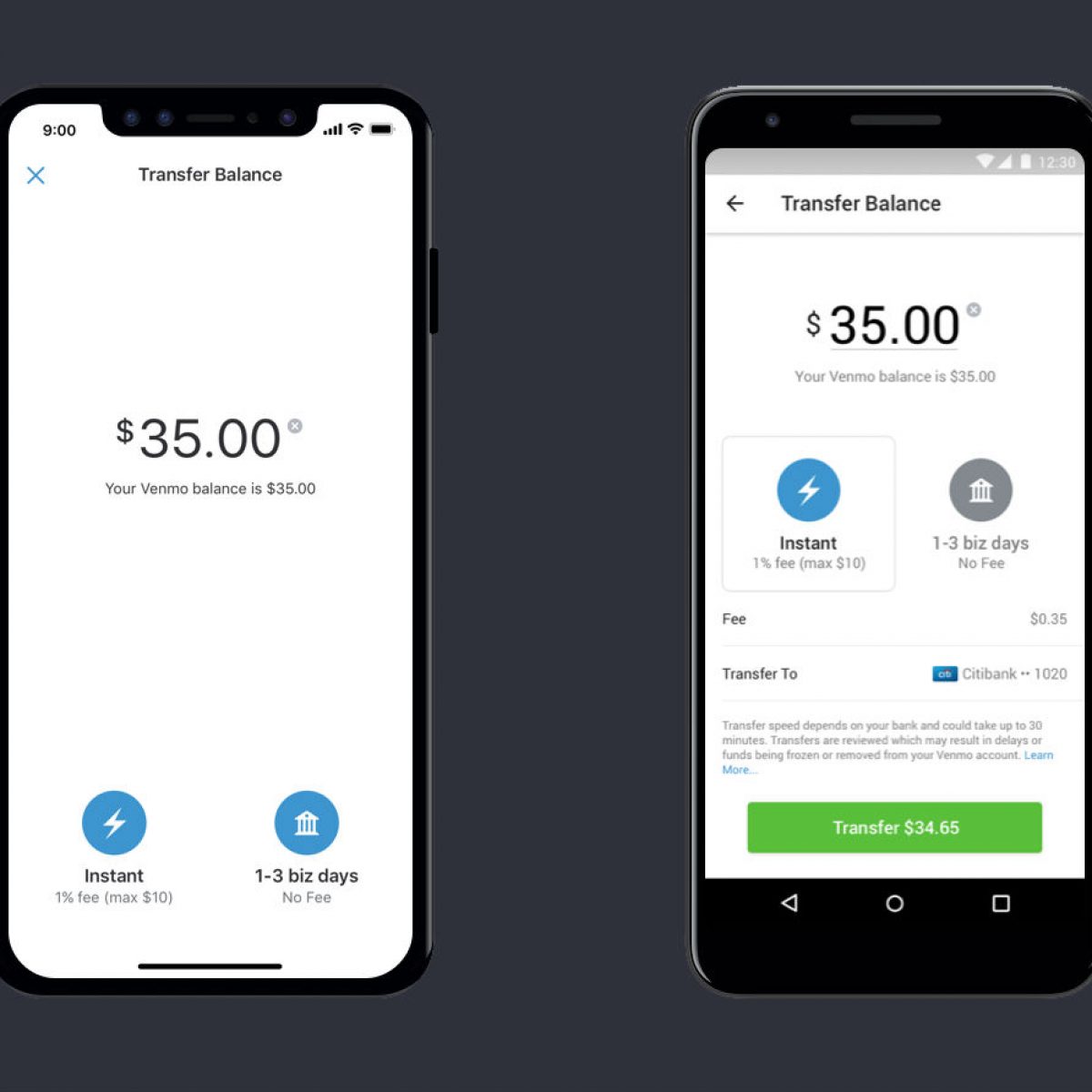
- Initiate Transfer: Tap the “Transfer Balance” button.
- Enter Amount: Input the amount you wish to transfer. You can transfer your full balance or a partial amount.
- Select Destination: Choose your linked bank account as the destination.
- Select Transfer Type: Choose “Standard” transfer.
- Confirm: Review the details and confirm the transfer.
Standard transfers typically take 1-3 business days to appear in your bank account, though weekends and holidays can extend this timeframe. While free, the waiting period is a crucial consideration for your cash flow and financial planning.
Opting for Instant Transfer (Fee-Based Expedited Option)

For situations requiring immediate access to your funds, Venmo offers an instant transfer option.
- Follow Steps 1-4 above.
- Select Transfer Type: Choose “Instant” transfer.
- Review Fee: Venmo will display the applicable fee (usually a percentage of the transfer amount, with a minimum). Review this cost carefully.
- Confirm: Confirm the transfer, acknowledging the fee.
Instant transfers are generally processed within minutes, though some banks may take up to 30 minutes. This speed comes at a cost, typically 1.75% of the transfer amount (minimum $0.25, maximum $25.00 as of recent policies). Weighing the urgency against the cost is a key financial decision here. For example, transferring $1000 instantly would incur a $17.50 fee, whereas waiting a few days costs nothing.
Navigating Fees, Limits, and Timelines for Optimal Financial Planning
Effective financial management with Venmo requires a clear understanding of the operational parameters governing transfers, specifically fees, daily/weekly limits, and expected timelines.
Understanding Transfer Fees and Their Impact
As discussed, standard transfers are free, while instant transfers incur a fee. This fee structure has direct implications for your personal finance. While 1.75% might seem small for minor transfers, it can add up significantly for larger amounts. For instance, frequently transferring $500 instantly multiple times a month could mean sacrificing a notable portion of your funds to fees. A strategic approach involves planning ahead for non-urgent transfers to avoid fees, reserving instant transfers only for true emergencies where the convenience outweighs the cost. Factor these potential fees into your budget if you frequently rely on instant access to Venmo funds.
Daily and Weekly Transfer Limits: What You Need to Know
Venmo imposes limits on how much you can transfer out of your balance. These limits vary based on whether your identity is verified or not. For unverified accounts, limits are considerably lower. For fully verified accounts (which typically requires providing your Social Security Number and other personal details), the weekly rolling limit for bank transfers is significantly higher, often in the thousands of dollars. It’s crucial to be aware of these limits, especially if you anticipate needing to transfer large sums. Trying to transfer an amount exceeding your limit will result in an error, potentially delaying your access to funds. Checking your specific limits within the Venmo app’s settings is a proactive step in financial planning.
Expected Transfer Timelines and Financial Planning Considerations
The timeline for funds reaching your bank account is a pivotal factor in financial planning. Standard transfers, taking 1-3 business days, mean that funds initiated on a Friday might not clear until the following Tuesday or Wednesday, accounting for weekends. This delay must be factored into your budgeting, particularly for expenses with strict due dates. Instant transfers, while convenient, carry a fee. Therefore, an informed financial strategy involves:
- Proactive Transfers: Initiate standard transfers well in advance of needing the funds in your bank account.
- Emergency Fund Access: Consider if the cost of an instant transfer is justified to access funds for an immediate financial need versus drawing from an established emergency fund.
- Cash Flow Management: Integrate Venmo transfer timelines into your personal cash flow projections to avoid shortfalls.
Ensuring Secure and Seamless Transfers: Protecting Your Financial Assets
The digital nature of Venmo transfers necessitates a focus on security to protect your financial assets from potential threats and human error.
Best Practices for Account Security
Protecting your Venmo account is paramount. Implement robust security measures such as:
- Strong, Unique Passwords: Use complex passwords that are not reused on other platforms.
- Two-Factor Authentication (2FA): Enable 2FA for an added layer of security. This requires a code from your phone in addition to your password for login, significantly reducing unauthorized access risk.
- Regular Monitoring: Periodically review your Venmo transaction history and linked bank accounts for any suspicious activity.
- Beware of Phishing: Be vigilant against suspicious emails or messages purporting to be from Venmo. Always access Venmo directly through the official app or website.
Adhering to these practices minimizes the risk of unauthorized access to your funds.
Verifying Account Information to Prevent Errors
A common reason for delayed or failed transfers is incorrect bank account information. Even a single digit typo in a routing or account number can send funds to the wrong place or cause the transfer to bounce back. Before confirming any transfer, especially the first time you link an account, meticulously verify that the routing and account numbers match your bank’s records precisely. If possible, use the instant verification method as it reduces the chance of manual input errors. A small moment of diligence can save hours or days of troubleshooting with Venmo support and your bank.

Troubleshooting Common Transfer Issues
Despite best efforts, issues can occasionally arise. Common problems include:
- Failed Transfers: Often due to incorrect bank details, insufficient funds (if you’re attempting a payment from Venmo), or exceeding daily/weekly limits.
- Delayed Transfers: Beyond the standard 1-3 business days, delays can occur due to bank processing times, holidays, or system maintenance.
- Missing Funds: If funds don’t appear after the expected timeline, first check your bank statements thoroughly (sometimes they show up under a generic “ACH deposit”).
If you encounter a problem, Venmo’s in-app support is the first point of contact. Be prepared to provide transaction details and account information. For issues where funds have left Venmo but not reached your bank within the expected timeframe, you may also need to contact your bank directly with the transfer details provided by Venmo. Patience and clear communication are key to resolving such financial discrepancies.
In conclusion, transferring money from Venmo to your bank account is a fundamental aspect of leveraging digital payment platforms for effective personal finance management. By understanding the processes, being mindful of fees and limits, and prioritizing security, you can ensure your funds move efficiently and securely, contributing positively to your overall financial health.
aViewFromTheCave is a participant in the Amazon Services LLC Associates Program, an affiliate advertising program designed to provide a means for sites to earn advertising fees by advertising and linking to Amazon.com. Amazon, the Amazon logo, AmazonSupply, and the AmazonSupply logo are trademarks of Amazon.com, Inc. or its affiliates. As an Amazon Associate we earn affiliate commissions from qualifying purchases.