
Live streaming has evolved from a niche hobby into a sophisticated digital infrastructure capable of broadcasting high-definition content to millions of viewers simultaneously. At the heart of this revolution is YouTube, a platform that provides the backbone for global live delivery. However, moving from a simple recorded video to a high-fidelity live broadcast requires a deep understanding of hardware requirements, software configurations, and network protocols. This guide provides an exhaustive technical roadmap for setting up a professional-grade stream on YouTube.
Essential Hardware and System Requirements
Before configuring software, you must ensure your hardware stack can handle the intensive demands of real-time video encoding. Live streaming is a resource-heavy process that necessitates a balance between CPU processing power and GPU efficiency.

The Central Processing Unit (CPU) vs. Graphics Processing Unit (GPU)
For years, the CPU was the primary driver of video encoding via the x264 codec. While high-core-count processors like the AMD Ryzen 9 or Intel Core i9 series are excellent for software encoding, modern streaming has pivoted toward hardware-based encoding. NVIDIA’s NVENC (NVIDIA Encoder) and AMD’s VCE (Video Codec Engine) offload the encoding workload from the CPU to a dedicated section of the GPU. This allows for smoother frame rates in gaming and reduces system latency. For a 1080p stream at 60 frames per second (fps), a minimum of a mid-range modern GPU (such as an RTX 30-series) is highly recommended.
Audio Interfaces and Visual Input
A professional stream is only as good as its input devices. Using a standard integrated webcam is often insufficient for high-bitrate streaming. Professional setups typically utilize a DSLR or mirrorless camera connected via a HDMI-to-USB capture card (such as the Elgato Cam Link 4K). This allows the camera’s high-quality sensor to be recognized as a standard video input.
On the audio side, avoiding USB microphones in favor of XLR microphones connected to an audio interface (like a Focusrite Scarlett or a GoXLR) provides superior analog-to-digital conversion. This setup allows for hardware-level gain control and phantom power, ensuring the audio signal remains clean and free of digital jitter before it reaches the encoding software.
Software Configuration and Encoding Standards
Once the hardware is established, the software acts as the bridge between your local machine and YouTube’s servers. Open Broadcaster Software (OBS) Studio is the industry standard due to its open-source nature and deep customization options, though alternatives like vMix or Streamlabs offer specialized workflows.
Understanding Codecs and Bitrates
The codec is the mathematical formula used to compress your video data. Currently, H.264 (AVC) is the most widely supported codec for YouTube streaming. However, YouTube has recently expanded support for H.265 (HEVC) and the highly efficient AV1 codec, which offers significantly better visual quality at lower bitrates.
Bitrate—the amount of data transmitted per second—is the most critical setting for stream stability. For a standard 1080p 60fps stream, YouTube recommends a bitrate between 4,500 and 9,000 Kbps. For 4K streaming, this jumps to 20,000–51,000 Kbps. Setting your bitrate too high for your upload speed will result in dropped frames, while setting it too low will cause “macroblocking” or pixelation during high-motion scenes.
Advanced OBS Settings
To optimize the stream, users must configure the “Output” and “Video” tabs in their software.
-
Rate Control: Constant Bitrate (CBR) is mandatory for live streaming to ensure a steady flow of data to YouTube’s ingest servers.
-
Keyframe Interval: YouTube requires a keyframe interval of 2 seconds. This ensures that the video can be recovered quickly if there is a momentary packet loss.
-
Color Space: Setting the color space to Rec. 709 and the color range to “Partial” (or “Limited”) ensures that the colors displayed on YouTube match the original source without crushing blacks or blowing out highlights.
Network Infrastructure and Connection Protocols
The most powerful PC in the world cannot compensate for a weak network connection. Live streaming requires a stable, high-bandwidth upload path, which is distinct from the download speed typically advertised by Internet Service Providers (ISPs).
Ethernet vs. Wi-Fi
Streaming over Wi-Fi is inherently risky due to radio frequency interference and signal attenuation. Even a high-end Wi-Fi 6 router can suffer from “jitter”—the variance in packet arrival time—which causes the stream to stutter. A dedicated Cat6 or Cat7 Ethernet connection is essential for professional reliability.
RTMP and RTMPS Protocols
YouTube uses the Real-Time Messaging Protocol (RTMP) and its secure version (RTMPS) to ingest video data. When you set up a stream, YouTube provides a “Stream URL” and a “Stream Key.” The Stream Key is a unique identifier that tells YouTube’s servers which account the data belongs to and how to process it. It is vital to keep this key confidential, as anyone with access to it can broadcast to your channel.
Bandwidth Overhead
A common technical pitfall is using 100% of the available upload bandwidth for the stream. You should ideally leave a 20-30% buffer for other network operations, such as game server communication or background OS updates. If your total upload speed is 20 Mbps, you should cap your stream bitrate at approximately 14-15 Mbps to maintain a “headroom” for network fluctuations.
The YouTube Studio Dashboard and Latency Management
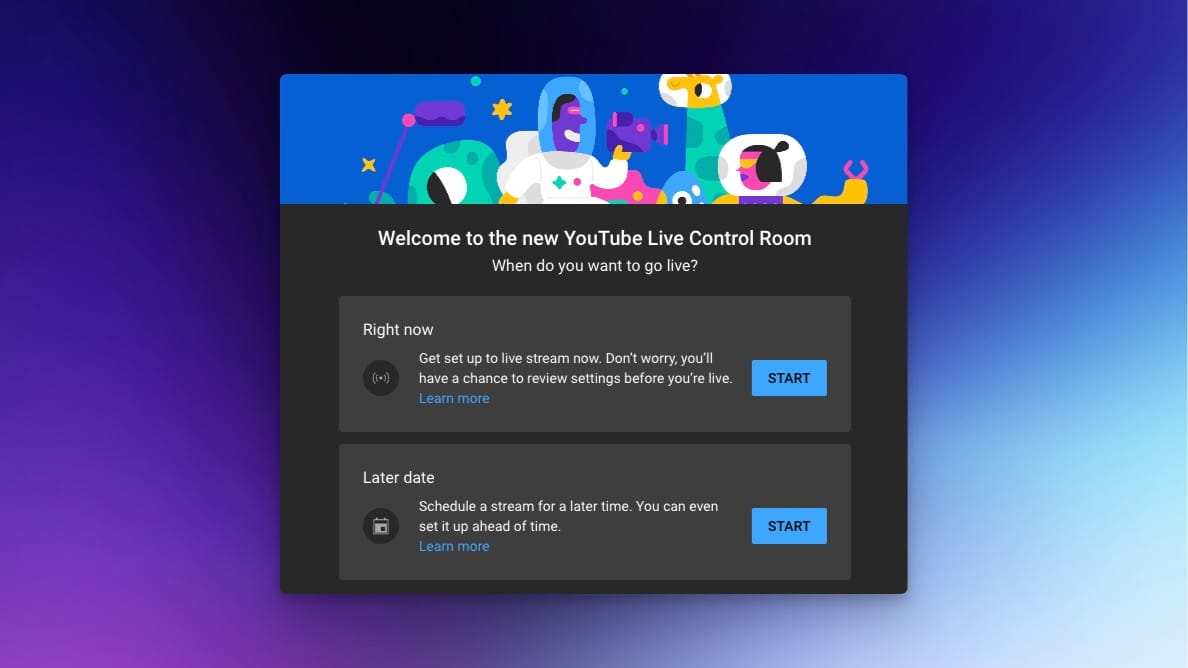
The final step in the technical chain happens within the YouTube Studio Live Control Room. This dashboard allows you to manage how YouTube’s servers distribute your data to the end-user.
Latency Modes
YouTube offers three primary latency settings:
-
Normal Latency: This provides the best viewer experience for those with slower internet connections by allowing for a larger buffer. It supports the highest resolutions (up to 4K).
-
Low Latency: A middle ground that allows for near-real-time interaction with the audience while maintaining high stability.
-
Ultra-Low Latency: Designed for high-speed interaction, reducing the delay between the streamer’s action and the viewer’s screen to just a few seconds. However, this mode does not support 4K or 1440p resolutions and is more prone to viewer buffering if their connection is unstable.
Digital Rights Management (DRM) and Automated Checks
YouTube’s technical backend includes automated Content ID scanners that monitor the live ingest for copyrighted audio or visual material. From a technical perspective, it is important to monitor the “Stream Health” tab in the Live Control Room. This tab provides real-time data on the status of your connection, warning you if the ingest bitrate is falling below the threshold required for the selected resolution.
Optimization and Troubleshooting
Even with a perfect setup, technical issues can arise. Understanding the telemetry provided by your software is key to rapid troubleshooting.
Analyzing Dropped Frames
In OBS, the “Stats” dock is a crucial diagnostic tool. If you see “Dropped Frames (Network),” the issue lies with your ISP or router. If you see “Skipped Frames (Encoding Lag),” your GPU or CPU is overloaded and cannot keep up with the compression demands. This often requires lowering the “Encoder Preset”—moving from “Slower” or “Quality” to “Faster” or “Performance”—to give the hardware more breathing room.
HDR and High-Resolution Workflows
For those pushing the technical limits, YouTube supports High Dynamic Range (HDR) streaming. This requires an end-to-end 10-bit pipeline, from the camera sensor through the capture card and finally through an encoder that supports the HLG or HDR10 standards. Streaming in 4K HDR requires massive bandwidth (upwards of 50 Mbps) and specialized hardware, but it represents the current pinnacle of consumer-level broadcasting technology.
By mastering these technical layers—from the silicon in your machine to the protocols governing data transmission—you move beyond basic streaming and into the realm of professional digital broadcasting. The synergy of hardware performance, software precision, and network stability is what defines a high-quality YouTube stream in the modern era.
aViewFromTheCave is a participant in the Amazon Services LLC Associates Program, an affiliate advertising program designed to provide a means for sites to earn advertising fees by advertising and linking to Amazon.com. Amazon, the Amazon logo, AmazonSupply, and the AmazonSupply logo are trademarks of Amazon.com, Inc. or its affiliates. As an Amazon Associate we earn affiliate commissions from qualifying purchases.