
YouTube has transcended its origins as a simple video-sharing platform to become a global digital phenomenon, an unparalleled hub for entertainment, education, news, and community. For billions worldwide, it is a primary source of information and leisure, offering an endless stream of content ranging from professional documentaries and music videos to personal vlogs and intricate tutorials. However, to truly unlock the full potential of YouTube – from subscribing to your favorite channels and curating personalized playlists to engaging with content creators through comments and even uploading your own videos – signing up for an account is an essential first step.

This comprehensive guide will demystify the process of creating a YouTube account, a journey that seamlessly intertwines with establishing a Google Account due to YouTube’s ownership by Google. We will navigate each technical step with clarity, providing insights into why certain procedures are in place and how to leverage your new account for an enriched digital experience. Whether you’re a first-time internet user or someone looking to finally formalize their YouTube engagement, this tutorial is designed to be your definitive roadmap.
The Foundation: Understanding the Google Account Ecosystem
Before diving into the specifics of YouTube, it’s crucial to grasp the symbiotic relationship between YouTube and Google. Since its acquisition by Google in 2006, YouTube has been deeply integrated into the broader Google ecosystem. This means that a YouTube account is not a standalone entity but rather a profile managed through your Google Account. If you already possess a Gmail address, use Google Drive, or have an Android phone, you likely already have a Google Account, which automatically serves as your YouTube account. If not, creating one is the prerequisite for joining the YouTube community.
Understanding the Google Ecosystem
Google has meticulously crafted an interconnected suite of services designed for seamless user experience. Your Google Account acts as a universal key, granting access to a vast array of services, including Gmail, Google Drive, Google Photos, Google Maps, and, critically, YouTube. This integration simplifies user management, centralizing your login credentials, privacy settings, and data across multiple platforms. From a technical standpoint, this unified system means enhanced security and convenience, as you only need to remember one set of credentials to access your entire digital life powered by Google. It also facilitates data synchronization, allowing for personalized experiences across platforms, such as YouTube recommending videos based on your search history on Google Search, or vice-versa.
Benefits of a Unified Account
The advantages of this unified account structure are manifold. Firstly, it significantly reduces credential fatigue; instead of managing dozens of usernames and passwords, one robust Google Account secures your access to critical digital services. Secondly, it streamlines the setup process for new services. Once your Google Account is established, accessing YouTube is often as simple as navigating to the website or app and being automatically logged in. Thirdly, the security architecture of Google’s entire ecosystem benefits from this centralization. Features like two-factor authentication (2FA) and advanced phishing protection are applied across all linked services, offering a robust shield against unauthorized access. Furthermore, a unified account allows for consistent personalization. Your viewing history, preferences, and subscriptions on YouTube can be synced and inform suggestions across other Google services, creating a more tailored and efficient online experience. This technical synergy is designed to make your interaction with Google’s extensive suite of tools both powerful and user-friendly.
Step-by-Step Guide to Creating Your YouTube Account
For those new to the Google ecosystem or without an existing Google Account, the process begins with its creation. This section will walk you through the precise technical steps required to set up your account, paving the way for full YouTube access.
Initiating the Google Account Creation
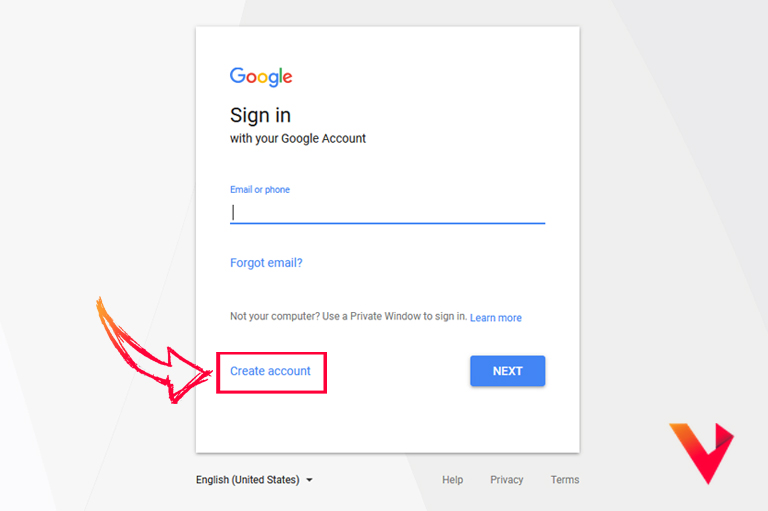
To begin, open your preferred web browser and navigate to the Google Account creation page. A simple search for “create Google account” will usually lead you to the official link. Alternatively, you can go directly to accounts.google.com/signup. On this page, you’ll be prompted to provide basic information to start your account. The form typically asks for your first name, last name, and requires you to choose a new Gmail address or specify that you’d prefer to use an existing email address as your username. Carefully consider your username choice, as it will be part of your digital identity across Google services. Following this, you’ll need to create a strong, unique password. A robust password should ideally include a combination of uppercase and lowercase letters, numbers, and symbols, and be at least 8-12 characters long. Utilize a password manager if you have one to ensure complexity and easy retrieval.
Providing Personal Information and Verification
The next stage involves providing more personal details for security and account recovery purposes. You will be asked to enter your date of birth and gender. It’s crucial to provide accurate information, particularly your date of birth, as YouTube (and Google) enforces age restrictions in compliance with various regulations, such as COPPA (Children’s Online Privacy Protection Act). For instance, content classified as mature or certain interactive features may be restricted based on the age associated with the account.
Following this, Google will require a phone number for verification. This step is a critical security measure. Google sends a verification code via SMS to ensure you are a real person and to link your account to a recoverable contact method. Enter the code received on your phone into the provided field to proceed. While optional, you may also be prompted to provide a recovery email address. This is highly recommended as an additional layer of security and a fallback option if you ever lose access to your primary account or phone number. Google utilizes these contact methods not for marketing, but for password resets and critical security alerts.
Reviewing Terms and Privacy Policy
Before finalizing your account creation, Google will present you with its Terms of Service and Privacy Policy. While it might be tempting to scroll past these documents, it is professionally advisable to review them. These documents outline your rights and responsibilities as a user, how Google collects, processes, and utilizes your data, and what you can expect from their services. Understanding these terms is fundamental to being an informed digital citizen. For example, the privacy policy details how your viewing habits on YouTube contribute to personalized advertising and content recommendations, and how you can manage these settings later. Once you have reviewed and understood the terms, you must click “I agree” or an equivalent button to proceed, signifying your consent to abide by Google’s guidelines and data practices. Upon agreeing, your Google Account is officially created, and by extension, your YouTube account is ready for use.
Navigating Your Newly Created YouTube Profile
With your Google Account successfully established, you now have full access to YouTube. The next step involves understanding the platform’s interface and personalizing your experience to make it truly your own.
Personalizing Your Channel Name and Avatar
While your Google Account is active, YouTube offers a layer of personalization. By default, your YouTube identity might be linked to your Google Account’s name. However, you have the option to create a distinct “channel name” and avatar, particularly if you plan to upload content or simply desire a more unique presence. To do this, navigate to YouTube, click on your profile icon (usually in the top right corner), and select “Your channel” or “Create a channel.” You’ll be prompted to choose a name and upload a profile picture (avatar). The channel name can be different from your Google Account name, allowing for anonymity or branding purposes. Your avatar should be a clear, recognizable image, ideally related to your chosen channel identity. This customization not only enhances your personal brand on the platform but also makes your comments and interactions more distinctive within the YouTube community.
Exploring YouTube’s Interface and Key Features
Upon logging in, you’ll be greeted by YouTube’s intuitive yet feature-rich interface. The homepage typically presents a personalized feed of recommended videos based on your initial interests (if provided), trending content, and suggestions from popular channels. Familiarize yourself with the navigation bar, usually located on the left side, which provides quick access to “Home,” “Shorts,” “Subscriptions,” “Library,” and “History.”
- Home: Your personalized feed.
- Shorts: YouTube’s short-form video content, akin to TikTok.
- Subscriptions: A dedicated feed showing new videos from channels you follow.
- Library: Houses your saved videos, playlists, liked videos, and watch history.
- History: A chronological list of all videos you’ve watched.
The search bar at the top allows you to find specific content, channels, or topics. Experiment with these features to understand how to efficiently discover and manage content. Pay attention to the settings cogwheel, usually accessible via your profile icon, which leads to comprehensive account settings.
Privacy Settings and Content Preferences
YouTube offers robust privacy controls, which are crucial for managing your digital footprint. Within your account settings, under the “Privacy” section, you can control various aspects of your viewing experience. For instance, you can choose to:
- Pause Watch History: Prevents videos you watch from appearing in your history and from influencing future recommendations.
- Pause Search History: Stops your searches from being saved.
- Keep all my subscriptions private: Hides the channels you subscribe to from public view.
- Keep all my saved playlists private: Makes your created playlists visible only to you.
Beyond privacy, you can also fine-tune content preferences. While YouTube’s algorithm is powerful, you can influence it by actively liking or disliking videos, clicking “Not interested” on recommendations, and subscribing to channels that align with your interests. Regular engagement with these features helps YouTube’s algorithms learn your preferences more accurately, leading to a more satisfying and personalized content feed. Regularly reviewing these settings ensures your YouTube experience remains aligned with your personal preferences and security comfort levels.
Unlocking Advanced YouTube Features
Signing up for YouTube is just the beginning. The platform offers a wealth of features designed to enhance engagement, content discovery, and community interaction. Understanding and utilizing these features transforms a passive viewing experience into an active and personalized journey.
Subscribing to Channels
One of the most fundamental and impactful features on YouTube is the ability to subscribe to channels. When you subscribe to a channel, you signal your interest in its content, and new videos from that channel will appear in your “Subscriptions” feed. This ensures you never miss updates from your favorite creators. To subscribe, simply click the “Subscribe” button located beneath a video or on a channel’s main page. For an added layer of notification, click the bell icon next to the subscribe button; this will notify you every time the channel uploads new content. Subscriptions are crucial for curating your personal content ecosystem, allowing you to follow specific topics, creators, or genres that resonate with you, transforming YouTube from a vast ocean of videos into a tailored stream of preferred content.
Creating Playlists and Saving Videos
Organization is key to managing the vast amount of content available on YouTube. Playlists are an incredibly powerful tool for this purpose. You can create custom playlists to categorize videos by theme, mood, or purpose (e.g., “Workout Mix,” “Coding Tutorials,” “Travel Vlogs”). To add a video to a playlist, click the “Save” button beneath the video, and then select an existing playlist or create a new one. This feature is particularly useful for educational content, allowing you to build comprehensive learning paths, or for entertainment, creating curated lists of your favorite music or comedy clips. Additionally, the “Watch Later” playlist, automatically available, serves as a temporary holding pen for videos you intend to view but don’t have time for immediately. These features transform YouTube from a consumption platform into a personal content library.
Commenting and Engaging with Content Creators
YouTube thrives on interaction. The comment section below each video is a vibrant space for discussion, feedback, and community building. As a signed-in user, you can leave comments, reply to others’ comments, and even use emojis to express your reactions. This engagement allows you to connect directly with content creators, offer your insights, ask questions, or simply express appreciation for their work. Many creators actively read and respond to comments, making it a direct line of communication. Beyond comments, you can also “Like” or “Dislike” videos, which helps creators understand audience reception and influences YouTube’s recommendation algorithm for other users. Engaging respectfully and thoughtfully enhances your experience and contributes positively to the broader YouTube community.
Uploading Your First Video (Channel Creation)
While the primary focus of “how to sign up” is on viewing, it’s worth noting that a signed-in YouTube user also gains the ability to upload their own content. By creating a “channel” (which happens automatically once you engage beyond just viewing, or you can explicitly create one), you become a creator. The “Create” button (often a camera icon or a plus sign) in the top right corner of the YouTube interface allows you to upload videos, go live, or create a “Short.” This opens up a whole new dimension of engagement, allowing you to share your own stories, knowledge, or creative endeavors with the world. While a detailed guide to uploading is beyond the scope of this sign-up tutorial, understanding that this capability is unlocked with your account highlights the full spectrum of YouTube’s interactive design.
Troubleshooting Common Sign-Up and Account Issues
Even with a streamlined process, users might occasionally encounter technical hurdles during sign-up or while managing their accounts. Knowing how to address these common issues ensures a smoother and more secure YouTube experience.
Password Recovery and Account Security
Forgetting your password is a common occurrence. Fortunately, Google has robust password recovery mechanisms in place. If you’ve forgotten your password, navigate to the Google sign-in page and click “Forgot password.” You’ll be guided through a series of verification steps, which might include:
- Sending a code to your recovery phone number: The most common method, leveraging the phone number you provided during sign-up.
- Sending a code to your recovery email address: An alternative if your phone isn’t available.
- Answering security questions: If previously set up.
- Verifying through a signed-in device: If you’re signed into your Google Account on another device (e.g., a smartphone), Google might send a prompt to that device for verification.
It’s paramount to keep your recovery information (phone number and email) up-to-date to facilitate quick recovery. Furthermore, enhance your account security by enabling two-factor authentication (2FA). This adds an extra layer of protection, requiring a second verification step (like a code from your phone) in addition to your password, significantly reducing the risk of unauthorized access even if your password is compromised.
Account Verification Problems
Occasionally, users might face issues with account verification, particularly when the system is unable to send an SMS code to the provided phone number. Common reasons include:
- Incorrect phone number: Double-check that you’ve entered the number correctly, including the country code.
- Network issues: Temporary signal problems or carrier restrictions might prevent SMS delivery. Try again after a few minutes or in a location with better signal.
- Blocked SMS: Ensure your phone isn’t blocking messages from unknown senders or shortcodes.
- Too many attempts: Google might temporarily block verification attempts if there are too many failed tries, as a security measure.
If persistent problems arise, look for an “I didn’t receive the code” option, which often provides alternative verification methods or directs you to Google’s support pages for further assistance.
Age Restrictions and Parental Controls
YouTube strictly enforces age restrictions in accordance with legal requirements, particularly for users under 13 or 18, depending on regional regulations. If your Google Account’s stated age falls below these thresholds, certain content might be restricted, and some features (like commenting or live chat) may be unavailable. These restrictions are in place to protect minors and ensure compliance with child safety laws.
For parents, Google offers comprehensive parental control features through “Google Family Link.” By creating a family group and managing a child’s Google Account, parents can:
- Monitor app usage: See what apps their child is using and for how long.
- Manage app approvals: Control what apps their child can download from the Google Play Store, including YouTube.
- Set screen time limits: Implement daily limits on device usage.
- Filter content: Adjust content settings for YouTube and other Google services to ensure age-appropriate viewing.
Understanding these technical limitations and parental tools is essential for a safe and compliant experience for all users on the platform.
In conclusion, signing up for YouTube is a straightforward technical process, fundamentally linked to the creation of a Google Account. This foundational step unlocks a world of content, community, and creative possibilities. By following the outlined steps, understanding the underlying Google ecosystem, personalizing your profile, and utilizing the platform’s advanced features, you can transform your viewing experience from passive consumption to active engagement. Should you encounter any technical issues, Google’s robust support and recovery options are designed to guide you through. Embrace the vast digital landscape of YouTube; your journey into its dynamic world begins now.
aViewFromTheCave is a participant in the Amazon Services LLC Associates Program, an affiliate advertising program designed to provide a means for sites to earn advertising fees by advertising and linking to Amazon.com. Amazon, the Amazon logo, AmazonSupply, and the AmazonSupply logo are trademarks of Amazon.com, Inc. or its affiliates. As an Amazon Associate we earn affiliate commissions from qualifying purchases.