
In an increasingly digital world, access to essential services and entertainment has become paramount for students navigating academic demands and personal pursuits. Amazon Prime Student offers a compelling suite of benefits, ranging from expedited shipping to extensive digital entertainment libraries and cloud storage solutions, all at a reduced cost. For the tech-savvy student, understanding the digital pathways to unlock these perks is key. This guide demystifies the enrollment process, focusing on the technological steps, digital verification mechanisms, and how to maximize the tech-driven advantages of your Prime Student membership. We will delve into the interfaces, systems, and digital best practices that underpin a seamless student experience with one of the internet’s most comprehensive subscription services.

Understanding Amazon Prime Student: A Digital Ecosystem for Learners
Amazon Prime Student isn’t merely a discounted version of Amazon Prime; it’s a strategically designed digital ecosystem tailored to the unique needs of college and university students. By leveraging Amazon’s robust technological infrastructure, it offers a blend of convenience and entertainment that can significantly enhance a student’s daily life, from academic resources to leisure activities. The enrollment process itself is a testament to modern digital identity verification, requiring an understanding of online forms, digital document submission, and secure account management.
The Core Tech Benefits for Students
The allure of Prime Student lies in its diverse array of digital services, each powered by sophisticated technology designed for seamless user experience.
-
Expedited Shipping & Logistics Technology: While seemingly simple, the backbone of Prime’s free two-day shipping (and often same-day or one-day in many areas) is an advanced logistical network driven by AI and automation. For students, this means quick delivery of textbooks, supplies, or even last-minute essentials, directly impacting their ability to meet academic deadlines. The ability to track packages in real-time via the Amazon app or website is a direct tech benefit, offering transparency and control.
-
Prime Video: Streaming Media Technology: Access to a vast library of movies, TV shows, and original content is a significant draw. This involves robust streaming technology that adapts to varying internet speeds, offers high-definition playback, and supports multiple devices simultaneously. Students can download content for offline viewing, a crucial feature for those with limited internet access or while commuting, enabled by sophisticated media caching and DRM (Digital Rights Management) systems.
-
Prime Music: Digital Audio Library Access: Millions of songs and podcasts are available ad-free. The underlying technology provides personalized recommendations, curated playlists, and seamless integration across devices, from smartphones to smart speakers. This digital music service offers an alternative to traditional streaming platforms, often included within the Prime Student package.
-
Prime Gaming (Twitch Prime): Interactive Entertainment Platforms: For students interested in gaming, Prime Gaming offers free games, in-game content, and a free monthly Twitch channel subscription. This leverages the integration between Amazon and Twitch’s interactive streaming platform, providing digital rewards and enhancing the gaming community experience.
-
Amazon Photos: Cloud Storage Solutions: Unlimited full-resolution photo storage, along with 5 GB for videos and other files, is a valuable digital asset. This cloud-based service ensures that precious memories or important academic documents are securely backed up and accessible from any device, leveraging Amazon Web Services (AWS) for its robust storage infrastructure.
-
Exclusive Deals & Digital Discounts: Beyond the core services, Prime Student members often receive exclusive digital discounts on textbooks, software, and other tech gadgets, further enhancing the value proposition through personalized offer algorithms.
Eligibility Requirements and Verification Technologies
To ensure the integrity of the student discount, Amazon employs specific digital verification processes. Understanding these is crucial for a successful signup.
-
Active Enrollment Status: The primary requirement is proof of enrollment in a two-year or four-year college or university, typically verified through a valid
.eduemail address or official academic documentation. -
Digital Verification Methods:
-
.eduEmail Address Verification: This is the most common and often quickest method. Amazon’s systems send a verification link to your official university email. Clicking this link digitally confirms your student status, leveraging email server authentication protocols. -
Third-Party Verification Services: In some cases, Amazon partners with services like SheerID or UNiDAYS. These platforms specialize in digital identity verification for academic populations, integrating with university databases or requiring document uploads to confirm eligibility.
-
Manual Document Upload: If an
.eduemail isn’t available or verification fails, you may be prompted to upload digital copies of official documents such as a student ID card with an expiration date, a transcript, or an enrollment letter. Amazon’s secure upload portals and human verification teams process these digital submissions.
-
-
Age and Location: While often overlooked, age and geographic location can play a role. Users generally need to be at least 18 years old and reside in a region where Prime Student is offered. The account’s registered address and age information are digitally cross-referenced during the signup process.
The Step-by-Step Tech Tutorial to Enrolling in Prime Student
Enrolling in Prime Student is a straightforward digital process, but success hinges on accurately navigating Amazon’s online interface and efficiently handling the academic verification. This section provides a detailed, tech-focused walkthrough.
Navigating the Amazon Website/App Interface
The journey begins on Amazon’s digital platforms, whether through a web browser or the Amazon mobile application.
-
Accessing the Prime Student Landing Page:
-
Web Browser: Open your preferred browser and navigate directly to the Amazon Prime Student signup page (often
amazon.com/primestudent). Alternatively, search “Amazon Prime Student” on Google, ensuring you click an official Amazon link. The page’s URL and SSL certificate (indicated by a padlock icon) are crucial for digital security. -
Amazon Mobile App: Open the Amazon app, tap the “menu” icon (usually three horizontal lines), scroll down to “Programs & Features,” and look for “Prime” or “Prime Student.” The app’s interface is designed for mobile-first interaction, optimizing touch gestures and screen real estate.
-
-
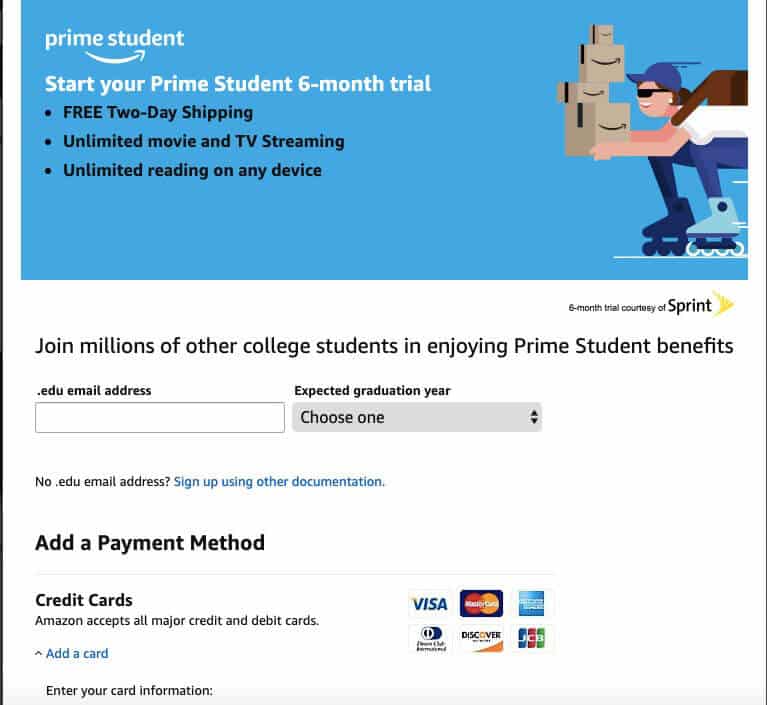
Initiating the Signup: On the Prime Student landing page, you’ll typically find a prominent “Start your 6-month trial” or “Join Prime Student” button. Clicking this initiates the enrollment workflow, redirecting you to a secure login or registration page.
-
Login or Create an Amazon Account:
-
Existing Users: If you already have an Amazon account, enter your existing email/phone and password. Ensure you’re using a strong, unique password and consider enabling two-factor authentication (2FA) for enhanced digital security.
-
New Users: If you’re new to Amazon, select “Create your Amazon account.” You’ll be prompted to provide your name, email address (preferably your personal one, not your
.eduone at this stage), and a new password. Amazon’s system validates these inputs in real-time.
-
Submitting Your Academic Verification Digitally
This is the most critical phase, where Amazon’s systems confirm your student status.
-
Entering Student Information: You will typically be asked to provide:
-
Your Name and Birthdate: Ensure these match official documents for potential manual verification.
-
University Name: Amazon’s interface often includes a dropdown or search function to select your institution. This uses a database lookup technology.
-
Expected Graduation Date: This helps Amazon’s systems manage your membership duration.
-
-
The
.eduEmail Verification Method:-
Inputting Your Student Email: Enter your official university-issued email address (e.g.,
yourname@university.edu). Amazon’s system will perform a basic format validation. -
Sending the Verification Link: Click the “Verify Email” or similar button. Amazon’s servers will send a unique, time-sensitive verification link to that
.eduaddress. -
Accessing Your Student Email and Clicking the Link: You must log into your university email client (webmail, Outlook, Gmail, etc.) within a specified timeframe and click the link. This action digitally authenticates your email ownership and confirms your student status to Amazon’s system. If you don’t receive it, check your spam/junk folder; sometimes university email filters are aggressive.
-
-
Alternative Verification (If
.eduFails or is Unavailable):-
Third-Party Redirect: You might be redirected to a partner verification service (e.g., SheerID). Follow their instructions, which often involve entering university details and possibly uploading documents. Their systems are designed for secure, encrypted data transfer.
-
Manual Document Upload: If prompted, you’ll use a secure upload portal on Amazon’s site. Digitize your documents (scan or take clear photos of your student ID, transcript, or enrollment letter). Ensure the file format is acceptable (e.g., PDF, JPG, PNG) and that all required information (name, university, date) is clearly legible. Amazon’s teams will then manually review your submission, a process that can take a few days.
-
Completing Your Membership Setup

Once your student status is verified, the final steps involve setting up your payment method and confirming your membership.
-
Adding a Payment Method: You’ll need to provide a valid credit or debit card. This information is processed through Amazon’s secure payment gateway, which uses encryption protocols (like SSL/TLS) to protect your financial data. Even though the first six months are often free, a payment method is typically required to ensure seamless transition into the paid membership after the trial.
-
Reviewing and Confirming: Before finalizing, Amazon will present a summary of your membership details, including the trial duration, the subsequent monthly/annual fee, and your payment method. Carefully review this information.
-
Activating Your Membership: Click the final “Start My Prime Student” or “Confirm Membership” button. You’ll receive a digital confirmation email, and your Amazon account will instantly reflect the Prime Student benefits. Your membership dashboard will become accessible, displaying your renewal date and current benefits.
Maximizing Your Prime Student Membership: Beyond the Basics
With your Prime Student membership active, the next step is to fully integrate its tech benefits into your academic and personal life. Understanding how to leverage these digital tools can significantly enhance your efficiency and enjoyment.
Exploring Prime Video, Music, and Gaming Tech
-
Multi-Device Access: Install the Prime Video and Prime Music apps on all your devices – smartphone, tablet, smart TV, gaming console. Prime’s technology allows for simultaneous streaming on multiple devices, ensuring you can access content wherever you are.
-
Offline Downloads: Utilize the offline download feature in Prime Video and Music apps. Before long commutes or trips with limited Wi-Fi, download your favorite shows, movies, or playlists. This leverages local storage technology on your device for uninterrupted entertainment.
-
Customization and Personalization: Explore recommendation algorithms within Prime Video and Music. The more you watch or listen, the better the system becomes at suggesting content tailored to your preferences, leveraging machine learning.
-
Twitch Prime Integration: Link your Amazon Prime account to your Twitch account. This unlocks monthly free games, exclusive in-game content, and a free channel subscription to support your favorite streamers. This cross-platform integration enhances your digital entertainment footprint.
Utilizing Cloud Storage and Digital Perks
-
Amazon Photos for Academic Backups: Beyond personal photos, consider using Amazon Photos’ unlimited storage for scanned lecture notes, project visuals, or presentation slides. The desktop app allows for automatic syncing, ensuring your academic work is always backed up to the cloud and accessible from any device.
-
Digital Textbooks and Rentals: Leverage Prime’s fast shipping for physical textbooks, but also explore Amazon’s Kindle Store for digital textbook rentals or purchases. These often come with interactive features, search functions, and highlighting tools that enhance digital learning.
-
Exclusive Digital Discounts: Keep an eye on the Prime Student exclusive deals section. These often include discounts on software, electronics, and study tools that can be valuable for students. Set up deal alerts to be notified when tech products you’re interested in go on sale.
Integrating Prime into Your Academic Workflow
-
Last-Minute Supplies: For those urgent project needs or forgotten stationery, Prime’s expedited shipping can be a lifesaver. Ensure your campus address or dorm location is accurately set as a shipping address in your Amazon account for precise delivery.
-
Study Break Entertainment: Use Prime Video or Music for quick, refreshing study breaks. The convenience of immediate access to a vast library can help manage stress and maintain focus.
-
Collaborative Tools (Indirectly): While Prime itself isn’t a direct collaboration tool, its ability to quickly deliver physical resources or provide cloud storage can indirectly support group projects by ensuring everyone has access to materials or quick backups.
Troubleshooting Common Enrollment Issues and Digital Security Tips
While the Prime Student signup process is designed to be user-friendly, technological hiccups can occur. Addressing these efficiently and maintaining digital security are paramount.
Resolving Verification Hurdles
-
.eduEmail Not Received:-
Check Spam/Junk Folders: University email filters can be strict.
-
Verify Email Address: Double-check that you entered your
.eduemail address correctly on Amazon’s site. -
Resend Verification: Look for an option to resend the verification email.
-
Contact Amazon Customer Service: If all else fails, reach out to Amazon’s digital support team via chat or phone. They can often manually assist with verification or provide insights into system errors.
-
-
Document Upload Issues:
-
File Format/Size: Ensure your uploaded documents meet the specified file format (e.g., PDF, JPG) and size limits. Compression tools can help with large files.
-
Clarity and Completeness: Make sure all required information (your name, university name, dates, etc.) is perfectly legible in your digital submission. Blurry images will be rejected by human or automated verification systems.
-
Patience: Manual review can take 3-5 business days. Factor this into your timeline.
-
Account Management and Digital Privacy
-
Strong Passwords and 2FA: Always use a unique, strong password for your Amazon account. Enable two-factor authentication (2FA) for an extra layer of digital security. This typically involves a code sent to your phone, protecting your account even if your password is compromised.
-
Reviewing Payment Methods: Regularly check your “Your Payments” section on Amazon to ensure your billing information is current and accurate. Remove any outdated cards to prevent issues with future renewals.
-
Understanding Privacy Settings: Familiarize yourself with Amazon’s privacy settings. You can often manage what data Amazon collects or how it personalizes recommendations. Opt out of marketing communications if desired.
-
Recognizing Phishing Attempts: Be vigilant against phishing emails or messages pretending to be from Amazon. Always check the sender’s email address and hover over links before clicking. Amazon will never ask for your password or sensitive financial information via unverified email.
What Happens After Graduation? (Membership Transition Tech)
Amazon’s systems are designed to manage the transition from Prime Student to a standard Prime membership.
-
Automatic Transition: Typically, after your student eligibility expires (e.g., after four years or upon reaching your expected graduation date, whichever comes first), your Prime Student membership will automatically convert to a full-price Amazon Prime membership. You will be notified digitally via email before this transition occurs.
-
Notification and Choice: Amazon’s system will send digital notifications to your registered email address, informing you of the upcoming change and the new billing rate. You will have the option to continue with the full-price membership or cancel your Prime subscription.
-
Managing Your Account Post-Graduation: Even after graduation, you’ll manage your Prime account through the same Amazon interface. Ensure your payment method is up-to-date if you choose to continue the full Prime service.
By meticulously following these tech-centric steps and remaining vigilant about digital security, students can seamlessly enroll in Amazon Prime Student and harness its full potential to support their academic journey and personal life in the digital age. This comprehensive guide equips you with the knowledge to navigate the process effectively, ensuring you unlock all the technological advantages this membership offers.
aViewFromTheCave is a participant in the Amazon Services LLC Associates Program, an affiliate advertising program designed to provide a means for sites to earn advertising fees by advertising and linking to Amazon.com. Amazon, the Amazon logo, AmazonSupply, and the AmazonSupply logo are trademarks of Amazon.com, Inc. or its affiliates. As an Amazon Associate we earn affiliate commissions from qualifying purchases.