
The landscape of sports broadcasting underwent a seismic shift when the distribution rights for NFL Sunday Ticket migrated from traditional satellite delivery to a digital-first, cloud-based infrastructure. Now exclusively hosted under the Google ecosystem via YouTube and YouTube TV, the service has transitioned into a sophisticated streaming product that requires a specific technical understanding to navigate. Whether you are a cord-cutter looking for a standalone solution or a power user seeking integrated live TV features, signing up for NFL Sunday Ticket involves selecting the right digital pathway, configuring your hardware, and optimizing your software settings for the best possible viewing experience.
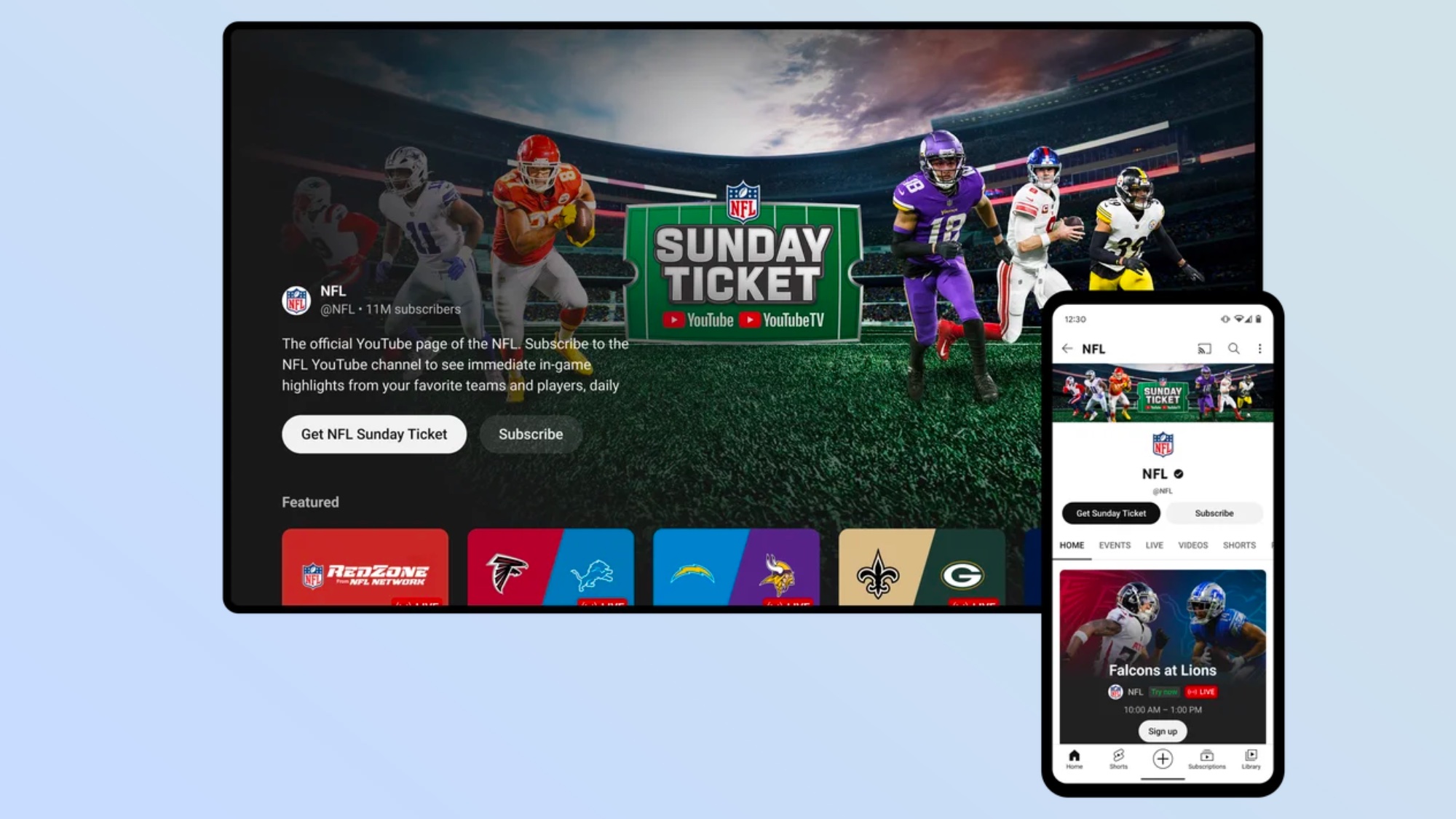
Navigating the Digital Ecosystem: YouTube TV vs. YouTube Primetime Channels
The first step in the sign-up process is identifying which platform architecture best suits your technological needs. Google offers two distinct methods for accessing NFL Sunday Ticket, each with its own set of interface dynamics and subscription requirements.
Signing Up via YouTube TV (The Integrated Experience)
For users who want a comprehensive cable-replacement service, signing up through YouTube TV is the most streamlined option. This path integrates the Sunday Ticket out-of-market games directly into the existing Live Guide, sitting alongside local affiliates and national sports networks.
-
Account Authentication: Access the YouTube TV interface via a desktop browser or the mobile app. Ensure you are logged into the primary Google Account intended for the subscription, as the service utilizes Google’s family sharing protocols.
-
Membership Settings: Navigate to the “Settings” menu (indicated by your profile icon) and select the “Membership” tab.
-
Add-on Selection: Locate NFL Sunday Ticket in the list of available add-ons. You will often see options to bundle the service with the NFL RedZone channel.
-
Transaction Processing: Confirm the selection and complete the checkout using the payment method linked to your Google Pay profile.
The technical advantage of this method is the “single-pane-of-glass” UI. When you search for a specific team, the software cross-references your local blackout data with the Sunday Ticket database to provide the correct stream instantly.
Signing Up via YouTube Primetime Channels (The Standalone Option)
If you do not require a full live TV streaming service and only want the Sunday Ticket games, the Primetime Channels path is the correct technical route. This treats the service as a standalone “app-within-an-app” on the standard YouTube platform.
-
Platform Access: Open the standard YouTube app or website.
-
Navigation: Search for “NFL” or go to the “Movies & TV” / “Programs” section on the left-hand sidebar.
-
Channel Hub: Locate the NFL Sunday Ticket channel page. This hub serves as the primary landing page for all out-of-market content.
-
Subscription Activation: Click the “Get NFL Sunday Ticket” button. You will be presented with package options (with or without RedZone).
-
Provisioning: Once the purchase is finalized, the “Movies & TV” section of your YouTube account will be updated with the live game modules, which activate every Sunday during the regular season.
Hardware Requirements and Software Optimization
Streaming high-bitrate live sports in 4K or high-definition requires more than just a subscription; it requires a hardware stack capable of handling the data throughput and software that is up to date.
Compatible Devices and Operating Systems
To ensure a stable stream, your hardware must support the latest version of the YouTube or YouTube TV application. Currently, the service is optimized for:
-
Smart TV OS: Android TV/Google TV, Samsung Tizen (2016+), LG WebOS (2016+), and Vizio SmartCast.
-
Streaming Sticks: Chromecast with Google TV, Roku (Ultra, Premiere, Stick+), Amazon Fire TV Stick (4K and Max), and Apple TV 4K (2nd Gen+).
-
Gaming Consoles: PlayStation 5 and Xbox Series X/S provide the best processing power for the Multiview feature.
-
Mobile/Desktop: iOS 15+, Android 9+, and the latest versions of Chrome, Safari, and Firefox.
Network Configuration and Bandwidth Management
The NFL Sunday Ticket streams are delivered via adaptive bitrate streaming (ABR). This technology adjusts the video quality in real-time based on your network congestion. For a consistent 1080p or 4K experience, a minimum download speed of 25 Mbps is recommended for a single stream. However, if you plan to use the Multiview feature—which renders up to four live games simultaneously—a stable 50 Mbps connection is the baseline to avoid buffering.
Hardwiring your streaming device via Ethernet (Cat6 or higher) is technically superior to Wi-Fi, as it eliminates radio frequency interference and provides lower latency, which is crucial for live sports where “spoiler” delays can occur via social media notifications.
Maximizing the User Experience: Advanced Features and Technical Controls
Once the sign-up is complete and the hardware is configured, users can leverage the advanced software features that distinguish the YouTube-based Sunday Ticket from its satellite predecessor.
The Multiview Feature: Technical Architecture
Multiview allows users to watch up to four games on a single screen. Unlike some desktop-based “picture-in-picture” tools that require the local device to decode four separate streams, YouTube handles the heavy lifting on its server side. The server stitches four video feeds into a single stream and sends that combined image to your device.
-
Customization Limitations: Currently, the Multiview selections are pre-compiled by YouTube’s servers to ensure maximum stability and minimum latency. To access these, navigate to the “Home” or “Live” tab during game windows, and the software will suggest various Multiview combinations based on popular matchups and your “watched” history.
-
Audio Switching: Users can toggle the audio focus between the four windows using the directional pad on their remote. The “Primary Focus” window is highlighted with a border, and the metadata (score, time remaining) for that specific game will be prioritized on the UI overlay.
Managing Latency and Real-Time Data
One of the biggest hurdles in streaming sports is “latency”—the delay between the action on the field and the image on your screen.
-
Low Latency Mode: Within the “Playback Settings” of the YouTube TV app, users can enable “Decrease Lag.” This reduces the buffer size to get closer to the live action, though it may require a more stable internet connection to prevent stuttering.
-
Stats and Key Plays: The app features a “Key Plays” view which uses machine learning to identify significant moments in a game. If you join a game late, you can select “Catch up with Key Plays” to see a curated loop of highlights before jumping into the live stream.
Troubleshooting, Security, and Geo-Location Requirements
The digital nature of the NFL Sunday Ticket means that it is subject to strict geo-fencing and account security protocols.
Handling Geo-Location and IP Restrictions
NFL Sunday Ticket is specifically designed for “out-of-market” games. This means that if a game is being broadcast by your local CBS or Fox affiliate, it will be “blacked out” on the Sunday Ticket stream to protect local broadcast rights.
-
Location Services: The app uses your device’s GPS (on mobile) or your ISP’s IP address (on TVs) to determine your Current Playback Area. If you are using a VPN, the service will likely fail to load or will provide an error message, as Google’s security filters actively block known VPN exit nodes to enforce regional licensing agreements.
-
System Verification: If you encounter a location error, go to the YouTube TV app, select your profile picture > Settings > Area > Current Program Area, and click “Update.” This re-syncs your digital location with the service’s permissions database.

Account Security and Family Sharing Technicalities
Google allows for “Family Sharing,” which permits the primary account holder to share the NFL Sunday Ticket subscription with up to five other family members.
-
Concurrent Streams: While the subscription allows for unlimited simultaneous streams within your home Wi-Fi network, it restricts users to two concurrent streams when accessing the service from outside the home network.
-
Two-Factor Authentication (2FA): Given the high value of the subscription, it is a technical best practice to enable hardware-based 2FA or Google Prompt on the primary account. This prevents unauthorized “account sharing” or credential stuffing attacks that could lock the primary user out of the stream during game day.
By understanding the technical infrastructure of the NFL Sunday Ticket on YouTube, from the initial platform choice to the configuration of Multiview and location settings, subscribers can ensure a high-fidelity, uninterrupted viewing experience. The transition to a SaaS (Software as a Service) model for sports broadcasting offers unprecedented flexibility and features, provided the user manages the digital requirements effectively.
aViewFromTheCave is a participant in the Amazon Services LLC Associates Program, an affiliate advertising program designed to provide a means for sites to earn advertising fees by advertising and linking to Amazon.com. Amazon, the Amazon logo, AmazonSupply, and the AmazonSupply logo are trademarks of Amazon.com, Inc. or its affiliates. As an Amazon Associate we earn affiliate commissions from qualifying purchases.