
In an increasingly interconnected digital world, an Amazon account serves as a pivotal gateway to an expansive universe of products, services, and entertainment. From instant purchases and streaming media to cloud computing services and smart home integration, Amazon has woven itself into the fabric of modern life for millions globally. Setting up an account is the foundational step to leveraging this vast ecosystem, but it’s more than just a simple registration. It involves understanding prerequisites, navigating the process securely, and configuring your account for optimal utility and safety.

This comprehensive guide will walk you through every step of creating and optimizing your Amazon account, focusing on the technical aspects, user experience, and digital security best practices essential for navigating this robust platform. Whether you’re a first-time user or looking to refine an existing setup, this article provides the insights needed to confidently establish your digital presence within Amazon’s technological dominion.
The Foundations of Your Amazon Journey: Prerequisites and Preparation
Before embarking on the account creation process, a little preparation can streamline your experience and ensure a smooth setup. Understanding the necessary information and considering your intended use will lay a strong groundwork for your Amazon journey. This initial phase is crucial for establishing a secure and functional account from the outset.
Essential Information You’ll Need
To begin, gather a few key pieces of information that Amazon will require for identification and communication. These elements are standard for most online service registrations and are vital for both usability and security.
- A Valid Email Address or Mobile Phone Number: This will serve as your primary identifier for logging in and receiving important communications, such as order confirmations, password reset links, and security notifications. Ensure it’s an address or number you have regular access to and plan to keep.
- A Strong, Unique Password: This is perhaps the most critical component for your account’s security. A strong password should be a combination of uppercase and lowercase letters, numbers, and symbols, and ideally, be at least 12-16 characters long. Crucially, it should be unique to your Amazon account and not reused from other online services. Consider using a reputable password manager to generate and store complex passwords securely.
- A Payment Method (Optional for setup, but essential for purchases): While not strictly required to create the account, you’ll need a valid credit card, debit card, or an Amazon Gift Card balance to make purchases. Having this information ready allows for a seamless transition from account creation to shopping.
- A Shipping Address: For physical goods, Amazon needs to know where to send your items. Having your preferred delivery address (including full street name, city, state/province, postal code, and country) ready will save time when you’re ready to order.
Choosing Your Account Type
For the vast majority of users, setting up a standard consumer account is the appropriate choice. However, it’s worth briefly touching upon other options to clarify the scope.
- Standard Consumer Account: This is the primary focus of this guide, designed for individuals to shop, stream, and access various Amazon digital services. It’s the default for most users.
- Amazon Business Account: For companies and organizations, Amazon Business offers specialized features like multi-user accounts, purchasing analytics, tax-exempt purchases, and business-only pricing. This account type caters to corporate procurement needs.
- AWS (Amazon Web Services) Account: This is entirely distinct and provides access to Amazon’s cloud computing platform, primarily for developers, businesses, and IT professionals. While linked by the Amazon umbrella, it’s a separate registration process and ecosystem.
Our focus remains on the standard consumer account, which is the gateway to Amazon’s retail and digital entertainment offerings.
Browser vs. App: Deciding Your Setup Platform
Amazon provides multiple interfaces for interaction. You can set up your account using a web browser on a desktop or mobile device, or through the dedicated Amazon Shopping app. Both offer similar functionality for account creation.
- Web Browser (Desktop/Mobile): Offers a full-screen experience, which some users find easier for inputting detailed information. It provides access to the complete Amazon website functionality.
- Amazon Shopping App: Designed for mobile convenience, the app offers a streamlined interface optimized for smartphones and tablets. It often integrates well with mobile device features like biometric authentication.
The choice largely comes down to personal preference and the device you have at hand. The steps outlined below are broadly applicable to both platforms.
Step-by-Step Account Creation: A Guided Walkthrough
With your essential information ready, the actual process of creating your Amazon account is straightforward. Amazon has optimized its registration flow for user-friendliness, ensuring a quick and efficient setup.
Navigating to the Registration Page
- Visit the Amazon Website or Open the App: Go to
amazon.com(or your regional Amazon domain likeamazon.co.uk,amazon.de, etc.) in your web browser, or launch the Amazon Shopping app. - Find the Account Section: On the website, hover over “Account & Lists” (or “Hello, Sign in Accounts & Lists”). A dropdown menu will appear. Click on “Start here” next to “New customer?”. In the app, you’ll typically see a “Sign In” button, and on the subsequent screen, an option like “Create a new Amazon account.”
Entering Your Core Details
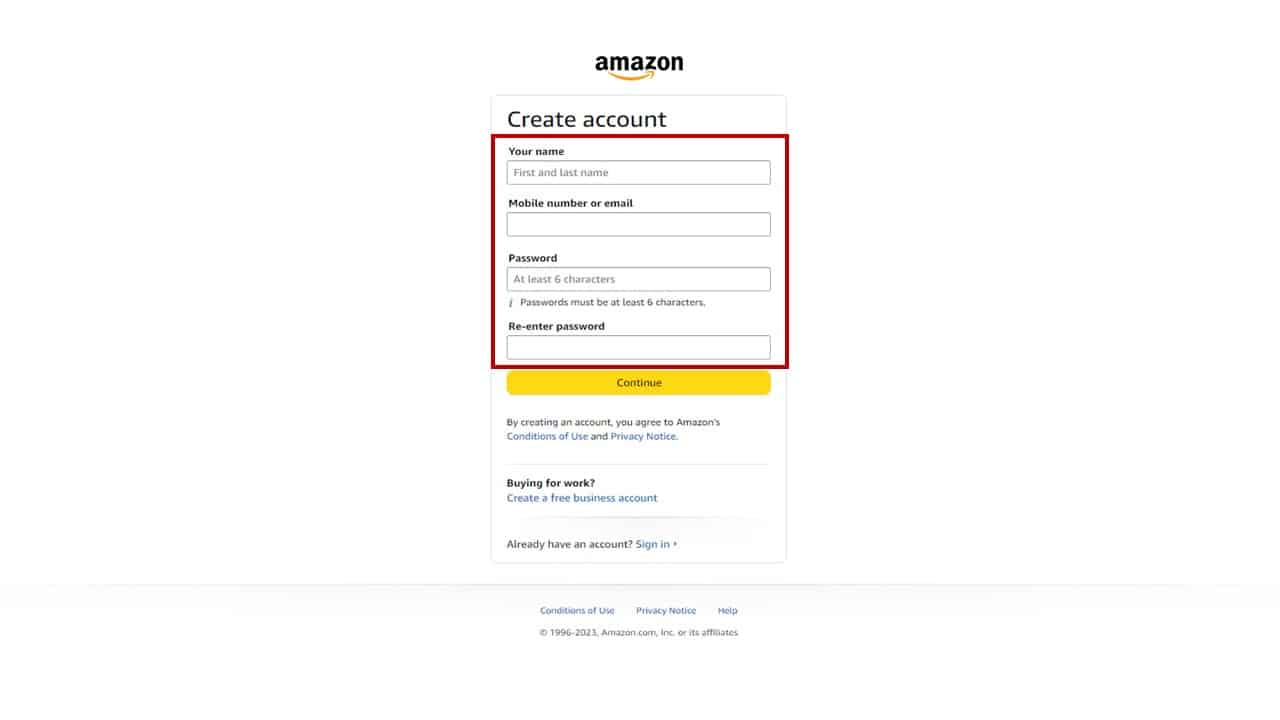
- Provide Your Name: Enter your full name as requested. This is used for personalization and shipping purposes.
- Enter Your Email Address or Mobile Phone Number: Input the primary identifier you chose earlier. Amazon will use this for verification and future communications.
- Create Your Password: Enter your strong, unique password twice to confirm accuracy. Take this opportunity to double-check for typos and ensure it meets Amazon’s criteria (usually at least 6 characters). Remember the importance of password strength for digital security.
Verifying Your Identity
After submitting your basic information, Amazon implements a crucial security step: identity verification. This helps prevent fraudulent account creation and ensures that you are the legitimate owner of the email address or phone number provided.
- Receive a One-Time Password (OTP): Amazon will send a unique One-Time Password (OTP) to the email address or mobile phone number you registered.
- Enter the OTP: Retrieve the OTP from your inbox or SMS messages and enter it into the designated field on Amazon’s registration page. This confirms that you have access to the provided contact method.
- Complete Account Creation: Once the OTP is successfully entered, click “Create your Amazon account.” Congratulations, your basic Amazon account is now active!
Enhancing Your Amazon Account: Beyond Basic Setup
Creating the account is just the beginning. To truly unlock Amazon’s potential and ensure a secure and convenient experience, it’s essential to configure additional settings and explore advanced features. These steps move beyond mere registration into actively managing your digital footprint within the Amazon ecosystem.
Adding Payment Methods Securely
To make purchases, you’ll need to link a payment method. Amazon employs robust security protocols to protect your financial information.
- Navigate to “Your Payments”: From “Account & Lists,” select “Your Payments.”
- Add a Payment Method: Click “Add a payment method.” You can choose to add a credit or debit card, link a bank account (if available in your region), or utilize Amazon Gift Card balances.
- Enter Details and Save: Provide your card number, expiry date, and cardholder name. Amazon uses tokenization and encryption to secure your data, ensuring your actual card number is not stored directly on their servers in plain text.
Managing Shipping Addresses
Efficient delivery relies on accurate address information. You can add multiple addresses and designate a default.
- Go to “Your Addresses”: Under “Account & Lists,” select “Your Addresses.”
- Add Address: Click “Add Address” and fill in all required fields accurately. You can specify whether it’s a residential or business address and add delivery instructions.
- Set Default: You can set one address as your default for future orders, saving time during checkout.
Exploring Amazon Prime Membership
Amazon Prime is a subscription service that dramatically enhances the Amazon experience, offering a range of benefits primarily focused on convenience and entertainment.

- Benefits: These typically include faster, free shipping (often same-day or two-day), access to Prime Video (streaming movies and TV shows), Prime Music, Kindle Unlimited access, exclusive deals, and more.
- Sign-Up/Trial: You can usually start a free trial of Prime directly from your account. Navigate to the Prime section within your account settings to learn more and activate a trial or subscription.
Setting Up Digital Assistants (Alexa) and Devices
Your Amazon account is the central hub for integrating Amazon’s smart devices and AI assistants into your life.
- Linking Devices: When you acquire an Echo smart speaker, a Fire TV stick, or a Kindle e-reader, you’ll link it to your Amazon account during its setup process. This enables personalized experiences, access to your digital purchases (e.g., Kindle books, Prime Video library), and voice control via Alexa.
- Alexa App: The Alexa app (available on iOS and Android) is used to manage your Alexa-enabled devices, configure smart home settings, and personalize your Alexa experience. Your Amazon account credentials are used to sign into this app.
Leveraging Security Features
Digital security is paramount. Amazon provides tools to further protect your account.
- Two-Step Verification (2SV/2FA): This is a critical security layer. Enable it in your “Login & security” settings. With 2SV, in addition to your password, you’ll need a code sent to your phone or generated by an authenticator app when signing in from an unrecognized device. This significantly reduces the risk of unauthorized access even if your password is compromised.
- Reviewing Account Activity: Regularly check your “Login & security” settings to review recent sign-ins and authorized devices. If you see any suspicious activity, immediately change your password and contact Amazon support.
Troubleshooting Common Setup Issues and FAQs
Even with a streamlined process, users might encounter minor hurdles during setup or in the early stages of using their Amazon account. Understanding how to address these common issues can prevent frustration and ensure uninterrupted access to the platform.
Forgotten Password and Account Recovery
Forgetting your password is a common occurrence. Amazon provides a clear recovery process.
- “Forgot your password?” Link: On the sign-in page, click the “Forgot your password?” link.
- Verification: You’ll be asked to enter the email address or phone number associated with your account. Amazon will then send a one-time password or a link to reset your password to that contact method.
- Reset and Re-secure: Once verified, you can set a new password. Always choose a strong, unique password, especially after a recovery event.
Verification Code Not Received
If you don’t receive the OTP during setup or password recovery:
- Check Spam/Junk Folder: Email verification codes often end up in spam or junk folders.
- Verify Phone Number/Email Address: Double-check that the email address or phone number you entered is correct and active.
- Resend Code: Look for an option to “Resend code” on the Amazon verification page.
- Temporary Network Issues: Sometimes, delivery can be delayed due to network congestion. Wait a few minutes before trying again.
- Contact Amazon Support: If all else fails, reach out to Amazon Customer Service for assistance.
Payment Method Declination
If a payment method is declined during a purchase:
- Incorrect Information: Double-check the card number, expiry date, CVV, and billing address. A single typo can cause a declination.
- Insufficient Funds/Credit: Ensure there are sufficient funds or available credit on the card.
- Bank Security Measures: Your bank might have flagged the transaction as suspicious. Contact your bank to authorize the purchase.
- Expired Card: Verify that your card has not expired.
- Amazon System Glitch: Occasionally, there might be a temporary issue on Amazon’s end. Try again later or use an alternative payment method.
Geolocation and Region-Specific Accounts
Amazon operates separate storefronts and accounts for different countries (e.g., amazon.com for the US, amazon.co.uk for the UK, amazon.de for Germany).
- Separate Accounts: Generally, an account created on one Amazon domain (e.g.,
amazon.com) does not automatically transfer your Prime membership or digital purchases to another domain (e.g.,amazon.ca). You might need separate accounts for different regions if you frequently purchase from them, although some digital content can be transferred. - Migrating Digital Content: Amazon offers options to transfer your digital content (like Kindle books) between regional accounts, but physical order history and Prime memberships are typically region-specific.
The Broader Technological Ecosystem of Your Amazon Account
An Amazon account is far more than just a login for online shopping; it’s a central identity that links you to a vast and interconnected technological ecosystem. Understanding this broader integration highlights the true power and utility of your account from a tech perspective.
Seamless Integration Across Amazon Services
Your single Amazon account acts as a unified key to almost all of Amazon’s diverse offerings. This seamless integration is a hallmark of its technological design.
- Prime Video and Music: Access your streaming libraries, watch movies, TV shows, and listen to music instantly.
- Kindle and Audible: Sync your e-books and audiobooks across devices, manage your digital libraries, and continue reading/listening right where you left off.
- Appstore: Purchase and download apps for Fire devices and Android smartphones.
- AWS Console (for developers): While requiring a separate AWS account, your consumer account credentials can sometimes be linked or used for initial access to certain developer resources, showcasing the underlying unity of Amazon’s tech infrastructure.
- Whole Foods Market & Amazon Fresh: Link your account for online grocery orders, digital coupons, and personalized shopping experiences.
This integrated approach provides a consistent user experience across different platforms and services, all managed under one digital identity.
Data Privacy and Account Settings
In the age of digital data, understanding and managing your privacy settings within your Amazon account is crucial for maintaining control over your personal information.
- Your Account Dashboard: This is your central hub for managing privacy. Navigate to “Your Account” and explore sections like “Login & Security,” “Your Addresses,” “Your Payments,” and crucially, “Your Data & Privacy.”
- Managing Personal Data: Here, you can review what data Amazon has collected, request a copy of your data, and sometimes manage specific data preferences, such as personalized advertising settings. You can opt out of certain ad targeting or manage your interest-based ads.
- Security Settings: Beyond 2SV, regularly reviewing authorized devices and sign-in alerts helps you monitor who is accessing your account. You can de-authorize devices you no longer use or don’t recognize.
- Voice Recordings (Alexa): For Alexa users, your account allows you to review and delete voice recordings, and manage how your voice data is used to improve Alexa’s services. This level of control is a key aspect of responsible tech usage.
The Role of Cloud Infrastructure (AWS) in the User Experience
While typically unseen by the end-user, Amazon Web Services (AWS) is the colossal cloud computing platform that underpins Amazon’s entire ecosystem, including your consumer account experience.
- Scalability and Reliability: AWS provides the infrastructure that allows Amazon to handle billions of transactions, millions of simultaneous video streams, and countless data requests daily with remarkable speed and reliability. This translates to your smooth shopping experience, fast page loads, and uninterrupted streaming.
- Data Storage and Security: Your account information, order history, and digital libraries are securely stored and managed on AWS’s globally distributed data centers. AWS implements industry-leading security measures to protect this data, though user-level security practices (like strong passwords and 2SV) remain vital.
- Innovation Engine: AWS empowers Amazon to rapidly deploy new features and services. When you see new functionalities or improvements on the Amazon platform, they are very likely powered by the agility and capabilities of AWS, constantly enhancing your account’s potential.
Understanding this backend powerhouse provides insight into the robust technological foundation supporting your seemingly simple Amazon account.
Conclusion
Setting up an Amazon account is the initial, yet significant, step into a vast digital ecosystem that integrates commerce, entertainment, and smart technology. By carefully following the registration steps, securing your account with strong passwords and two-step verification, and then configuring your payment and address details, you lay the groundwork for a secure, convenient, and feature-rich experience.
Beyond basic setup, actively managing your account’s privacy settings and understanding its seamless integration across Amazon’s diverse services – from Prime Video to Alexa-enabled devices – empowers you to fully leverage the platform’s technological prowess. Your Amazon account is not just a login; it’s a personal hub within a sophisticated digital infrastructure, designed to simplify and enrich your online life. With this guide, you are now equipped to navigate this digital landscape with confidence and control.
aViewFromTheCave is a participant in the Amazon Services LLC Associates Program, an affiliate advertising program designed to provide a means for sites to earn advertising fees by advertising and linking to Amazon.com. Amazon, the Amazon logo, AmazonSupply, and the AmazonSupply logo are trademarks of Amazon.com, Inc. or its affiliates. As an Amazon Associate we earn affiliate commissions from qualifying purchases.