
In an increasingly digital world, the ability to transfer funds swiftly, securely, and conveniently has become a cornerstone of both personal finance and business operations. Among the myriad of platforms facilitating these transactions, PayPal stands out as a pioneering and dominant force. Since its inception, PayPal has transformed from a simple peer-to-peer payment system into a comprehensive financial tool, enabling millions globally to send, receive, and manage money with unprecedented ease. Understanding how to effectively utilize PayPal for sending money is not just a matter of technical proficiency; it’s a vital skill for modern financial management, impacting everything from daily budgeting and international remittances to supporting burgeoning side hustles and streamlining small business finances.
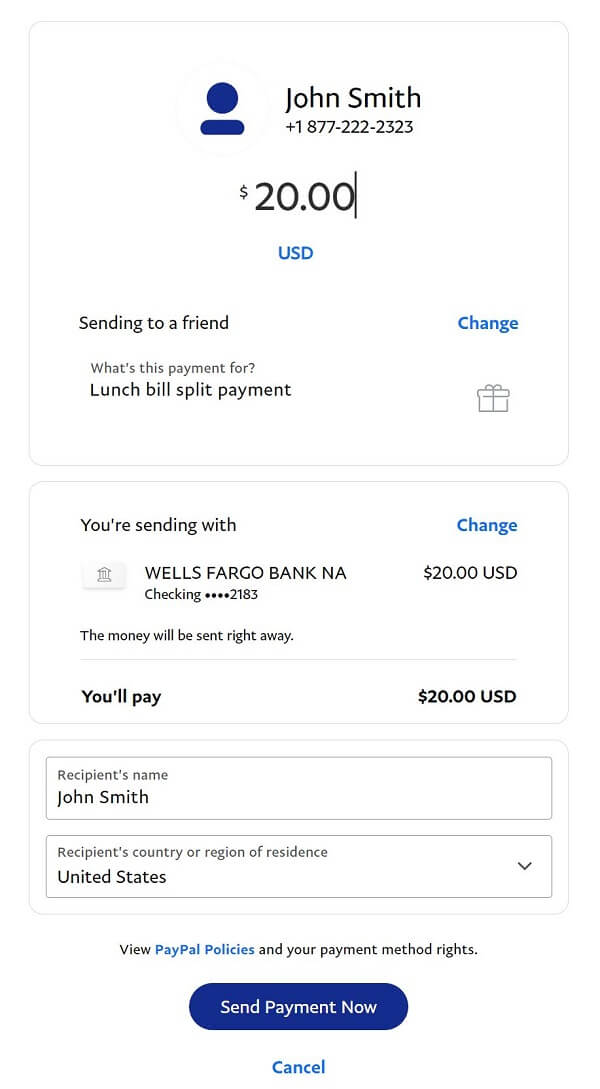
This guide will demystify the process of sending money with PayPal, delving into its functionalities, financial implications, and strategic uses. We will explore the various methods of payment, discuss associated costs, highlight security measures, and illustrate how PayPal can be integrated into a broader financial strategy, ensuring that users can leverage this powerful tool to its fullest potential, optimize their financial transactions, and maintain robust financial health.
Understanding PayPal’s Core Functionality in Personal Finance
PayPal’s enduring relevance in the financial landscape stems from its robust functionality and user-centric design, making it an indispensable tool for a wide spectrum of financial activities. From settling dinner tabs with friends to paying international vendors, PayPal offers a versatile solution that bridges traditional banking with digital convenience.
PayPal’s Evolution as a Financial Tool
Originating in the late 1990s, PayPal initially focused on facilitating payments for eBay transactions. Its explosive growth, however, quickly positioned it as a standalone leader in online payments. Over two decades, PayPal has continuously evolved, expanding its services to encompass a vast array of financial tools: peer-to-peer payments, online shopping gateway, business invoicing, international money transfers, and even credit services. This evolution reflects a deep understanding of consumer and business financial needs, solidifying PayPal’s role not just as a payment processor, but as a critical component in the digital economy’s financial infrastructure. For individuals, it means having a versatile digital wallet; for businesses, it provides a crucial mechanism for accepting and making payments globally.
Key Benefits for Senders and Recipients
The primary allure of PayPal lies in the tangible benefits it offers to both parties involved in a transaction. For senders, the platform provides unparalleled convenience, allowing money transfers to be initiated from virtually anywhere, at any time, via a smartphone or computer. Speed is another significant advantage; funds often arrive in the recipient’s PayPal account almost instantaneously, a stark contrast to the multi-day waits often associated with traditional bank transfers. From a financial security perspective, PayPal acts as an intermediary, meaning senders do not directly share their sensitive banking or card details with recipients, adding an extra layer of protection against fraud.
Recipients benefit equally. They gain access to funds quickly, which can then be used for online purchases, withdrawn to a linked bank account, or held within their PayPal balance for future transactions. The global reach of PayPal also facilitates cross-border payments, opening up opportunities for individuals receiving remittances from abroad or businesses engaging in international trade, thereby expanding their financial horizons.
Distinguishing Between Personal and Business Payments
A critical aspect of using PayPal effectively, particularly from a financial management standpoint, is understanding the distinction between personal payments (Friends & Family) and business payments (Goods & Services). This differentiation is not merely a technicality; it carries significant financial implications regarding fees, buyer/seller protection, and tax reporting.
Friends & Family (Personal Payments): This option is designed for sending money to individuals you know and trust, such as family members or friends, for non-commercial purposes (e.g., splitting a bill, sending a gift). Typically, if funded by a PayPal balance or linked bank account, these transactions are free for both sender and recipient within the same country. However, using a credit card or debit card for Friends & Family payments often incurs a small fee for the sender. Importantly, these payments generally do not come with PayPal’s Buyer Protection, meaning if an issue arises, the recourse is limited. From a personal finance perspective, this is ideal for informal financial settlements.
Goods & Services (Business Payments): This option is specifically for buying items or paying for services. When selecting this, the transaction is automatically covered by PayPal’s robust Buyer Protection for the sender and Seller Protection for the recipient (under certain conditions). This means if an item isn’t received, or is significantly not as described, the buyer can file a dispute and potentially recover their funds. For sellers, while they pay a transaction fee (typically 2.9% + a fixed fee per transaction), they gain the assurance of Seller Protection. From a business finance perspective, this is the standard for any commercial transaction, ensuring legal and financial safeguards for both parties and aiding in proper financial record-keeping for tax purposes. Ignoring this distinction can lead to unexpected fees or a lack of protection, underscoring its importance in responsible financial planning.
A Step-by-Step Guide to Sending Personal Payments
Sending money to friends and family through PayPal is designed to be straightforward, emphasizing convenience and speed. Mastering this process is fundamental for leveraging PayPal’s utility in your daily personal finance management.
Setting Up and Funding Your PayPal Account
Before you can send money, you need an active PayPal account linked to a reliable funding source.
- Account Creation: If you don’t have one, visit the PayPal website or download the mobile app and sign up. You’ll need to provide basic personal information and verify your email address.
- Linking a Funding Source: To send money without relying solely on a pre-existing PayPal balance, you must link a bank account, debit card, or credit card.
- Bank Account: This is often the most cost-effective option for sending money, as transfers from a linked bank account are typically free for Friends & Family payments within the same country. You’ll usually need to provide your bank’s routing number and your account number, followed by a small deposit verification process.
- Debit/Credit Card: Linking a card provides instant access to funds but may incur fees for certain transaction types. You’ll input your card number, expiration date, and security code.
Linking multiple funding sources offers flexibility and redundancy, an intelligent financial practice. Always ensure these links are secure and up-to-date to prevent transaction failures or security vulnerabilities.
The “Send Money” Process (Friends & Family)
Once your account is set up and funded, sending a personal payment is intuitive:
- Log In: Access your PayPal account via the website or mobile app.
- Navigate to “Send”: On the dashboard, locate and click or tap the “Send” option.
- Enter Recipient Details: You’ll be prompted to enter the recipient’s email address or mobile phone number. It’s crucial to double-check this information for accuracy to avoid sending money to the wrong person, a costly mistake that can be difficult to reverse.
- Enter Amount and Currency: Specify the amount you wish to send. If sending internationally, select the appropriate currency. PayPal will display the exchange rate if currency conversion is needed, along with any associated conversion fees.
- Choose Payment Type: This is where you select “Sending to a friend” or “Friends & Family.”
- Select Funding Source: Choose which linked bank account, debit card, credit card, or your PayPal balance you want to use for the payment. Remember the fee implications mentioned earlier – generally, using your PayPal balance or a linked bank account is free for domestic Friends & Family payments.
- Review and Confirm: Before finalizing, a summary screen will display all transaction details, including the recipient, amount, funding source, and any applicable fees. Carefully review this information.
- Send Payment: Click “Send Money Now” to complete the transaction. The funds are typically available to the recipient almost instantly.
Confirming Transaction Status and Record Keeping
After sending, PayPal provides immediate confirmation. You can always verify the transaction status in your “Activity” section. This digital record is invaluable for personal budgeting and financial tracking. Regularly reviewing your transaction history allows you to:
- Monitor Spending: Understand where your money is going.
- Reconcile Accounts: Match PayPal transactions with your bank statements.
- Resolve Disputes: Have concrete evidence if there’s a discrepancy or a need to contact PayPal’s resolution center.
Maintaining diligent records through PayPal’s activity log is a simple yet powerful habit for effective personal financial management.
Navigating Business Payments and Invoicing with PayPal
While PayPal excels at personal transfers, its functionalities for business transactions are equally robust, catering to freelancers, small businesses, and e-commerce merchants. Understanding these features is crucial for anyone engaging in commercial activities or operating a side hustle.
Sending Money for Goods & Services
When purchasing items or paying for professional services through PayPal, it is imperative to use the “Goods & Services” option. This choice activates PayPal’s comprehensive Buyer Protection, a vital financial safeguard for consumers.
- Initiate Payment: Similar to personal payments, navigate to the “Send” option.
- Enter Recipient Details: Input the seller’s email or phone number.
- Specify Amount and Currency: Enter the transaction amount.
- Select Payment Type: Crucially, select “Paying for an item or service” or “Goods & Services.” This informs PayPal that the transaction is commercial, enabling buyer protection.
- Add a Note (Optional): Include details about the purchase, such as an invoice number or item description, which can be useful for both parties’ financial records.
- Choose Funding Source: Select your preferred payment method.
- Review and Confirm: Scrutinize all details, including the total amount and any currency conversion rates.
- Complete Purchase: Confirm the payment.
For the buyer, the primary financial implication is the peace of mind offered by Buyer Protection, which can help recover funds if the purchased item is not received or is significantly different from its description. For the seller, accepting “Goods & Services” payments means they will incur a fee (typically 2.9% + a fixed fee per transaction) but gain access to Seller Protection, which mitigates risks associated with chargebacks and unauthorized transactions. This fee is a necessary business expense for ensuring secure transactions and customer confidence.
Utilizing PayPal Invoicing for Professional Transactions
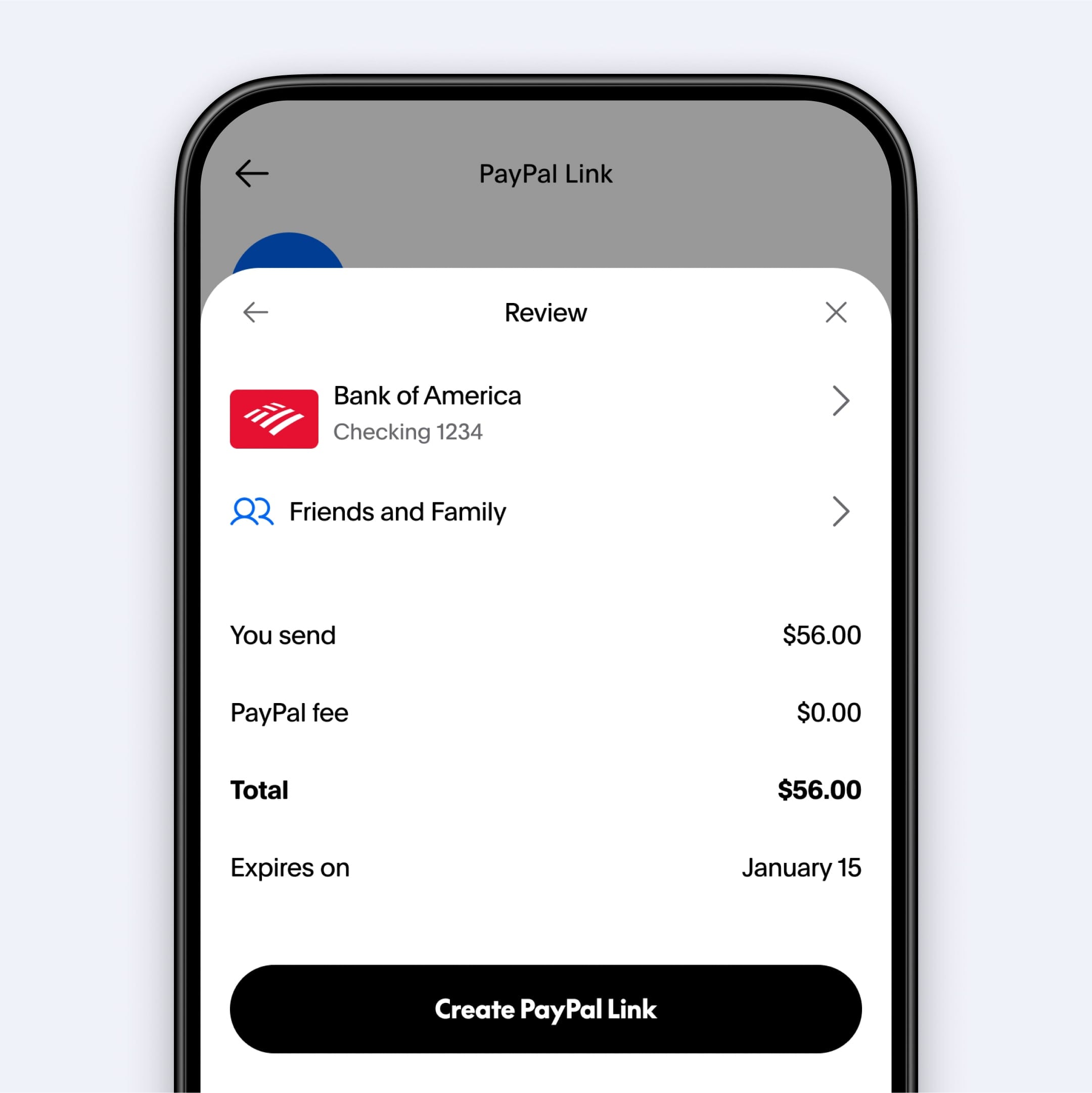
PayPal’s invoicing feature is a powerful tool for freelancers and small businesses to manage their accounts receivable, streamlining the process of requesting and receiving payments for services rendered or goods sold.
- Create an Invoice: From your PayPal dashboard, select “Send & Request” and then “Create Invoice.”
- Add Client Details: Input the client’s email address and contact information.
- Itemize Services/Goods: Clearly list the services or products provided, including quantities, unit prices, and descriptions. This transparency is crucial for professional financial dealings.
- Specify Terms: Include payment due dates, any discounts, applicable taxes, and shipping costs.
- Send Invoice: Once finalized, send the invoice directly from PayPal.
Clients receive the invoice via email and can pay securely through PayPal using various funding sources. This feature not only professionalizes financial interactions but also provides robust tracking. PayPal maintains a record of all sent invoices, their status (paid, pending, overdue), and payment history, simplifying financial reconciliation, tax preparation, and overall business finance management.
Mass Payments and Recurring Transactions
For businesses or individuals with repetitive payment needs, PayPal offers solutions for efficiency:
- Mass Payments (Payouts): This feature allows businesses to send multiple payments simultaneously to various recipients, such as for payroll, commissions, or vendor payouts. It significantly reduces administrative overhead compared to processing individual payments. While designed for businesses, it offers a glimpse into how PayPal scales its financial tools for large-volume transactions.
- Recurring Payments/Subscriptions: PayPal facilitates setting up recurring payments for subscriptions or installments. This is beneficial for both subscribers (ensuring uninterrupted service) and businesses (guaranteeing consistent revenue streams). For individuals managing subscriptions, PayPal’s interface allows for easy tracking and cancellation, aiding in personal budgeting and avoiding unwanted recurring charges.
These advanced features underscore PayPal’s utility beyond simple transfers, positioning it as a versatile financial partner for managing complex payment landscapes.
Cost Implications and Financial Security Considerations
While PayPal offers unparalleled convenience, it’s essential for users to understand the financial implications of its fee structure and to prioritize robust security measures. A savvy financial user optimizes costs and protects their assets.
Decoding PayPal Fees
Understanding PayPal’s fee structure is critical for efficient financial planning and avoiding unexpected charges.
- Domestic vs. International Fees: For “Friends & Family” payments, sending money within the same country from a PayPal balance or linked bank account is typically free. However, if you use a debit or credit card, the sender will incur a fee (usually a percentage of the transaction amount). International “Friends & Family” payments generally incur a fee for the sender, regardless of the funding source, plus potential currency conversion fees.
- Goods & Services Fees: For “Goods & Services” payments, the recipient (seller) usually pays a fee, which varies by country but is typically around 2.9% + a fixed fee per transaction.
- Currency Conversion Rates: When sending money in a different currency, PayPal applies its own exchange rate, which includes a margin in addition to the interbank rate. This can add a significant cost to international transfers. Always compare PayPal’s rates with other services to ensure you’re getting the best value.
- Tips for Minimizing Fees:
- For personal payments, prioritize using your PayPal balance or a linked bank account.
- For international transfers, consider alternative services if PayPal’s conversion rates are unfavorable, or explore the option of sending in the recipient’s local currency if possible.
- Understand that business payments inherently come with fees; these are a cost of doing business and part of the protection mechanism.
Being aware of these fees allows users to make informed decisions, optimize their transactions, and ensure their financial resources are managed effectively.
Safeguarding Your Financial Information
The digital nature of PayPal transactions necessitates a proactive approach to security. Protecting your account is paramount to safeguarding your financial well-being.
- Two-Factor Authentication (2FA): Enable 2FA immediately. This adds an extra layer of security, requiring a code from your mobile device in addition to your password during login. It significantly deters unauthorized access.
- Recognizing Phishing Attempts: Be vigilant against phishing emails or messages that mimic PayPal. PayPal will never ask for your password or sensitive financial details via email. Always check the sender’s email address and look for suspicious links. If in doubt, type www.paypal.com directly into your browser.
- Strong, Unique Passwords: Use a complex, unique password for your PayPal account that is not used on any other service.
- Understanding Buyer/Seller Protection: While these policies offer crucial safeguards, they are not absolute. Buyers should still exercise due diligence, and sellers must adhere to PayPal’s policies regarding shipping and proof of delivery to be eligible for protection. Knowing the limits of these protections is part of sound financial risk management.
- Regularly Monitor Activity: Periodically review your PayPal transaction history for any unfamiliar activity. Report suspicious transactions immediately.
Adhering to these security best practices significantly reduces the risk of fraud and unauthorized access, ensuring your funds and financial data remain secure.
Dispute Resolution and Refunds
Despite best practices, financial issues can arise. PayPal offers a structured dispute resolution process.
- Initiating a Dispute: If you send money for goods or services and encounter an issue (e.g., item not received, item significantly not as described), you can open a dispute in the Resolution Centre within a specified timeframe (typically 180 days).
- Communication with Seller: PayPal initially encourages direct communication between buyer and seller to resolve the issue.
- Escalating to a Claim: If direct communication fails, the dispute can be escalated to a claim, at which point PayPal investigates and makes a decision based on evidence provided by both parties.
- Refunds: If a dispute is resolved in your favor, or if a seller voluntarily agrees to a refund, the money is typically returned to your original funding source (PayPal balance, bank account, or credit card).
Understanding this process is vital for protecting your financial interests when transactions don’t go as planned, providing a critical safety net for both personal and business financial interactions.
Strategic Uses of PayPal in Modern Financial Planning
Beyond its primary function of sending and receiving money, PayPal can be strategically integrated into a broader financial planning framework, enhancing budgeting, facilitating global transactions, and supporting entrepreneurial ventures.
Budgeting and Expense Tracking
PayPal’s digital nature makes it an excellent tool for systematic financial management. Every transaction, whether incoming or outgoing, is meticulously recorded in your activity history. This detailed log can be invaluable for:
- Automated Expense Categorization: Many personal finance software tools and budgeting apps can link directly to your PayPal account, automatically importing and categorizing transactions. This reduces manual data entry and provides real-time insights into spending patterns.
- Identifying Spending Habits: A clear record of PayPal payments helps individuals pinpoint where their money is going – be it for online shopping, digital subscriptions, or peer-to-peer transfers. This visibility is crucial for identifying areas where budgeting adjustments can be made to improve financial health.
- Reconciliation: For small businesses or freelancers, reconciling PayPal activity with broader accounting software ensures accuracy in financial statements and simplifies tax preparation. The ability to export transaction data is a powerful feature for financial analysis.
Cross-Border Remittances and Global Commerce
PayPal plays a pivotal role in facilitating international financial flows, making it an indispensable tool for global citizens and businesses.
- Seamless Remittances: Individuals can easily send money to family and friends in other countries, supporting loved ones abroad. While fees and exchange rates apply, the convenience and speed often outweigh those for smaller, frequent transfers.
- Global E-commerce: For online businesses, PayPal serves as a universally recognized payment gateway, allowing them to accept payments from customers worldwide. This drastically lowers the barrier to entry for international trade, opening up vast new markets and income streams.
- Online Income and Freelancing: Many international clients and platforms use PayPal for payouts to freelancers or online service providers, making it a critical tool for managing online income earned from global opportunities.
Integrating PayPal with Other Financial Tools
PayPal’s ecosystem extends through various integrations that enhance its utility in a holistic financial management strategy.
- E-commerce Platforms: Integration with platforms like Shopify, Etsy, and eBay allows for streamlined payment processing, making it easier for small businesses to manage their online sales and financial operations.
- Budgeting Apps: As mentioned, linking PayPal to personal finance apps like Mint or YNAB provides a comprehensive view of your financial standing, combining your bank accounts, credit cards, and PayPal transactions into a single dashboard.
- Accounting Software: For businesses, integration with accounting software such as QuickBooks or Xero automates reconciliation, categorizes expenses, and generates financial reports, significantly simplifying bookkeeping and ensuring financial compliance.
PayPal as a Payment Gateway for Side Hustles and Small Businesses
For the burgeoning population of freelancers and small business owners, PayPal offers an accessible and low-overhead solution for accepting payments.
- Ease of Setup: Unlike traditional merchant accounts, setting up PayPal to accept payments is straightforward, requiring minimal paperwork and time. This makes it ideal for individuals starting a side hustle or testing a new business idea.
- Versatile Payment Options: PayPal allows businesses to accept payments from customers using credit cards, debit cards, bank transfers, or their PayPal balance, catering to a wide customer base.
- Professionalism and Trust: Displaying the PayPal logo as a payment option instills trust in customers, leveraging PayPal’s established reputation for security and reliability. This professional appearance is crucial for growing a small business and building customer confidence in financial transactions.
By strategically leveraging these features, individuals and businesses can transform PayPal from a simple payment app into a powerful component of their overall financial architecture, supporting growth, enhancing security, and improving financial oversight.
Conclusion
PayPal has undeniably revolutionized how we send and receive money, evolving into a sophisticated financial ecosystem that serves millions across the globe. From settling a quick bill with a friend to managing complex international business transactions, its versatility and accessibility are unparalleled. This guide has illuminated the intricacies of sending money with PayPal, differentiating between personal and business payments, detailing step-by-step processes, and uncovering the vital aspects of fees, security, and dispute resolution.
For anyone navigating the modern financial landscape, mastering PayPal is more than just learning a technical skill; it’s about empowering oneself with a tool that enhances personal financial management, facilitates global commerce, and supports entrepreneurial endeavors. By understanding its capabilities, discerning its costs, and adhering to best security practices, users can unlock PayPal’s full potential. In an era where digital financial fluency is increasingly essential, leveraging PayPal strategically ensures that your money moves efficiently, securely, and in alignment with your broader financial goals, ultimately contributing to a more robust and responsive financial life.
aViewFromTheCave is a participant in the Amazon Services LLC Associates Program, an affiliate advertising program designed to provide a means for sites to earn advertising fees by advertising and linking to Amazon.com. Amazon, the Amazon logo, AmazonSupply, and the AmazonSupply logo are trademarks of Amazon.com, Inc. or its affiliates. As an Amazon Associate we earn affiliate commissions from qualifying purchases.