
In the landscape of modern personal finance, the ability to quickly and securely access your banking credentials is a fundamental skill. Whether you are setting up a direct deposit for a new side hustle, linking a brokerage account for long-term investing, or automating your monthly bill payments, your Chase account number serves as the primary identifier for your liquid assets. While digital banking has made these processes more convenient, the layers of security designed to protect your wealth can sometimes make finding this information feel like a challenge.

Understanding how to navigate the Chase ecosystem is not just about finding a string of digits; it is about mastering the financial tools at your disposal to ensure your personal finance management remains seamless, secure, and efficient.
The Role of Account and Routing Numbers in Personal Finance
To effectively manage your money, you must first understand the architecture of your bank account. Every Chase customer is assigned two critical identifiers: the account number and the routing number. While they often appear together, they serve vastly different purposes in the movement of capital.
Understanding the Difference Between Account and Routing Numbers
Think of your routing number as the address of the “building” (Chase Bank), while your account number is the specific “apartment” where your money resides. The routing number is a nine-digit code used by financial institutions to identify the bank during transactions like ACH transfers, wire transfers, and check clearing.
Your account number, however, is unique to you. It is the specific ledger where your deposits are recorded and your withdrawals are deducted. When you are asked for this information to facilitate an “online income” transfer or a “side hustle” payment, providing the correct combination is crucial. An error in these digits can lead to failed transfers or, in rare cases, funds being sent to the wrong individual.
Why Privacy Protocols Hide Your Sensitive Data
If you have ever logged into the Chase app and noticed that your account number is obscured by asterisks (e.g., ****1234), this is a deliberate security feature. In the realm of digital security and personal finance, “masking” is used to prevent “shoulder surfing” or unauthorized access to your full credentials if your device is lost.
In an era where identity theft can compromise your entire financial portfolio, Chase utilizes these protocols to ensure that your full account number is only visible when you intentionally request to see it. Understanding how to bypass this mask securely is the first step in active financial oversight.
Accessing Your Information via the Chase Mobile App
The Chase Mobile® app is one of the most robust financial tools available to consumers today. It serves as a portable command center for your personal finances, allowing you to monitor spending, invest in equities, and manage your account details on the go.
Navigating the Account Dashboard
To find your account number using the mobile app, you must first clear the biometric or passcode security gate. Once on the main dashboard, you will see a list of your various accounts—Checking, Savings, Credit Cards, and potentially Investment accounts.
- Tap on the specific account (e.g., “Total Checking”) for which you need the number.
- Once the account details page opens, look for the “Account Details” link, which is usually located near the top of the screen or under a “See Details” dropdown.
- Within this section, your account and routing numbers will be listed. Initially, they may be masked. Tap the “Show” icon (usually an eye symbol) to reveal the full string of digits.
Managing Multiple Accounts for Better Budgeting
For those managing multiple streams of income or dedicated savings buckets, you may have several account numbers within the same Chase profile. It is a common strategy in business finance and personal budgeting to separate “operating expenses” from “emergency funds.”
When accessing your account numbers via the app, ensure you are selecting the correct sub-account. Using a savings account number for a transaction intended for checking can lead to “Overdraft Protection” triggers or transfer delays. Always double-check the account nickname or the last four digits before copying the full number for a financial transaction.
Utilizing Chase Online for Desktop Financial Oversight
While mobile apps offer convenience, the Chase Online℠ desktop portal provides a more comprehensive view of your financial health. This is often the preferred method for individuals performing deep-dive financial planning or those who need to download official documentation for tax or mortgage purposes.
Downloading Statements for Record-Keeping
The most reliable way to find your account number while also verifying your financial history is through your monthly statements. These documents are the “gold standard” of financial proof.
- Log in to the Chase website.
- Navigate to the “Statements & Documents” tab.
- Select the most recent statement for the account in question.
- Open the PDF. Your full account number and routing number are typically located in the top-right header or the “Account Summary” section of the first page.
From a personal finance perspective, keeping a digital folder of these statements is a best practice. It provides a paper trail for your income and expenses, which is vital if you are tracking side hustle earnings or preparing for a financial audit.
The Benefits of Electronic Document Storage
Using the desktop portal allows you to easily copy and paste your account information into other financial tools, such as tax software or investment platforms. This reduces the risk of manual entry errors. Furthermore, the desktop version often provides more detailed “Routing Number” information, distinguishing between “Electronic” routing numbers (for ACH and direct deposits) and “Wire” routing numbers (for large-scale domestic or international transfers). Knowing which one to use is a key component of sophisticated business finance management.
Best Practices for Financial Security and Data Protection
Accessing your account number is a necessary task, but it is one that carries inherent risks. Your account number is a “key” to your financial vault; if it falls into the wrong hands, it can be used for unauthorized ACH withdrawals or fraudulent check creation.
Protecting Your Account Number from Identity Theft
Never share your full account number via email or unencrypted messaging apps. If a “financial tool” or “online income” platform asks for your banking details, ensure that the website is secure (look for the “https” and the padlock icon).
In the context of personal branding and professional side hustles, you may occasionally need to provide this information to clients. In these instances, consider using a professional invoicing service that handles the encrypted transfer of banking data rather than sending it in plain text. This protects both your brand’s integrity and your personal assets.
Enabling Two-Factor Authentication (2FA)
Chase offers advanced security features that go beyond a simple password. As a cornerstone of digital financial safety, you should always have Two-Factor Authentication enabled. This ensures that even if someone manages to see your account number or guess your password, they cannot access your account without a unique code sent to your mobile device. This layer of protection is essential for anyone serious about safeguarding their online income and personal savings.
Alternatives and Backup Methods for Locating Credentials
If you do not have access to a smartphone or a computer, there are traditional methods to retrieve your account information. These methods are rooted in the “Old School” of personal finance but remain 100% accurate.
Traditional Paper Checks and Statements
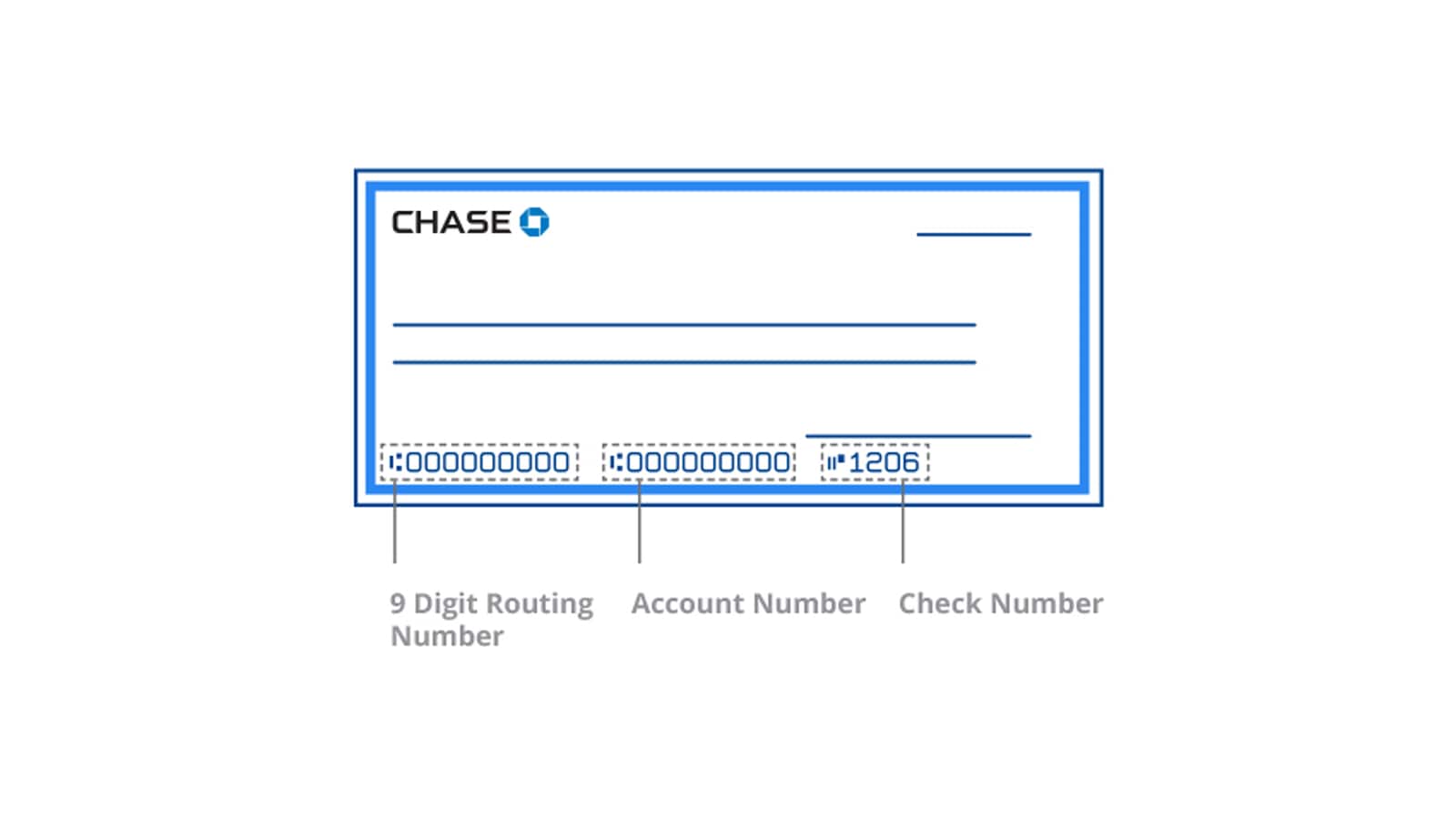
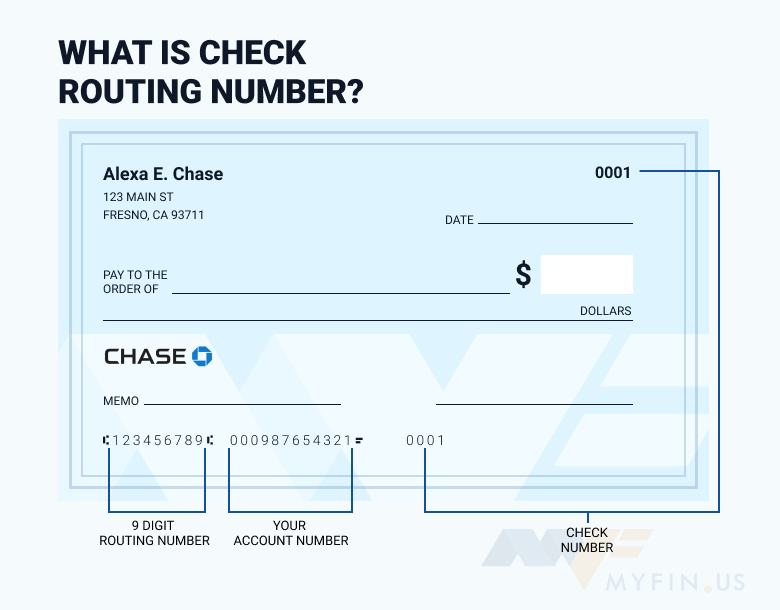
If you still use paper checks, your account number is printed at the bottom of every check. Looking at the bottom of a check, you will see three sets of numbers:
- The nine-digit Routing Number (on the left).
- Your Account Number (in the middle).
- The Check Number (on the right).
This is often the fastest way to find the information if your checkbook is handy. Similarly, any physical mail received from Chase regarding your account will typically contain the last four digits, though full numbers are usually restricted to official statements for your protection.
Contacting Customer Support Safely
In a situation where you are locked out of your digital accounts, you can visit a Chase branch with a valid government-issued ID to obtain your account information. Alternatively, you can call Chase customer service. However, be aware that for security reasons, representatives may not be able to read your full account number over the phone. They are more likely to help you regain access to your online portal so you can view it yourself. This protocol exists to protect the “Money” niche’s most important asset: the customer’s trust and security.
By mastering these digital and physical tools, you position yourself as a proactive manager of your own financial destiny. Whether you are scaling a business or simply organizing your monthly budget, knowing exactly where and how to find your Chase account number is a small but vital component of long-term financial success.
aViewFromTheCave is a participant in the Amazon Services LLC Associates Program, an affiliate advertising program designed to provide a means for sites to earn advertising fees by advertising and linking to Amazon.com. Amazon, the Amazon logo, AmazonSupply, and the AmazonSupply logo are trademarks of Amazon.com, Inc. or its affiliates. As an Amazon Associate we earn affiliate commissions from qualifying purchases.