
In today’s dynamic business landscape, navigating the labyrinth of financial obligations can be daunting. Among these, sales tax stands as a critical component, requiring diligent collection, accurate reporting, and timely remittance. Historically, this process might have involved paper forms, manual calculations, and trips to the post office or tax offices. However, the digital age has ushered in a more streamlined, efficient, and often mandatory approach: online sales tax payment. For businesses of all sizes, mastering this digital process isn’t just about compliance; it’s about optimizing financial operations, minimizing errors, and ensuring long-term fiscal health.

This article delves into the intricacies of paying sales tax online, providing a comprehensive guide for businesses operating in an increasingly digitized economy. From understanding your fundamental sales tax responsibilities to executing flawless online payments and adopting best practices for ongoing compliance, we will equip you with the knowledge to transform a potentially complex task into a manageable and even strategic element of your financial toolkit. Embracing online sales tax payments is not merely a convenience; it’s a testament to a modern business’s commitment to efficiency, accuracy, and unwavering regulatory adherence, all of which contribute to a robust financial foundation.
Understanding Your Sales Tax Obligations
Before you can effectively pay sales tax online, you must first possess a clear and comprehensive understanding of your underlying sales tax obligations. This foundational knowledge is paramount, as errors at this stage can lead to significant penalties, audits, and financial distress. Sales tax compliance is not a “one-size-fits-all” scenario; it varies significantly based on your business type, location, and the nature of your sales.
What is Sales Tax and Who Collects It?
Sales tax is a consumption tax imposed by state and local governments on the sale of goods and services. While it’s ultimately paid by the end-consumer, businesses are responsible for collecting this tax at the point of sale and then remitting it to the appropriate taxing authorities. This makes businesses critical intermediaries in the sales tax ecosystem. The revenue generated from sales tax funds essential public services, making its accurate collection and payment a civic duty as much as a financial requirement. Importantly, sales tax is distinct from income tax; it’s levied on transactions, not on profits.
The “who collects it” aspect often involves both state and local jurisdictions. Most states impose a statewide sales tax, but many cities, counties, and special districts also impose their own local sales taxes on top of the state rate. This layered approach means a single transaction can be subject to multiple tax rates, which can vary even within the same state depending on the exact point of sale (or point of delivery for remote sales).
Determining Your Nexus: Physical vs. Economic
A crucial concept in sales tax is “nexus,” which essentially means a sufficient physical or economic presence in a state that obligates your business to collect and remit sales tax there. Without nexus in a particular state, you generally aren’t required to collect sales tax from customers in that state.
Historically, nexus was primarily determined by physical presence. This meant having a physical store, office, warehouse, employees, or even inventory stored in a state. If you had any of these, you established physical nexus and had to collect sales tax from customers within that state.
However, the landscape dramatically shifted with the 2018 Supreme Court ruling in South Dakota v. Wayfair, Inc. This decision introduced the concept of economic nexus. Now, states can require remote sellers (businesses without a physical presence) to collect sales tax if their sales activity into that state exceeds certain thresholds, typically a specific dollar amount of sales or a number of transactions within a given period (e.g., $100,000 in sales or 200 separate transactions annually). This has significantly expanded the sales tax collection obligations for many online businesses selling across state lines. Understanding where you have nexus, both physical and economic, is the first critical step to sales tax compliance.
Sales Tax Rates and Product Taxability
Once you’ve determined where you have nexus, the next challenge is to identify the correct sales tax rates and understand which of your products or services are taxable.
-
Sales Tax Rates: These can be incredibly complex. As mentioned, rates vary by state, county, city, and special district. For businesses with physical nexus, the rate is often determined by the location of your store. For remote sellers, particularly after Wayfair, many states require you to collect tax based on the destination of the sale (where the customer receives the goods), which can mean thousands of different rates to manage. Sales tax software and automated solutions are often indispensable for managing this complexity.
-
Product Taxability: Not all products and services are subject to sales tax. While tangible personal property is generally taxable, there are numerous exemptions. Common exemptions include certain food items, prescription medications, agricultural products, and some services. The taxability of services is particularly varied, with some states taxing a broad range of services while others tax very few. It’s crucial to research the taxability rules for each state where you have nexus for the specific goods and services you sell. Misclassifying a taxable item as exempt, or vice-versa, can lead to underpayment or overpayment and subsequent issues.
Registration Requirements: Getting Your Sales Tax Permit
After establishing nexus and understanding taxability, the very next step is to register your business with the appropriate state tax authorities in every state where you have nexus and are required to collect sales tax. This process typically involves applying for a sales tax permit, seller’s permit, or vendor’s license. You cannot legally collect sales tax until you have registered and received this permit.
Most states offer an online registration portal, which is usually the most efficient way to complete this step. You’ll typically need your Federal Employer Identification Number (EIN), business legal name, address, and information about your business structure and sales activities. Failing to register when required is a serious compliance violation and can result in significant penalties, even if you eventually remit the taxes you collected. Consider registration a non-negotiable prerequisite to any sales tax payment activity.
Preparing for Online Sales Tax Payments
With a solid grasp of your sales tax obligations, the next phase involves meticulous preparation for the actual online payment process. This stage is all about organization, data integrity, and selecting the appropriate tools to ensure smooth and accurate remittance. Effective preparation minimizes the risk of errors, missed deadlines, and the stress associated with last-minute scrambles.
Gathering Necessary Information
Before logging into any payment portal, compile all the essential data you’ll need. This typically includes:
-
Your Federal Employer Identification Number (EIN): Your business’s unique federal tax ID.
-
State Sales Tax ID/Permit Number: The registration number you received when you registered for sales tax in that specific state.
-
Reporting Period: Clearly identify the period for which you are remitting tax (e.g., January 1 – January 31).
-
Total Taxable Sales: The sum of all sales made during the reporting period that were subject to sales tax.
-
Total Sales Tax Collected: The total amount of sales tax you collected from customers during the reporting period.
-
Any Deductions, Credits, or Pre-payments: Some states allow for vendor discounts for timely filing, or you might have made estimated payments. Keep these records handy.
-
Bank Account Information: For ACH payments (most common), you’ll need your bank account number and routing number.
Having this information readily accessible will make the online payment process much faster and less prone to errors.
Accurate Record-Keeping: The Foundation
The integrity of your sales tax payments hinges entirely on the accuracy and completeness of your underlying sales records. Without robust record-keeping, gathering the necessary information for payment becomes a nightmare, leading to potential inaccuracies.
-
Point-of-Sale (POS) Systems: Modern POS systems are invaluable. They can automatically calculate sales tax at the point of transaction, categorize taxable and non-taxable items, and generate detailed sales reports broken down by sales tax collected.
-
Accounting Software: Integrating your POS with accounting software (like QuickBooks, Xero, or Sage) further streamlines the process. This software can aggregate sales data, track sales tax liabilities, and often generate reports specifically designed for sales tax filing. Many even offer direct integrations with state tax portals or third-party sales tax solutions.
-
E-commerce Platforms: If you sell online, your e-commerce platform (Shopify, WooCommerce, Amazon Seller Central, etc.) plays a critical role. Ensure it’s configured correctly to calculate and collect the appropriate sales tax for each jurisdiction. These platforms usually provide detailed sales tax reports that can be exported.
-
Manual Records: Even with automated systems, maintaining physical or digital backups, reconciling data regularly, and documenting any adjustments or exemptions is crucial. Good record-keeping not only facilitates payments but is also essential in the event of an audit.
Choosing the Right Payment Platform
Most states offer their own dedicated online portals for sales tax filing and payment. These are typically the most direct method. However, businesses with nexus in multiple states, or those with complex sales tax scenarios, often benefit from third-party solutions.
-
State Tax Portals: These are the official websites maintained by each state’s department of revenue or treasury. They are generally user-friendly and specifically designed for their state’s reporting requirements. You’ll usually need to create an account, which ties to your state sales tax ID.
-
Third-Party Sales Tax Software: Solutions like Avalara, TaxJar, or Vertex specialize in automating sales tax compliance. They can:
-
Calculate sales tax rates in real-time for thousands of jurisdictions.
-
Integrate with your e-commerce platforms and accounting software.
-
Generate accurate sales tax reports for each state.
-
Automate filing and remittance: This is a major benefit, as they can often file your returns and make payments directly to the states on your behalf, significantly reducing your administrative burden.
-
-
Accounting Software with Tax Features: Some accounting software packages offer enhanced sales tax features, including reporting and sometimes direct filing capabilities for simpler cases.
The choice of platform depends on your business’s size, the number of states you have nexus in, and the complexity of your sales. For multi-state sellers, a specialized third-party solution often proves to be a wise investment, offering peace of mind and significant time savings.
A Step-by-Step Guide to Online Payment
Once you’ve meticulously prepared, the actual process of paying sales tax online becomes remarkably straightforward. While the exact interface may vary slightly from state to state, the core steps remain consistent. This guide outlines a general workflow that applies to most online sales tax payment systems.
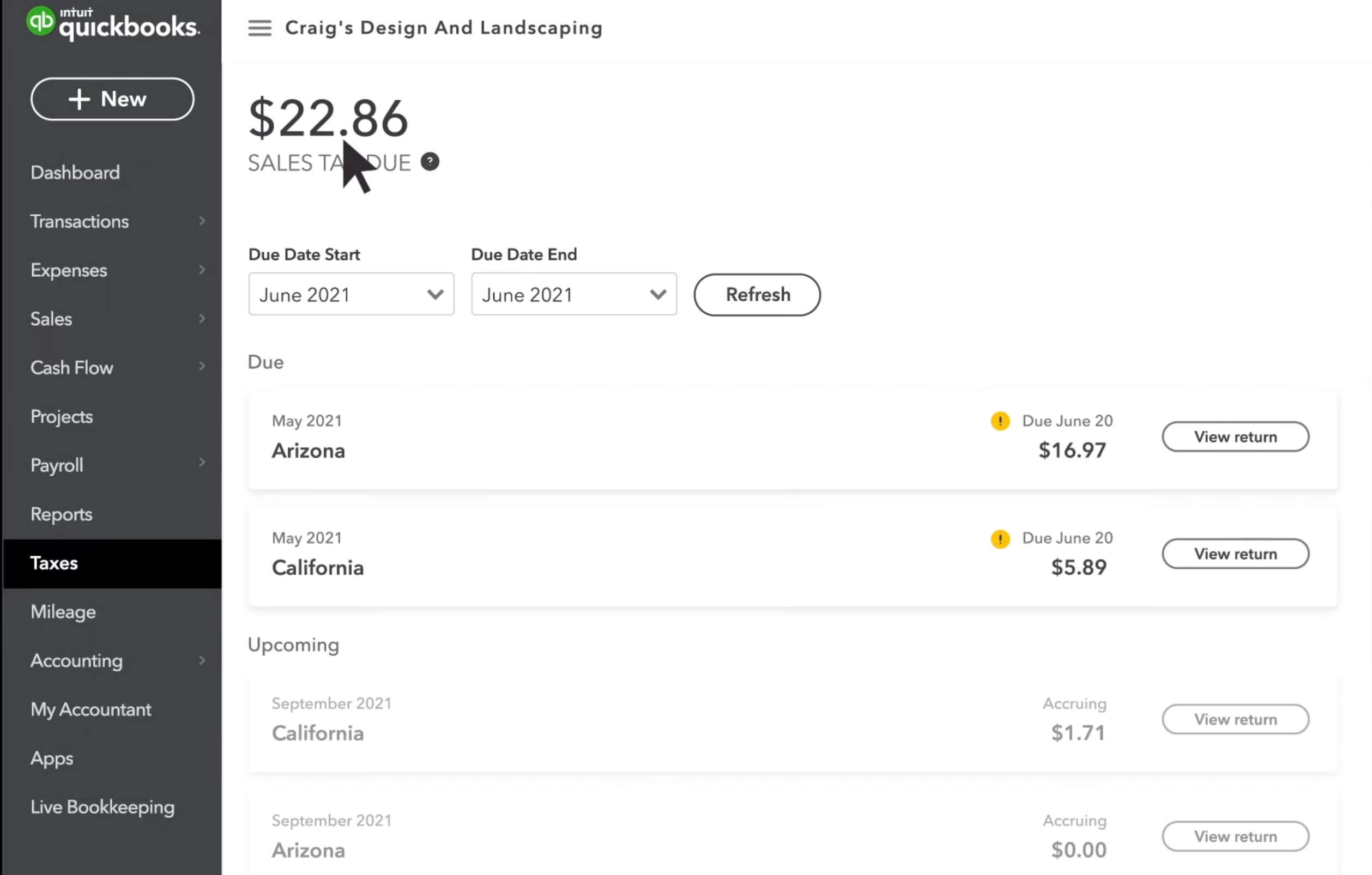
Navigating Your State’s Tax Portal
The first step is to access the official online portal for the state tax authority where you need to make a payment. A quick search for “[State Name] Department of Revenue” or “[State Name] Sales Tax Online Payment” will typically lead you to the correct site.
-
Login/Account Creation: If you haven’t already, you’ll need to create an account. This usually involves providing your Sales Tax ID/Permit Number, EIN, and setting up a username and password. Keep these credentials secure. If you already have an account, simply log in.
-
Locate Sales Tax Filing Section: Once logged in, navigate to the section related to sales tax filing or payments. This might be labeled “File a Return,” “Make a Payment,” “Business Taxes,” or similar.
-
Select Filing Period: You’ll typically be prompted to select the reporting period for which you are filing and paying (e.g., Q1 2024, March 2024). Ensure you select the correct period to avoid penalties for late or incorrect filings.
Entering Sales Data and Calculating Tax Due
This is where the information you gathered in the preparation phase comes into play. The online portal will guide you through a series of forms to input your sales data.
-
Gross Sales: Many forms will first ask for your total gross sales for the period, even if some of these sales were non-taxable.
-
Exempt Sales/Deductions: You will then typically be asked to report any non-taxable or exempt sales. This could include sales for resale, sales to tax-exempt organizations, or sales of non-taxable goods/services. Be prepared to categorize these according to the state’s specific requirements.
-
Taxable Sales: Based on your gross sales minus exemptions, the system may automatically calculate your total taxable sales.
-
Sales Tax Collected: Input the total amount of sales tax you collected from customers during the reporting period. Some states will calculate the tax due based on your taxable sales and the prevailing rates, but it’s crucial to cross-reference this with the actual tax you collected. The general rule is to remit the tax you actually collected, even if there was an error in collection.
-
Credits/Adjustments: If you are eligible for any vendor discounts (for timely filing) or have made prior estimated payments, there will be sections to enter these. This will reduce your final tax liability.
-
Review Calculation: The portal will often display a summary of your calculation and the final amount due. Take your time to review every line item against your records.
Reviewing and Verifying Information
Before clicking “submit,” a thorough review is non-negotiable. This is your last chance to catch any errors that could lead to an incorrect payment, penalties, or future audit issues.
-
Cross-Reference with Records: Compare every number on the online form with your internal records (sales tax reports from POS/accounting software).
-
Check Dates and Period: Ensure the filing period is correct and that the due date hasn’t passed.
-
Verify Bank Details (if applicable): If you’ve entered bank account information for an ACH debit, double-check the routing and account numbers for accuracy. A single digit error can cause the payment to fail.
-
Confirm Contact Information: Ensure your business contact information on file with the state is up-to-date.
Submitting Payment
Once you are confident in the accuracy of your filing, proceed to submit your payment.
-
Payment Method Selection: Most state portals offer various payment options:
-
ACH Debit (Electronic Funds Transfer): This is the most common and often preferred method. You authorize the state to debit the sales tax amount directly from your bank account. It’s usually free of charge.
-
Credit Card: Some states allow credit card payments, but these often come with a processing fee charged by a third-party payment processor, which can add up for larger payments.
-
E-Check: Similar to ACH, but may involve a slightly different process.
-
-
Confirm Submission: After selecting your payment method and confirming, you’ll usually click a final “Submit” or “Pay Now” button.
-
Payment Date: Note the date your payment is scheduled to be debited from your account. Ensure funds are available on that date.
Confirmation and Record-Keeping
The process isn’t complete until you have confirmation.
-
Confirmation Number: The portal will typically provide a confirmation number or transaction ID once the filing and payment are successfully submitted. Save this number immediately. Print the confirmation page or take a screenshot and store it securely. This is your proof of filing and payment.
-
Print/Save Return Copy: Most portals allow you to download or print a copy of the submitted return. Do this for your records.
-
Update Internal Records: Mark your internal accounting records to show that the sales tax for that period has been filed and paid. Reconcile your bank statement when the payment clears to confirm it went through correctly.
Best Practices for Seamless Sales Tax Compliance
Beyond the transactional act of paying sales tax online, a holistic approach to compliance is essential for long-term financial health and peace of mind. Implementing best practices transforms sales tax from a recurring chore into a well-managed aspect of your business finance.
Setting Up Reminders and Automations
One of the easiest ways to ensure compliance is to never miss a deadline. Each state will assign your business a filing frequency (e.g., monthly, quarterly, annually) based on your sales volume.
-
Calendar Alerts: Set up recurring reminders in your digital calendar (Google Calendar, Outlook) for each state’s sales tax due date. Include a reminder a few days before the actual deadline to give yourself ample time for preparation.
-
Software Automations: If you use third-party sales tax software (e.g., Avalara, TaxJar), leverage their automation features. Many can automatically generate reports, file returns, and even remit payments on your behalf, significantly reducing manual effort and the risk of missed deadlines.
-
Accounting Software Notifications: Some accounting platforms can provide alerts when sales tax reports are due.
Reconciling Sales Tax Accounts Regularly
Consistent reconciliation is vital for catching discrepancies early.
-
Monthly Review: Even if you file quarterly, review your sales tax collected versus sales tax remitted at least monthly. Compare the sales tax liability recorded in your accounting software with the actual amounts collected in your POS or e-commerce platform.
-
Bank Statement Reconciliation: When your sales tax payment clears your bank account, verify the amount debited matches the amount you filed.
-
Investigate Discrepancies: If you find any differences, investigate them immediately. It could be a data entry error, a misclassified sale, or a system glitch. Addressing these proactively prevents larger problems down the line.
Staying Updated with Tax Law Changes
Sales tax laws are not static. They are constantly evolving, particularly with the expanding reach of economic nexus and the changing definitions of what constitutes a taxable good or service.
-
Subscribe to State Tax Authority Newsletters: Most state Departments of Revenue offer email newsletters or alerts specifically for businesses. Subscribing to these is an excellent way to stay informed about changes in rates, new nexus rules, updated product taxability guidelines, or changes to filing procedures.
-
Industry News and Resources: Follow reputable accounting and tax news sources, industry associations, and sales tax compliance blogs.
-
Regular Review: Periodically (e.g., annually or semi-annually), review your nexus determinations and taxability matrix to ensure they align with current laws. This is especially important if you expand your sales into new states or introduce new product lines.
Seeking Professional Guidance
While this guide provides comprehensive information, sales tax can be exceptionally complex, especially for multi-state sellers or businesses with unique product offerings.
-
Accountants and CPAs: A qualified accountant or Certified Public Accountant (CPA) with expertise in sales tax can be an invaluable asset. They can help you determine nexus, correctly classify taxable items, navigate complex state regulations, and even handle the filing and payment process for you.
-
Tax Attorneys: For highly complex issues, audits, or disputes with tax authorities, a tax attorney specializing in state and local taxes (SALT) can provide expert legal counsel.
-
Sales Tax Consultants: Specialized sales tax consultants focus exclusively on compliance, offering deep expertise in the nuances of various state tax laws.
Don’t hesitate to invest in professional guidance when in doubt. The cost of expert advice is often far less than the penalties and headaches associated with non-compliance. These professionals can ensure your online sales tax payments are not just made, but made correctly, securely, and in full adherence to all applicable laws.

Conclusion
The transition to online sales tax payment represents a significant leap forward in financial management for businesses. It offers unparalleled efficiency, reduces the margin for human error, and ensures a transparent, auditable trail of compliance. From the critical initial steps of understanding your nexus and taxability obligations to the meticulous preparation of accurate records, and finally, to the streamlined execution of online payments, each phase is integral to maintaining fiscal integrity.
By diligently adhering to best practices—setting up automated reminders, regularly reconciling accounts, proactively staying abreast of evolving tax laws, and judiciously seeking professional guidance when necessary—businesses can transform the often-dreaded task of sales tax remittance into a seamlessly integrated and confidently managed aspect of their operations. Mastering “how to sales tax payment online” is more than just navigating a digital form; it’s about embedding financial prudence, operational excellence, and unwavering regulatory compliance into the very fabric of your business. Embrace the digital tools available, invest in accuracy, and secure your financial future by making sales tax compliance a cornerstone of your business strategy.
aViewFromTheCave is a participant in the Amazon Services LLC Associates Program, an affiliate advertising program designed to provide a means for sites to earn advertising fees by advertising and linking to Amazon.com. Amazon, the Amazon logo, AmazonSupply, and the AmazonSupply logo are trademarks of Amazon.com, Inc. or its affiliates. As an Amazon Associate we earn affiliate commissions from qualifying purchases.