
In an increasingly digital world, the security of our online accounts is paramount. Services like Spotify, which house our personal preferences, listening habits, and sometimes even payment information, become prime targets for unauthorized access if not properly secured. While the phrase “how to reset password” might seem trivial at first glance, it often signifies a critical juncture in a user’s digital journey – either a proactive security measure or a response to a forgotten credential. This guide delves into the technical process of resetting your Spotify password, but more importantly, it broadens the discussion to encompass the foundational principles of digital account security, robust password management, and proactive protective measures within the broader technology landscape. Understanding these elements is not just about regaining access; it’s about fortifying your digital presence against an evolving array of cyber threats.
Understanding the Importance of Account Security
The seemingly simple act of resetting a password is often a gateway to understanding a much larger and more critical aspect of our digital lives: account security. In today’s interconnected ecosystem, where personal data is a valuable commodity, safeguarding access to our online services is no longer merely a convenience but a necessity.
The Digital Threat Landscape
The internet, while a tremendous enabler of communication and entertainment, also presents a complex and ever-evolving threat landscape. Cybercriminals employ sophisticated tactics ranging from phishing attacks and malware to credential stuffing and brute-force attempts to gain unauthorized access to user accounts. A compromised Spotify account, while perhaps not as immediately financially devastating as a banking breach, can still lead to significant privacy infringements. Attackers could change your profile details, disrupt your listening experience, or even use your account as a springboard for further malicious activities, leveraging your trust to target your contacts or access linked services. Moreover, the prevalence of password reuse means that a single breach on one platform can expose your credentials across multiple services, creating a domino effect of vulnerability. Understanding these threats is the first step towards building a robust defense. It underscores why every user, regardless of their technical proficiency, must take an active role in protecting their digital identity.
Why Regular Password Management Matters
Beyond reacting to a forgotten password, proactive password management is a cornerstone of digital security hygiene. Regularly updating passwords, even when not prompted, significantly reduces the window of opportunity for attackers who might have acquired old credentials through data breaches. Furthermore, strong password practices prevent dictionary attacks and make brute-force attempts computationally unfeasible. The concept of “password fatigue” is real, but it should not deter users from adopting best practices. Instead, it should encourage the adoption of smart strategies and tools, which we will explore, to make password management less burdensome and more effective. Consistent attention to this detail ensures that even if one service experiences a breach, your other accounts remain relatively secure, minimizing potential damage and maintaining your digital autonomy.
Step-by-Step: Resetting Your Spotify Password
Regaining access to your Spotify account is a straightforward process designed to be user-friendly, even in moments of frustration. However, understanding the exact steps and potential pitfalls can streamline the experience and ensure a swift resolution.
Via the Spotify Website
The most common and recommended method for resetting your Spotify password involves utilizing their official website. This ensures you are interacting with legitimate Spotify infrastructure and not a phishing attempt.
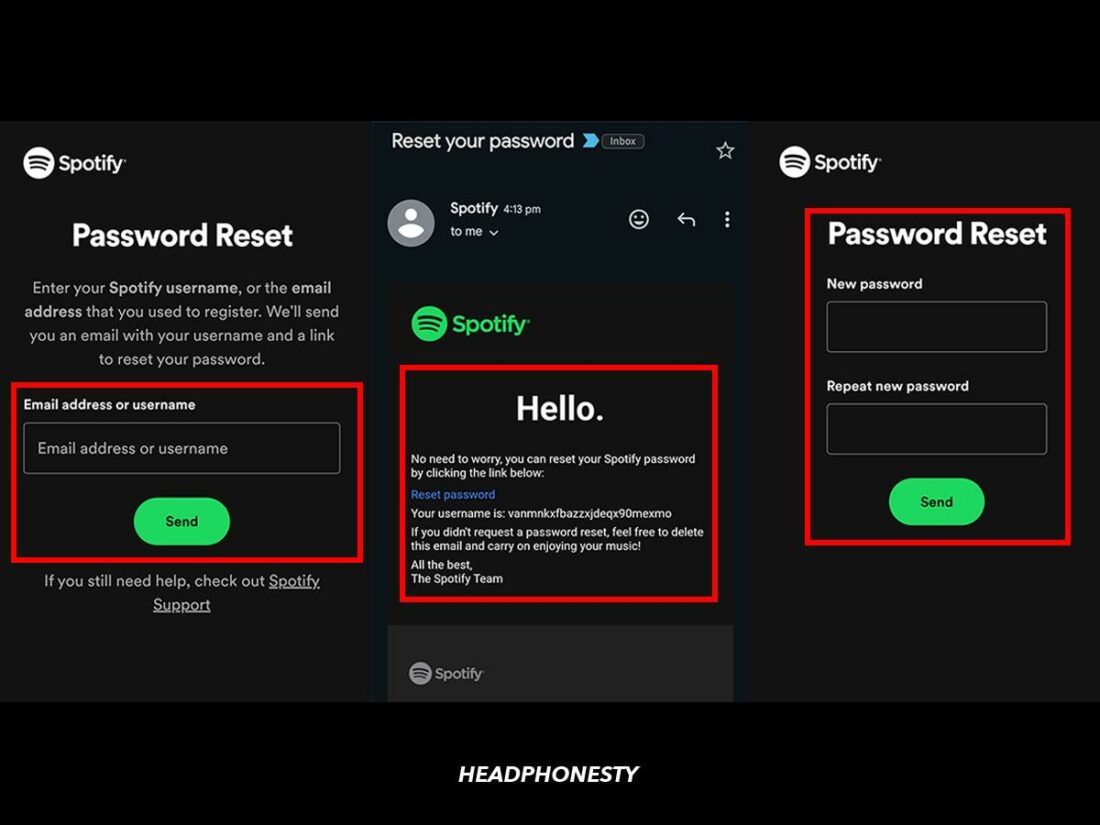
- Navigate to the Spotify Password Reset Page: Open your web browser and go directly to
spotify.com/password-reset. Avoid using search engine results if you suspect your computer might be compromised, or simply double-check the URL carefully. - Enter Your Registered Email Address or Username: On the password reset page, you will be prompted to enter the email address or username associated with your Spotify account. It’s crucial that this is the email you originally used to sign up or the one currently registered to your account.
- Complete the reCAPTCHA Verification: To confirm you are not a bot, Spotify will likely present a reCAPTCHA challenge. Follow the instructions to complete it successfully.
- Check Your Email Inbox: Once the verification is complete, Spotify will send a password reset link to the email address you provided.
- Important: Check your primary inbox, spam folder, and junk mail folders. Sometimes, automated emails can be miscategorized.
- Time Sensitivity: The reset link is usually time-sensitive, often expiring after a certain period (e.g., 30 minutes to 24 hours). If it expires, simply repeat the process to request a new link.
- Click the Reset Link and Create a New Password: Open the email from Spotify and click on the “Reset Password” link. This will direct you to a secure page on Spotify’s website where you can set your new password.
- Password Requirements: Adhere to Spotify’s password strength requirements (typically a minimum length, combination of uppercase and lowercase letters, numbers, and symbols). Aim for a strong, unique password that you haven’t used anywhere else.
- Confirm and Log In: After entering and confirming your new password, click “Set Password” or a similar button. You should then be redirected to the Spotify login page, where you can log in with your new credentials. This action will often log you out of all active sessions on other devices, which is an important security feature to ensure only you have access.
What if You Can’t Access Your Registered Email?
Losing access to your registered email account can complicate the password reset process significantly, as it’s the primary channel for identity verification.
- Recover Your Email Account First: Your immediate priority should be to regain access to your email account. Utilize your email provider’s recovery options (e.g., security questions, secondary recovery email, phone number verification). Most major email providers (Gmail, Outlook, Yahoo) have robust recovery processes.
- Contact Spotify Support (as a Last Resort): If you absolutely cannot recover your email account, and therefore cannot receive the password reset link, you will need to contact Spotify customer support directly. Be prepared to provide as much verifiable information as possible about your account (e.g., username, full name, date of birth used for registration, any linked social media accounts, subscription details, recent activity) to prove ownership. This process can take longer as it involves manual verification.
Troubleshooting Common Issues
While the process is generally smooth, users might encounter a few common hurdles:
- Email Not Arriving: Double-check the email address you entered for typos. Check spam/junk folders. Ensure your email inbox isn’t full. Add
@spotify.comto your safe sender list. - Link Expired: Simply request a new password reset link by repeating the initial steps.
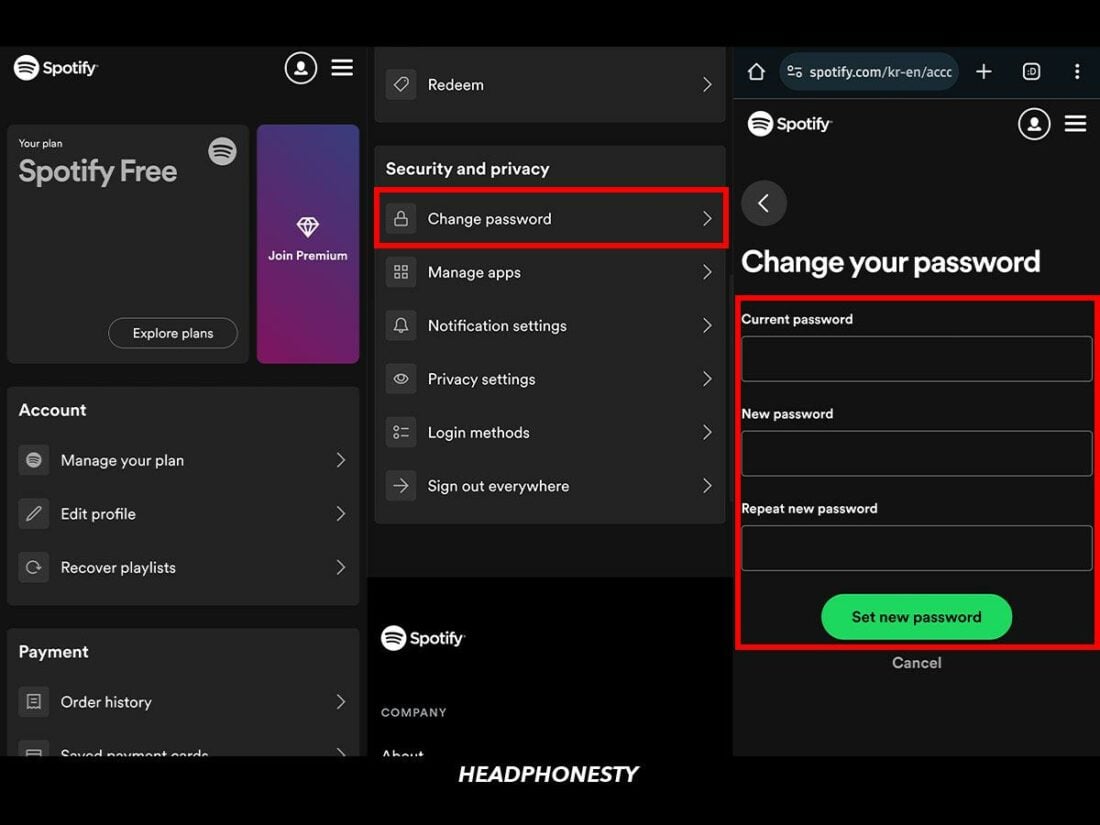
- Difficulty Creating a Strong Password: If you struggle to meet strength requirements, consider using a random password generator within a reputable password manager (discussed below).
- Persistent Login Issues: After resetting, if you still can’t log in, ensure Caps Lock is off and there are no extra spaces before or after your username/password. Clear your browser’s cache and cookies, or try a different browser/device.
Crafting and Managing Robust Passwords
The reset process itself is merely a tool; the effectiveness of your account security ultimately rests on the strength and management of your new password. This section delves into the principles of creating unassailable passwords and the technologies that aid in their management.
Principles of Strong Password Creation
A truly strong password is the primary deterrent against unauthorized access. While algorithms and security protocols underpin digital protection, the user’s chosen password remains the frontline defense. The core principles include:
- Length is King: Modern cryptography emphasizes length over complexity alone. A password with 16 characters or more, even if less complex, is generally harder to crack than a shorter, complex one. Each additional character exponentially increases the number of possible combinations.
- Diversity of Characters: Incorporate a mix of uppercase letters, lowercase letters, numbers, and symbols. This diverse character set broadens the possibilities for attackers and significantly slows down brute-force attacks.
- Uniqueness: Never reuse passwords across different services. A breach on one website could then compromise all your accounts if you use the same credentials. This is perhaps the single most critical rule for modern digital security.
- Randomness and Unpredictability: Avoid using personal information (birthdays, pet names, family names), common dictionary words, or sequential patterns (e.g., “123456”, “qwerty”). Attackers often use dictionaries and pre-computed tables (rainbow tables) to crack common or predictable passwords. Think of a random string of words (a “passphrase”) or a truly random string of characters.
- Passphrases: A modern alternative to complex single-word passwords is a “passphrase” – a sequence of unrelated words. For example, “CoffeeLakeMoonShadow” is easy to remember but incredibly difficult to guess or brute-force due to its length and randomness.
Leveraging Password Managers for Enhanced Security
The human brain is not designed to remember dozens of unique, complex, and random passwords. This is where password managers become indispensable tools in a robust tech security strategy.
- Centralized, Encrypted Storage: Password managers (e.g., LastPass, 1Password, Bitwarden, KeePass) securely store all your login credentials in an encrypted vault, accessible only with a single, strong master password.
- Strong Password Generation: Most password managers come with built-in generators that can create highly complex and truly random passwords with specified length and character types, ensuring adherence to the principles of strong password creation.
- Auto-Fill Capabilities: They can automatically fill in usernames and passwords on websites and apps, reducing typing errors and protecting against phishing attempts by only auto-filling on legitimate URLs.
- Multi-Device Synchronization: Password managers sync across all your devices, providing seamless access to your credentials whether you’re on your desktop, laptop, tablet, or smartphone.
- Security Audits: Many premium password managers offer security audit features, flagging weak, reused, or compromised passwords, allowing you to proactively strengthen your digital defenses.
Embracing a password manager transforms password management from a cumbersome chore into an efficient and highly secure practice, making it a cornerstone of contemporary digital security.
Avoiding Common Password Pitfalls
Even with the best intentions, users often fall prey to common traps that compromise password strength:
- Sequential or Repetitive Patterns: Passwords like “password123”, “111111”, or “abcdefg” are among the first an attacker will try.
- Keyboard Patterns: “qwerty”, “asdfgh”, “zxcvbn” are easily guessed.
- Personal Information: Using your name, birthdate, pet’s name, or any easily discoverable personal data (from social media, for instance) makes your password susceptible to social engineering and dictionary attacks.
- Substituting Letters for Numbers/Symbols: While “P@ssw0rd1” looks complex, it’s a well-known substitution pattern that advanced cracking tools recognize instantly.
- Writing Passwords Down Physically (Unsecured): Sticky notes on monitors or notebooks left open are physical security vulnerabilities. If you must write them down, keep them in a physically secure, hidden location.
Proactive Measures for Spotify Account Protection
Beyond the immediate act of resetting a password, adopting a proactive mindset towards digital security involves implementing additional layers of protection and maintaining vigilance.
Enabling Two-Factor Authentication (If Applicable/General Best Practice)
While Spotify currently doesn’t offer a traditional 2FA (Two-Factor Authentication) for login for all users directly through its platform (it relies on email verification for password resets and sometimes social media logins), it’s a critical general tech security best practice applicable to almost all other online services. When available, enabling 2FA adds a significant layer of security:
- What it is: 2FA requires a second piece of verification, in addition to your password, to log in. This could be a code sent to your phone, a fingerprint scan, or a token from an authenticator app.
- Why it’s crucial: Even if an attacker somehow obtains your password, they cannot access your account without this second factor, which they typically won’t have. This effectively neutralizes most password breaches.
For other services linked to your digital identity (like the email account used for Spotify), always enable 2FA if available. This forms a robust barrier against unauthorized access.
Recognizing Phishing Attempts and Scams
A significant number of account compromises stem not from sophisticated hacking but from user deception. Phishing attempts are designed to trick you into voluntarily giving up your credentials.
- Email Scams: Be wary of emails that appear to be from Spotify but contain suspicious links, unusual grammar, urgent demands, or requests for personal information. Always check the sender’s email address carefully (hover over it without clicking). Spotify will never ask for your password via email.
- Malicious Websites: Always verify that you are on the official Spotify domain (
spotify.com) before entering your login details. Phishing sites often mimic legitimate ones with subtle URL changes (e.g.,spotlfy.com). - Unsolicited Messages: Exercise caution with unexpected messages via SMS or social media that ask you to click links or provide account details.
Train yourself to scrutinize every request for credentials. When in doubt, navigate directly to the official website and log in from there rather than clicking on links in suspicious communications.
Regular Security Audits and Device Management
Maintaining optimal digital security is an ongoing process, not a one-time setup.
- Review Connected Apps: Periodically check your Spotify account settings for any third-party apps you’ve granted access to. Revoke access for any apps you no longer use or don’t recognize. This limits potential exposure if a third-party service is compromised.
- Device Management: Spotify often shows you a list of devices currently logged into your account. If you see an unfamiliar device, log it out immediately. Similarly, ensure that your own devices (computers, phones) are secure with up-to-date operating systems, antivirus software, and robust screen locks/biometrics.
- Monitor Account Activity: Pay attention to any unusual activity on your Spotify account, such as unfamiliar playlists appearing, changes in listening history, or email notifications about changes you didn’t make. These could be early warning signs of a compromise.
By actively monitoring and managing your digital footprint, you create a more resilient defense against evolving cyber threats.
The Broader Context of Digital Identity and Data Privacy
While focusing on Spotify, it’s crucial to understand that individual account security is part of a larger ecosystem of digital identity and data privacy. Your Spotify account, like many others, contributes to your overall online persona and is interconnected with various aspects of your digital life.
The Interconnectedness of Online Accounts
In the modern internet, services are rarely isolated. Your Spotify account might be linked to your Facebook, Google, or Apple ID for easier login. While convenient, this interconnectedness means that a breach in one service can potentially offer a foothold into others. Strong security for your primary email and any social media accounts used for single sign-on is therefore paramount, as they often serve as recovery points for many other services. Understanding this web of connections allows for a more holistic approach to securing your entire digital identity, rather than just isolated accounts.
Spotify’s Role in User Data Protection
As a major digital service provider, Spotify carries a significant responsibility in protecting user data. This includes implementing robust backend security measures, encrypting sensitive information, and adhering to global data privacy regulations (like GDPR and CCPA). While users play a critical role in securing their individual accounts, the platform’s commitment to security architecture, regular vulnerability assessments, and transparent communication about data handling forms the bedrock upon which user trust is built. Users should familiarize themselves with Spotify’s privacy policy to understand how their data is collected, used, and protected.
Empowering Users Through Knowledge
Ultimately, the most potent tool in digital security is knowledge. Understanding how to reset a password, why strong passwords are vital, how to recognize phishing, and the broader context of data privacy empowers users to make informed decisions. Technology evolves rapidly, and so do the threats. Staying informed about new security best practices, platform updates, and emerging cyber risks is not just for tech professionals but for every individual navigating the digital landscape. By taking an active and informed role in their own digital security, users not only protect themselves but also contribute to a safer and more secure online environment for everyone.
aViewFromTheCave is a participant in the Amazon Services LLC Associates Program, an affiliate advertising program designed to provide a means for sites to earn advertising fees by advertising and linking to Amazon.com. Amazon, the Amazon logo, AmazonSupply, and the AmazonSupply logo are trademarks of Amazon.com, Inc. or its affiliates. As an Amazon Associate we earn affiliate commissions from qualifying purchases.