
In an increasingly digital world, financial tools like Cash App have become indispensable for managing personal finances, facilitating quick transactions, and even serving as a primary banking alternative for many. The Cash App Card, a Visa debit card directly linked to your Cash App balance, extends the utility of this popular application, allowing users to spend their funds at millions of merchants worldwide, both online and in-store. Understanding how to efficiently and securely fund your Cash App Card is a foundational step toward maximizing its potential as a personal finance instrument. This comprehensive guide delves into the various methods available, security considerations, and best practices for integrating Cash App seamlessly into your financial life.

Understanding Your Cash App Card: A Versatile Financial Tool
The Cash App Card isn’t just a piece of plastic; it’s a gateway to your digital funds, offering convenience and flexibility in managing everyday expenses. For millions, it has redefined how they interact with their money, moving beyond traditional banking limitations.
The Role of Cash App in Personal Finance
Cash App, developed by Block, Inc., began primarily as a peer-to-peer payment service, simplifying money transfers between friends and family. However, it has rapidly evolved into a more comprehensive financial platform, offering direct deposit, stock and Bitcoin investing, and the aforementioned Cash App Card. For many individuals, particularly those who are underbanked or seeking modern, mobile-first financial solutions, Cash App acts as a central hub for their income and spending. It democratizes access to financial services, providing features traditionally found in conventional banks but with the added convenience and immediacy of a mobile application.
Benefits of Using the Cash App Card for Everyday Spending
The Cash App Card brings several compelling advantages to the table. Firstly, it offers instant access to funds received through direct deposit, peer-to-peer transfers, or other funding methods. There’s no waiting period for funds to clear as there might be with a traditional bank transfer. Secondly, it provides widespread acceptance; being a Visa debit card, it is accepted virtually anywhere Visa is. This makes it incredibly versatile for everything from online shopping to daily groceries. Thirdly, Cash App often features “Boosts” – instant discounts at specific merchants – which can lead to tangible savings on regular purchases. Lastly, it offers a degree of financial autonomy, allowing users to manage a distinct portion of their funds separate from their main bank account, which can be useful for budgeting or controlling discretionary spending.
Key Considerations Before Funding
Before you start loading money onto your Cash App Card, it’s crucial to be aware of a few foundational aspects. Verification is paramount: to unlock higher spending and loading limits, and to use features like direct deposit, you’ll need to verify your identity with Cash App by providing your full legal name, date of birth, and the last four digits of your Social Security Number. This is a standard regulatory requirement for financial services. Additionally, be mindful of daily, weekly, and monthly limits for loading funds, which can vary based on your verification status. Understanding these limits prevents unexpected transaction failures. Finally, always ensure you have a stable internet connection when performing transactions to avoid disruptions or data errors.
Diverse Methods to Load Your Cash App Card
One of Cash App’s strengths lies in the variety of ways it allows users to fund their accounts, catering to different preferences and financial situations. From direct electronic transfers to physical cash deposits, there’s a method for almost everyone.
Direct Deposit: The Seamless Approach
For many, direct deposit is the most convenient and efficient way to fund their Cash App account. By setting up direct deposit with your employer, government benefits provider, or other payer, your paycheck or benefits can be sent directly to your Cash App balance. This method bypasses traditional banking entirely, often making funds available up to two days earlier than many banks. To set this up, you’ll need to locate your Cash App routing and account numbers within the app (usually found by tapping the “Banking” tab and then selecting “Direct Deposit”). Provide these details to your payer, and your funds will automatically arrive in your Cash App account, ready for use with your Cash App Card. This is particularly beneficial for those managing their primary income through the app.
Linking a Bank Account: The Standard Method
The most common way to add money to your Cash App balance is by linking an external bank account. This process typically involves:
- Navigating to the “Banking” tab (the house icon) on your Cash App home screen.
- Tapping “Add Cash.”
- Choosing a desired amount to add.
- Selecting “Add” and confirming the transaction with your PIN or Touch ID.
Your linked bank account acts as the source for these funds, which are then transferred to your Cash App balance. For security, Cash App uses Plaid, a third-party service, to securely connect to your bank, requiring you to log in with your bank credentials. Once linked, future transfers are straightforward and usually instant or near-instant.
Adding Funds with a Debit Card: Quick and Easy
Similar to linking a bank account, you can also link a debit card directly to your Cash App account to add funds. This method is often preferred for its speed and simplicity, especially if you want to use a debit card associated with a different bank account than your primary linked one, or if you don’t want to provide full bank login credentials.
- Go to the “Banking” tab.
- Tap “Add Cash.”
- Enter the amount.
- If you haven’t linked a debit card, you’ll be prompted to do so by entering the card number, expiration date, CVV, and billing ZIP code.
- Confirm the transaction.
Funds added via a linked debit card are typically available immediately, making it an excellent option for quick top-ups. Credit cards generally cannot be used to add money to your Cash App balance, only to send money to others (and often with a fee).
Using Paper Money at Retailers: Bridging Digital and Physical
For individuals who receive income in cash or prefer to manage physical currency, Cash App offers a convenient way to convert paper money into digital funds on their Cash App Card. This is done through participating retail locations, such as Walgreens, CVS, Dollar General, Walmart, and others.
- Open your Cash App and tap the “Banking” tab.
- Select “Add Cash.”
- Choose the “Paper Money” option (if available).
- Cash App will generate a unique barcode.
- Present this barcode to the cashier at a participating retailer.
- Hand over the cash amount you wish to deposit to the cashier.
The cashier will scan the barcode, and the funds will be added to your Cash App balance, usually instantly or within a few minutes. This method often comes with a small fee charged by the retailer, so it’s wise to check the fee structure before making a deposit. This bridge between physical cash and digital funds is crucial for financial inclusion and flexibility.
Managing Your Funds and Enhancing Financial Security
Beyond merely funding your Cash App Card, effective financial management involves constant monitoring and robust security practices. Protecting your digital wallet is as important as protecting a physical one.
Monitoring Your Cash App Balance
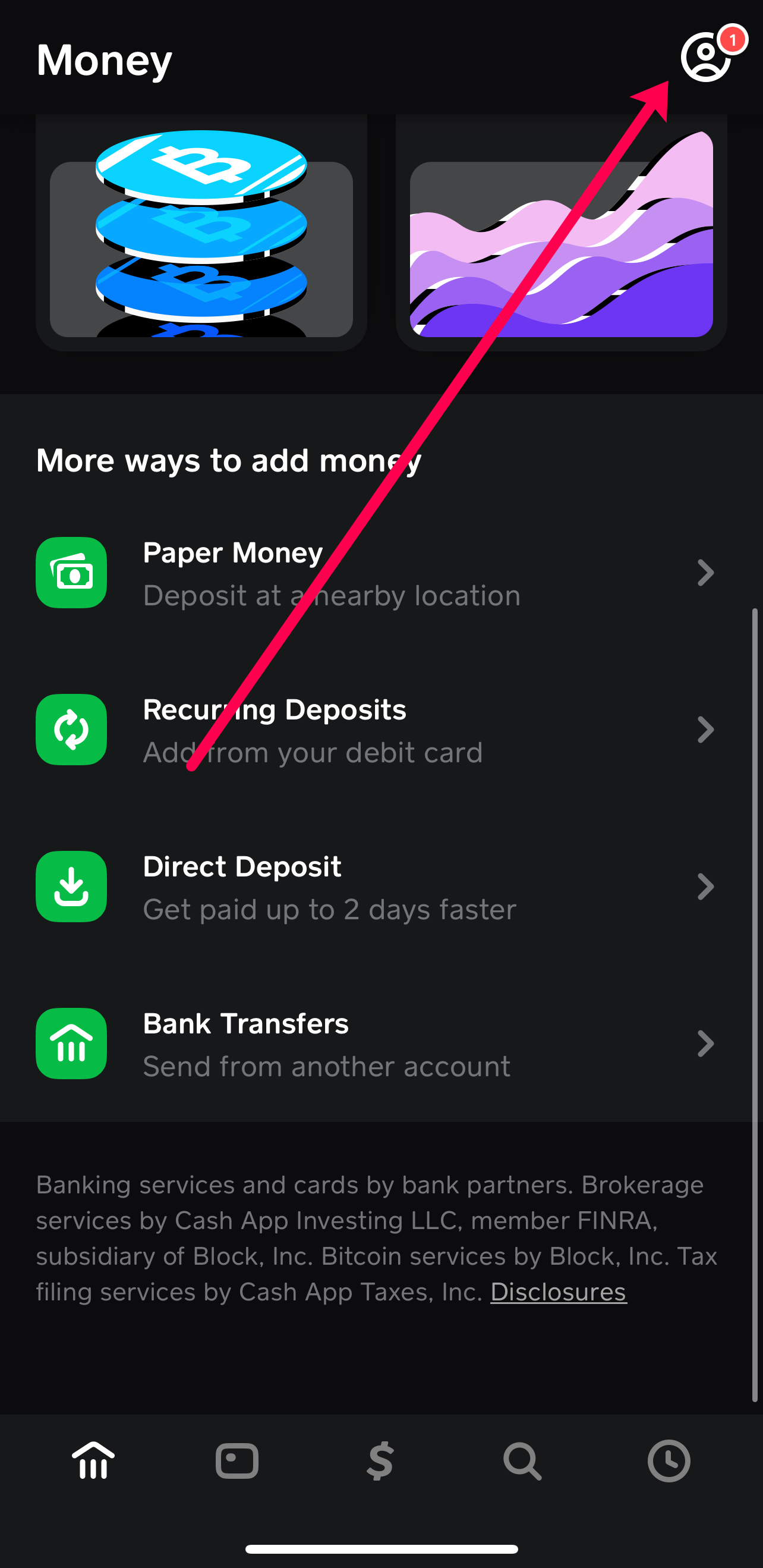
Regularly checking your Cash App balance is a fundamental aspect of responsible money management. You can view your current balance directly on the Cash App home screen. Additionally, the app provides a detailed transaction history, allowing you to review all incoming and outgoing funds. This transparency is crucial for tracking spending, identifying unauthorized transactions, and ensuring your budget remains on track. Periodically reconciling your Cash App activity with any external bank statements or personal finance tracking tools further enhances your financial oversight.
Protecting Your Account: Security Best Practices
Security should always be a top priority when dealing with digital finance.
- Strong, Unique Passwords: Use a complex password or PIN for your Cash App account that isn’t reused on other platforms.
- Two-Factor Authentication (2FA): Enable 2FA whenever possible. Cash App allows you to secure your account with a verification code sent to your phone or email, adding an extra layer of protection.
- Biometric Security: Utilize fingerprint or facial recognition features on your smartphone to quickly and securely access your app, preventing unauthorized physical access.
- Beware of Scams: Be highly suspicious of unsolicited requests for money or personal information, especially those promising unrealistic returns or claiming to be from “Cash App support” via unconventional channels. Cash App will never ask for your PIN or sign-in code outside of the app itself.
- Monitor Notifications: Keep an eye on Cash App notifications for transaction alerts and account changes, which can help you quickly detect and report suspicious activity.
- Public Wi-Fi Caution: Avoid accessing your Cash App account over unsecured public Wi-Fi networks, as these can be vulnerable to eavesdropping.
Understanding Limits and Fees
Cash App implements various limits on transactions, including how much you can add to your account, send, or spend using your Cash App Card. These limits are generally lower for unverified accounts and increase significantly once your identity is verified. It’s important to be aware of these limits to avoid transaction failures. For example, there might be a daily limit on cash deposits at retailers or a weekly limit on adding funds from a linked debit card.
Regarding fees, while Cash App generally prides itself on being free for standard transactions, some services may incur charges:
- Instant Deposits: Transferring funds from your Cash App balance to a linked bank account instantly usually incurs a small fee (e.g., 0.5% – 1.75%). Standard deposits are free but take 1-3 business days.
- Cash Deposits at Retailers: As mentioned, participating retailers may charge a small fee for processing cash deposits.
- Credit Card Transfers: Sending money using a linked credit card typically incurs a 3% fee. (However, credit cards generally cannot be used to add money to your own Cash App balance).
Always review the specific transaction details within the app before confirming to understand any applicable fees.
Optimizing Cash App for Your Financial Lifestyle
Beyond its basic function of funding your card, Cash App offers features that can be strategically integrated into a broader personal finance strategy. Leveraging these effectively can enhance budgeting, facilitate quick transactions, and even open doors to basic investment.
Budgeting and Tracking Expenses with Cash App
For those who use Cash App as a primary spending vehicle, the app’s transaction history serves as a built-in expense tracker. By reviewing your spending patterns within the app, you can gain insights into where your money is going. While it doesn’t offer sophisticated budgeting categories like some dedicated personal finance apps, the ability to see all your Cash App Card expenditures in one place is invaluable. Many users dedicate their Cash App balance to discretionary spending, which helps compartmentalize their budget and prevent overspending from their main bank account. This “envelope system” for digital funds can be a powerful tool for maintaining financial discipline.
Instant Transfers and Peer-to-Peer Payments
The core strength of Cash App remains its instant peer-to-peer payment functionality. Being able to quickly send or receive money from friends, family, or even for small business transactions (like splitting a bill or paying a freelance worker) is incredibly convenient. Funds sent or received are immediately available in your Cash App balance, meaning they are ready for spending with your Cash App Card. This immediacy reduces friction in financial interactions and eliminates the need for cash or checks in many scenarios.
Leveraging Cash App for Savings and Investments (Optional)
While not its primary function, Cash App has expanded to include features that can contribute to your broader financial goals. Users can purchase fractional shares of stocks directly within the app, allowing for accessible entry into the investment market with small amounts of money. Similarly, Cash App supports buying and selling Bitcoin, offering a simplified way to engage with cryptocurrency. While these features are relatively basic compared to dedicated investment platforms, they provide an entry point for users interested in diversifying their financial activities, even if it’s just allocating a small portion of their Cash App balance towards these ventures. This integration makes Cash App a multi-faceted tool in a modern financial toolkit.
Troubleshooting Common Funding Issues
Even with a straightforward process, you might occasionally encounter issues when trying to put money on your Cash App Card. Knowing how to diagnose and resolve these can save time and frustration.
Verifying Account Information
The most common reason for funding failures is incorrect or unverified account information.
- Bank/Debit Card Details: Double-check that the linked bank account or debit card number, expiration date, and CVV are accurate and up-to-date. Expired cards are a frequent culprit.
- Verification Status: Ensure your Cash App account is fully verified. Unverified accounts have lower limits, and attempts to exceed these limits will fail. If you haven’t verified, follow the in-app prompts to provide your details.
- Linked Account Status: Confirm that your linked bank account or debit card is active and has sufficient funds to cover the transfer. Also, ensure there are no restrictions or freezes on the external account.
Addressing Declined Transactions
If a transaction to add cash is declined, consider these possibilities:
- Insufficient Funds: The most straightforward reason. Your linked bank account or debit card might not have enough money to complete the transfer.
- Daily/Weekly Limits: You might have hit your Cash App loading limit. Check your limits within the app, especially if you’ve made several deposits recently.
- Bank Restrictions: Your external bank might have its own daily limits for transfers to third-party apps, or it might flag large or frequent transfers to Cash App as suspicious. Contact your bank to inquire about any such restrictions.
- Security Flags: Cash App’s security system might flag a transaction as unusual (e.g., a very large sum, or an unusual pattern of activity). This is for your protection.
Contacting Cash App Support
If you’ve exhausted all troubleshooting steps and are still unable to fund your card, contacting Cash App support is the next logical step.
- In-App Support: The most efficient way is often through the app itself. Tap the profile icon on your Cash App home screen, scroll down, and select “Support” or “Cash Support.”
- Website: You can also visit the Cash App support page on their official website for FAQs and contact options.
- Be Prepared: When contacting support, have all relevant transaction details ready, including dates, amounts, and any error messages you received. Be clear and concise in describing your issue.
It’s important to remember that Cash App support will never ask for your sign-in code, PIN, or full account number via phone or email. Be wary of phishing attempts or fake support numbers.

Conclusion
The Cash App Card serves as a powerful extension of the Cash App ecosystem, providing users with a flexible and immediate way to spend their digital funds. From seamless direct deposits that can expedite access to paychecks, to quick top-ups via linked bank accounts and debit cards, and even the conversion of physical cash at retail locations, Cash App offers a comprehensive suite of funding options tailored to diverse financial needs. By understanding these methods, prioritizing account security, monitoring transaction limits, and knowing when to troubleshoot or seek support, users can effectively integrate their Cash App Card into their daily financial routines. As financial technology continues to evolve, tools like Cash App empower individuals with greater control and convenience over their money, fostering a more agile and responsive approach to personal finance.
aViewFromTheCave is a participant in the Amazon Services LLC Associates Program, an affiliate advertising program designed to provide a means for sites to earn advertising fees by advertising and linking to Amazon.com. Amazon, the Amazon logo, AmazonSupply, and the AmazonSupply logo are trademarks of Amazon.com, Inc. or its affiliates. As an Amazon Associate we earn affiliate commissions from qualifying purchases.