
Venmo has revolutionized the way millions exchange money, transforming what was once a cumbersome process into a seamless, social interaction. As a peer-to-peer (P2P) payment application, it allows users to quickly send and receive funds using their mobile devices, simplifying everything from splitting dinner bills to sending money to family. Understanding the mechanics of Venmo payments is crucial for anyone looking to leverage this popular digital tool effectively and securely.
Understanding Venmo: More Than Just a Payment App
At its core, Venmo is a digital wallet and payment service designed for convenience. It facilitates instant money transfers between individuals and, increasingly, allows payments to businesses. Its user-friendly interface and integrated social features have made it a staple in the digital economy, especially among younger demographics.

The Core Functionality
Venmo’s primary function is to enable users to send and receive money from one another using linked bank accounts, debit cards, or credit cards. Funds can be held within a user’s Venmo balance or transferred directly to a linked bank account. The system is built on speed and accessibility, allowing transactions to complete in moments, unlike traditional bank transfers which can take days. This immediacy is a significant technological advantage, streamlining everyday financial interactions.
Who Uses Venmo and Why
Venmo’s appeal extends to a broad user base, primarily individuals seeking a quick and easy way to handle casual financial transactions. It’s ideal for friends splitting the cost of groceries, roommates sharing rent, or family members sending allowances. Beyond personal use, an increasing number of small businesses and merchants are adopting Venmo as a payment option, recognizing its popularity and ease of use for customers. The platform’s social feed, which displays anonymized or public transaction notes, also adds a unique communal aspect, though privacy settings allow users to control their visibility. This blend of financial utility and social engagement is a key differentiator in the crowded fintech landscape.
Preparing for Your First Venmo Payment
Before you can send money through Venmo, a few essential steps are required to set up your account and link your financial instruments. These initial configurations ensure your payments are secure and your funds are accessible.
Setting Up Your Venmo Account
The journey begins by downloading the Venmo app from your device’s app store (iOS or Android) or by visiting the Venmo website. Account creation typically involves providing your name, email address, phone number, and creating a strong password. You’ll also need to verify your email and phone number, which is a critical security measure to confirm your identity and prevent unauthorized access. This digital verification process is a standard practice for financial applications to comply with regulatory requirements and enhance user safety.
Linking Your Funding Source
To send money, Venmo needs a source to draw funds from. You can link a bank account (via instant verification or manual entry), a debit card, or a credit card. Linking a bank account or debit card is generally free for sending payments, while using a credit card usually incurs a 3% transaction fee, charged by Venmo. This fee structure is an important consideration for users, highlighting the technological cost differences between processing various payment types. It’s advisable to link at least one funding source to ensure seamless transactions. Venmo employs robust encryption and security protocols to protect your financial information during this process.
Finding Friends and Businesses
Venmo is a network, and to pay someone, you first need to find them on the platform. You can search for users by their username, phone number, or email address. Venmo also offers features to import contacts from your phone, making it easier to connect with people you know who are already on the platform. For businesses, you might search for their business profile directly, scan a QR code they provide, or select Venmo as a payment option during an online checkout process. The app’s search functionality is designed to be intuitive, leveraging common digital identification methods to facilitate connections.
Step-by-Step Guide to Sending Money on Venmo
Once your account is set up and funded, sending money through Venmo is a straightforward process, designed for efficiency and clarity.
Initiating a Payment
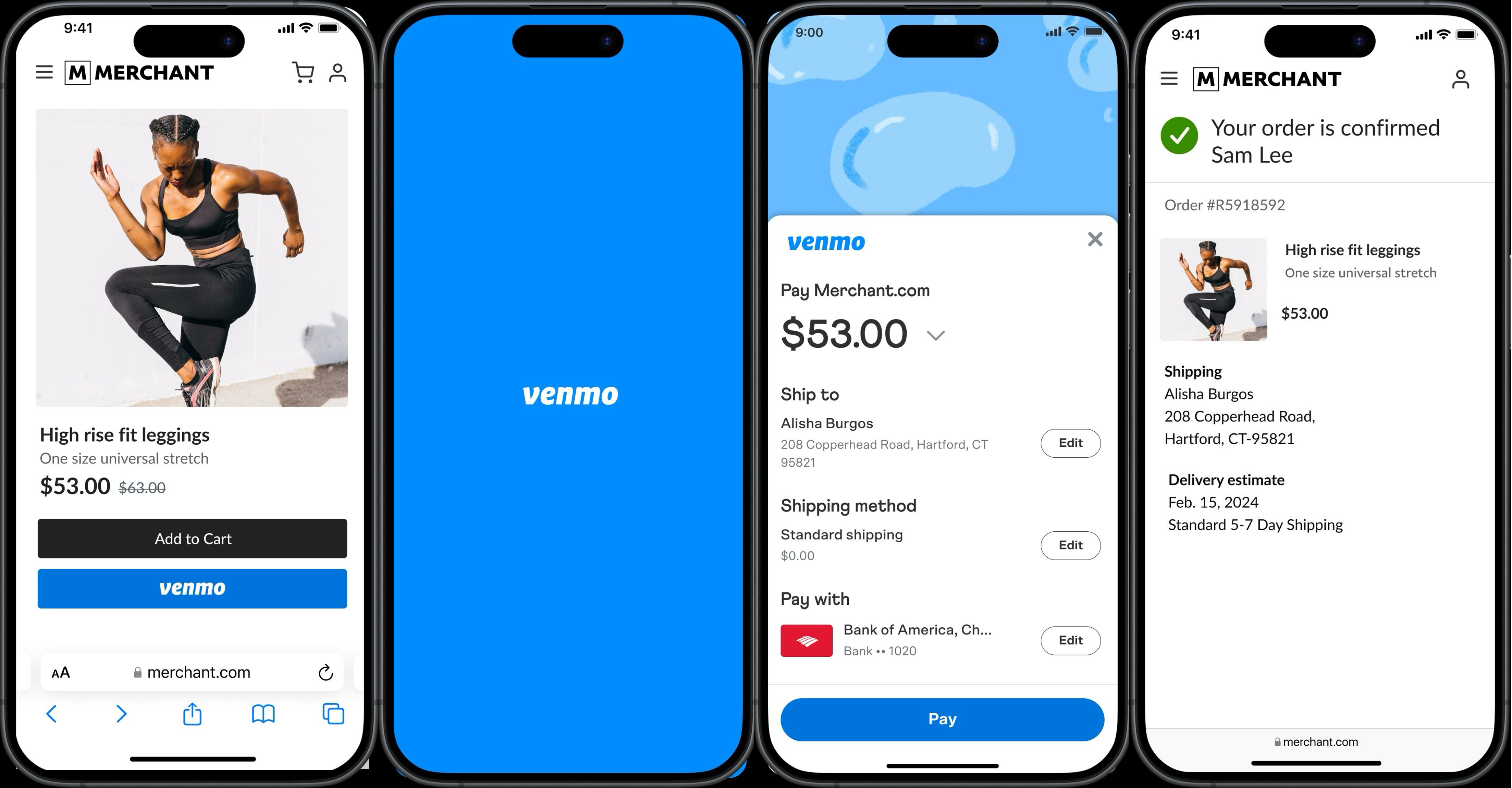
To start a payment, open the Venmo app and tap the “Pay or Request” icon, usually located at the bottom center of the screen. This action navigates you to the payment interface, where you’ll begin constructing your transaction. The interface is deliberately minimalistic, guiding users to the core inputs required for a transfer.
Specifying the Recipient and Amount
Next, you’ll need to select the recipient. You can choose from your list of Venmo friends, recent contacts, or search for a new user by their username, phone, or email. Once the recipient is selected, enter the exact amount you wish to send. Accuracy here is paramount, as Venmo payments are often instant and can be difficult to reverse without the recipient’s cooperation. The app’s design prioritizes speed, but this also places responsibility on the user for correct input.
Adding a Note and Adjusting Privacy
A unique feature of Venmo is the ability to add a note to each transaction, often accompanied by emojis. This note serves as a description for the payment (e.g., “Dinner last night,” “Rent for May”). Critically, Venmo transactions have a social aspect, allowing you to choose the privacy setting for this note:
-
Public: Visible to all Venmo users on the public feed.
-
Friends: Visible only to your Venmo friends.
-
Private: Visible only to you and the recipient.
Opting for “Private” is recommended for sensitive or personal transactions. This feature underscores Venmo’s blend of financial utility with social networking elements, giving users control over their digital footprint.
Reviewing and Confirming the Transaction
Before the money is sent, Venmo provides a review screen detailing the recipient, amount, note, and privacy setting. This is your final opportunity to verify all the information. Additionally, you can select your preferred funding source if you have multiple linked (e.g., Venmo balance, debit card, credit card). Once you confirm everything is correct, tap the “Pay” button. The funds are typically transferred almost instantly, appearing in the recipient’s Venmo balance, making it one of the quickest digital payment methods available.
Advanced Venmo Payment Scenarios and Features
Beyond basic peer-to-peer transfers, Venmo offers several advanced features and scenarios that enhance its utility as a versatile payment platform.
Paying Businesses with Venmo
Venmo isn’t just for friends anymore. Many businesses, from online retailers to local shops, accept Venmo as a payment method. When checking out online, look for the Venmo option. In physical stores, businesses might display a Venmo QR code or allow you to pay directly through their point-of-sale system. Paying businesses often provides additional consumer protections through Venmo’s Purchase Protection Program, which can be a significant advantage compared to casual P2P transfers. This expansion into merchant services demonstrates the platform’s evolution from a simple P2P app to a broader digital payment ecosystem.
Using QR Codes for Payments
QR codes offer a quick and touch-free way to facilitate transactions. Venmo users can generate a personal QR code to receive payments, or they can scan another user’s or business’s QR code to send money. To pay via QR code, simply tap the “Scan” icon within the Venmo app, align your camera with the code, and the app will automatically populate the recipient’s information, simplifying the payment process and reducing potential errors from manual entry. This technology streamlines in-person transactions, enhancing efficiency and user convenience.
Splitting Bills
Venmo excels at simplifying group expenses. If you’ve paid for a group dinner or shared a travel expense, you can easily “request” money from specific individuals for their share. The app allows you to specify who owes what, and you can add a note describing the expense. This feature makes managing communal finances significantly easier, eliminating the awkwardness and complexity of traditional cash or bank transfers for shared costs. It’s a prime example of how digital tools can enhance social interactions by removing financial friction.
Requesting Money and Managing Received Funds
Just as easily as you can send money, you can also request it. Tap the “Pay or Request” icon, select the individual, enter the amount, and choose “Request” instead of “Pay.” This sends a notification to the person, prompting them to send the requested funds. Once you receive money, it automatically goes into your Venmo balance. From there, you have options: you can use it to make other Venmo payments, or you can transfer it to your linked bank account. Standard bank transfers typically take 1-3 business days, while an “Instant Transfer” option is available for a small fee, reflecting different technological pathways and their associated costs.
Ensuring Secure Venmo Transactions
While Venmo is designed for convenience, users must remain vigilant about security to protect their funds and personal information. Digital platforms, by nature, are targets for malicious actors, making user awareness paramount.
Best Practices for Account Security
Securing your Venmo account starts with strong, unique passwords and enabling two-factor authentication (2FA). 2FA adds an extra layer of security by requiring a code from your phone in addition to your password. Regularly review your transaction history for any unauthorized activity. Be cautious of phishing attempts – emails or messages that pretend to be from Venmo but are designed to steal your login credentials. Venmo will never ask for your password or full bank account number via email or text. Keeping the app updated ensures you have the latest security patches and features.
Understanding Venmo’s Purchase Protection
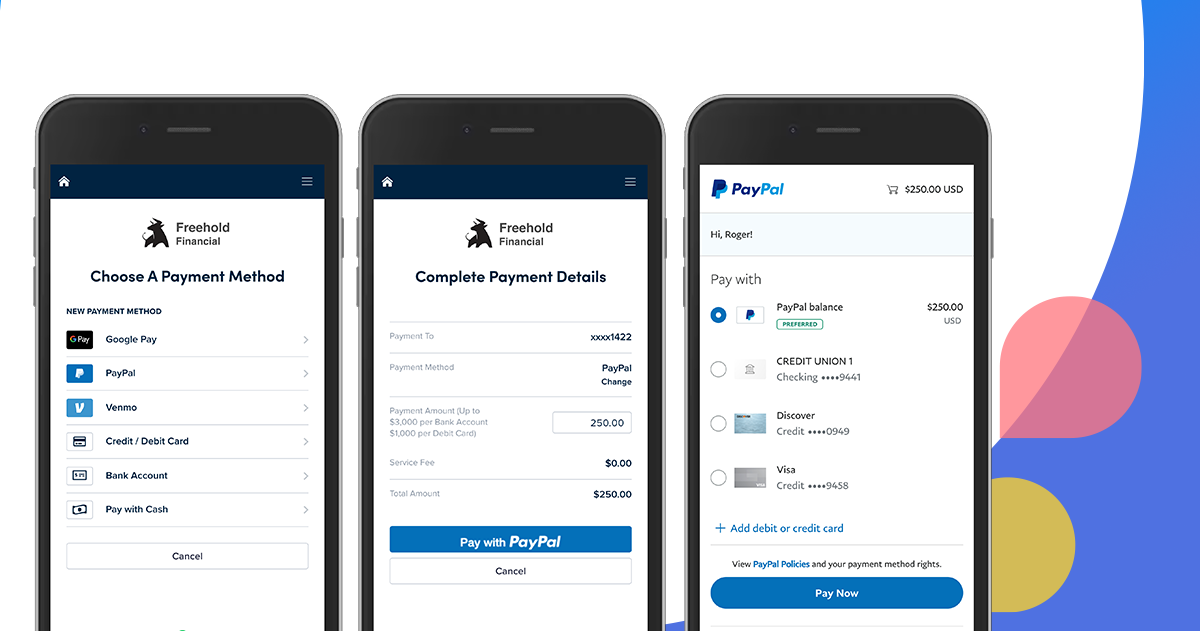
For eligible transactions with authorized businesses, Venmo offers a Purchase Protection Program. This program can safeguard buyers against certain issues, such as not receiving an item or receiving an item significantly different from its description. It’s important to understand that this protection typically does not apply to peer-to-peer payments between individuals, underscoring the casual nature of those transfers. Always exercise caution when sending money to individuals you don’t know well. Familiarizing yourself with the terms of this protection is vital, as it delineates the scope of Venmo’s technological safeguards for commercial transactions.
What to Do in Case of Issues
If you encounter a suspicious transaction, an unauthorized payment, or have trouble with a payment, contact Venmo support immediately. The app usually provides in-app support options or directs you to their help center. For unauthorized access, it’s crucial to change your password, enable 2FA, and report the incident. Prompt action can significantly increase the chances of resolving the issue and protecting your financial assets within the digital ecosystem.
aViewFromTheCave is a participant in the Amazon Services LLC Associates Program, an affiliate advertising program designed to provide a means for sites to earn advertising fees by advertising and linking to Amazon.com. Amazon, the Amazon logo, AmazonSupply, and the AmazonSupply logo are trademarks of Amazon.com, Inc. or its affiliates. As an Amazon Associate we earn affiliate commissions from qualifying purchases.