
In an increasingly digitized world, the ability to transfer funds seamlessly and securely is no longer a luxury but a fundamental expectation. Google Pay stands at the forefront of this evolution, offering a robust digital payment platform that simplifies person-to-person (P2P) transactions. Far beyond being just an app, Google Pay represents a sophisticated blend of software engineering, security protocols, and user-centric design, transforming how we interact with our money through technology. This article delves into the technical intricacies and practical applications of using Google Pay to send funds, providing a comprehensive guide for leveraging this powerful tool.
Understanding Google Pay as a Digital Payment Platform
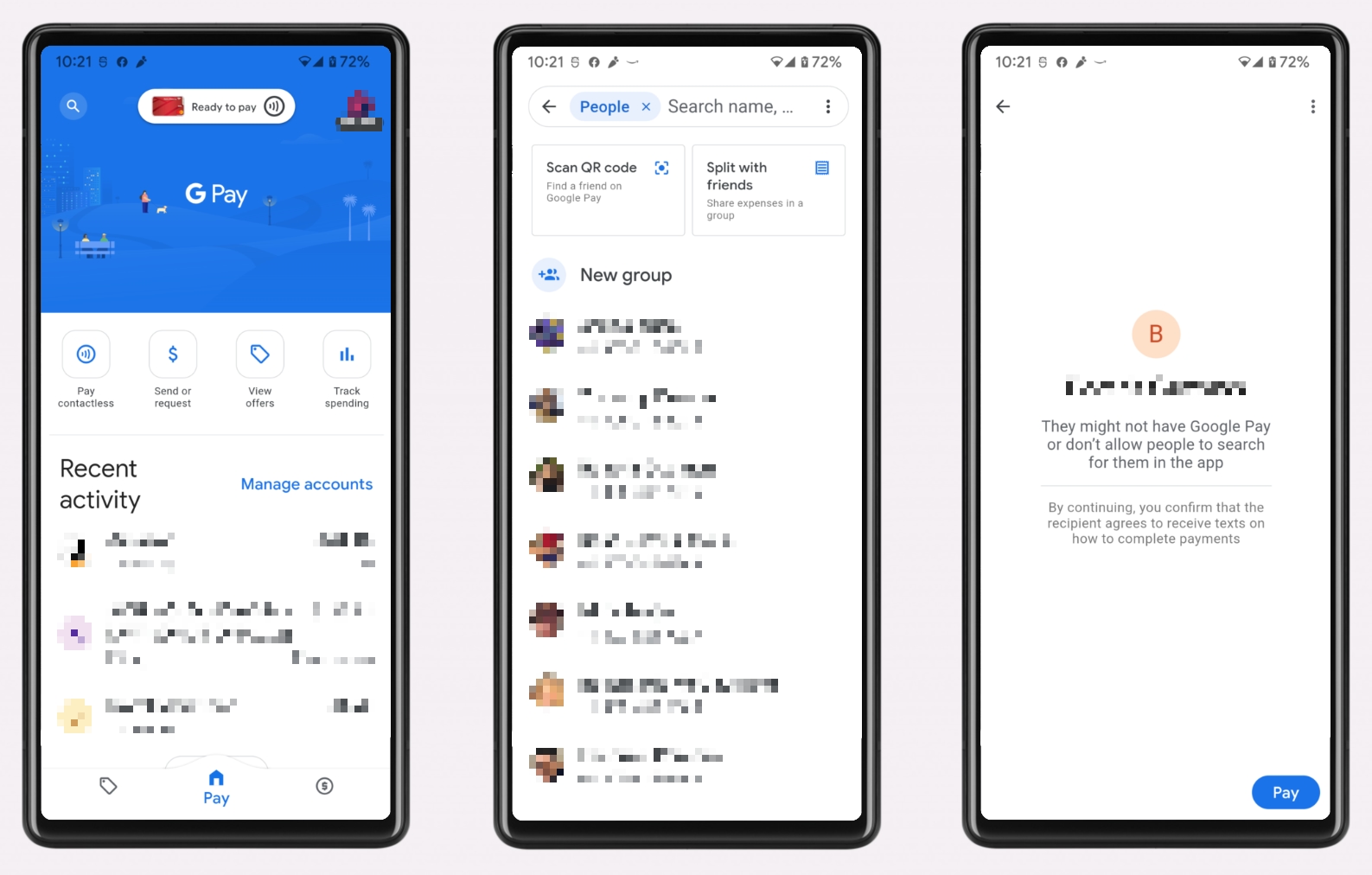
At its core, Google Pay is a mobile payment and digital wallet service developed by Google to power in-app, online, and contactless purchases on mobile devices, enabling users to make payments with Android phones, tablets, or watches. More importantly, it facilitates P2P money transfers, acting as a digital intermediary that removes the friction traditionally associated with sending or receiving money. From a technological standpoint, it integrates various services and security features, creating a cohesive ecosystem for digital transactions.
The Ecosystem of Google Pay
The Google Pay ecosystem is built upon a foundation of interconnected technologies. It leverages Google’s vast cloud infrastructure, machine learning capabilities, and extensive network of partnerships with financial institutions. This multi-layered architecture allows Google Pay to communicate securely with banks, process transactions rapidly, and offer a consistent user experience across different devices and geographical regions. The service supports a wide array of underlying payment methods, including debit cards, credit cards, and bank accounts, acting as a universal digital wrapper that streamlines access to these financial instruments. Its integration into other Google services, such as Gmail and Google Assistant, further extends its reach and utility, embedding payment capabilities directly into everyday digital interactions.
Key Technological Advantages
Google Pay’s prominence stems from several distinct technological advantages. Firstly, its NFC (Near Field Communication) capability allows for tap-to-pay transactions, transforming smartphones into virtual debit/credit cards. This relies on secure element technology within devices, ensuring sensitive data is isolated. Secondly, for P2P payments, Google Pay employs sophisticated encryption and tokenization techniques. Instead of transmitting actual card numbers, a unique, encrypted “token” is generated for each transaction. This token is useless if intercepted, significantly reducing the risk of data breaches. Thirdly, the platform benefits from Google’s expertise in user interface (UI) and user experience (UX) design, offering an intuitive and streamlined process that makes complex financial operations feel simple. Finally, continuous updates and security patches, driven by Google’s massive R&D investments, ensure that the platform remains resilient against evolving cyber threats and compatible with the latest mobile operating systems.
Getting Started: Setting Up Google Pay for P2P Transfers
Before you can leverage Google Pay for sending or receiving money, a proper setup is essential. This involves ensuring your device meets the technical specifications, securely linking your financial accounts, and completing any necessary verification processes. The initial setup is a one-time process designed to establish a secure foundation for all your future transactions.
Device Compatibility and Software Requirements
Google Pay is primarily designed for Android devices running Android 5.0 (Lollipop) or higher. While an Android smartphone is the most common device, it can also be used on Android tablets and Wear OS smartwatches for certain functionalities. Crucially, for P2P payments, a stable internet connection (Wi-Fi or mobile data) is required to facilitate communication with Google’s servers and financial institutions. The Google Pay app itself needs to be downloaded from the Google Play Store, ensuring you have the latest version for optimal performance, security, and access to all features. For non-Android users, while the full app functionality might be limited, some cross-platform payment features might still be accessible through web interfaces or integrated Google services.
Linking Your Payment Methods Securely
The cornerstone of setting up Google Pay for transfers is linking one or more payment methods. This typically involves adding a debit card, credit card, or directly linking a bank account. When adding a card, you’ll be prompted to enter the card number, expiration date, CVV, and billing address. Google Pay employs industry-standard encryption during this process. For direct bank transfers, you might need to provide your bank’s routing number and your account number. Google’s system then typically performs a micro-deposit verification (sending small amounts to your account that you then confirm) to ensure the account truly belongs to you, adding an extra layer of security. It’s critical to ensure all entered details are accurate to avoid transaction failures.
Verifying Your Account for Enhanced Security
To comply with financial regulations and bolster security, Google Pay often requires users to verify their identity, particularly for P2P transfers exceeding certain thresholds or for initial setup. This process, often referred to as “Know Your Customer” (KYC), might involve providing personal information such as your full name, address, and sometimes a photo ID or Social Security Number. This data is handled with stringent privacy protocols, typically encrypted and stored in secure data centers. Identity verification helps prevent fraud, money laundering, and ensures that funds are transferred between legitimate users. While seemingly an extra step, it is a vital technological and regulatory safeguard designed to protect both users and the integrity of the financial system.
Step-by-Step Guide: Sending Money Through Google Pay
Once your Google Pay account is set up and verified, sending money becomes a remarkably straightforward process. The app’s intuitive interface guides users through each stage, making what was once a multi-step bank transfer a matter of a few taps. Understanding the flow of the transaction is key to a smooth experience.
Initiating a Payment
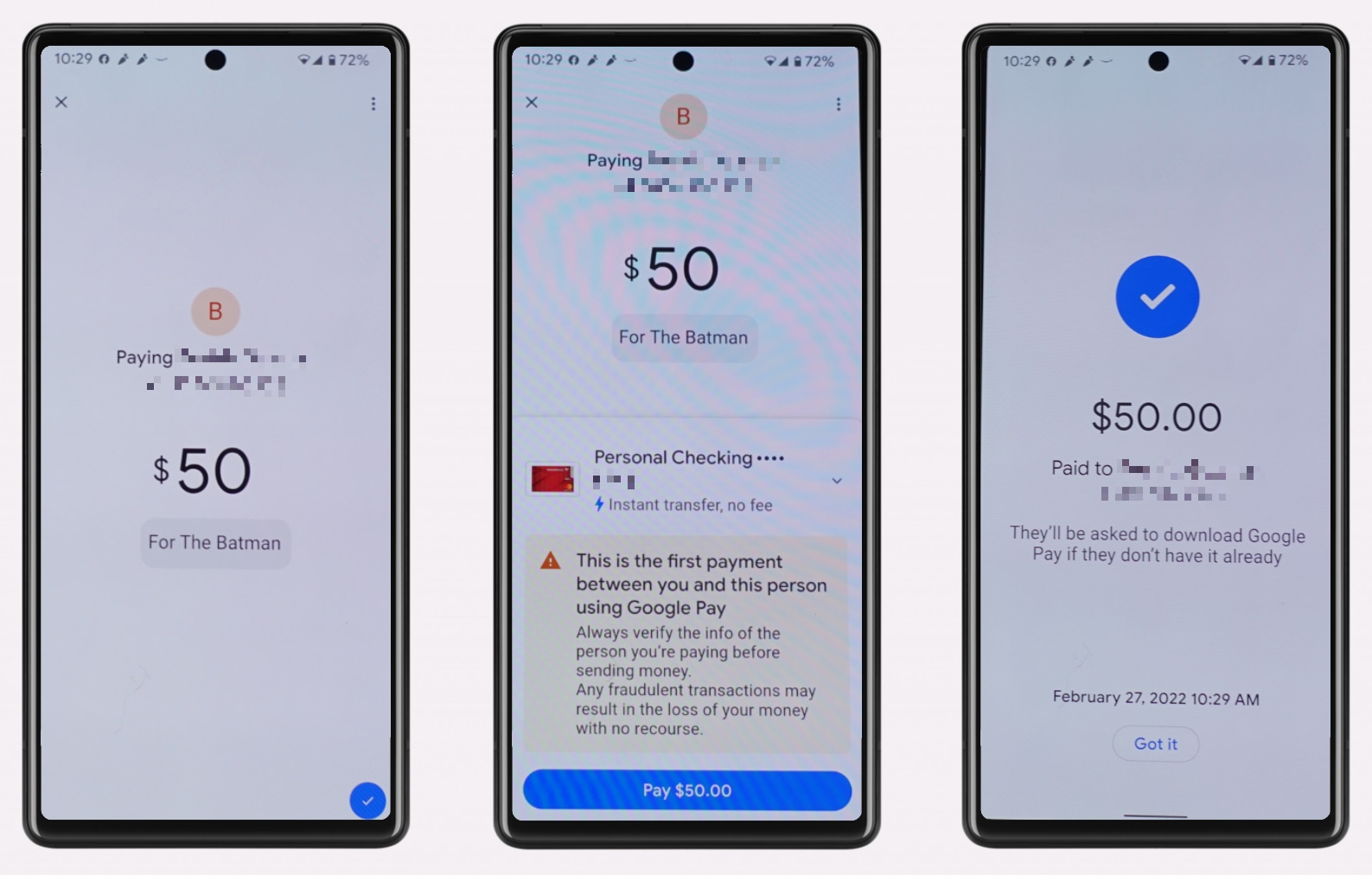
To begin, open the Google Pay app on your device. You’ll typically find a prominent “Send” or “New Payment” button. Tapping this will prompt you to select a recipient. Google Pay leverages your phone’s contact list, making it easy to find friends, family, or colleagues who are also using Google Pay or have a phone number/email linked to a Google account. If the recipient is not in your contacts, you can manually enter their phone number or email address. The system then checks if the recipient is set up to receive payments via Google Pay. If they are not, Google Pay will provide an option to invite them to join or send them a link to claim the money, ensuring the transaction can still proceed.
Confirming Transaction Details and Authenticating
After selecting the recipient, you’ll enter the amount you wish to send. This is a critical step for accuracy. You can also add a memo or note for the payment, providing context for the transaction. Following this, you’ll be prompted to select the payment method you wish to use (e.g., a linked debit card or bank account). Google Pay will display a summary of the transaction: recipient, amount, and payment method. Before the transfer is finalized, an authentication step is required. This typically involves entering your device’s PIN, pattern, or using biometric authentication (fingerprint or facial recognition). This security measure ensures that only the device owner can authorize the payment, even if the device is unlocked. Once authenticated, the funds are initiated for transfer.
Receiving and Accepting Payments
For the recipient, receiving money via Google Pay is equally simple. If they have Google Pay set up and linked to a payment method, the funds will generally be deposited automatically into their default bank account. They will receive a notification within the app and potentially an email confirmation. If the recipient does not have Google Pay set up, they will receive a notification (usually via SMS or email) with instructions on how to claim the money. This often involves downloading the Google Pay app, setting up an account, and linking a bank account for the deposit. It’s crucial for recipients to follow these instructions within a specified timeframe (typically 7-14 days) to prevent the funds from being returned to the sender. Google Pay acts as a secure intermediary, holding the funds until the recipient successfully claims them.
Security Protocols and Privacy Features of Google Pay
The technological backbone of Google Pay is heavily invested in security and privacy. Recognizing the sensitive nature of financial transactions, Google has implemented multiple layers of protection, far beyond simple passwords, to safeguard user data and funds. These protocols are continuously updated to counteract emerging digital threats.
Encryption and Tokenization Technologies
One of the most significant security features is tokenization. When you add a credit or debit card to Google Pay, the actual card number is not stored on your device or shared with the merchant during transactions. Instead, Google Pay generates a unique, encrypted virtual account number (token) that represents your actual card number. This token is used for payments. If a data breach were to occur at a merchant’s end, the stolen data would only contain useless tokens, not your real card details. All data transmitted between your device, Google’s servers, and financial institutions is secured using end-to-end encryption, typically TLS (Transport Layer Security), ensuring that information is unreadable to unauthorized parties.
Biometric and PIN Authentication
For every transaction and even to access the Google Pay app, robust authentication mechanisms are in place. This includes device-level security features like PINs, patterns, and passwords. More advanced Android devices support biometric authentication, such as fingerprint scanning or facial recognition. These methods provide a highly secure and convenient way to verify the user’s identity before any payment can be authorized. This multi-factor authentication approach significantly reduces the risk of unauthorized transactions, even if your phone is lost or stolen, as a thief would need to bypass both the device’s security and the Google Pay app’s authentication.
Fraud Protection and Dispute Resolution Mechanisms
Google Pay incorporates sophisticated fraud detection algorithms that continuously monitor transactions for unusual patterns or suspicious activity. Leveraging Google’s machine learning capabilities, these systems can flag and potentially block fraudulent transactions in real-time. In the unfortunate event of an unauthorized transaction, Google Pay provides mechanisms for users to dispute charges directly within the app. Google works closely with financial institutions to investigate and resolve these disputes, often offering buyer protection policies similar to those provided by credit card companies. This robust framework ensures that users have recourse and are protected against financial losses due to fraud or errors.
Optimizing Your Google Pay Experience and Troubleshooting
Beyond the basic functionality, Google Pay offers features that allow users to manage their financial interactions more effectively. Understanding these can enhance your overall experience, while knowing how to troubleshoot common technical issues ensures seamless operation.
Managing Payment Methods and Transaction History
Within the Google Pay app, users have full control over their linked payment methods. You can easily add new cards or bank accounts, remove old ones, or set a default payment method for faster transactions. This flexibility is crucial for adapting to changing financial needs or expiry dates. Furthermore, Google Pay provides a comprehensive transaction history log. Every payment sent or received is recorded, detailing the amount, date, recipient/sender, and payment method used. This digital ledger is invaluable for personal record-keeping, reconciling statements, and quickly identifying any discrepancies. The ability to search and filter transactions further enhances its utility, offering a clear overview of your digital spending and receiving patterns.
Common Technical Glitches and Solutions
While Google Pay is generally reliable, users might occasionally encounter technical glitches.
- “Payment not sent” or “Transaction failed”: This often relates to connectivity issues, insufficient funds in the linked account, incorrect recipient details, or bank-side restrictions. Ensure strong internet, check your balance, verify recipient info, and contact your bank if issues persist.
- App crashing or freezing: Like any app, temporary software bugs can occur. Try force-closing the app and reopening it, clearing the app’s cache (Settings > Apps > Google Pay > Storage > Clear cache), or restarting your device.
- Authentication issues: If biometric authentication fails, ensure your fingerprint or face data is correctly registered on your device and the sensor is clean. Revert to PIN authentication if biometrics consistently fail.
- NFC not working for tap-to-pay: Ensure NFC is enabled in your device settings and that Google Pay is set as your default payment app for tap-to-pay. The phone needs to be unlocked for NFC payments to work.
Keeping your Google Pay app and Android OS updated is crucial, as updates often include bug fixes and performance improvements.
Future Trends in Google Pay and Mobile Payments
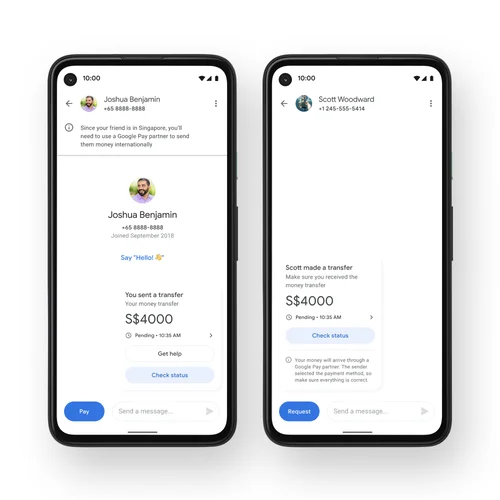
The landscape of mobile payments is constantly evolving, and Google Pay is at the forefront of these innovations. We can expect to see further integration of AI and machine learning for even more personalized financial insights, enhanced fraud detection, and predictive spending recommendations. The expansion of cross-border payment capabilities will likely simplify international remittances, leveraging blockchain technologies or existing global payment networks. The rise of digital identity solutions could further streamline verification processes, making setup and transaction authorization even smoother. Furthermore, the convergence of payment systems with broader digital ecosystems, such as smart homes and connected cars, points towards a future where payments are seamlessly embedded into every aspect of our technologically advanced lives, with Google Pay continuously adapting to meet these emerging demands.
In conclusion, Google Pay is more than just a convenient app for sending money; it’s a sophisticated technological platform that embodies modern digital finance. By understanding its underlying architecture, setup requirements, operational steps, and robust security measures, users can confidently and efficiently leverage this tool to navigate their personal financial transactions in the digital age. Its continuous evolution promises an even more integrated and secure future for mobile payments.
aViewFromTheCave is a participant in the Amazon Services LLC Associates Program, an affiliate advertising program designed to provide a means for sites to earn advertising fees by advertising and linking to Amazon.com. Amazon, the Amazon logo, AmazonSupply, and the AmazonSupply logo are trademarks of Amazon.com, Inc. or its affiliates. As an Amazon Associate we earn affiliate commissions from qualifying purchases.