
The Digital Evolution of Payments: Understanding Google Wallet
In an increasingly digitized world, the method by which we conduct financial transactions has undergone a profound transformation. Physical wallets, once indispensable, are steadily being supplanted by their digital counterparts, offering unparalleled convenience, enhanced security, and a streamlined user experience. Among the pioneers in this shift is Google Wallet, a robust application designed to consolidate your payment methods, passes, tickets, and loyalty cards into a single, accessible platform on your smartphone or smartwatch. It’s more than just a place to store your credit cards; it’s an integrated system that leverages cutting-edge technology to facilitate secure and swift transactions across various touchpoints. Understanding its core functionality and technological underpinnings is the first step toward mastering its capabilities.

More Than Just a Payment App: A Digital Hub
Google Wallet transcends the traditional definition of a mere payment application. While its primary function is to enable secure transactions, its ecosystem extends to a much broader range of digital items. Users can store transit passes, event tickets, boarding passes, loyalty cards, student IDs, and even digital car keys (in select regions and with compatible vehicles). This consolidation significantly reduces the clutter in your physical wallet and ensures that essential items are always at your fingertips, provided your device is charged. The integration with the broader Google ecosystem, including Google Pay for online checkouts and Google Maps for transit, further enhances its utility, making it a central hub for various aspects of daily digital life. This comprehensive approach positions Google Wallet as a versatile tool for managing not just your money, but also your access and affiliations, all from the convenience of your mobile device.
The Underlying Technology: NFC and Tokenization
At the heart of Google Wallet’s in-store payment functionality lies Near Field Communication (NFC) technology. This short-range wireless technology allows two devices, typically your smartphone and a payment terminal, to communicate when brought into close proximity, usually within a few centimeters. When you “tap to pay,” your device transmits encrypted payment information to the terminal via NFC, initiating the transaction. The process is incredibly fast, often completing within seconds, making it far quicker than swiping or inserting a card.
Beyond speed, security is paramount, and this is where tokenization plays a crucial role. Instead of transmitting your actual credit card number during a transaction, Google Wallet employs tokenization. This process replaces your sensitive card details with a unique, randomly generated “token” – a surrogate number specific to that transaction and device. If intercepted, this token is useless to a fraudster as it cannot be reverse-engineered to reveal your real card number. This multi-layered security approach, combining NFC for proximity-based data exchange and tokenization for data obfuscation, ensures that your financial information remains protected even during the most frequent transactions.
Setting Up Your Secure Digital Wallet
Embarking on your Google Wallet journey is a straightforward process, meticulously designed for user convenience and robust security. The initial setup involves downloading the application, configuring your basic preferences, and crucially, integrating your preferred payment methods. This foundational stage is vital, as it dictates the range of options available for your future transactions and establishes the security protocols that protect your financial information. Taking the time to properly set up your wallet ensures a seamless and secure experience when you’re ready to make purchases, manage passes, or simply navigate your daily digital interactions.
Downloading and Initial Configuration
The first step is to download the Google Wallet app, which is available on both Android devices via the Google Play Store and iOS devices via the Apple App Store. Once installed, opening the app will prompt you through a series of initial setup screens. You’ll typically be asked to log in with your Google Account – an essential prerequisite for using the service, as it links your wallet to your personal Google ecosystem and security settings. The app will guide you through granting necessary permissions, such as access to your camera for scanning cards or location services for identifying relevant passes. It’s important to review and understand these permissions, as they facilitate various features of the wallet, from adding new cards to displaying location-specific loyalty offers. The initial configuration is designed to be intuitive, ensuring even first-time users can quickly get started.
Adding Payment Methods: Cards, Accounts, and More
With the app downloaded and your Google Account linked, the next critical step is to populate your digital wallet with payment methods. Google Wallet supports a wide array of options, primarily credit and debit cards from major networks like Visa, Mastercard, American Express, and Discover. To add a card, you’ll typically tap the “Add to Wallet” button and then select “Payment card.” You can then either use your device’s camera to scan the card, which often auto-fills most of the details, or manually enter the card number, expiration date, and CVV (Card Verification Value).
Beyond traditional bank cards, Google Wallet also supports the integration of other payment instruments depending on your region and bank. This might include linking a PayPal account, certain bank accounts, or even adding gift cards. The flexibility in payment options makes Google Wallet a versatile tool for various financial needs. For each payment method added, you can also assign a friendly name (e.g., “Work Card,” “Personal Savings”) and mark one as your default for quicker transactions. This level of customization enhances the user experience, allowing for efficient management of multiple financial tools within a single interface.
Verifying Your Financial Credentials
To ensure the security and legitimacy of your transactions, Google Wallet requires a verification process for each payment method added. This step is crucial for preventing unauthorized use of your financial details. The verification process typically involves your bank or card issuer. After adding a card, you’ll usually be presented with several verification options, such as:
- SMS or Email Code: A one-time code sent to the phone number or email address associated with your bank account.
- Bank App or Website: You might be prompted to log into your bank’s official app or website to confirm the addition of the card to Google Wallet.
- Phone Call: In some cases, you may need to call your bank directly to verify ownership.
- Small Deposit/Withdrawal: Your bank might make a small, temporary transaction that you then need to confirm the amount of within the Google Wallet app.
Completing this verification step is mandatory before you can begin using a particular card for payments through Google Wallet. It acts as an essential security gate, confirming that you are the legitimate owner of the financial instrument and reinforcing the trustworthiness of the digital payment ecosystem. Once verified, the card is ready for use, fully secured within your digital wallet.
Seamless Transactions: Paying In-Store and Online
The primary allure of Google Wallet lies in its ability to transform the payment experience, making it faster, more convenient, and inherently more secure than traditional methods. Whether you’re making a quick purchase at a local store or finalizing an order on an e-commerce website, Google Wallet provides a streamlined path to transaction completion. This seamless integration across various payment environments is a cornerstone of its design, enabling users to move effortlessly between physical and digital marketplaces without compromising on efficiency or safety.
Tap and Go: In-Store Payments with NFC
Making an in-store payment with Google Wallet is remarkably simple, leveraging the power of NFC technology. When you encounter a payment terminal displaying the Google Pay or contactless payment symbol (four curved lines resembling a Wi-Fi icon), your device is ready to tap and pay. For most Android phones, you simply unlock your device (using your PIN, pattern, fingerprint, or face unlock) and hold the back of your phone near the payment terminal. There’s usually no need to open the Google Wallet app beforehand, especially if you’ve set a default card.
If you have multiple cards stored and wish to use one that isn’t your default, you’ll need to open the Google Wallet app, select the desired card, and then hold your phone to the terminal. On smartwatches compatible with Google Wallet, you typically press a designated button to bring up your cards and then tap the watch to the terminal. A confirmation sound or vibration, along with an on-screen checkmark on your device and the terminal, signals a successful transaction. This “tap and go” method is not only faster than chip cards but also more hygienic, as it minimizes physical contact with shared surfaces.
Online and In-App Purchases Made Simple
Google Wallet extends its convenience beyond physical storefronts to the vast landscape of online and in-app commerce. When shopping online or within an app, you’ll often see the “Google Pay” button at checkout. Clicking this button allows you to complete your purchase using a payment method stored in your Google Wallet, bypassing the need to manually enter your card number, expiration date, and billing address for each transaction.
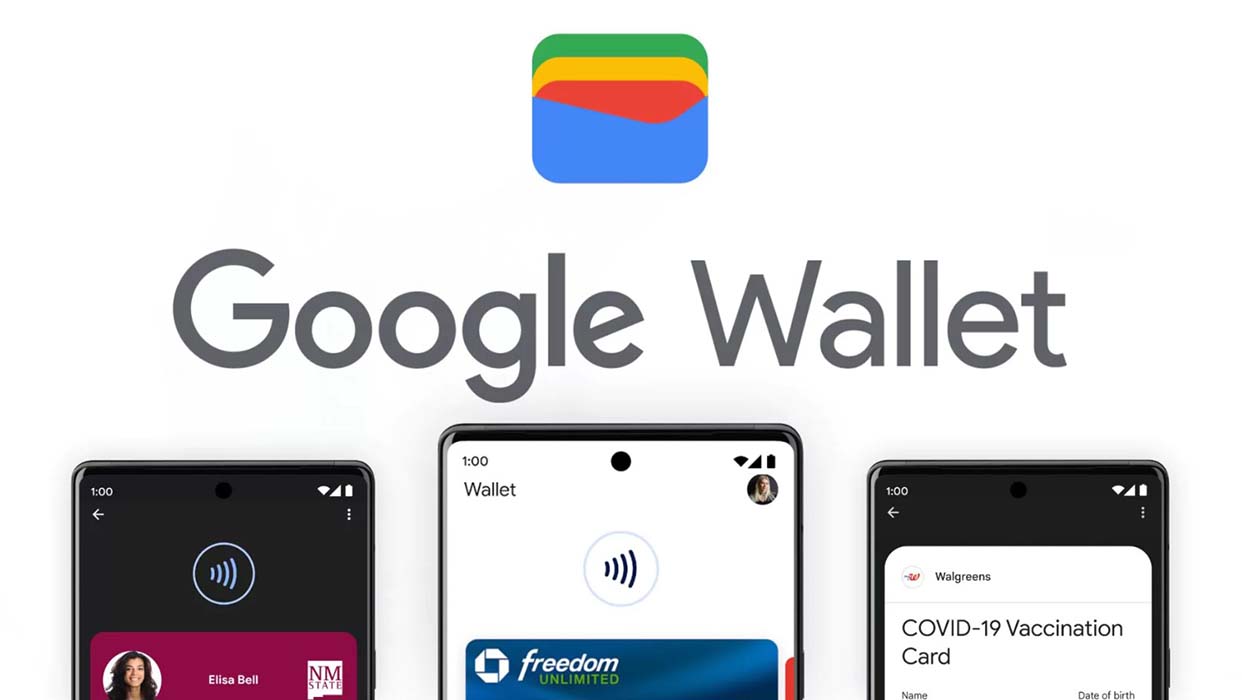
Upon clicking the Google Pay button, a secure pop-up or redirect will appear, displaying your stored cards and shipping addresses. You can quickly select the preferred option, and with a single confirmation (often requiring your device’s biometric authentication or PIN), the transaction is completed. This not only saves time but also enhances security by reducing the exposure of your sensitive card details on multiple websites. Many apps also integrate Google Pay directly, offering a seamless one-tap purchase experience, making impulse buys or routine subscriptions incredibly convenient while maintaining the robust security framework of tokenization.
Beyond Payments: Managing Passes, Tickets, and Loyalty
Google Wallet’s utility stretches far beyond mere financial transactions. It serves as an excellent digital repository for a variety of passes, tickets, and loyalty cards, further decluttering your physical wallet and ensuring essential items are always accessible.
- Transit Passes: Many public transportation systems integrate with Google Wallet, allowing you to add and use digital transit cards directly from your phone. This means tapping your phone to ride the subway or bus, eliminating the need for physical cards or fumbling for change.
- Event Tickets and Boarding Passes: For concerts, sports events, movies, or flights, you can often add digital tickets and boarding passes to Google Wallet. This provides quick access for scanning at entry points, complete with event details, seat numbers, or flight information.
- Loyalty and Gift Cards: Instead of carrying a stack of plastic loyalty cards, you can add them to Google Wallet. Many retailers allow you to scan the barcode of your physical card or enter its details. When checking out, simply open your Wallet, select the loyalty card, and present the barcode to be scanned for points or discounts. Gift cards can also be stored and used similarly.
This comprehensive management of various digital credentials enhances the overall convenience and efficiency of your daily interactions, solidifying Google Wallet as a truly versatile digital hub.
Prioritizing Your Digital Security
In the realm of digital payments, convenience must never come at the expense of security. Google Wallet is engineered with multiple layers of protection to safeguard your financial information and personal data. This commitment to security is fundamental, ensuring that users can engage in seamless digital transactions with peace of mind. Understanding these security features is crucial for appreciating the robustness of the platform and for taking proactive steps to protect your digital identity.
Multi-Layered Protection: Encryption and Biometrics
Google Wallet employs a sophisticated array of security measures to protect your data. Firstly, all payment information transmitted between your device and Google’s servers is heavily encrypted, rendering it unreadable to unauthorized parties. This encryption extends to data stored on your device, ensuring that even if your phone is compromised, your financial details remain inaccessible without proper authentication.
Secondly, biometric authentication plays a critical role in securing your transactions. Before you can make a payment, Google Wallet typically requires you to unlock your device using a fingerprint, face scan, or a secure PIN/pattern. This means that even if your phone falls into the wrong hands, unauthorized individuals cannot simply tap and pay. This “something you are” (biometrics) or “something you know” (PIN) authentication adds a powerful layer of personal security, ensuring that only you can initiate transactions from your device. For cards requiring higher verification, you might even be asked for your PIN at the payment terminal itself, mimicking traditional card usage.
Tokenization: Safeguarding Your Card Details
As previously touched upon, tokenization is a cornerstone of Google Wallet’s security architecture, especially for in-store and online payments. When you add a credit or debit card to your wallet, the actual 16-digit card number is not directly stored on your device or transmitted to merchants. Instead, a unique, encrypted token is generated and assigned to that card for use within Google Wallet.
During a transaction, it is this token – and not your real card number – that is sent to the merchant and the payment network. If a data breach occurs at a merchant’s end, the stolen data would only contain these useless tokens, not your actual card numbers. This significantly reduces the risk of credit card fraud and protects your financial identity from being compromised, making Google Wallet a more secure way to pay than often using a physical card where the full number is exposed. This innovative approach isolates your sensitive data, offering peace of mind with every tap.
What to Do if Your Device is Lost or Stolen
The thought of losing a device that contains your digital wallet can be unsettling, but Google Wallet has built-in features to mitigate the risk. In the unfortunate event that your smartphone or smartwatch is lost or stolen, you have immediate recourse through Google’s “Find My Device” service. From any web browser or another device, you can:
- Locate your device: Pinpoint its last known location on a map.
- Remotely lock your device: Prevent unauthorized access to your phone and, consequently, your Google Wallet.
- Remotely erase your device: As a last resort, you can wipe all data from your phone, including your Google Wallet information, ensuring that no sensitive data falls into the wrong hands.
Additionally, because your payment information is tokenized and requires your device’s unlock method, even if a thief were to gain access to your unlocked phone, they would still need your biometrics or PIN to make a payment. It is also advisable to contact your bank immediately to report any lost cards that were linked to your digital wallet, though Google’s robust security measures provide substantial protection even before such action.
Maximizing Your Google Wallet Experience
Beyond the fundamental processes of setting up and using Google Wallet for payments and passes, there are several advanced considerations that can help you optimize your experience. From troubleshooting common hiccups to understanding the ongoing evolution of digital payment technologies, a proactive approach ensures that you leverage Google Wallet to its fullest potential, maintaining a seamless and secure digital lifestyle.
Troubleshooting Common Payment Issues
While Google Wallet is designed for reliability, occasional issues can arise. Knowing how to troubleshoot them can save time and frustration:
- Payment Terminal Not Responding: Ensure NFC is enabled on your device (check your phone’s settings). Make sure your phone is unlocked and held correctly against the terminal – sometimes a slightly different angle or distance is needed. Confirm the terminal accepts contactless payments.
- “Card Not Accepted” Error: Double-check that the card you’re trying to use has been successfully verified in your Google Wallet. If it’s a new card, verification might still be pending. Ensure your card issuer supports Google Wallet for that specific card type. Sometimes, the merchant’s payment processor might have an issue, or the card type isn’t accepted by that specific merchant.
- “Authentication Required” or PIN Prompts: This is often a security feature. Some transactions, especially larger ones or those made consecutively, may require extra verification like your device PIN or the card’s actual PIN at the terminal. This is normal and enhances security.
- App Glitches: If the app is behaving erratically, try closing and reopening it. If that doesn’t work, clear the app’s cache (via your phone’s settings) or restart your device. As a last resort, reinstalling the app can resolve persistent issues, though you’ll need to re-add your cards.
- Outdated Software: Ensure both your Google Wallet app and your device’s operating system are up to date. Software updates often include bug fixes and performance improvements.

Future-Proofing Your Digital Finance
The landscape of digital payments is constantly evolving, with new features, integrations, and security protocols emerging regularly. To maximize your Google Wallet experience, it’s beneficial to stay informed and leverage these advancements:
- Embrace Updates: Regularly update the Google Wallet app and your device’s OS. These updates often bring performance enhancements, new features (like support for additional pass types or payment methods), and critical security patches that protect you against emerging threats.
- Explore New Integrations: Google continuously partners with banks, transit authorities, and retailers to expand Google Wallet’s utility. Keep an eye out for announcements regarding new banks supported, new cities where transit passes can be used, or retailers offering exclusive loyalty programs through the Wallet.
- Understand Digital Security Best Practices: While Google Wallet offers robust security, your personal habits are equally important. Use strong, unique passwords for your Google Account, enable two-factor authentication, and be wary of phishing attempts. Regularly review your transaction history within the app to spot any unauthorized activity.
- Leverage Wearables: If you own a compatible smartwatch, integrating Google Wallet offers unparalleled convenience for quick payments without needing to retrieve your phone. This integration represents a significant step in the future of ubiquitous, discreet digital transactions.
By understanding Google Wallet’s core functionalities, security features, and remaining adaptable to its ongoing evolution, you can fully embrace a more efficient, secure, and technologically advanced approach to managing your daily finances and digital credentials.
aViewFromTheCave is a participant in the Amazon Services LLC Associates Program, an affiliate advertising program designed to provide a means for sites to earn advertising fees by advertising and linking to Amazon.com. Amazon, the Amazon logo, AmazonSupply, and the AmazonSupply logo are trademarks of Amazon.com, Inc. or its affiliates. As an Amazon Associate we earn affiliate commissions from qualifying purchases.