
In an increasingly digital world, the smartphone has evolved from a communication device into a comprehensive personal assistant, capable of managing nearly every aspect of our daily lives. Among its most transformative capabilities is the ability to handle financial obligations with unprecedented ease and speed. Paying bills on your phone is no longer a niche feature but a standard expectation, offering unparalleled convenience and efficiency. This guide delves into the technological landscape of mobile bill payments, providing a clear roadmap for leveraging your device to manage your finances securely and effectively.
The Ubiquity of Mobile Bill Pay: Convenience at Your Fingertips
The shift towards mobile bill payment reflects a broader societal embrace of digital convenience. Gone are the days of writing checks, stuffing envelopes, or even logging onto a desktop computer specifically to make a payment. Your smartphone, an omnipresent companion, now serves as a portable financial hub. This technological evolution is driven by several factors: the widespread availability of high-speed internet, the proliferation of sophisticated mobile applications, and an ever-growing consumer demand for instant gratification and simplified processes.
Mobile bill pay liberates users from geographical constraints and time-sensitive deadlines. Whether you’re commuting, traveling, or simply relaxing at home, your bills can be settled with a few taps. This convenience translates into significant time savings and a reduction in stress, knowing that essential payments can be managed on the go. Furthermore, the intuitive interfaces of modern apps have democratized financial management, making it accessible even to those less familiar with complex digital systems.
Essential Methods for Mobile Bill Payment
Navigating the various avenues for mobile bill payment can seem daunting at first, but most methods fall into a few primary categories, each offering distinct advantages. Understanding these options is key to choosing the most suitable approach for your specific needs and the types of bills you manage.
Utilizing Dedicated Provider Apps
Many service providers, from utility companies and telecommunications giants to credit card issuers and insurance firms, have developed their own dedicated mobile applications. These apps are often the most streamlined and direct way to manage and pay your bills.
- Benefits: Dedicated apps offer a highly integrated experience. They typically provide a comprehensive view of your account, including current balance, payment history, usage details, and customer support options. Notifications for upcoming due dates or payment confirmations are standard, helping you stay on top of your obligations. Security is often robust, leveraging the provider’s existing infrastructure.
- How it Works (General Steps):
- Download the App: Search for your service provider’s official app in your phone’s app store (App Store for iOS, Google Play Store for Android). Always ensure you’re downloading the legitimate app, usually identified by the provider’s official logo and a high number of downloads/reviews.
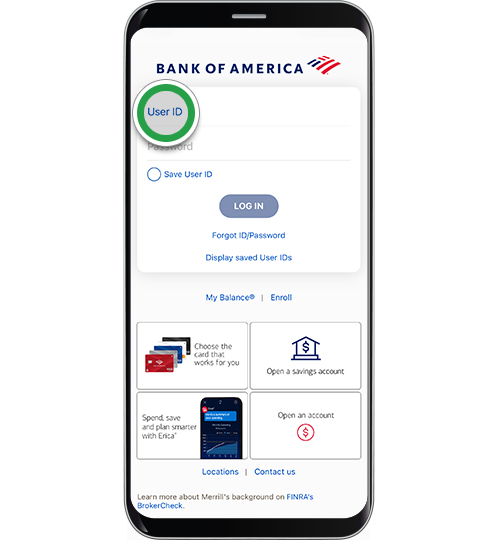
- Log In or Register: Use your existing online account credentials. If you don’t have an online account, you’ll typically be prompted to register within the app or on the provider’s website. This usually involves creating a username and password, and possibly verifying your identity with account numbers or personal details.
- Navigate to Payments: Once logged in, look for a section clearly labeled “Payments,” “Bill Pay,” “My Bills,” or a similar intuitive heading.
- Select Payment Method: You’ll usually have options to pay with a linked bank account (ACH transfer), a debit card, or a credit card. Some apps may allow you to save payment information for future transactions.
- Enter Payment Details: If using a new card or bank account, input the required information (card number, expiration, CVV; or bank account and routing numbers). Specify the payment amount (current balance, minimum payment, or a custom amount).
- Review and Confirm: Double-check all details before confirming the payment. Most apps will provide a confirmation screen and send an email receipt.
Harnessing Online Banking Apps
Your primary bank’s mobile app is another powerful tool for centralized bill management. Many financial institutions have integrated robust bill pay features directly into their mobile banking platforms, allowing you to pay various bills from a single secure interface.
- Benefits: The primary advantage here is centralization. Instead of logging into multiple provider apps, you can manage nearly all your outgoing payments from one place. This offers a holistic view of your financial outflow. Banks also typically have extremely high security standards, adding an extra layer of trust. Many bank apps allow you to schedule recurring payments, ensuring you never miss a due date.
- How it Works (General Steps):
- Log In to Your Banking App: Access your bank’s official mobile app using your secure credentials, often enhanced with biometric authentication (fingerprint or face ID).
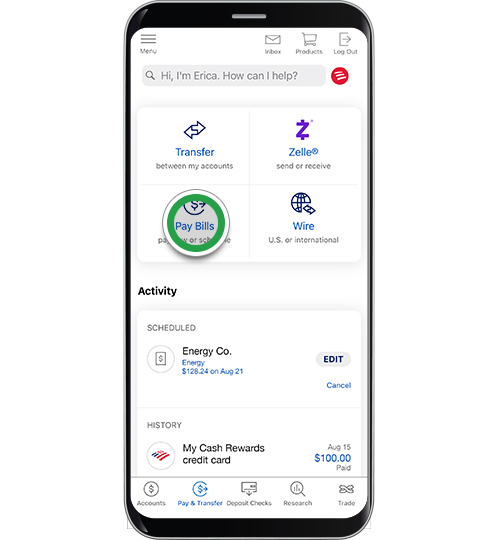
- Find the Bill Pay Section: Look for “Bill Pay,” “Payments,” or a similar option within the app’s main menu or navigation bar.
- Add a Payee: If it’s your first time paying a specific biller, you’ll need to add them as a “payee.” This usually involves searching for the company by name, entering their address, and providing your account number with that company. Your bank might even have a list of common billers to simplify this process.
- Enter Payment Details: Select the payee, enter the amount you wish to pay, and choose the date you want the payment to be sent. You can often set up one-time payments or recurring schedules.
- Select Funding Account: Choose which of your linked bank accounts (checking or savings) you want the payment to come from.
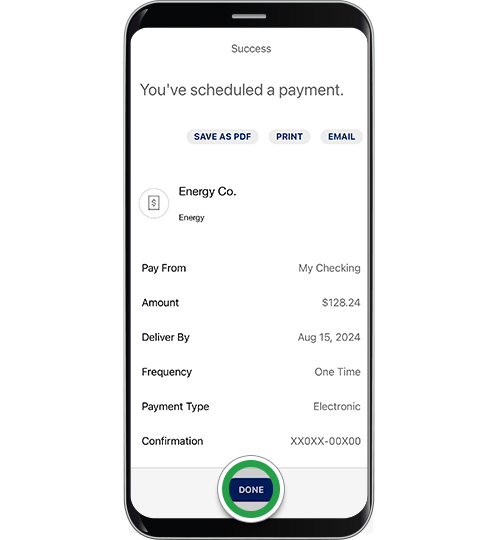
- Review and Confirm: Verify all information, including the payee, amount, and date, before finalizing the transaction. Your bank app will usually provide confirmation and update your transaction history.
Exploring Third-Party Payment Apps and Digital Wallets
Beyond provider-specific and banking apps, a growing ecosystem of third-party payment apps and digital wallets offers alternative ways to pay bills. These include services like PayPal, Apple Pay, Google Pay, and others.
- Benefits: These platforms often facilitate rapid transactions and can be particularly useful for merchants who accept them directly. They provide an extra layer of privacy by not sharing your full card details with every merchant. Digital wallets can also store multiple cards, simplifying the selection process during checkout.
- How it Works:
- Link Accounts: Set up your chosen digital wallet or payment app by linking your debit cards, credit cards, or bank accounts. This usually involves a verification process.
- Merchant Integration: When making a payment on a merchant’s website or app, look for options to pay with your digital wallet (e.g., “Pay with PayPal,” “Buy with Apple Pay,” “Google Pay”).
- Authentication: You’ll typically authenticate the payment using your phone’s security features (PIN, fingerprint, face ID) within the digital wallet interface.
- Confirm: The payment details are securely transferred to the merchant, and you receive confirmation within the digital wallet app and often from the merchant directly.
Note: While excellent for many purchases, direct bill payment through these apps might be less common than using provider or banking apps, unless the biller explicitly integrates with them.
Key Security Measures for Mobile Transactions
The convenience of mobile bill pay must be balanced with robust security practices. Protecting your financial information is paramount when conducting transactions on your smartphone.
Protecting Your Device and Accounts
Your phone is a gateway to your financial life; securing it is the first line of defense.
- Strong Passwords and Biometrics: Always use a strong, unique password or PIN for your phone. Enable biometric security features like fingerprint or face recognition for unlocking your device and authenticating financial transactions within apps.
- Two-Factor Authentication (2FA): Activate 2FA whenever possible for your banking apps, biller accounts, and email. This adds an extra layer of security by requiring a second form of verification (e.g., a code sent to another device) in addition to your password.
- Keep Apps Updated: Regularly update all your apps, especially banking and payment applications. Developers frequently release updates that include security patches to protect against newly identified vulnerabilities.
- Use Secure Wi-Fi: Avoid making financial transactions over public or unsecured Wi-Fi networks. These networks are often susceptible to eavesdropping. Stick to your cellular data or a trusted, password-protected home Wi-Fi network.
- Review App Permissions: Be mindful of the permissions you grant to apps. A payment app might need access to your camera for scanning, but be wary of apps requesting unnecessary access to your contacts or microphone.
Recognizing and Avoiding Scams
Cybercriminals constantly devise new methods to trick users into revealing sensitive information.
- Phishing Awareness: Be extremely cautious of unsolicited emails, texts, or calls asking for personal or financial information. Legitimate financial institutions and service providers will rarely ask for your password, PIN, or full account numbers via email or text.
- Verify Legitimate Requests: If you receive a suspicious communication regarding a bill, do not click on links or respond directly. Instead, independently verify the request by logging into your official provider app or website, or by calling their official customer service number.
- Monitor Transaction History: Regularly review your bank statements and transaction history within your banking and biller apps. Report any unauthorized or suspicious transactions immediately to your bank and the relevant service provider.
Troubleshooting Common Mobile Payment Issues
Despite the seamless nature of mobile bill pay, occasional hiccups can occur. Knowing how to troubleshoot common issues can save you frustration and ensure your bills are paid on time.
- Connectivity Problems: A poor internet connection (either Wi-Fi or cellular data) can interrupt a payment. Ensure you have a stable connection before initiating a transaction. If issues persist, try switching between Wi-Fi and mobile data.
- App Glitches: Sometimes, an app might freeze or behave unexpectedly. Try closing the app completely and reopening it. If the problem continues, restart your phone. As a last resort, uninstalling and reinstalling the app (after backing up any crucial data) can resolve persistent software bugs.
- Payment Confirmation Delays: It’s not uncommon for payment confirmations to take a few minutes, or even a few hours, to appear in your app or email. If you’ve waited a reasonable amount of time and still haven’t received confirmation, check your bank account or credit card statement to see if the payment has been debited.
- Payment Failure: If a payment fails, the app or your bank will usually provide a reason (e.g., insufficient funds, incorrect card details, security hold). Rectify the issue and attempt the payment again. If the reason is unclear, contact your bank or the biller’s customer service.
- Incorrect Amount or Payee: If you discover you’ve paid the wrong amount or sent money to the wrong payee, contact both your bank and the biller immediately. Speed is crucial in resolving such errors.
The Future of Mobile Bill Payment
The landscape of mobile bill payment is continuously evolving, driven by advancements in technology and changing consumer expectations. We can anticipate even more integrated and intuitive experiences. Artificial intelligence may play a larger role in predictive bill management, offering personalized insights and automated payment suggestions based on spending patterns. Biometric authentication will likely expand beyond fingerprints and facial recognition to include even more sophisticated methods, further enhancing security and convenience.
Furthermore, the rise of open banking initiatives means greater interoperability between financial institutions and third-party services, potentially leading to a truly unified platform for managing all financial obligations. As technology progresses, paying bills on your phone will not only remain a standard practice but will become an even more streamlined, intelligent, and secure part of your digital life.
aViewFromTheCave is a participant in the Amazon Services LLC Associates Program, an affiliate advertising program designed to provide a means for sites to earn advertising fees by advertising and linking to Amazon.com. Amazon, the Amazon logo, AmazonSupply, and the AmazonSupply logo are trademarks of Amazon.com, Inc. or its affiliates. As an Amazon Associate we earn affiliate commissions from qualifying purchases.