
In an increasingly digitized world, the lines between social interaction and financial transactions continue to blur, largely thanks to innovative platforms like Venmo. Once primarily known for its peer-to-peer payment system, Venmo has expanded its utility with the introduction of physical and virtual debit cards, seamlessly integrating daily spending with its established digital ecosystem. For many, acquiring a Venmo card represents a significant step towards a more unified and convenient approach to personal finance management, deeply embedded within a familiar technological framework. This guide delves into the technical aspects of ordering a new Venmo card, navigating its features, and leveraging its digital functionalities to enhance your financial tech experience.

The process of obtaining a Venmo card is more than just a simple application; it’s an engagement with a sophisticated financial technology product. It requires understanding the underlying application architecture, adhering to digital security best practices, and optimizing your interaction with the platform’s user interface. This article will walk you through the entire journey, from understanding the card’s place within the Venmo ecosystem to troubleshooting potential technical hiccups, ensuring you can harness the full power of this versatile digital tool.
Understanding the Venmo Card Ecosystem: A Technological Integration
The Venmo card isn’t merely a piece of plastic; it’s a critical extension of the Venmo application, designed to bridge the gap between your digital balance and real-world spending. Its existence underscores a broader trend in FinTech: the convergence of mobile-first platforms with traditional banking functionalities, all delivered through a seamless software experience.
What is the Venmo Card and How Does It Integrate?
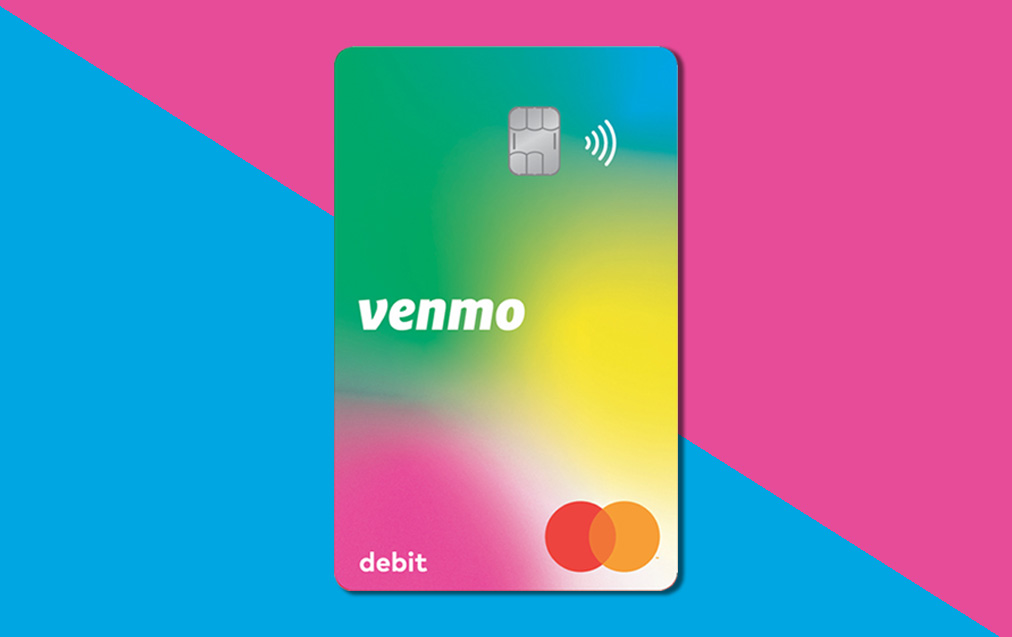
At its core, the Venmo card functions as a Mastercard debit card directly linked to your Venmo balance. This means that funds received via peer-to-peer payments or added to your Venmo account become instantly accessible for purchases wherever Mastercard is accepted. From a technological standpoint, this integration is crucial. Unlike traditional debit cards linked to a separate bank account, the Venmo card operates within its own proprietary digital ledger, leveraging Venmo’s robust backend infrastructure.
There are primarily two forms:
-
The Physical Card: This is a tangible debit card with a chip and magnetic stripe, allowing for in-person transactions, ATM withdrawals, and traditional point-of-sale interactions. It employs standard EMV chip technology for enhanced security at physical terminals.
-
The Virtual Card: Accessible directly within the Venmo app, the virtual card provides instant access to your Venmo balance for online purchases. It typically features a unique card number, expiration date, and CVV, which can be viewed securely within the app. This digital-first approach aligns with modern e-commerce trends, offering convenience without needing to carry a physical wallet.
The integration extends to real-time transaction notifications delivered via the Venmo app, providing instant visibility into your spending. This immediate feedback loop is a hallmark of modern financial technology, allowing users to monitor their balance and track expenses with unprecedented granularity and speed.
Benefits from a Tech User Perspective
For the tech-savvy individual, the Venmo card offers a suite of advantages that go beyond simple payment processing:
-
Seamless App Integration: Every aspect of the card, from ordering to activation to transaction history, is managed within the intuitive Venmo application. This centralized control panel simplifies financial management, reducing the need to juggle multiple apps or platforms.
-
Instant Notifications and Spending Insights: The card leverages Venmo’s push notification system to provide immediate alerts for every transaction. This real-time data flow is invaluable for security monitoring and budget tracking, offering a digital audit trail that’s easily accessible and searchable.
-
Enhanced Digital Security Features: Venmo incorporates various digital security measures for its cardholders, including the ability to instantly freeze/unfreeze the card from the app, biometric authentication (fingerprint/Face ID) for access, and advanced fraud detection algorithms. These features empower users with significant control over their card’s security posture.
-
Accessibility to Digital Wallet Ecosystems: The Venmo card can be integrated with leading digital wallets like Apple Pay, Google Pay, and Samsung Pay, expanding its utility to contactless payments. This technological interoperability enhances user convenience and broadens the acceptance landscape for the card.
Prerequisites for Ordering: Ensuring Technical Readiness
Before initiating the card order, certain technical and account-specific prerequisites must be met to ensure a smooth process:
-
Verified Venmo Account: Your Venmo account must be fully verified, which typically involves confirming your identity (name, date of birth, last four digits of SSN) and linking a bank account or debit card for funding. This is a standard KYC (Know Your Customer) protocol for financial services, ensuring compliance and security.
-
Latest App Version: Ensure you have the most up-to-date version of the Venmo app installed on your smartphone. Updates often include critical security patches, bug fixes, and new features, including improvements to the card ordering interface.
-
Sufficient Balance (Optional, for card fees): While the standard Venmo debit card has no monthly fees, some promotional offers or custom card designs might involve a nominal fee, which would be debited from your Venmo balance.
Meeting these technical and account prerequisites sets the stage for a frictionless ordering experience, leveraging Venmo’s robust backend to provision your new card securely and efficiently.
A Step-by-Step Technical Guide to Ordering Your Card
Ordering your Venmo card is primarily an in-app process, meticulously designed for user-friendliness while adhering to stringent financial security protocols. Understanding the technical flow and user interface elements is key to a successful acquisition.
Navigating the Venmo App Interface
The Venmo app’s user interface (UI) is designed for intuitive navigation. To begin the card ordering process:
-
Launch the App: Open the Venmo app on your iOS or Android device. Ensure you’re logged in using your credentials, possibly requiring biometric authentication if enabled.
-
Access the Cards Section: Look for the “Cards” or “Venmo Card” section. This is typically found in the main menu (often represented by three horizontal lines or a profile icon in the top corner) or directly accessible from the home screen for some users. The UI/UX designers aim to make this feature prominent due to its significance.
-
Initiate Card Application: Within the Cards section, you’ll see an option to “Get a Venmo Card” or “Apply for a Card.” Tap this to start the application workflow.
Initiating the Card Order: Data Input and Verification
This phase involves providing necessary information and confirming your details within a secure digital form:
-
Review Card Features: The app will likely present a summary of the Venmo card’s benefits and terms. Read through these carefully, paying attention to any technical specifications or limitations.
-
Confirm Personal Information: Venmo will pre-populate your application with information from your verified account. Double-check your name, shipping address, and other contact details for accuracy. Inaccurate data can lead to processing delays or delivery issues. The system performs real-time validation checks on input fields.
-
Agree to Terms and Conditions: You’ll be presented with the cardholder agreement, privacy policy, and other legal disclosures. These are critical documents outlining the technical and legal framework for using the card. You must digitally consent to these terms to proceed.
-
Submit Application: Once all information is confirmed and terms accepted, tap the “Submit” or “Order Card” button. At this point, Venmo’s backend systems process your application, performing eligibility checks and initiating the card issuance process. This typically involves secure data transmission and database updates.
Customization and Delivery Options
The Venmo card often offers a degree of personalization, a small but engaging aspect of its digital design:
-
Choose Your Design (if available): Venmo occasionally offers various card designs. Select your preferred aesthetic. This choice is stored digitally and communicated to the card printing facility.
-
Confirm Delivery Address: Re-verify your shipping address. The card will be mailed to this location. You might receive a digital confirmation email or in-app notification with an estimated delivery timeframe. Tracking information, if available, would also be provided digitally.
Activating Your Card: A Digital Handshake
Upon receiving your physical card, activation is a simple, app-based process designed for security and instant usability:
-
Receive Your Card: The physical card will arrive in the mail.
-
Open the Venmo App: Log back into your Venmo account.
-
Navigate to Activation: In the “Cards” section, you’ll find an option to “Activate Card.”
-
Enter Card Details: You’ll be prompted to enter specific information from your new physical card, such as the last four digits of the card number or the CVV. This digital input confirms that you are in physical possession of the card.
-
Set Your PIN: You will be guided to create a four-digit Personal Identification Number (PIN). This PIN is crucial for ATM withdrawals and chip-and-PIN transactions and is securely stored and encrypted within Venmo’s system.
-
Confirmation: Upon successful activation, you’ll receive an in-app confirmation, and your card will be ready for use, digitally linked to your Venmo balance.
Enhancing Your Digital Security and Card Management
From a technological standpoint, the Venmo card is designed with several layers of security and robust digital management features, empowering users to control their financial access points effectively.
Leveraging Venmo’s Security Features
Venmo integrates several advanced security measures to protect your card and funds:
-
In-App Card Freeze/Unfreeze: This is a cornerstone feature for immediate security. If you misplace your card or suspect unauthorized activity, you can instantly “freeze” it within the app, preventing any transactions. Once found or the threat is mitigated, you can just as easily “unfreeze” it. This real-time control is a significant technological advantage over traditional cards, which require phone calls and manual processing.
-
Biometric Login: For quick and secure access to your Venmo app (and thus your card management features), enabling Face ID or fingerprint authentication is highly recommended. This leverages device-level biometrics, adding a robust layer of protection against unauthorized access.
-
Transaction Alerts: Venmo provides instant push notifications for every card transaction. This allows for immediate detection of fraudulent activity, providing crucial time to react and report.
-
Advanced Fraud Monitoring: Venmo employs sophisticated algorithms and machine learning models to detect unusual spending patterns or suspicious transactions, often flagging them before they cause significant harm.
Managing Your Card Digitally
The Venmo app serves as a comprehensive digital dashboard for your card:
-
Reporting Lost/Stolen Cards: If your card is irretrievably lost or stolen, the app provides a streamlined process to report it. This instantly deactivates the compromised card and initiates the order for a replacement, all without needing to contact customer service directly unless further assistance is required.
-
Changing Your PIN: For security reasons or simply if you forget your current PIN, you can securely reset it directly through the app, requiring identity verification to proceed.
-
Viewing Virtual Card Details: For online purchases, the app allows you to securely view your virtual card number, expiration date, and CVV, protecting this sensitive information from being physically written down or easily compromised.
Integrating with Digital Wallets
Expanding the technological reach of your Venmo card, integrating it with digital wallets like Apple Pay, Google Pay, or Samsung Pay offers unparalleled convenience and security:
-
Tap-to-Pay Functionality: Once added to a digital wallet, your Venmo card enables contactless payments at compatible terminals, leveraging NFC (Near Field Communication) technology for swift and secure transactions.
-
Tokenization: Digital wallets employ tokenization, replacing your actual card number with a unique, encrypted token for each transaction. This significantly enhances security by preventing merchants from ever accessing your real card details, further protecting against data breaches.
-
Cross-Device Accessibility: Once configured, your Venmo card in your digital wallet can often be used across multiple synced devices (e.g., phone, smartwatch), extending its utility and convenience.
Troubleshooting Common Ordering Issues and Best Practices
While Venmo’s systems are designed for reliability, technical glitches or user errors can occasionally occur during the ordering process. Understanding common issues and best practices ensures a smoother experience.
Addressing Order Delays and Rejections
Several factors, both technical and administrative, can lead to delays or rejection of a card application:
-
Incomplete Verification: The most common issue is an incomplete or pending account verification. Ensure all required documents or identity confirmations have been successfully processed by Venmo’s system. Technical issues during document upload (e.g., poor image quality, incorrect file format) can also hinder this process.
-
App Glitches: Occasionally, the Venmo app itself might experience a temporary bug or connectivity issue preventing successful submission. Try restarting the app, checking your internet connection, or attempting the order on a different device.
-
Address Discrepancies: Ensure the shipping address provided exactly matches the address on file with your bank or other official records, as automated systems often cross-reference this information for fraud prevention.
-
Account Status: A Venmo account that has been flagged for unusual activity or has restrictions may be unable to order a card. Resolve any outstanding account issues with Venmo support.
-
System Overload: During peak demand, Venmo’s card issuance system might experience temporary delays. Patience is key in such situations.
If your application is persistently delayed or rejected, the best course of action is to contact Venmo’s customer support. They can access backend system logs and provide specific reasons for the issue, guiding you towards a resolution.
Ensuring Optimal App Performance for Card Management
The Venmo card’s utility is heavily reliant on the seamless functioning of the Venmo app. Here are best practices for maintaining optimal app performance:
-
Keep Your App Updated: Regularly check for and install the latest Venmo app updates. These updates often contain critical performance improvements, bug fixes, and security enhancements that directly impact your card’s functionality and management.
-
Maintain a Stable Internet Connection: A reliable Wi-Fi or cellular data connection is essential for real-time transaction notifications, card freezing/unfreezing, and seamless digital wallet integrations.
-
Clear App Cache (if necessary): If the app becomes sluggish or exhibits unusual behavior, clearing its cache through your device settings can sometimes resolve performance issues by removing corrupted temporary data.
-
Device Compatibility: Ensure your smartphone meets Venmo’s minimum operating system requirements. Older devices or outdated OS versions might struggle to run the app efficiently, affecting your ability to manage your card.
Staying Updated with Venmo App Features
Venmo, as a dynamic FinTech platform, continually rolls out new features and improvements. Staying informed ensures you get the most out of your card:
-
Read Release Notes: When updating the app, take a moment to read the release notes. They often highlight new card-related functionalities or security enhancements.
-
Follow Venmo’s Official Channels: Keep an eye on Venmo’s official blog, social media, or in-app announcements for news about new features, partnerships, or changes to card policies.
-
Explore In-App Guides: Venmo often includes interactive tutorials or help sections within the app to guide users through new features, including those related to card management.
The Future of Digital Payments and the Venmo Card’s Role
The Venmo card is more than just a payment instrument; it’s a testament to the evolving landscape of digital finance and the increasing integration of technology into our everyday transactions. Its design and functionality offer a glimpse into the future, characterized by speed, security, and seamless user experience.
Contactless Payments and Chip Technology
The card’s reliance on EMV chip technology and its compatibility with NFC-enabled digital wallets solidify its position in the forefront of secure, modern payment methods. These technologies are foundational to preventing card-present fraud and enabling rapid, convenient transactions, moving away from outdated magnetic stripe systems. As global payment infrastructure continues to upgrade, the Venmo card is well-positioned to leverage these advancements.
The Convergence of Social and Financial Tech
Venmo’s unique blend of social feeds and financial transactions is a pioneering effort in the FinTech space. The card extends this convergence, allowing users to spend from their “social” balance in the “real” world, creating a feedback loop where daily purchases can, optionally, become part of their social financial narrative within the app. This innovative integration hints at a future where financial activities are more interconnected with our digital identities and communities.

Venmo Card as a Gateway to Broader Digital Finance
For many, the Venmo card serves as an entry point into managing their finances entirely through a mobile application. It familiarizes users with digital transaction monitoring, in-app card controls, and the benefits of a cashless ecosystem. As Venmo continues to evolve, potentially offering more sophisticated financial products (e.g., savings features, investment options), the card will likely remain a central component, acting as the primary physical touchpoint for a growing suite of digital financial services.
In conclusion, ordering a new Venmo card is a straightforward process when approached with an understanding of its technological underpinnings. By leveraging the app’s intuitive interface, robust security features, and seamless integration capabilities, users can unlock a powerful tool for managing their daily spending within the dynamic world of FinTech. As digital payments continue to shape our financial interactions, the Venmo card stands out as an exemplary product at the intersection of technology, convenience, and security.
aViewFromTheCave is a participant in the Amazon Services LLC Associates Program, an affiliate advertising program designed to provide a means for sites to earn advertising fees by advertising and linking to Amazon.com. Amazon, the Amazon logo, AmazonSupply, and the AmazonSupply logo are trademarks of Amazon.com, Inc. or its affiliates. As an Amazon Associate we earn affiliate commissions from qualifying purchases.