
In an increasingly digital world, the ability to seamlessly access online services is paramount. Amazon stands as a colossus in this digital landscape, offering an unparalleled array of products and services, from e-commerce to digital entertainment, cloud computing, and smart home devices. For billions worldwide, an Amazon account serves as the gateway to this expansive ecosystem. While the process of creating an account is designed to be straightforward, understanding each step, ensuring digital security, and preparing for a rich user experience can enhance your journey. This guide will meticulously walk you through opening your Amazon account, transforming a simple setup into an informed and secure digital initiation.

Understanding the Amazon Ecosystem: More Than Just Shopping
Before diving into the mechanics of account creation, it’s beneficial to grasp the breadth of services an Amazon account unlocks. Amazon is far more than just an online store; it’s a multi-faceted technology conglomerate. Understanding its core offerings helps contextualize why an account is so crucial.
The Core Offerings
At its heart, Amazon revolutionised retail with its vast e-commerce platform. From books to electronics, groceries, and fashion, an Amazon account provides access to millions of products, often with competitive pricing and rapid delivery options, especially with a Prime membership. This includes features like one-click ordering, wish lists, and comprehensive order tracking.
Beyond physical goods, Amazon has made significant inroads into digital content. Your account is the key to unlocking Prime Video, offering a library of movies, TV shows, and original content; Amazon Music, providing millions of songs; Kindle, for digital books; and Audible, for audiobooks. Each of these services integrates directly with your Amazon profile, allowing for a personalized and synchronized experience across devices.
While not consumer-facing in the same way, Amazon’s cloud services, primarily Amazon Web Services (AWS), underpin a significant portion of the internet and Amazon’s own operations. While you won’t create an AWS account directly through the consumer sign-up, understanding that your Amazon infrastructure is built on robust, secure cloud technology adds another layer to its digital prowess.
Finally, Amazon has deeply integrated into our homes with its range of smart devices. From Alexa-enabled Echo speakers to Fire TV streaming sticks and Ring security cameras, an Amazon account is essential for setting up, managing, and personalising these smart home technologies, allowing for voice commands, smart routines, and seamless interaction with your digital life.
Why an Account is Your Digital Passport
An Amazon account serves as your digital passport to this sprawling ecosystem. It provides centralized access to all these diverse services under a single login, eliminating the need for multiple credentials. This centralization allows for personalization and saved preferences, meaning your shopping recommendations, video watchlists, and music preferences are tailored to your past interactions, enhancing user experience.
Critically, an account ensures security and order tracking. All your purchases, digital content access, and interactions are recorded and protected, allowing you to track orders, manage subscriptions, and review past activities. Furthermore, it enables streamlined payment and shipping, saving multiple addresses and payment methods for quick and convenient transactions, all secured within your account profile. Without an account, the vast majority of Amazon’s offerings remain inaccessible, making its creation the foundational step in engaging with this tech giant.
Pre-Account Creation Checklist: Setting Up for Success
Embarking on the account creation process is simple, but a brief preparation can ensure a smooth, secure, and efficient setup. Gathering necessary information and understanding basic technical requirements will streamline the journey.
Essential Information You’ll Need
The core of your Amazon account will be linked to a single, verifiable piece of contact information. You will need a valid email address or mobile phone number. This will be your primary login credential and the main channel for account verification and communication from Amazon. Ensure you have access to this email inbox or mobile device for the verification step.
Secondly, you will need to choose a strong, unique password. This cannot be overstated in terms of digital security. A strong password typically includes a mix of uppercase and lowercase letters, numbers, and symbols, and is at least 12-16 characters long. Crucially, it should be unique and not reused from other online accounts. Consider using a password manager to generate and store complex passwords securely.
While not strictly required for the initial creation of an account, you will eventually need a payment method (credit card, debit card, or other accepted methods) to make purchases. Having this information handy can save you time later, though you can add it at any point. Similarly, a shipping address will be necessary for physical purchases. You can input this during or after account creation.
Device and Connectivity Requirements
Creating an Amazon account doesn’t demand high-end technology, but some basic requirements ensure a frustration-free experience. You will need a stable internet connection to access Amazon’s website or app. A reliable Wi-Fi network or cellular data connection is sufficient.
You can create an account using a web browser (e.g., Chrome, Firefox, Edge, Safari) on a desktop computer, laptop, or mobile device. Alternatively, you can download and use the Amazon Shopping App available for iOS and Android smartphones and tablets. Both methods offer a user-friendly interface for account creation.
Finally, a basic level of computer or smartphone literacy is helpful. This includes knowing how to navigate websites, fill out online forms, and access your email or phone for verification codes. These foundational skills empower you to confidently manage your digital presence on Amazon.
Step-by-Step Guide to Opening Your Amazon Account
With your preparations complete, let’s walk through the precise steps to create your new Amazon account. The process is designed to be intuitive, guiding you through each necessary field.
Navigating to the Registration Page

Begin by opening your web browser or the Amazon Shopping App. If using a browser, navigate to Amazon.com or your local Amazon domain (e.g., Amazon.co.uk, Amazon.de, Amazon.ca). On the website, locate the “Hello, Sign in” or “Accounts & Lists” option, typically in the top right corner. Hover over or click this, and a dropdown menu will appear. Look for an option that says “Start here.” or “New customer? Start here.” or “Create your Amazon account.” Click on this link to be directed to the registration page.
If you are using the Amazon Shopping App, open it, and you’ll usually be prompted to sign in or create an account immediately. Look for the “Create Account” option.
Filling Out Your Details
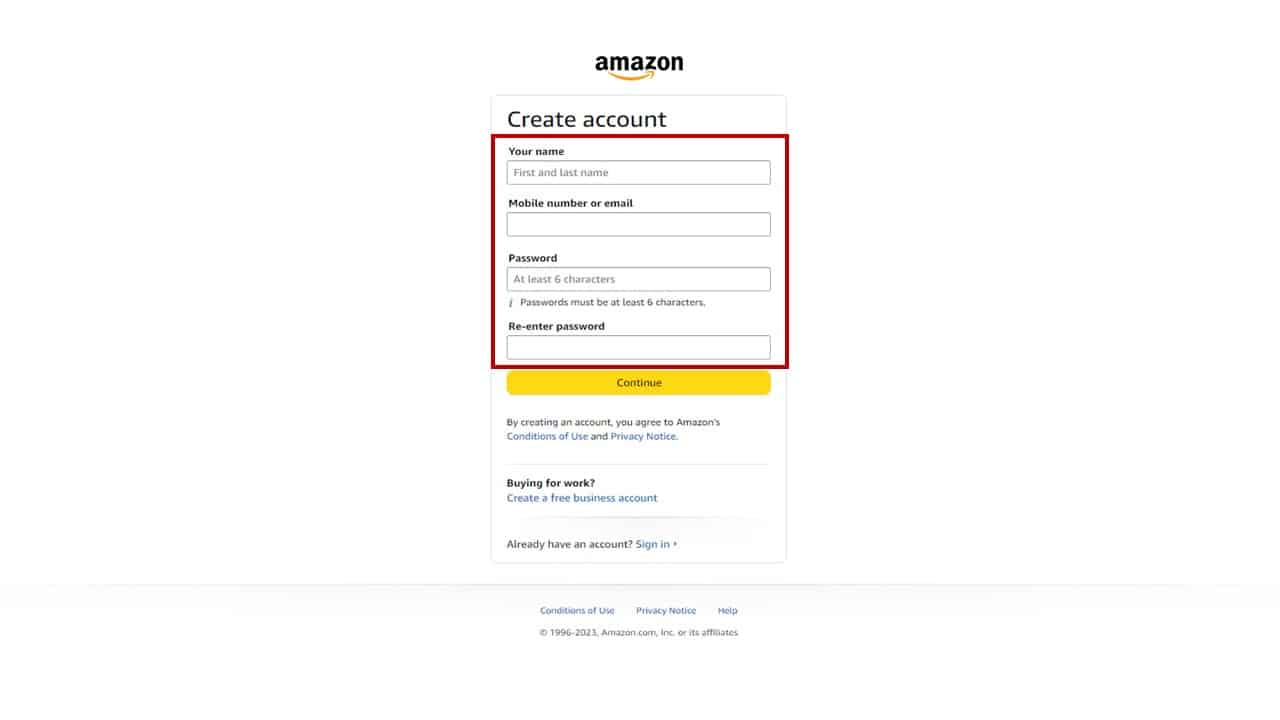
On the registration page, you will be presented with a simple form requiring a few key pieces of information:
- Your name: Enter your full name. This helps personalize your account and is used for shipping labels.
- Mobile number or email: Enter the valid email address or mobile phone number you prepared earlier. This will become your primary login ID.
- Password: Enter the strong, unique password you’ve chosen. Make sure to type it carefully, and double-check if there’s a “show password” option. You will likely be asked to re-enter it for confirmation to ensure there are no typos.
It is crucial to ensure that all information is accurate, especially your email address or phone number, as it is vital for the next step.
Verifying Your Account
Amazon implements a crucial security measure to confirm your identity and prevent fraudulent account creation: account verification. After submitting your initial details, Amazon will send a One-Time Password (OTP) or verification code to the email address or mobile phone number you provided.
Check your email inbox (including spam/junk folders) or your mobile phone’s SMS messages for this code. Once received, enter the OTP into the designated field on the Amazon registration page. This step confirms that you own the email address or phone number, which is critical for future account security, password resets, and notifications. Without successfully verifying your account, you will not be able to proceed.
Initial Account Setup and Personalization (Optional but Recommended)
Once your account is verified, you are technically ready to start exploring Amazon. However, taking a few extra steps will enhance your experience and secure your account further:
- Adding a shipping address: Navigate to “Your Account” and then “Your Addresses.” Add your primary shipping address. This will save time during checkout. You can add multiple addresses for different locations or recipients.
- Adding a payment method: Go to “Your Account” and then “Your Payments.” Add your preferred credit card, debit card, or other payment options. Amazon’s payment system is encrypted and secure, but always ensure you are on the official Amazon website or app.
- Setting up 2-Factor Authentication (2FA): This is perhaps the most important digital security step you can take. Under “Your Account,” navigate to “Login & Security” and look for “Two-Step Verification” or “Two-Factor Authentication.” Enable this feature. It requires a secondary verification code (usually from an authenticator app or SMS to your phone) in addition to your password each time you log in from a new device. This vastly improves your account’s resistance to unauthorized access.
- Exploring account settings: Familiarize yourself with other settings like communication preferences, privacy settings, and digital content preferences to tailor your Amazon experience.
Post-Account Creation: Maximizing Your Amazon Experience
Opening your account is just the beginning. To truly leverage the full potential of Amazon and maintain robust digital security, ongoing engagement and awareness are key.
Security Best Practices for Your New Account
Digital security is a continuous process, not a one-time setup.
- Regularly updating your password is a simple yet effective measure. Even a strong password can eventually be compromised, so periodic changes add an extra layer of protection.
- Enabling and maintaining 2FA remains your strongest defense. Ensure your secondary verification method (e.g., phone number for SMS codes, authenticator app) is up-to-date and accessible.
- Recognizing phishing attempts is crucial. Amazon will never ask for your password or personal financial information via unsolicited emails or texts. Always verify the sender and the link before clicking. Look for grammatical errors, suspicious URLs, or urgent demands. If in doubt, directly type Amazon’s URL into your browser rather than clicking a link.
- Monitoring account activity regularly, especially your order history and login activity, can help you spot unauthorized transactions or access attempts early. Amazon provides tools within your account settings to review recent activity.
Exploring Amazon’s Features and Settings
Your Amazon account is a hub for numerous features designed to enhance convenience and personalization.
- Consider Prime membership for benefits like free expedited shipping, access to Prime Video and Music, exclusive deals, and more. Explore the “Try Prime” option to see if it suits your needs.
- Utilize wishlists to save items you’re interested in for later purchase or to share with friends and family.
- Keep track of your order history for easy reordering, returns, or warranty inquiries.
- Customize your communication preferences to receive only the notifications and promotional emails you desire, avoiding inbox clutter.
- Explore your digital content libraries for Kindle books, Audible audiobooks, and Prime Video, which are all tied to your account and accessible across compatible devices.
Troubleshooting Common Account Issues
Despite Amazon’s robust systems, you might occasionally encounter minor issues.
- Password reset: If you forget your password, Amazon’s “Forgot your password?” link on the sign-in page will guide you through a secure reset process, typically involving email or phone verification.
- Verification code delays: If an OTP doesn’t arrive immediately, check your spam folder, ensure your phone has signal, or request a resend.
- Contacting Amazon customer service: For more complex issues, such as unauthorized charges, account lockouts, or technical glitches, Amazon’s customer service is readily available. You can usually find contact options (chat, phone, email) through the “Help” or “Customer Service” link at the bottom of Amazon’s website or within the app. Be prepared to verify your identity.
Conclusion
Opening an Amazon account is the foundational step to unlocking a vast digital world of commerce, entertainment, and convenience. While the process itself is straightforward, approaching it with an understanding of Amazon’s ecosystem and a commitment to digital security best practices ensures a seamless, secure, and rewarding experience. By following this comprehensive guide, you’ve not only created an account but also equipped yourself with the knowledge to navigate the Amazon platform effectively, securely, and insightfully, transforming a simple setup into a gateway for enhanced digital living. Embrace the possibilities, explore responsibly, and enjoy the unparalleled access that your new Amazon account provides.
aViewFromTheCave is a participant in the Amazon Services LLC Associates Program, an affiliate advertising program designed to provide a means for sites to earn advertising fees by advertising and linking to Amazon.com. Amazon, the Amazon logo, AmazonSupply, and the AmazonSupply logo are trademarks of Amazon.com, Inc. or its affiliates. As an Amazon Associate we earn affiliate commissions from qualifying purchases.