
Setting up an Amazon Business account is a strategic financial move for any organization looking to streamline procurement, optimize spending, and gain access to exclusive business-centric benefits. Unlike a standard consumer account, an Amazon Business account is specifically designed to meet the complex purchasing needs of businesses, from sole proprietorships and small businesses to large enterprises and non-profits. This dedicated platform facilitates better financial management, offering tools and features that contribute directly to a more efficient and cost-effective operational budget. By centralizing purchasing, simplifying expense tracking, and leveraging business-specific pricing, companies can unlock significant financial advantages that directly impact their bottom line.
Understanding the Financial Benefits of an Amazon Business Account
The core appeal of an Amazon Business account lies in its inherent financial advantages, which are tailored to help businesses save money and manage their expenditures more effectively. These benefits extend beyond simple discounts, encompassing a comprehensive suite of tools designed for enhanced financial oversight and operational efficiency.
Streamlined Procurement and Cost Savings
One of the most immediate financial benefits is the ability to streamline procurement processes. Amazon Business allows for the creation of multi-user accounts, meaning multiple employees can make purchases under a single, consolidated business account. This centralization is crucial for maintaining financial control. Administrators can set up spending limits, designate preferred vendors, and establish approval workflows, ensuring that all expenditures align with the company’s financial policies and budget. The detailed transaction history and custom reporting features make it easier to track departmental spending, identify cost centers, and pinpoint opportunities for savings. For instance, by aggregating purchases across different departments, businesses can often qualify for higher quantity discounts that would not be available on individual orders. This systematic approach to purchasing directly translates into reduced administrative costs and improved cash flow management.
Access to Business-Specific Pricing and Promotions
Amazon Business grants exclusive access to a different pricing structure than what is available to individual consumers. This includes quantity discounts on eligible items, allowing businesses to purchase in bulk at a lower per-unit cost. Furthermore, members often receive access to business-specific promotions, deals, and daily discounts that are not advertised on the standard Amazon marketplace. For organizations that regularly purchase office supplies, IT equipment, cleaning products, or manufacturing components, these specialized prices can lead to substantial ongoing savings. The platform also offers tiered pricing, where the price per unit decreases as the order volume increases, directly incentivizing larger, more cost-effective purchases. This tailored approach to pricing ensures that businesses are getting the best possible value for their operational needs, directly impacting their budget efficiency.
Simplified Expense Tracking and Reporting
Effective financial management hinges on accurate and accessible expense tracking. Amazon Business significantly simplifies this process through its advanced reporting capabilities. Account administrators can generate detailed purchase reports, categorized by user, department, product type, or custom tags. These reports are invaluable for budgeting, financial audits, and tax preparation. The platform often integrates with popular accounting software like QuickBooks, Xero, and SAP Ariba, allowing for automated reconciliation of purchases. This integration reduces manual data entry errors, saves significant administrative time, and provides a real-time view of business expenditures. The ability to export comprehensive reports in various formats ensures that financial data can be easily shared with accounting teams or used for in-depth financial analysis, making it a powerful tool for maintaining fiscal health.
Essential Steps to Setting Up Your Amazon Business Account
The process of creating an Amazon Business account is straightforward, but it requires careful attention to detail, particularly regarding the financial and legal documentation that validates your business identity. Proper setup ensures you can fully leverage all the financial tools and benefits the platform offers.
Eligibility and Initial Requirements
Before initiating the registration process, ensure your business meets Amazon’s eligibility criteria and you have the necessary documentation ready. Typically, you’ll need:
- A valid business email address: This should be a domain-specific email (e.g., yourname@yourcompany.com), not a generic personal email.
- A legally registered business name: This could be a sole proprietorship, partnership, LLC, corporation, or non-profit organization.
- Your company’s tax identification number (TIN) or VAT ID: For U.S. businesses, this is typically an Employer Identification Number (EIN). International businesses will require their respective tax IDs. This is crucial for tax exemption eligibility and financial compliance.
- A valid payment method: While you’ll set up payment methods later, Amazon needs to confirm you have access to legitimate business payment options.
- A business address and phone number: These details are used for verification and billing purposes.
Having these financial and legal documents readily accessible will significantly expedite the verification process and ensure a smooth financial onboarding experience.
The Registration Process: A Step-by-Step Financial Onboarding
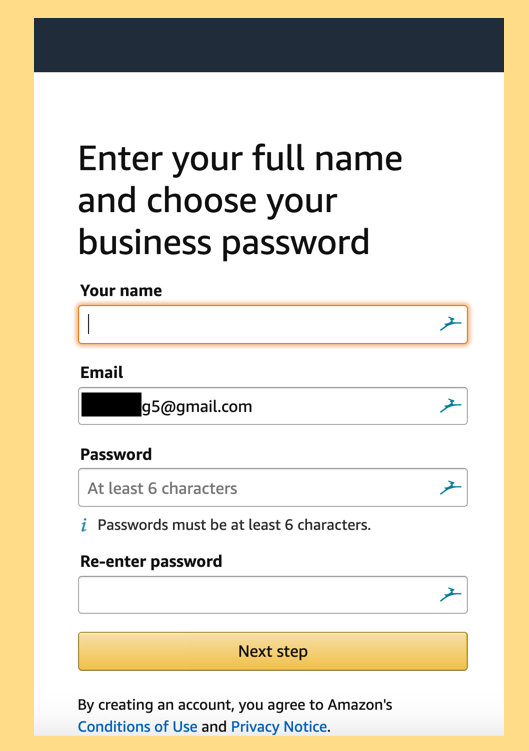
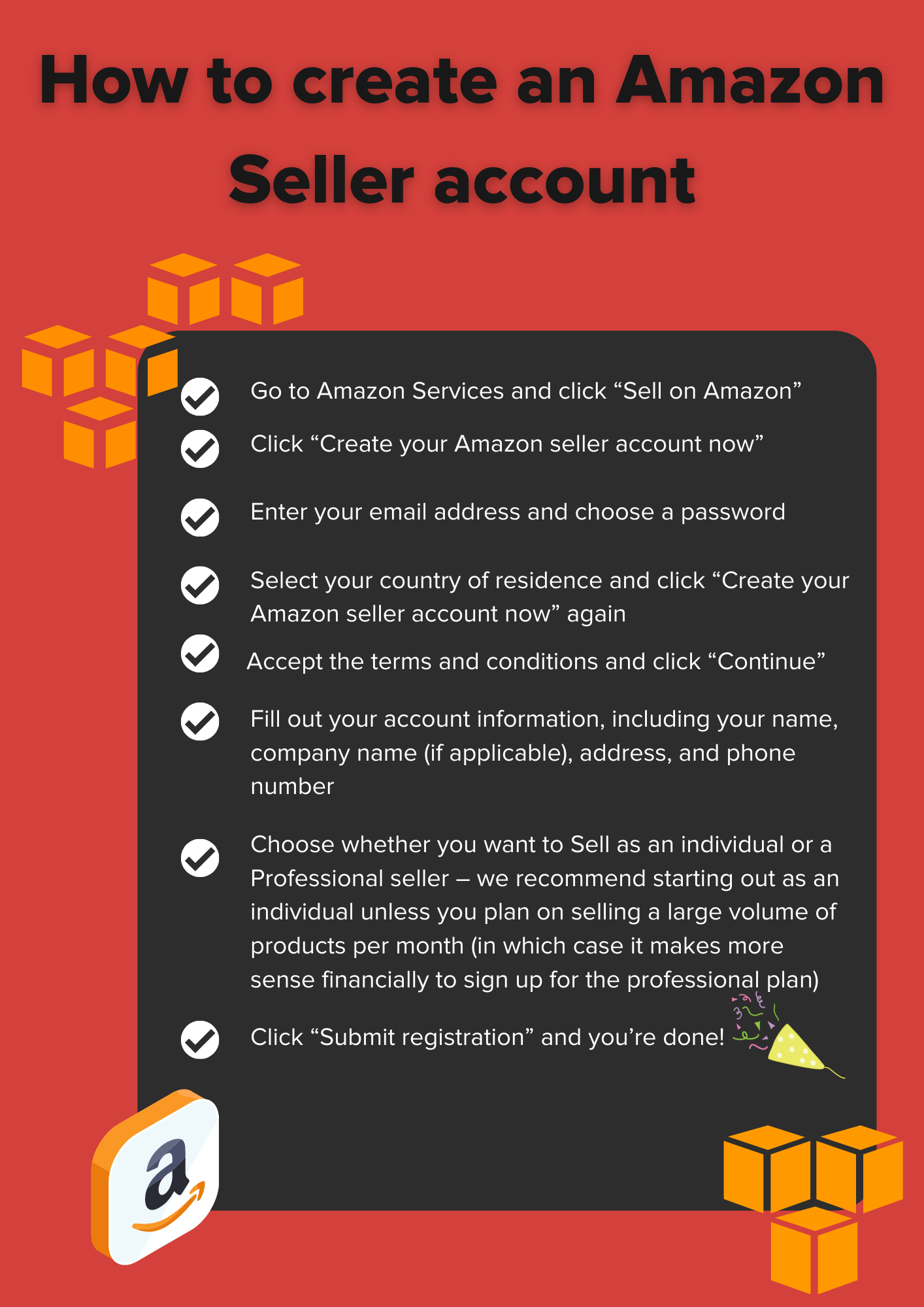
The registration process typically begins by navigating to the Amazon Business homepage and clicking “Create a free account.”
- Enter your business email address: Use the dedicated business email established earlier.
- Create a password: Ensure it’s strong and secure.
- Provide your business name: Enter the exact legal name of your business.
- Enter your business address and phone number: Provide the primary physical address for your operations.
- Submit your tax identification number (TIN/EIN/VAT ID): This is a critical step for Amazon to verify your business’s legal and financial standing.
- Select your business type: Choose from options like “small business,” “medium business,” “enterprise,” or “non-profit,” as this can influence access to certain features and pricing tiers.
- Review and agree to the Amazon Business terms and conditions: Pay attention to clauses related to financial responsibility and data usage.
After submitting this initial information, Amazon will typically send a verification email to the business address provided. Clicking the link in this email confirms your account creation and moves you to the next stage of verification.
Verifying Your Business Identity and Financial Details
Amazon takes identity verification seriously to ensure the integrity of its business platform and protect both buyers and sellers. This phase often involves Amazon reviewing the submitted information against public records or requesting additional documentation.
- Email verification: Confirm your business email address.
- Tax ID verification: Amazon will cross-reference your submitted TIN/EIN/VAT ID with government databases to confirm your business’s legitimacy.
- Possible document requests: In some cases, especially for newer businesses or if there are discrepancies, Amazon may request additional documentation. This could include a copy of your business license, articles of incorporation, bank statements, or utility bills linked to your business address. These documents primarily serve to verify the financial and legal existence of your entity.
The verification process typically takes 1-3 business days, though it can be faster or slower depending on the complexity of your business structure and the accuracy of the information provided. Once verified, your account is fully active, allowing you to begin purchasing and utilizing all the financial tools Amazon Business has to offer.
Optimizing Your Amazon Business Account for Financial Efficiency
Once your Amazon Business account is active, the real work of maximizing its financial benefits begins. Strategic configuration and consistent utilization of its features can lead to significant operational cost reductions and improved budget management.
Managing Multiple Users and Purchase Approvals
A critical feature for financial control in larger organizations is the ability to manage multiple users with varying levels of access and spending authority. As an administrator, you can:
- Invite team members: Add employees to your business account, assigning them roles such as “Requester,” “Purchaser,” or “Administrator.”
- Create user groups: Organize users by department, project, or location, allowing for tailored purchasing policies.
- Set spending limits: Establish individual or group spending thresholds to prevent unauthorized or excessive expenditures, directly impacting budget adherence.
- Implement approval workflows: Mandate that certain purchases (e.g., those over a specific amount) require approval from a manager or finance department before they can be completed. This ensures financial oversight and accountability, preventing costly rogue spending.
These controls are indispensable for maintaining budgetary discipline and ensuring that procurement aligns with financial goals.
Leveraging Tax Exemption Programs
For many businesses and organizations, sales tax can represent a significant hidden cost. Amazon Business offers a robust tax exemption program that allows eligible entities to make tax-exempt purchases directly on the platform.
- Enroll in the Amazon Tax Exemption Program (ATEP): Businesses and non-profits in qualifying states or jurisdictions can upload their tax exemption certificates.
- Automatic tax removal: Once approved, Amazon automatically removes applicable sales tax from eligible purchases, directly reducing the cost of goods and services.
- Compliance documentation: The program also helps businesses maintain compliance by providing necessary documentation for tax audits.
Actively enrolling in ATEP is a powerful way to reduce operational costs and improve cash flow, as the savings can be substantial over time.
Integrating with Financial Software
The efficiency gains from integrating your Amazon Business account with your existing financial management systems cannot be overstated.
- Automated data transfer: Connect your account with accounting software like QuickBooks Online, Xero, or procurement platforms like SAP Ariba. This allows for automated transfer of purchase data, including line-item details, pricing, and vendor information.
- Reduced manual effort and errors: Eliminating manual data entry drastically reduces the risk of human error and frees up accounting staff to focus on more strategic financial tasks.
- Real-time financial visibility: With integrated systems, your financial records are updated in near real-time, providing a current and accurate picture of your expenditures. This is vital for accurate budgeting, forecasting, and financial reporting.
- Streamlined reconciliation: Bank and credit card statement reconciliation becomes much simpler when all Amazon Business transactions are automatically categorized and matched within your accounting software.
Investing time in setting up these integrations will yield long-term financial efficiency and enhance the accuracy of your financial statements.
Advanced Financial Strategies with Your Amazon Business Account
Beyond basic procurement and expense management, an Amazon Business account can be a powerful tool for implementing more advanced financial strategies, driving deeper insights and further cost optimizations.
Analyzing Spending Patterns for Better Budgeting
The detailed analytics and reporting features within Amazon Business provide a wealth of data that can be leveraged for strategic financial planning.
- Identify spending trends: Regularly review custom reports to identify patterns in purchasing, such as peak spending periods, frequently purchased items, and departmental expenditure variations.
- Vendor consolidation opportunities: Analyze purchases across multiple vendors for similar items. Identifying opportunities to consolidate purchases with fewer vendors, especially Amazon Business itself, can lead to increased quantity discounts and simplified accounts payable.
- Budget adjustments: Use spending data to refine future budgets, allocating resources more effectively and identifying areas where spending can be reduced or reallocated for greater impact. For instance, if a department consistently overspends on a particular category, the data provides a clear basis for policy adjustments or negotiating better terms.
- Cost avoidance strategies: By understanding where money is being spent, businesses can proactively seek alternatives, negotiate better prices, or implement policies to avoid unnecessary costs in the future.
This data-driven approach transforms reactive expense tracking into proactive financial management.
Maximizing Discounts and Bulk Purchasing
To truly optimize your financial outlay, it’s essential to actively seek out and leverage the various discount opportunities available.
- Utilize quantity discounts: Always evaluate if ordering a larger quantity of frequently used items will result in a lower per-unit cost. The platform often highlights these savings directly.
- Recurring Delivery (Subscribe & Save for Business): For consumable items, setting up recurring deliveries can unlock additional percentage discounts, ensuring consistent supply while saving money.
- Spotting exclusive business deals: Regularly check the “Business Deals” section for limited-time offers and promotions specific to business customers. These can include significant savings on electronics, office equipment, or seasonal supplies.
- Comparison shopping within the platform: Even within Amazon Business, compare prices from different sellers for the same product, as pricing can vary. Leverage Amazon’s competitive environment to secure the best possible rates.
These strategies directly contribute to improving profitability by reducing the cost of goods and operational expenses.

Understanding Payment Solutions and Credit Options
Amazon Business offers flexible payment solutions that can significantly impact a company’s cash flow and financial flexibility.
- Amazon Business Prime Card: Businesses can apply for an Amazon Business Prime Store Card or Amazon Business Prime American Express Card, which offer extended payment terms (e.g., 90 days for qualified purchases) or cash back rewards. These options can improve working capital management.
- Invoice financing/Pay by Invoice: Eligible businesses can opt for “Pay by Invoice,” which provides net payment terms (e.g., Net 30, Net 45, Net 60) on approved purchases. This allows businesses to receive goods immediately and pay later, enhancing cash flow and reducing the immediate strain on financial resources.
- Purchasing cards and corporate credit lines: Integrate existing corporate purchasing cards or credit lines seamlessly into the Amazon Business account. This centralizes spending and simplifies reconciliation for accounting teams.
Carefully selecting and utilizing the most appropriate payment solutions can provide crucial financial leverage, allowing businesses to manage their cash flow more effectively and invest in growth opportunities.
aViewFromTheCave is a participant in the Amazon Services LLC Associates Program, an affiliate advertising program designed to provide a means for sites to earn advertising fees by advertising and linking to Amazon.com. Amazon, the Amazon logo, AmazonSupply, and the AmazonSupply logo are trademarks of Amazon.com, Inc. or its affiliates. As an Amazon Associate we earn affiliate commissions from qualifying purchases.