
Creating a web application is a multi-faceted endeavor that combines elements of design, programming, and infrastructure management. It involves building interactive digital experiences accessible via a web browser, ranging from simple informational sites to complex, data-driven platforms. Understanding the foundational principles and a structured approach is crucial for transforming an idea into a functional and effective web application. This guide delves into the essential components, development phases, and best practices for embarking on this journey.
Understanding the Core Components of a Web Application
A typical web application operates through a layered architecture, with distinct components working in harmony to deliver the user experience. These layers are broadly categorized into frontend, backend, and database.

Frontend Development: The User Interface
The frontend is what users directly interact with—the visual and interactive elements of a web application displayed in their browser. It’s often referred to as client-side development. The core technologies underpinning the frontend are:
- HTML (HyperText Markup Language): Provides the structure and content of web pages. It defines elements like headings, paragraphs, images, and links.
- CSS (Cascading Style Sheets): Controls the presentation and layout of HTML elements, dictating colors, fonts, spacing, and responsive behavior for different screen sizes.
- JavaScript: Adds interactivity and dynamic behavior to web pages. It enables features like form validation, animations, asynchronous data loading, and complex user interface manipulations.
Modern frontend development heavily relies on JavaScript frameworks and libraries that streamline the creation of complex user interfaces and single-page applications (SPAs). Popular choices include React, Angular, and Vue.js, each offering different paradigms for component-based development and state management. Build tools like Webpack or Vite are also essential for bundling and optimizing frontend assets.
Backend Development: The Server-Side Logic
The backend, or server-side, is the unseen engine of a web application. It handles the logic, data processing, authentication, and communication with the database. When a user interacts with the frontend (e.g., submits a form, requests data), the frontend sends a request to the backend. The backend processes this request, interacts with the database if necessary, and sends a response back to the frontend.
Backend development involves:
- Programming Languages: A wide array of languages are used, including Python, Node.js (JavaScript on the server), Ruby, Java, PHP, and Go. The choice often depends on project requirements, team expertise, and ecosystem support.
- Web Frameworks: These provide a structured way to build web applications, offering pre-built components and conventions for routing, handling requests, managing sessions, and interacting with databases. Examples include Django (Python), Express.js (Node.js), Ruby on Rails (Ruby), Spring Boot (Java), and Laravel (PHP). These frameworks significantly accelerate development by abstracting away much of the boilerplate code.
- APIs (Application Programming Interfaces): Backend services often expose APIs (typically RESTful or GraphQL) that allow the frontend or other services to communicate with them programmatically.
Databases: Storing and Retrieving Data
Databases are critical for storing, organizing, and retrieving the data that powers a web application. This data can range from user profiles and content to transactions and application settings. There are two primary types of databases:
- Relational Databases (SQL): These databases organize data into tables with predefined schemas, where data is related through keys. They are excellent for structured data where data integrity and complex querying are paramount. Popular examples include PostgreSQL, MySQL, SQL Server, and Oracle.
- Non-relational Databases (NoSQL): These databases offer more flexible data models and are often better suited for handling large volumes of unstructured or semi-structured data, and for applications requiring high scalability and availability. Examples include MongoDB (document-oriented), Cassandra (column-family), and Redis (key-value store, often used for caching).
The backend interacts with the database through Object-Relational Mappers (ORMs) or database drivers, simplifying data manipulation and ensuring secure transactions.
The Development Lifecycle: A Step-by-Step Guide
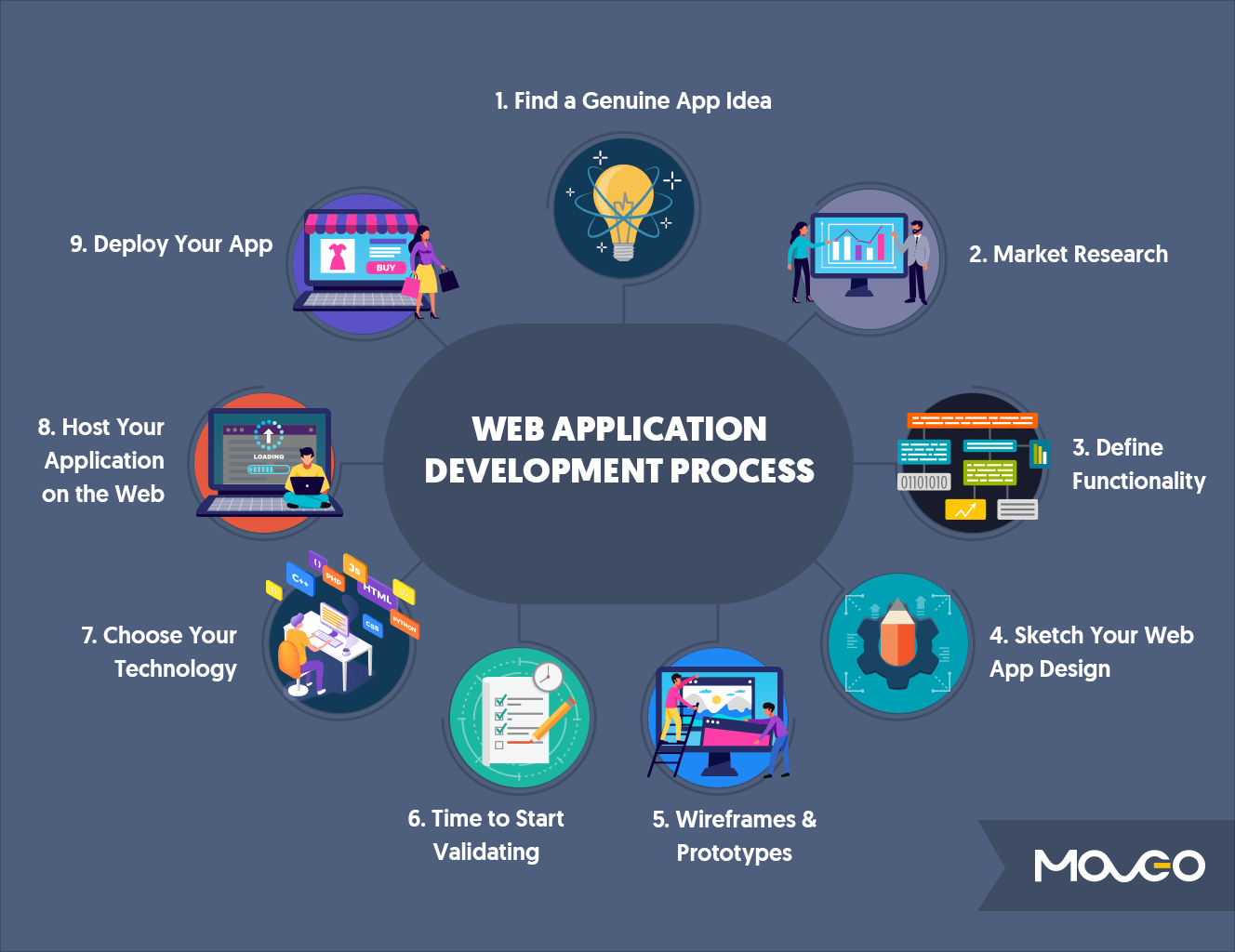
Building a web application typically follows a structured lifecycle, moving from conceptualization to deployment and ongoing maintenance.
Planning and Design: Laying the Foundation
This initial phase is critical for defining the application’s purpose, features, and target audience. It involves:
- Requirements Gathering: Clearly defining what the application should do, who it’s for, and what problems it solves.
- User Experience (UX) Design: Focusing on how users will interact with the application, ensuring it’s intuitive and efficient. This includes creating user flows, wireframes (skeletal layouts), and mockups (visual designs).
- Technical Design & Architecture: Choosing the appropriate technology stack (frontend framework, backend language/framework, database), outlining the system architecture, API designs, and potential third-party integrations. This phase also includes considering scalability, security, and performance from the outset.
Development and Implementation: Bringing it to Life
With a solid plan in place, the development team begins coding:
- Frontend Development: Building the user interface according to the UX/UI designs, implementing interactivity, and ensuring responsiveness across devices.
- Backend Development: Developing the server-side logic, APIs, and business rules, including user authentication, data processing, and integration with the database.
- Database Setup: Designing the database schema, creating tables (for SQL) or collections (for NoSQL), and populating initial data.
- API Integration: Connecting the frontend to the backend APIs to enable data exchange and functionality.
Throughout this phase, developers utilize version control systems (like Git) to manage code changes, collaborate effectively, and maintain a history of the project.
Testing and Quality Assurance: Ensuring Robustness
Thorough testing is paramount to ensure the application is stable, secure, and performs as expected. This involves several types of testing:
- Unit Testing: Testing individual components or functions in isolation to verify they work correctly.
- Integration Testing: Verifying that different modules or services of the application work together seamlessly.
- End-to-End Testing: Simulating real user scenarios to test the entire application flow from frontend to backend and database.
- Performance Testing: Assessing the application’s responsiveness and stability under various load conditions.
- Security Testing: Identifying vulnerabilities and ensuring the application is protected against common threats.
Debugging tools and automated testing frameworks are indispensable during this stage to identify and resolve bugs efficiently.
Deployment and Hosting: Making it Accessible
Once the application is stable and tested, it needs to be deployed to a server where it can be accessed by users over the internet.
- Server Setup: Configuring web servers (e.g., Nginx, Apache), application servers, and databases.
- Cloud Platforms: Utilizing cloud providers like AWS (Amazon Web Services), Microsoft Azure, or Google Cloud Platform (GCP) for scalable and reliable hosting. These platforms offer a range of services from virtual machines (IaaS) to platform-as-a-service (PaaS) options like Heroku, Vercel, or Netlify, which simplify deployment.
- CI/CD (Continuous Integration/Continuous Deployment): Implementing automated pipelines that build, test, and deploy code changes automatically, streamlining the release process and ensuring faster iterations.
Essential Tools and Technologies for Modern Web Development
The web development ecosystem is vast and constantly evolving. Leveraging the right tools can significantly enhance productivity and the quality of the final product.
Version Control Systems: Git and GitHub/GitLab
Git is the industry standard for version control, allowing developers to track changes in code, revert to previous versions, and collaborate without overwriting each other’s work. Platforms like GitHub, GitLab, and Bitbucket provide cloud-based hosting for Git repositories, facilitating team collaboration, code reviews, and project management.
Integrated Development Environments (IDEs): VS Code, IntelliJ IDEA
IDEs offer a comprehensive suite of tools for programming, including a code editor, debugger, build automation, and intelligent code completion. Visual Studio Code (VS Code) is a popular, lightweight, and highly extensible choice for web development. Other powerful IDEs include IntelliJ IDEA (particularly for Java and JavaScript) and WebStorm.
Package Managers: npm, Yarn, Pip
Package managers automate the process of installing, updating, and managing libraries and dependencies for a project. npm (Node Package Manager) and Yarn are essential for JavaScript projects, while Pip is the standard for Python. These tools ensure that all required external code is present and compatible.
Containerization: Docker and Kubernetes
For deploying and scaling applications, Docker allows developers to package applications and their dependencies into portable containers. This ensures consistency across different environments. Kubernetes is an orchestration system that automates the deployment, scaling, and management of containerized applications, making it ideal for microservices architectures and large-scale deployments.
Best Practices for Building Scalable and Secure Web Applications
Beyond mere functionality, a robust web application must be scalable, secure, and maintainable.
Security First: OWASP Top 10, Data Encryption
Security must be integrated into every stage of development, not as an afterthought. Adhering to guidelines like the OWASP Top 10 for web application security vulnerabilities is crucial. This includes implementing strong authentication and authorization mechanisms, protecting against SQL injection and cross-site scripting (XSS) attacks, encrypting sensitive data (both in transit and at rest), and regularly patching software.
Performance Optimization: Caching, CDN, Efficient Queries
A slow application deters users. Optimizing performance involves:
- Caching: Storing frequently accessed data closer to the user or in memory to reduce database load and server response times.
- Content Delivery Networks (CDNs): Distributing static assets (images, CSS, JavaScript) to servers geographically closer to users to reduce latency.
- Efficient Database Queries: Writing optimized queries and indexing database tables properly to retrieve data quickly.
- Code Optimization: Minifying JavaScript and CSS, compressing images, and optimizing server-side logic.
Scalability Considerations: Microservices, Load Balancing
As user traffic grows, the application must scale seamlessly.
- Load Balancing: Distributing incoming network traffic across multiple servers to ensure no single server is overloaded.
- Microservices Architecture: Breaking down a monolithic application into smaller, independent services that can be developed, deployed, and scaled independently.
- Serverless Functions: Utilizing services like AWS Lambda or Azure Functions to run code without provisioning or managing servers, automatically scaling with demand.
Maintainability and Documentation: Clean Code, API Docs
A maintainable codebase is essential for long-term success.
- Clean Code: Writing readable, well-structured, and self-documenting code.
- API Documentation: Providing clear and comprehensive documentation for APIs, making it easier for frontend developers and other services to integrate.
- Comments: Using comments judiciously to explain complex logic or non-obvious design choices.
Post-Launch: Monitoring, Maintenance, and Iteration
Launching an application is not the end of the journey; it’s the beginning of its operational phase.
Analytics and User Feedback: Understanding Usage Patterns
Tools like Google Analytics or Mixpanel provide insights into user behavior, helping identify popular features, bottlenecks, and areas for improvement. Collecting direct user feedback through surveys or support channels is also invaluable.
Continuous Updates and Bug Fixes: Agile Development
Web applications require continuous attention. This includes applying security patches, fixing bugs reported by users, and rolling out new features. Adopting agile development methodologies allows for frequent, iterative releases, keeping the application relevant and stable.

Infrastructure Monitoring: Uptime, Performance, Error Tracking
Monitoring tools (e.g., Datadog, New Relic, Prometheus) are essential for tracking server health, application performance, and identifying errors in real-time. Proactive monitoring helps prevent outages and ensures a smooth user experience.
By systematically addressing these phases and incorporating best practices, individuals and teams can successfully navigate the complexities of web application development, creating robust, scalable, and user-centric digital solutions.
aViewFromTheCave is a participant in the Amazon Services LLC Associates Program, an affiliate advertising program designed to provide a means for sites to earn advertising fees by advertising and linking to Amazon.com. Amazon, the Amazon logo, AmazonSupply, and the AmazonSupply logo are trademarks of Amazon.com, Inc. or its affiliates. As an Amazon Associate we earn affiliate commissions from qualifying purchases.