
In the vast and ever-evolving digital marketplace, Amazon stands as a colossus, facilitating billions of transactions annually. While the convenience and reach of this e-commerce giant are undeniable, the sheer volume of operations inevitably leads to occasional discrepancies. From misplaced packages and damaged goods to incorrect orders and unauthorized charges, the need to file a claim is a common scenario for many Amazon users. This guide delves into the intricate digital pathways Amazon provides for customers to resolve these issues, offering a professional, insightful, and engaging tutorial on leveraging the platform’s technological infrastructure to successfully make a claim. We will navigate the digital landscape of Amazon’s support system, providing step-by-step instructions and best practices to ensure your concerns are addressed efficiently and effectively.

The Digital Landscape of Amazon Customer Service
Amazon’s customer service operates primarily through its sophisticated digital ecosystem. Understanding this environment is the first step toward successfully filing and resolving a claim. It’s a network of web pages, interactive tools, and automated systems designed to streamline support for its global user base.
Understanding Amazon’s Ecosystem and Support Channels
At its core, Amazon’s support is integrated directly into its website and mobile applications. This means that unlike traditional retail where you might walk back into a physical store, your “point of contact” is always a digital interface. The primary support channels include:
-
Your Account Section: This personalized hub is where all your order history, digital receipts, payment methods, and personal information reside. It’s the starting point for nearly all claim-related activities.
-
Help Pages/Customer Service Hub: A dedicated section of the Amazon website (and app) designed to answer frequently asked questions (FAQs), provide troubleshooting guides, and direct users to specific support options.
-
Automated Chatbots: Increasingly, Amazon deploys AI-powered chatbots as the first line of digital defense. These bots are programmed to understand common queries and guide users to relevant solutions or escalate issues to human representatives when necessary.
-
Email Support: For non-urgent matters or issues requiring detailed documentation, email remains a core channel, allowing for asynchronous communication and robust record-keeping.
-
Phone Support: While Amazon heavily leans on digital self-service, human phone support is still available, often accessed after an initial digital interaction has proven insufficient.
Recognizing these channels and understanding their purpose is crucial. The platform is engineered to guide you through a self-service resolution first, escalating to direct human interaction only when automated systems cannot suffice.
Identifying Common Claim Scenarios within the Digital Realm
Before diving into the “how-to,” it’s beneficial to recognize the types of claims Amazon’s digital system is equipped to handle. These typically fall into several categories:
-
Order Issues:
-
Missing or Late Deliveries: The item was never received, or significantly delayed beyond the estimated delivery window. Amazon’s tracking technology plays a crucial role here.
-
Damaged or Defective Items: Products arrived broken, not functioning, or significantly different from their description. Digital photos or videos are often critical evidence.
-
Incorrect Items Received: You received a product that was not what you ordered.
-
Missing Parts/Components: An item arrived incomplete.
-
-
Billing and Payment Issues:
-
Unauthorized Charges: Transactions you didn’t initiate.
-
Incorrect Charges: Overcharges or charges for canceled items.
-
Refund Not Received: A promised refund hasn’t been processed.
-
-
Account-Related Issues:
-
Account Security Concerns: Suspected unauthorized access or fraudulent activity.
-
Subscription Management: Issues with Prime, Kindle Unlimited, or other digital subscriptions.
-
-
Seller-Related Disputes:
- Problems with third-party sellers (Fulfilled by Amazon vs. Fulfilled by Seller). Amazon’s A-to-z Guarantee comes into play here, offering buyer protection.
Each scenario has a specific digital path within Amazon’s system, designed to efficiently collect the necessary information and guide the user towards a resolution.
The Role of Your Amazon Account in Claim Management
Your Amazon account is the central hub for all interactions, including claims. It stores your entire purchasing history, communication logs with sellers, and any previous support tickets. This centralization is a key technological feature that streamlines the claims process.
-
Personalized Data: When you initiate a claim, Amazon’s system automatically associates it with your account and the relevant order, pre-populating much of the necessary data.
-
Communication Hub: All messages, updates, and resolutions related to your claim are typically recorded and accessible within your account’s “Message Center” or “Your Orders” section.
-
Security and Verification: Your account login acts as your digital identity, ensuring that only you can access and manage your claims, protecting sensitive information.
Understanding that your account is the anchor for all support interactions simplifies the process considerably, as most actions will originate from or be routed back to this personalized digital space.
Navigating the Amazon Platform to Initiate a Claim
Once you understand the digital landscape, the next step is to physically (or rather, digitally) navigate to the correct sections of the Amazon platform to begin your claim. This involves accessing specific pages and potentially utilizing various digital tools available.
Locating Your Order History and Digital Receipts
The vast majority of claims begin with an order. Therefore, your “Order History” is the most crucial starting point.
-
Log In: Ensure you are logged into your Amazon account on either the desktop website or the mobile app.
-
Access “Returns & Orders”: On the desktop site, look for “Returns & Orders” in the top right corner. On the mobile app, tap the person icon at the bottom, then “Your Orders.”
-
Find the Relevant Order: Scroll through your recent orders or use the search/filter function to locate the specific order associated with your claim. Each order listing acts as a digital receipt, containing details about the item, seller, payment, and delivery status.
From this order page, you will find options like “Return or Replace Items,” “Problem with order,” or “View order details,” which are your gateways to initiating a claim for that specific purchase.
Accessing the “Help” and “Customer Service” Portals
While order history is great for product-specific issues, for broader concerns like account security or general inquiries, the dedicated “Help” or “Customer Service” portals are more appropriate.
-
Desktop: Scroll to the very bottom of any Amazon page and look for “Help” under the “Let Us Help You” section, or “Customer Service” under “Make Money with Us” (though “Help” is more direct).
-
Mobile App: Tap the menu icon (three horizontal lines) or the person icon at the bottom, then scroll down and select “Customer Service.”
These portals lead to a digital labyrinth of FAQs, self-help articles, and eventually, options to contact Amazon directly via chat, email, or phone. It’s designed to allow you to find answers independently before seeking human intervention.
Utilizing the Amazon Assistant and Chatbot Features
Amazon has increasingly integrated AI-powered assistants and chatbots to triage customer inquiries.
-
Amazon Assistant (Browser Extension): This browser extension offers quick access to order tracking, comparisons, and sometimes direct links to support pages. While not directly for claims, it can expedite navigation.
-
On-site/In-app Chatbot: When you click “Contact Us” or certain “Help” topics, you’ll often be presented with a chatbot first. This digital agent will ask you to describe your issue and try to match it with a pre-programmed solution or guide you to the correct department. Be clear and concise in your natural language input; these AI tools are becoming more sophisticated at understanding complex queries. If the bot cannot resolve your issue, it will typically offer to connect you to a human associate via chat or phone. This initial bot interaction is a critical part of Amazon’s scaled customer service technology.
Step-by-Step Guide to Filing Your Digital Claim
With the navigation mastered, you can now proceed with the actual process of filing your claim. This involves selecting the correct pathways, providing evidence, and tracking the resolution digitally.
Selecting the Correct Issue and Digital Claim Type
Once you’ve identified the relevant order or navigated to the general “Contact Us” section, you’ll be prompted to describe your issue.
-
Order-Specific Claims:
-
From “Your Orders,” click “Return or Replace Items” (for returns, replacements, or refunds) or “Problem with order” (for other issues like late delivery, missing items).
-
The system will then present a list of common problems related to that specific order. Select the one that best matches your situation (e.g., “Item defective or doesn’t work,” “Missing parts or accessories,” “Item arrived too late”).
-
Each selection will lead to tailored prompts, designed to gather specific information relevant to that claim type.
-
-
General Claims (Non-Order Specific):
-
If contacting via “Customer Service” for an account issue, for example, you’ll select broader categories first (e.g., “Digital Services and Device Support,” “Payment, Charges, or Gift Cards”).
-
Sub-categories will appear, narrowing down your options until you reach a specific problem description.
-
Choosing the most accurate description is paramount, as it directs your claim to the appropriate Amazon team and ensures you receive the most relevant digital forms and instructions.
Providing Essential Information and Digital Evidence
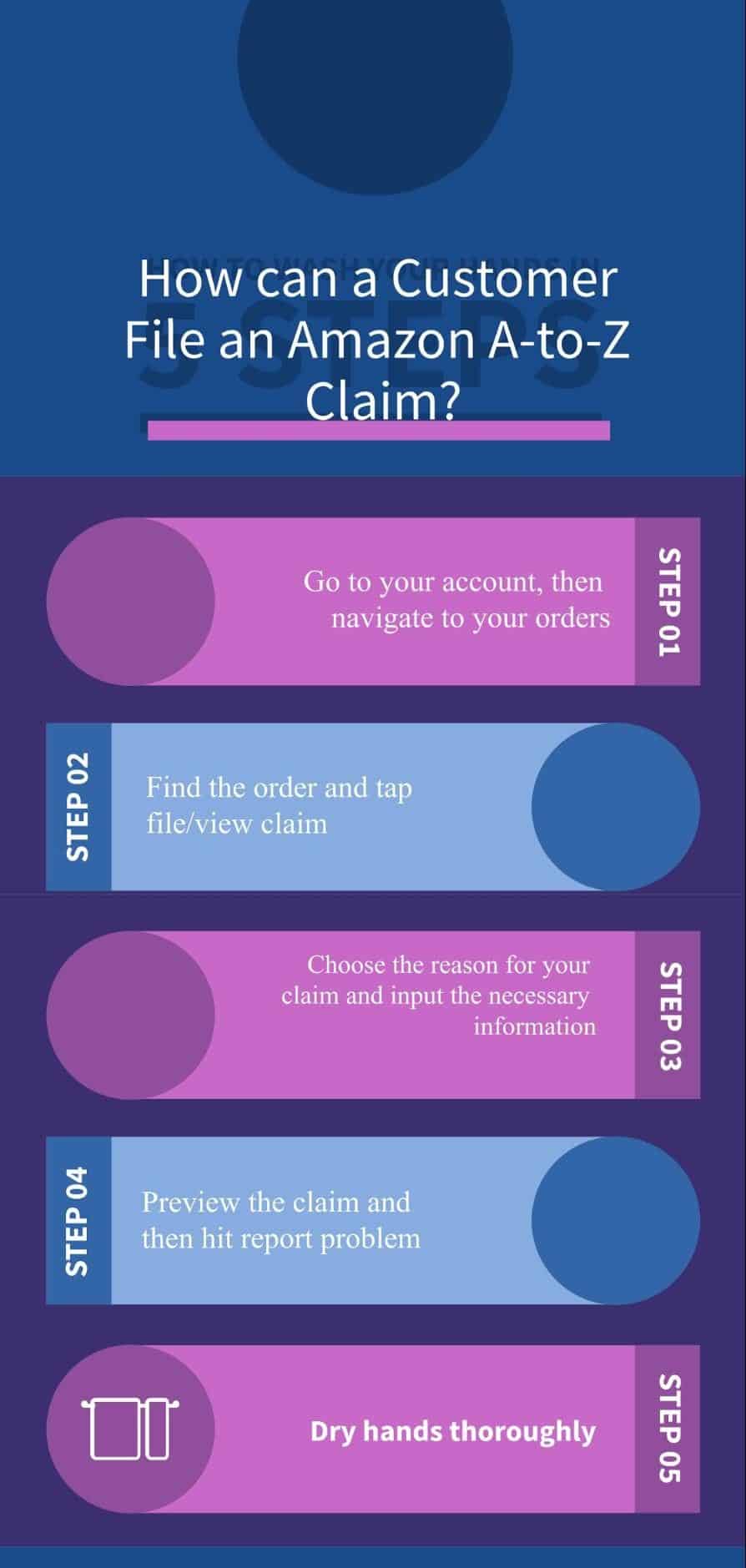
Once the issue type is selected, the system will ask for details. This is where your digital documentation becomes critical.
-
Detailed Description: Clearly and concisely explain the problem. Include dates, specific product details, and what resolution you expect (e.g., refund, replacement).
-
Digital Photos/Videos: For damaged, defective, or incorrect items, photographic or video evidence is often requested and highly effective. Amazon’s digital interface will provide an upload mechanism. Ensure images are clear and show the issue definitively.
-
Screenshots: For billing errors, unauthorized charges, or website glitches, screenshots of your bank statement, Amazon transaction history, or error messages can be invaluable.
-
Tracking Numbers/Communication Logs: If your claim involves a third-party seller or carrier, having their tracking numbers or any prior digital communication (emails, chat logs) ready will significantly expedite the process.
The more comprehensive and organized your digital evidence, the faster and smoother your claim resolution is likely to be. Remember, the support agent will be working purely from the digital information you provide.
Submitting Your Claim and Tracking Its Digital Status
After providing all necessary information and evidence, you will typically click a “Submit” or “Continue” button.
-
Confirmation: You’ll usually receive an on-screen confirmation and an email detailing your claim reference number and an estimated response time. This email is a critical digital record.
-
Tracking: Your claim’s status can usually be tracked within your “Your Orders” section (for order-specific claims) or via the “Message Center” within your Amazon account. Here, you can see updates, respond to Amazon’s inquiries, and view the final resolution.
-
Communication: Amazon will communicate updates via email or messages within your account. Regularly check both, especially if the issue is time-sensitive.
The digital tracking system provides transparency and allows you to monitor progress without repeated manual inquiries, a core benefit of a technologically integrated support system.
Advanced Digital Strategies for Claim Resolution
While Amazon’s automated systems resolve many claims, some require a more proactive and strategic approach, leveraging different digital pathways to ensure a satisfactory outcome.
Engaging with Amazon Customer Service Representatives Directly (Beyond Automated Systems)
When the chatbot or self-help options prove insufficient, the next digital step is to engage with a human representative.
-
Live Chat: Often, after interacting with the chatbot, you’ll be offered the option to “Chat with an associate.” This is a highly efficient digital channel for real-time interaction. Prepare to provide your order number and a brief summary of your issue. You can often save the chat transcript as a digital record.
-
Phone Call Request: If chat isn’t suitable, Amazon often provides an option to “Request a phone call.” You input your number, and an Amazon representative calls you directly, often within minutes. This avoids waiting on hold and ensures you speak to someone knowledgeable. While it’s a verbal interaction, the initiation process is entirely digital.
-
Email Support: For complex issues requiring extensive documentation or for issues where you need a detailed written response, emailing support can be beneficial. The “Contact Us” page usually provides an email option after a few steps.
When engaging directly, be professional, clear, and provide all pertinent digital records and reference numbers from previous interactions.
Escalating Your Claim Through Official Digital Channels
If your initial claim isn’t resolved satisfactorily, there are avenues for escalation.
-
Re-opening a Case: If a claim is closed without resolution, you can often re-open it within your account or by responding to the last message from Amazon support.
-
Asking for a Supervisor: In a live chat or on a phone call, if the first representative cannot resolve your issue, politely request to speak with a supervisor or a more senior specialist. These individuals often have greater authority and experience in handling complex digital disputes.
-
Amazon’s A-to-z Guarantee: For purchases from third-party sellers on Amazon (not “Sold by Amazon” or “Fulfilled by Amazon”), the A-to-z Guarantee offers significant buyer protection. If a seller fails to resolve an issue, you can file an A-to-z claim directly through your order history. This is a powerful digital tool for recourse, where Amazon steps in to mediate and often issue refunds itself. Understanding its terms and conditions is essential for leveraging this protective digital framework.
Understanding Amazon’s A-to-z Guarantee and Digital Protection Programs
The A-to-z Guarantee is Amazon’s flagship digital protection program for marketplace purchases. It covers various scenarios:
-
Non-Delivery: If an item doesn’t arrive by the estimated delivery date.
-
Item Not as Described: If the item received is materially different from what was ordered.
-
Returns Not Processed: If you returned an item according to Amazon’s policy but didn’t receive a refund.
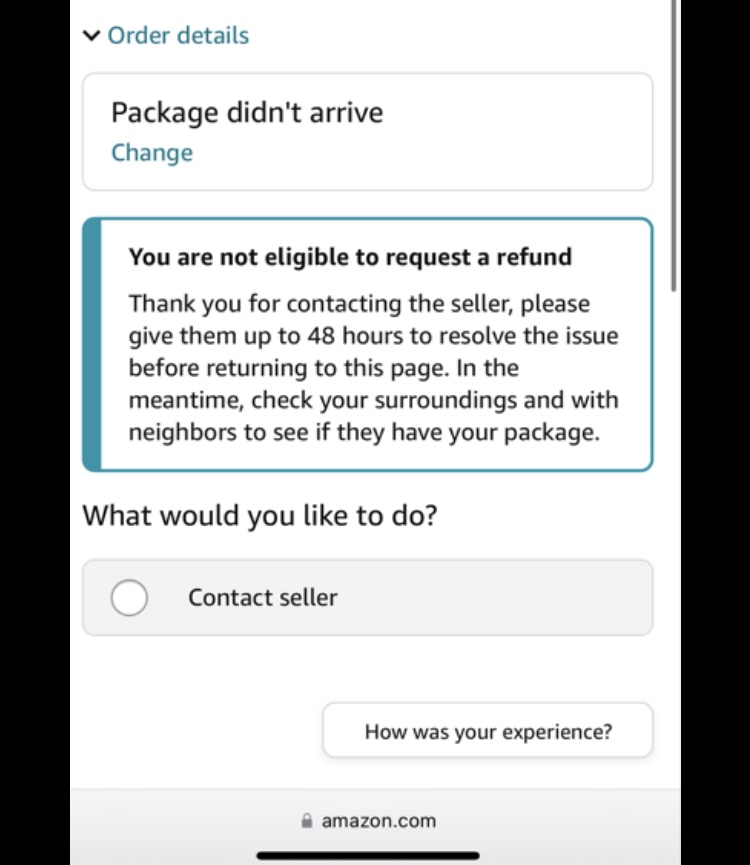
To file an A-to-z claim, you must typically have first attempted to contact the seller and waited a reasonable period (usually 48 hours) for a response. The entire A-to-z process is managed digitally through your Amazon account, providing a clear audit trail and ensuring Amazon’s direct oversight of the dispute. This digital safety net is a critical feature, enhancing trust in the vast third-party marketplace.
Best Practices for Effective Digital Claim Management
Successfully navigating Amazon’s digital claims process isn’t just about knowing the steps; it’s about adopting best practices that maximize your chances of a swift and fair resolution.
Maintaining Digital Records and Documentation
In the digital world, your word is often backed by your digital footprint.
-
Screenshot Everything: From the order confirmation to tracking information, product descriptions, conversations with sellers, and error messages – capture screenshots. These are immutable digital records.
-
Save Emails and Chat Transcripts: Keep copies of all email communications from Amazon and any chat transcripts. Many chat interfaces offer an option to email the transcript to yourself.
-
Photograph Packaging and Damage: If an item arrives damaged, photograph the shipping box (if damaged), the internal packaging, and the damaged item from multiple angles. Timestamped photos (if your device supports it) can add further credibility.
-
Record Dates and Times: Note down when you initiated contact, when you received responses, and any deadlines provided.
This meticulous digital record-keeping provides irrefutable evidence and a clear timeline, which is invaluable if a dispute escalates.
Communicating Clearly and Concisely Online
When interacting with Amazon’s digital support, clarity is king.
-
Be Specific: State the problem directly and avoid vague language. “My order is wrong” is less helpful than “Order #123-4567890-1234567 contained a blue widget instead of the red widget I ordered.”
-
Provide All Relevant Information Upfront: Include order numbers, item names, dates, and any reference numbers from previous contacts.
-
Maintain a Professional Tone: While frustrating, aggressive or emotional language can hinder resolution. A calm, factual approach is always more effective, even in written digital communication.
-
Proofread: Before sending an email or chat message, quickly review it for typos or unclear phrasing.
Clear, professional digital communication ensures that your issue is understood quickly and correctly, minimizing back-and-forth and accelerating resolution.
Leveraging Feedback and Review Systems for Broader Impact
While direct claims are the primary route for personal resolution, Amazon’s feedback and review systems can serve a broader purpose, impacting both Amazon’s service quality and other shoppers’ decisions.
-
Product Reviews: If a product is defective or not as described, leaving an honest, detailed review (once your personal claim is resolved) can inform other potential buyers and signal to Amazon (and the seller) quality control issues.
-
Seller Feedback: For third-party sellers, the seller feedback rating is critical. If a seller was unresponsive or unhelpful during your claim process, leaving factual feedback about their customer service can impact their future business and alert Amazon to potential issues with specific vendors.
-
Customer Service Feedback: After a support interaction (chat or phone), Amazon often sends a survey. Take a few moments to provide honest feedback. This digital data helps Amazon refine its support processes, improve chatbot efficacy, and train its human representatives.
These systems, while not directly part of the claims process, are vital digital mechanisms for quality assurance and continuous improvement within the Amazon ecosystem. They contribute to a more transparent and accountable marketplace for everyone.
Conclusion
Making a claim on Amazon, while potentially daunting at first, is a streamlined digital process designed to address a wide array of customer concerns. By understanding the technological infrastructure of their support system, navigating the platform effectively, and adhering to best practices for digital documentation and communication, you can significantly enhance your chances of a swift and satisfactory resolution. From the moment an issue arises, remember that your Amazon account is your control center, and clarity, evidence, and persistence are your most powerful tools in the digital claims arena. By leveraging the comprehensive suite of digital tools Amazon provides, you empower yourself to resolve disputes confidently and continue enjoying the vast benefits of online shopping.
aViewFromTheCave is a participant in the Amazon Services LLC Associates Program, an affiliate advertising program designed to provide a means for sites to earn advertising fees by advertising and linking to Amazon.com. Amazon, the Amazon logo, AmazonSupply, and the AmazonSupply logo are trademarks of Amazon.com, Inc. or its affiliates. As an Amazon Associate we earn affiliate commissions from qualifying purchases.