
The Gateway to Amazon’s Digital Ecosystem
Creating an Amazon account is the fundamental first step into a vast digital ecosystem, offering much more than just a retail platform. It serves as your unique digital identity, unlocking access to a comprehensive suite of services ranging from e-commerce to entertainment, cloud computing, and smart home integration. This single account is the key to Amazon’s extensive digital infrastructure, providing a unified access point for services like Prime Video, Amazon Music, Kindle e-books, Audible audiobooks, AWS (Amazon Web Services) management consoles for developers, and the seamless operation of smart devices like Alexa-enabled speakers and Ring security systems.

The process of setting up an Amazon account is designed to be straightforward, yet it involves critical steps concerning digital security and personal data management. Understanding each phase of this technical walkthrough ensures not only successful account creation but also lays the groundwork for a secure and optimized digital experience within Amazon’s robust network. By establishing this account, users gain the ability to personalize their interactions, manage preferences, and leverage Amazon’s AI-driven recommendation engines, all while maintaining control over their digital footprint across various integrated platforms.
Step-by-Step Account Creation: A Technical Walkthrough
The initiation of an Amazon account involves a precise sequence of actions, ensuring user verification and data integrity from the outset. This process is engineered to be intuitive, whether accessed via a desktop browser or a mobile application.
Initiating the Process: Navigating to Amazon’s Registration Page
To begin, direct your web browser to the official Amazon website (amazon.com or your local domain, e.g., amazon.co.uk). On the desktop version, hover over “Hello, Sign in” in the top right corner. A dropdown menu will appear, presenting a prominent “Start here” link next to “New customer?”. Clicking this link will redirect you to the account creation page.
For mobile users, the Amazon Shopping app provides an equally streamlined entry. Upon launching the app, you will typically be prompted to sign in or create an account. Select the option to “Create a new Amazon account.” Both pathways lead to the same data input interface, ensuring a consistent user experience regardless of the device.
Essential Information Input: Data Fields and Verification
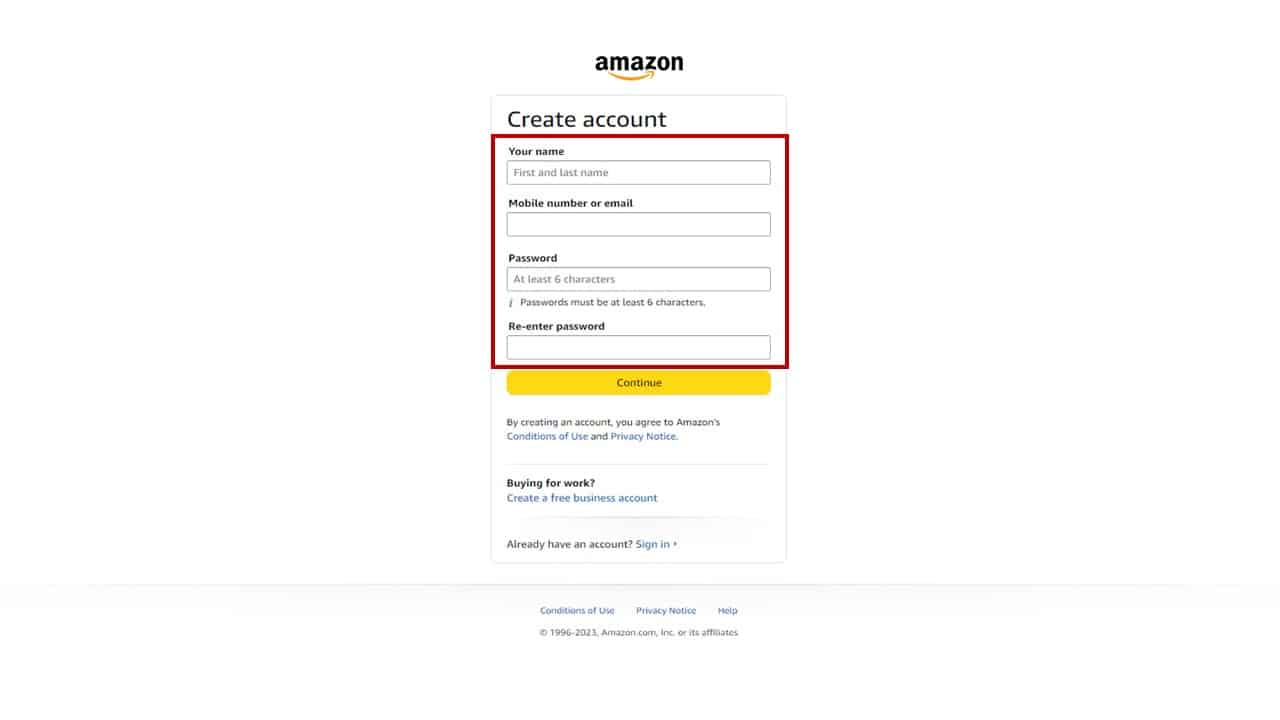
The registration page requires several pieces of personal information to establish your digital identity. You will be prompted to enter your full name, a valid email address or mobile phone number, and to create a secure password.
- Name: Provide your legal name. This is used for personalizing your account and for shipping purposes.
- Email/Mobile Number: This serves as your primary login credential and is crucial for account recovery and communication. If you opt for an email address, ensure it is one you regularly access. If choosing a mobile number, verify its accuracy to receive SMS notifications and one-time passwords (OTPs).
- Password: Creating a strong, unique password is paramount for digital security. Amazon typically requires a minimum of six characters, and best practices dictate using a combination of uppercase and lowercase letters, numbers, and symbols. Avoid using easily guessable information such as birthdays, common words, or sequences. It is highly recommended to use a password manager to generate and store complex passwords, reducing the risk of unauthorized access.
Following the input of these details, Amazon implements a crucial verification step. If you registered with an email address, an OTP will be sent to that email. If you used a mobile number, the OTP will be sent via SMS. You must retrieve this code and enter it into the designated field on the Amazon registration page. This real-time verification ensures that the contact information provided is legitimate and accessible to the account creator, adding a layer of security against fraudulent account creation.
Finalizing Registration and Initial Account Setup
Once the OTP is successfully entered and verified, you will typically be asked to confirm your acceptance of Amazon’s Conditions of Use and Privacy Notice. It is advisable to review these documents to understand Amazon’s policies regarding data handling, service terms, and user responsibilities. After confirmation, your account will be successfully created, granting you immediate access to Amazon’s core services. At this stage, you are technically logged in, and the platform may offer immediate prompts to set up shipping addresses or payment methods, which can be done at your convenience. The initial account setup is now complete, providing a secure foundation for engaging with the Amazon ecosystem.
Optimizing Your Amazon Account for Enhanced Digital Experience
Beyond the initial creation, several configuration steps are crucial for maximizing security and personalizing your Amazon digital experience. These optimizations enhance both convenience and protection within the Amazon tech environment.
Enhancing Security: Multi-Factor Authentication (MFA)
One of the most critical security enhancements available for your Amazon account is Multi-Factor Authentication (MFA), also known as Two-Step Verification. MFA adds an essential layer of security by requiring a second form of verification in addition to your password when logging in from an unrecognized device. This significantly mitigates the risk of unauthorized access, even if your password is compromised.
To enable MFA, navigate to your “Account & Lists” section, then select “Your Account,” and finally “Login & security.” Within this section, locate “Two-Step Verification Settings” and click “Turn On.” Amazon offers two primary methods for the second factor:
- Authenticator App: This is generally the most secure method. You can use a dedicated authenticator app (e.g., Google Authenticator, Authy) on your smartphone. Amazon will provide a QR code or a manual key to link your account with the app. Each time you log in, the app will generate a unique, time-sensitive code that you must enter.
- SMS/Voice Call: This method sends a verification code via text message or a voice call to a registered mobile number. While convenient, it is slightly less secure than an authenticator app due to potential vulnerabilities like SIM swapping.
It is highly recommended to enable MFA immediately after creating your account. Additionally, Amazon allows you to set up a backup verification method, ensuring you can still access your account if your primary method (e.g., phone) is unavailable.
Managing Digital Payment Methods and Shipping Addresses
Efficient management of your payment methods and shipping addresses is vital for a seamless e-commerce experience. Within your “Account & Lists,” navigate to “Your Payments” to add, edit, or remove credit/debit cards, bank accounts, or Amazon gift card balances. Amazon uses advanced encryption protocols to secure your financial information. Regularly review your stored payment methods to ensure they are current and accurate.
Similarly, under “Your Addresses,” you can add multiple shipping addresses, define default addresses, and edit existing ones. Maintaining accurate shipping information prevents delivery delays and ensures packages reach the intended destination. For digital products, ensure your billing address matches the one associated with your payment card for successful transactions. These settings contribute to the overall convenience and reliability of your digital interactions with Amazon.
Personalizing Preferences and Notification Settings
Amazon offers extensive options to personalize your digital experience. Under “Your Account,” explore sections like “Email alerts, messages, & ads” to manage the types of communications you receive. You can opt-in or opt-out of promotional emails, order updates, and personalized recommendations.
The “Your Recommendations” section, powered by Amazon’s sophisticated AI algorithms, allows you to refine your product suggestions. You can mark items as “Not interested” or “Already owned” to improve the accuracy of future recommendations, tailoring the browsing experience to your actual interests.
For those integrating smart home devices, accessing “Your Devices and Content” or the Alexa app (linked to your Amazon account) allows you to manage connected devices like Echo speakers, Kindle e-readers, Fire TV sticks, and Ring doorbells. This central hub enables you to configure settings, manage content libraries, and link various digital services, solidifying your Amazon account as the core of your personal tech ecosystem. Regularly reviewing these preferences ensures your Amazon experience remains optimized, relevant, and secure.
Troubleshooting Common Account Creation Issues
While creating an Amazon account is generally straightforward, users might occasionally encounter technical hurdles. Understanding common issues and their resolutions can save time and frustration.
Addressing Verification Challenges
One frequent issue is not receiving the One-Time Password (OTP) during the verification step. If this occurs:
- Check Spam/Junk Folders: Email OTPs often get filtered into spam or junk folders. Always check these directories.
- Verify Contact Information: Double-check the email address or mobile phone number you entered for typos. A single incorrect character will prevent the OTP from reaching you.
- Resend OTP: Look for a “Resend code” or “Didn’t receive code?” option on the verification screen. Click it to request a new OTP.
- Mobile Network Issues: For SMS OTPs, ensure your mobile device has a stable network connection. Temporary network outages can delay message delivery. If the issue persists, try restarting your phone.
- Carrier Blocking: In rare cases, your mobile carrier might inadvertently block messages from automated systems. Contact your carrier if other troubleshooting steps fail.
Password-Related Hurdles
Issues with password creation or subsequent logins are also common:
- Password Complexity: Amazon has specific requirements for password strength. If your chosen password is “too common” or doesn’t meet minimum complexity rules (e.g., minimum characters, mixture of character types), the system will prompt you to choose a stronger one. Ensure you are meeting all specified criteria.
- Typographical Errors: When entering your password, especially on mobile devices, accidental typos are common. Use the “show password” option (if available) to verify your entry.
- Forgotten Password: If you forget your password after account creation, do not attempt multiple incorrect logins, as this might temporarily lock your account. Instead, use the “Forgot your password?” link on the sign-in page. This initiates a password reset process, typically involving an OTP sent to your registered email or phone number. Follow the instructions carefully to create a new, secure password.
Browser and App Compatibility
Technical glitches can sometimes stem from the browsing environment:
- Clear Cache and Cookies: Accumulated browser cache and cookies can interfere with website functionality. Clearing your browser’s cache and cookies can resolve many display and interaction issues.
- Update Browser/App: Ensure you are using an up-to-date version of your web browser or the Amazon Shopping app. Outdated software can have compatibility issues with modern web standards and security protocols.
- Internet Connection: A stable internet connection is crucial for account creation and login processes. Intermittent connectivity can lead to failed attempts or incomplete submissions.
- Browser Extensions: Certain browser extensions (e.g., ad blockers, security tools) can sometimes interfere with website scripts. Temporarily disabling them might help diagnose if they are the cause of the problem.
If these troubleshooting steps do not resolve the issue, contacting Amazon Customer Service directly is the next logical step. They can provide personalized assistance based on your specific account and technical environment.

The Digital Future: What an Amazon Account Unlocks
An Amazon account transcends its initial function as a simple shopping portal, evolving into a central hub for an expansive suite of interconnected digital services and technologies. It’s the unifying credential that enables users to navigate Amazon’s diverse digital landscape, integrating various aspects of their personal and professional tech lives.
Beyond the obvious benefit of purchasing physical goods, your Amazon account grants access to a rich media ecosystem. This includes Prime Video, offering a vast library of movies and TV shows, often accessible on multiple devices from smart TVs to mobile phones; Amazon Music, providing streaming audio services; and the Kindle platform, which synchronizes e-books across various e-readers, tablets, and smartphone apps. Audible, Amazon’s audiobook service, also leverages your Amazon account for library management and listening across devices. These digital content services represent a significant portion of Amazon’s value proposition, delivered seamlessly through a single user account.
For tech enthusiasts and professionals, an Amazon account also serves as the gateway to more specialized services. Developers and businesses can link their Amazon account to AWS (Amazon Web Services), managing cloud infrastructure, deploying applications, and utilizing a wide array of computing, storage, and networking services. This integration highlights the account’s versatility, extending from consumer convenience to enterprise-level technical operations.
Furthermore, an Amazon account is indispensable for controlling and integrating Amazon’s smart home devices. Your account links Alexa-enabled devices (like Echo speakers and smart displays), allowing for voice control over smart lights, thermostats, and other IoT devices. Products from Ring (video doorbells, security cameras) and Eero (mesh Wi-Fi systems) are also managed and linked through your primary Amazon account, creating a cohesive and secure smart home environment. This centralizes control, allowing users to manage device settings, view security footage, and receive notifications through their linked apps, all authenticated by their Amazon credentials.
Even gaming finds its place within this ecosystem, with Amazon Luna offering cloud gaming services tied directly to your account. This demonstrates Amazon’s commitment to providing a holistic digital experience that caters to a broad spectrum of technological needs and interests. In essence, an Amazon account is not merely a login; it is a powerful digital identity that unlocks an ever-expanding array of tech services, enhancing convenience, entertainment, productivity, and security across virtually all digital touchpoints within the Amazon universe.
aViewFromTheCave is a participant in the Amazon Services LLC Associates Program, an affiliate advertising program designed to provide a means for sites to earn advertising fees by advertising and linking to Amazon.com. Amazon, the Amazon logo, AmazonSupply, and the AmazonSupply logo are trademarks of Amazon.com, Inc. or its affiliates. As an Amazon Associate we earn affiliate commissions from qualifying purchases.